

Hedgehog Source Code V1.0 MQ5

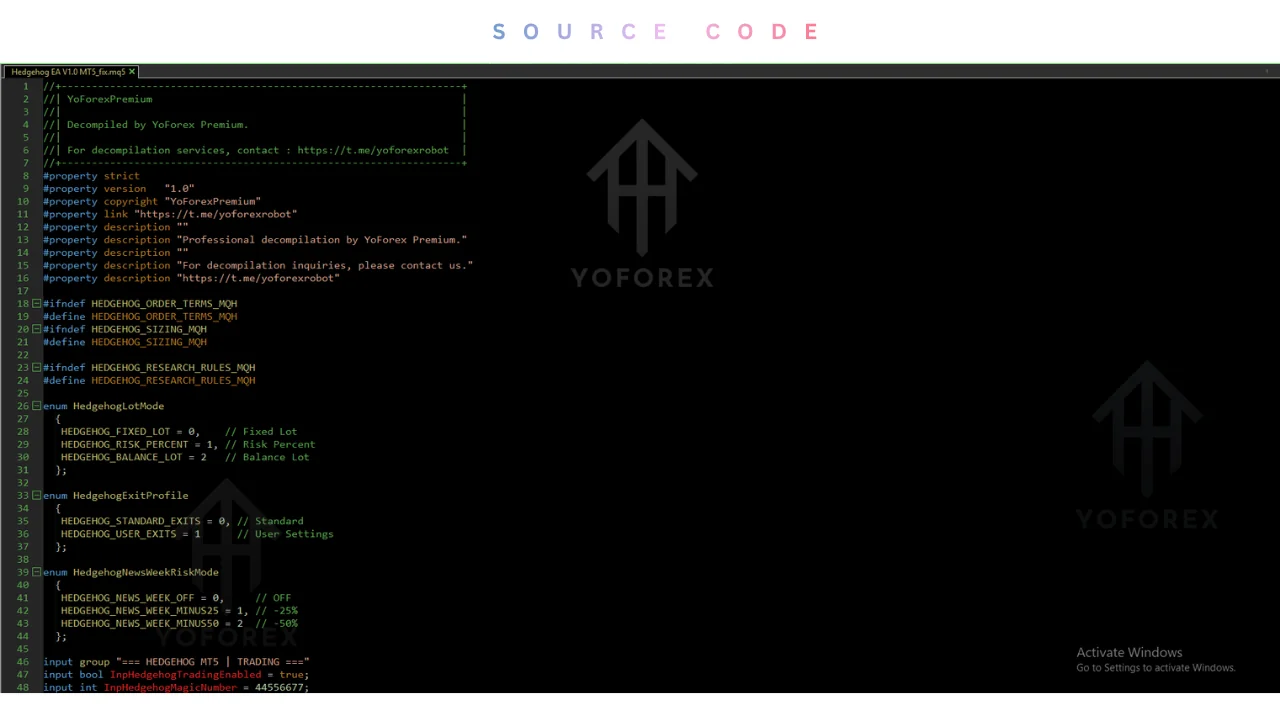
Hedgehog SOURCE CODE V1.0 MQ5 refers to an editable MetaTrader 5 Expert Advisor project built for XAUUSD. Source code offers full transparency. However, independent live performance records remain unverified, and sellers publish different pricing terms across storefronts such as EAStorely.
Traders searching for hedgehog source code v1.0 mq5 usually want to know whether paying for editable MQL5 code is justified, what trading logic is verified, and which risks remain undocumented. This review examines publicly available product specifications, seller claims, and code-evaluation principles so buyers can separate documented facts from marketing gaps. While storefront listings outline platform compatibility, position-sizing options, and pricing across MQLume's overview and EAStorely's product sheet, neither independently audited live performance nor public input-parameter manuals are available for verification.
What Is the Product?
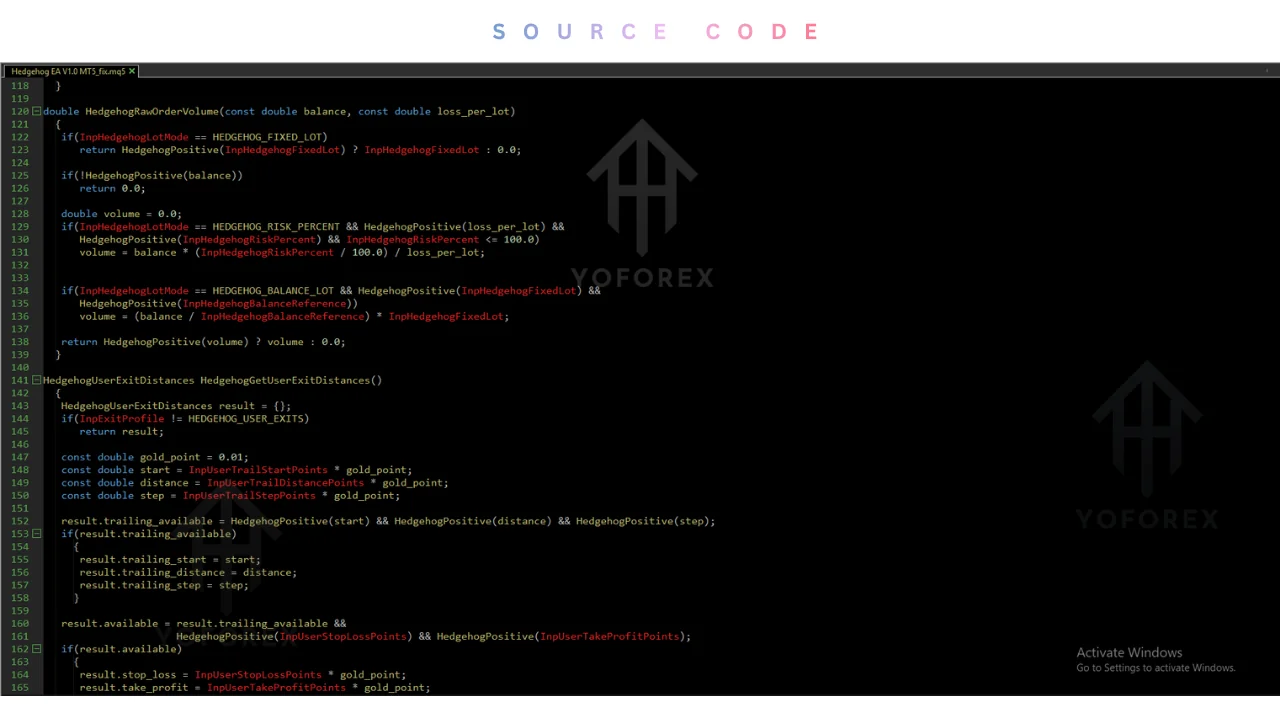
Hedgehog SOURCE CODE V1.0 MQ5 is presented by third-party software storefronts as an editable MetaTrader 5 Expert Advisor source-code package tailored to XAUUSD trading on the H1 chart. Rather than restricting buyers to a locked executable file, the distribution pairs an editable English MQ5 file with a matching EX5 file and parameter documentation. That format allows technically inclined traders to inspect trade rules directly and modify behaviors such as session filters, logging, or risk rules inside MetaEditor.
Public listings do not identify an individual developer or independent auditing firm behind the project, and Gold EAs sold across multiple third-party catalogs often vary in support terms. MQLume dates its Hedgehog v1.0 update to November 14, 2026, and frames the package for unlimited personal customization on a user's own accounts without recurring activation fees.
How It Works
According to seller documentation, Hedgehog operates as an automated Expert Advisor for gold that relies on five gold profiles with pending entries, adjustable sizing, and managed exits. Another catalog description characterizes the v1.00 release as a breakout Expert Advisor for XAUUSD that places pending stop orders and applies configurable protective exits.
Documented exit and filtering controls include fixed or risk-based lot sizing, Stop Loss, Take Profit, trailing stops, and an optional news filter. On the operational side, MQLume states that live news backup requires WebRequest access to nfs.faireconomy.media and that unavailable news feeds can pause new entries while MT5 remains running for managed protection. Exact breakout calculations, indicator thresholds, and internal entry triggers are not publicly disclosed and remain not verified.
Strategy and Risk Controls
Publicly accessible product pages do not publish the underlying mathematical entry conditions, stop-placement formulas, maximum open-order caps, or spread-protection thresholds used inside the code. Without opening the source file itself, traders cannot verify how the system behaves during rapid price spikes, weekend gaps, or thin liquidity periods around major economic releases.
Because undocumented logic creates hidden exposure, traders evaluating any automated tool should review position-sizing behavior, drawdown limits, and fail-safe routines after terminal restarts before funding an account. Reviewing foundational Risk management guide principles helps establish realistic capital limits before testing unfamiliar rule sets.
Features and Quick Specifications
Seller-reported features emphasize self-contained MQL5 engineering and personal customizability rather than locked licensing. MQLume states that the project uses standard MT5 libraries without extra dependencies and ships with editable MQ5 files, matching EX5 binaries, and installation guidance. At the same time, general MT5 source code evaluation guidance notes that possessing an MQ5 or EX5 file alone does not prove compilation completeness, dependency safety, or future trading results.
| Feature | Details |
|---|---|
| Product | Hedgehog Source Code |
| Version | V1.0 |
| Platform | MetaTrader 5 |
| File Format | MQ5 |
| Product Type | Expert Advisor Source Code |
| Programming Language | MQL5 |
| Strategy | Requires verification |
| Trading Style | Not confirmed |
| Instruments/Pairs | Requires verification |
| Timeframe | Requires verification |
| Risk Management | Requires source-code inspection |
| Automation | Depends on the implemented EA functionality |
| VPS | Requirements depend on intended operation |
| Best For | MT5 users and MQL5 developers |
Every specification above reflects seller-stated capabilities rather than independent laboratory verification. Items marked not verified cannot be confirmed from public pre-sale documentation alone.
Operating Requirements and Settings
Storefront guidance indicates that the Expert Advisor runs on MetaTrader 5 and references XAUUSD H1 in its English user guide for Strategy Tester setup. Sellers state that traders can select fixed or risk-based position sizing alongside Stop Loss, Take Profit, trailing stop parameters, and an optional economic news filter.
However, exact input parameter names, preset `.set` file profiles, numeric lot multipliers, and recommended trailing distances are not published before purchase. Verified product-specific settings information was not available. Prospective users who plan to run automated terminals continuously should also review general VPS resources and confirm broker symbol naming, margin rules, and WebRequest permissions.
Benefits, Limitations, and Risks
Having access to editable MQ5 source code offers practical transparency compared with compiled black-box robots. Buyers can audit every function, compile locally, and tailor logic for personal trading accounts without activation locks. Storefront documentation also highlights configurable Stop Loss and trailing exits for XAUUSD breakout setups.
Pros
- Editable MQ5 source code allows direct inspection and custom rule edits within MetaEditor.
- Self-contained code relies on standard MT5 libraries without external add-ons.
- Includes configurable sizing, Stop Loss, Take Profit, trailing stops, and an optional news filter.
Cons
- No independently audited live track record or verified historical metrics accompany the code listings.
- Exact parameter defaults, drawdown caps, and full breakout formulas remain undocumented pre-purchase.
- Storefront pricing and upgrade rules diverge sharply between and EAStorely.
Beyond product-specific gaps, automated gold trading carries structural execution risks. Widening spreads, order slippage, broker requotes, internet disconnections, misconfigured risk parameters, and sudden XAUUSD volatility can all produce drawdowns that historical simulations fail to capture. Even well-structured trading tools do not guarantee profits, and demo testing plus Strategy Tester runs are essential before risking capital. Traders needing plug-and-play simplicity or unable to tolerate loss should avoid unverified source packages.
Backtesting and Live Performance
Responsible evaluation separates historical Strategy Tester backtests, live-feed forward demo tests, and independently audited live account records. Historical backtests model past price ticks under assumed spreads and execution speed, whereas live trading introduces variable slippage, swap fees, liquidity gaps, and broker-specific order handling.
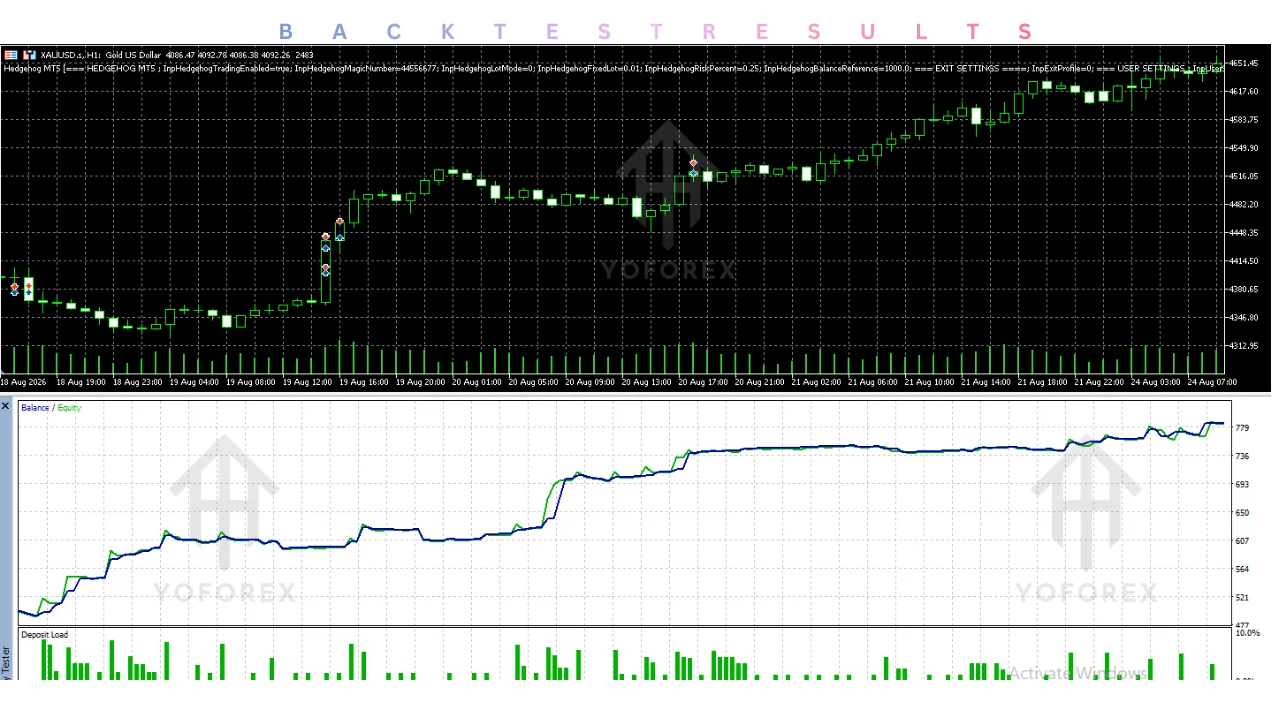
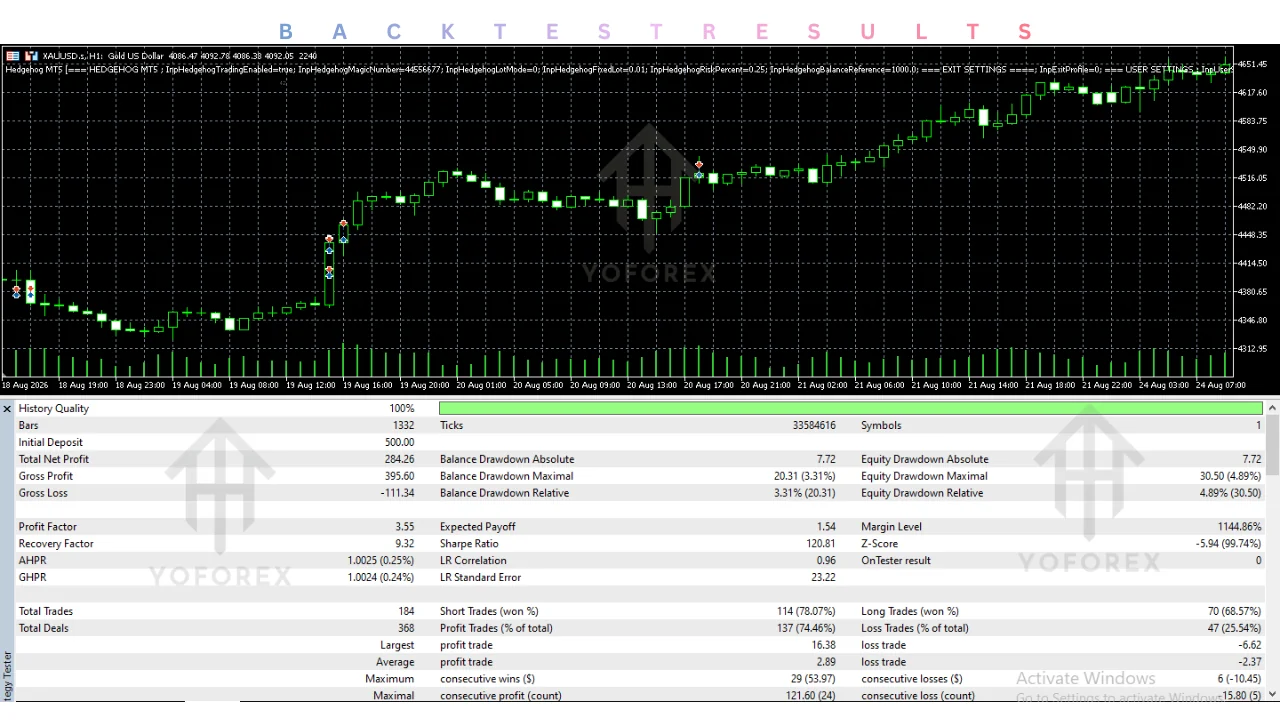
For Hedgehog v1.0, neither verified historical backtest statistics nor independently audited live trading results are available in the reviewed documentation. Even when sellers provide sample curves or Strategy Tester screenshots elsewhere, seller-controlled figures are not equivalent to third-party verified live performance, and past results do not guarantee future outcomes
Comparison With Manual Trading
Choosing between an automated MT5 script and manual execution depends on technical comfort, oversight availability, and how much rule transparency a trader requires. As MT5 source-code guidance emphasizes, editable code only becomes reliable after compiling and testing it yourself, and software tools support process without ensuring returns.
| Comparison | Hedgehog Source Code | Manual Trading |
|---|---|---|
| Execution | Depends on EA implementation | Trader executes manually |
| Screen Time | Can reduce routine monitoring | Usually requires active attention |
| Consistency | Follows programmed rules | Depends on trader discipline |
| Emotional Interference | Can reduce emotional order decisions | Emotions may influence decisions |
| Speed | Automated execution when enabled | Depends on manual response |
| Flexibility | Requires code or parameter changes | Direct decision-making |
| Monitoring | Requires terminal monitoring | Trader monitors directly |
| Risk Management | Depends on implemented rules | Depends on trader decisions |
Manual trading preserves human context during irregular market conditions, whereas an EA enforces coded instructions continuously as long as the terminal remains online. Neither approach inherently outperforms the other across changing market regimes.
Who Should Consider It?
Evaluating this source package makes the most sense for experienced MetaTrader 5 traders who understand MQL5 syntax, know how to compile projects in MetaEditor, and want modifiable XAUUSD breakout and exit controls. Users with sufficient time to run multi-month Strategy Tester checks and forward demo accounts can inspect the code directly and adjust parameters to match broker conditions.
Conversely, the package is unsuitable for beginners looking for turnkey automation, traders unwilling to audit `.mq5` logic, or anyone unable to tolerate potential capital loss. If you cannot verify essential compatibility, risk limits, and licensing terms before buying, pause and keep testing on demo accounts.
What to Check Before Buying
Before paying for any storefront download, verify every technical and commercial detail directly with the seller:
- Exact product name and version: Confirm whether the archive delivers Hedgehog v1.0 or v1.00 and includes matching `.mq5`, `.ex5`, and resource files as listed on MQLume.
- Strategy and trading logic: Inspect or ask how pending orders, DLL imports, WebRequests, and terminal restarts are handled in code.
- Risk controls, drawdown, and performance evidence: Confirm whether maximum drawdown protections exist and note that no audited live results are published.
- MT4/MT5 and broker compatibility: Verify MetaTrader 5 hedging-account support and XAUUSD symbol formatting required for operation.
- VPS requirements: Ask about uptime, latency, and whether keeping MT5 running is mandatory for managed exit protection.
- Settings and documentation: Request confirmation of what the English user guide covers, as pre-purchase parameter defaults and `.set` details are missing.
- Testing evidence: Plan your own Strategy Tester and demo evaluation rather than relying on unverified storefront claims.
- Support and updates: Compare update rules carefully; EAStorely limits version eligibility to normal-catalog purchases with a 30% future-version discount.
- License and activation limits: Verify whether unlimited personal use prohibits commercial redistribution or signal resale.
- Price and refund terms: Reconcile the gap between US$ 299.99 and €130.00 EUR across sellers, and read digital-download refund policies before checkout.
How to Evaluate It
If you obtain legitimate access to the source archive, follow a disciplined validation workflow before deploying real funds:
- Confirm platform and broker compatibility, ensuring you are running a MetaTrader 5 hedging account with the seller's specified XAUUSD H1 setup.
- Review the documentation, settings, license, and costs, checking included English user instructions and any version-upgrade restrictions.
- Follow only verified installation instructions, opening the `.mq5` file in MetaEditor to confirm self-contained compilation and inspecting WebRequest or dependency calls.
- Test on a demo account after running comparative Strategy Tester simulations with realistic broker spreads and commissions.
- Monitor execution and risk closely, checking position sizing, Stop Loss placement, trailing behavior, and how the EA responds to rejected orders or news-feed pauses.
- Decide whether the product fits your risk tolerance and monitoring schedule before considering live use, keeping in mind that demo stability never ensures live profitability.
Conclusion
Hedgehog SOURCE CODE V1.0 MQ5 offers a clear structural advantage for MQL5-literate traders: editable source code for XAUUSD breakout automation paired with configurable sizing, protective exits, and no activation locks. Yet key uncertainties remain substantial. Public listings lack full parameter documentation, independently verified backtests, and live account audits, while pricing diverges sharply between US$ 299.99 and €130.00 EUR across sellers.
Because source files require independent testing and software cannot guarantee returns, buyers should confirm exact storefront terms, license rights, and refund policies before purchasing. To strengthen your evaluation workflow first, explore YoForexEA's educational Guides before testing any automated trading system.
Support & Disclaimer
Support:
If you need help installing or configuring your EA, or face any kind of bug, feel free to reach out on:
Telegram Group: Join our community
Disclaimer:
Forex and gold trading involve risk. Past performance doesn’t guarantee future results. Always test robots on demo before live trading and use proper risk management.
REFERRAL
Join the VIP Signals Telegram Channel for real-time expert trading signals and stay ahead in the forex market. Get personalized strategies by becoming a part of our Real Account Management Telegram Channel and optimize your trading experience. If you’re aiming to Pass PropFirm Challenges , join our dedicated channel for tips and proven methods. Start managing your capital effectively with expert advice from our Funded Account Management Telegram Channel. For advanced traders, our HFT EA / Passing Telegram Channel offers high-frequency trading insights and strategies to boost your performance.
FREQUENTLY ASKED QUESTIONS
Collections & Tags
READY TO TEST HEDGEHOG?
Verify spreads, stop-loss controls, and execution on demo first.
Demo-test first on your target broker feed before live capital.
Kapish Sharma
Kapish Sharma is a technical content writer focused on trading software, MT4/MT5 Expert Advisors, indicators, and automated trading systems. He specializes in breaking down technical product features and trading concepts into clear, reader-friendly articles. Kapish Sharma creates guides, product-focused content, and educational articles for traders interested in understanding how modern trading tools work.
