
AI Fusion Combo EA V1.6 MT5

Should you buy AI Fusion Combo EA V1.6 MT5? Verify the evidence first. Community posts describe eleven local MT5 modules trading four symbols, while Build 6230 preset notes omit audited results and an MQL5 listing review reports a $99.99 price without broker-verified live performance. Always test on demo.
What Is the Product?
AI Fusion Combo EA V1.6 MT5 is presented in public listings as a MetaTrader 5 Expert Advisor designed to automate multi-symbol trading from a single chart. Understanding this tool requires separating two sets of public records: community release posts and an independent marketplace summary. On November 18, 2026, shared social posts referenced version 1.6 with Build 6230 presets linked to a third-party reseller page.
Separately, an independent evaluation covers AI Fusion Combo MT5 on MQL5, identifying the developer as Lo Thi Mai Loan and listing a retail price of $99.99. While those descriptions share overlapping product naming, independent reviewers have not verified whether third-party preset packages match the official marketplace build. Traders comparing tools across AI trading and Gold EAs should treat unverified reseller files cautiously.
How It Works
Publicly shared technical notes state that the robot executes all logic locally inside MetaTrader 5 without calling external APIs or paid internet-based AI services. According to the shared product summary, a single chart instance manages four instruments—XAUUSD, AUDCAD, AUDNZD, and NZDCAD—through eleven independent strategy modules.
Each module reportedly maintains its own trade identity and order-management sequence, while a shared adaptive layer evaluates completed trade outcomes, responds to changing market conditions, and applies portfolio-level protection. Beyond this high-level architecture, exact operating mechanics remain unverified. Public documentation does not disclose specific entry indicators, exit triggers, timeframe assignments, or whether individual modules use grid, averaging, or hedging logic.
Strategy and Risk Controls
The documented strategy structure centers on multi-currency diversification across gold and three Oceanic currency crosses, paired with module-level trade separation. Public posts state that the eleven-module framework isolates individual trade identities across XAUUSD, AUDCAD, AUDNZD, and NZDCAD rather than treating every position as a single undifferentiated basket.
However, specific quantitative risk controls remain undocumented in verified sources. Although portfolio-level protection is mentioned alongside the adaptive evaluation layer, public extracts do not confirm maximum drawdown thresholds, lot-sizing formulas, equity stop levels, or news filters. Traders reviewing automated systems should study foundational Risk management guide principles before relying on unverified protective claims.
Features and Quick Specifications
Verified marketplace metadata confirms MetaTrader 5 platform support and a $99.99 MQL5 price, whereas multi-module specifications rely on unverified seller and reseller descriptions. Reviewing both sources side by side helps clarify what is documented versus what still needs confirmation:
- Local execution: Seller-sourced descriptions state the software runs inside MT5 without external AI subscriptions or APIs.
- Multi-symbol design: Shared product notes claim four instruments managed on one chart across eleven modules.
- Marketplace listing: Independent review notes list developer Lo Thi Mai Loan at $99.99 on MQL5 Market with stop-loss usage noted on the listing.
| Feature | Details |
|---|---|
| Platform | MetaTrader 5 |
| Strategy | 11 independent modules + adaptive layer |
| Trading Style | Multi-strategy portfolio |
| Instruments/Pairs | XAUUSD, AUDCAD, AUDNZD, NZDCAD |
| Timeframe | One chart (XAUUSD M15 recommended for monitoring) |
| Risk Management | Profile-based + portfolio limits |
| Automation | Fully automated |
| VPS | Recommended for continuous operation |
| Best For | Traders wanting multi-market automation from one EA |
Operating Requirements and Settings
Verified product-specific settings information was not available. Because public parameter tables and official user manuals are absent from reviewed materials, buyers cannot verify default lot sizes, stop-loss inputs, risk percentages, or symbol-specific preset adjustments prior to installation.
Before running any MetaTrader 5 Expert Advisor, traders typically confirm terminal build compatibility, broker symbol naming suffixes, minimum margin requirements, and whether continuous uptime via a virtual private server is necessary for uninterrupted trade management. Reviewing general Guides and VPS resources helps establish baseline setup checks, while actual EA inputs should only be obtained from verified developer documentation.
Benefits, Limitations, and Risks
Documented strengths center on self-contained MT5 execution and free demo access, while major limitations stem from absent live audits and execution sensitivity. Running locally inside MetaTrader 5 removes ongoing external API costs, and the MQL5 Market provides a free Strategy Tester demo prior to purchase.
Against those points, independent listing analysis warns that results tuned on raw-spread accounts do not carry over to standard accounts due to spread and commission differences. General automated-trading risks also apply, including prolonged drawdown, slippage during volatile XAUUSD sessions, misconfigured preset files, connectivity drops, and historical backtest limitations.
Pros
- Operates locally inside MetaTrader 5 with no external API or AI subscription required.
- Listed on MQL5 Market with a free Strategy Tester demo for pre-purchase checks.
- Designed to manage four instruments from one chart using separated module identities.
- Listing notes indicate stop-loss usage on trades and configurable risk parameters.
Cons
- No broker-verified live track record or audited performance history is published in reviewed sources.
- Specific settings, timeframes, and exact module entry rules for version 1.6 are undocumented.
- Execution depends heavily on broker spread, commission, and account type.
- Discrepancy exists between the $99.99 MQL5 listing and third-party Build 6230 preset shares.
Backtesting and Live Performance
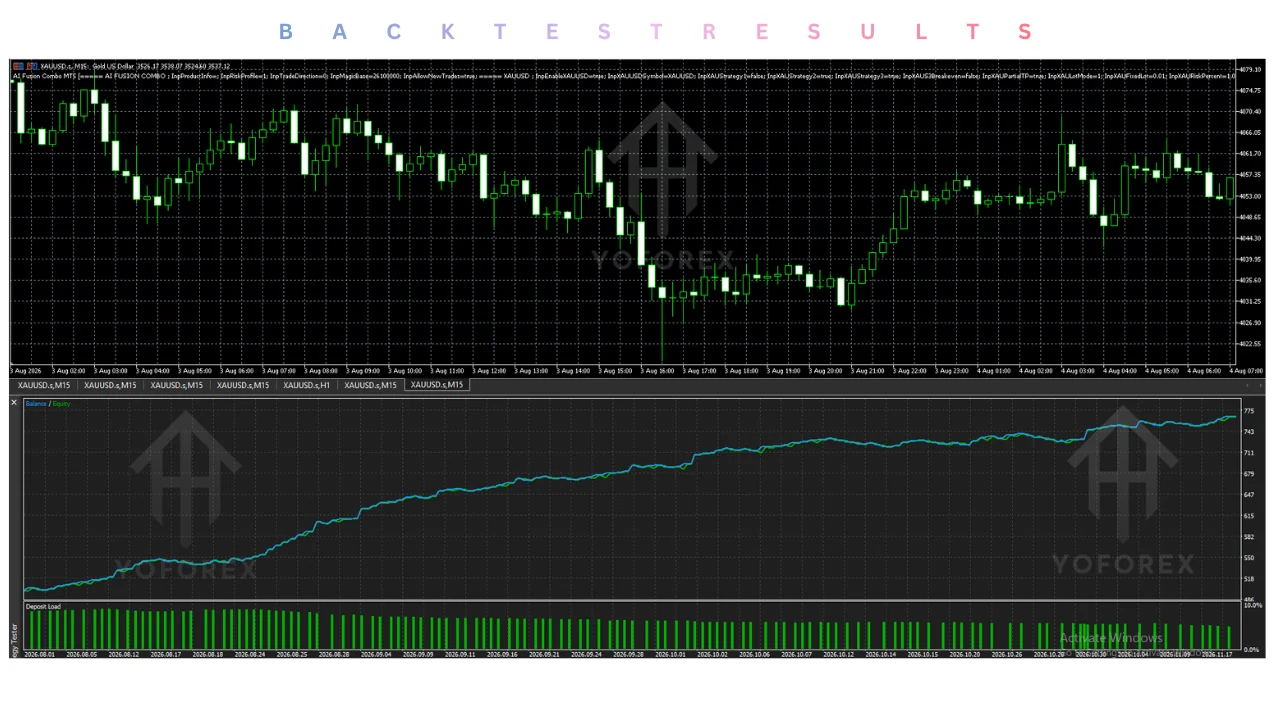
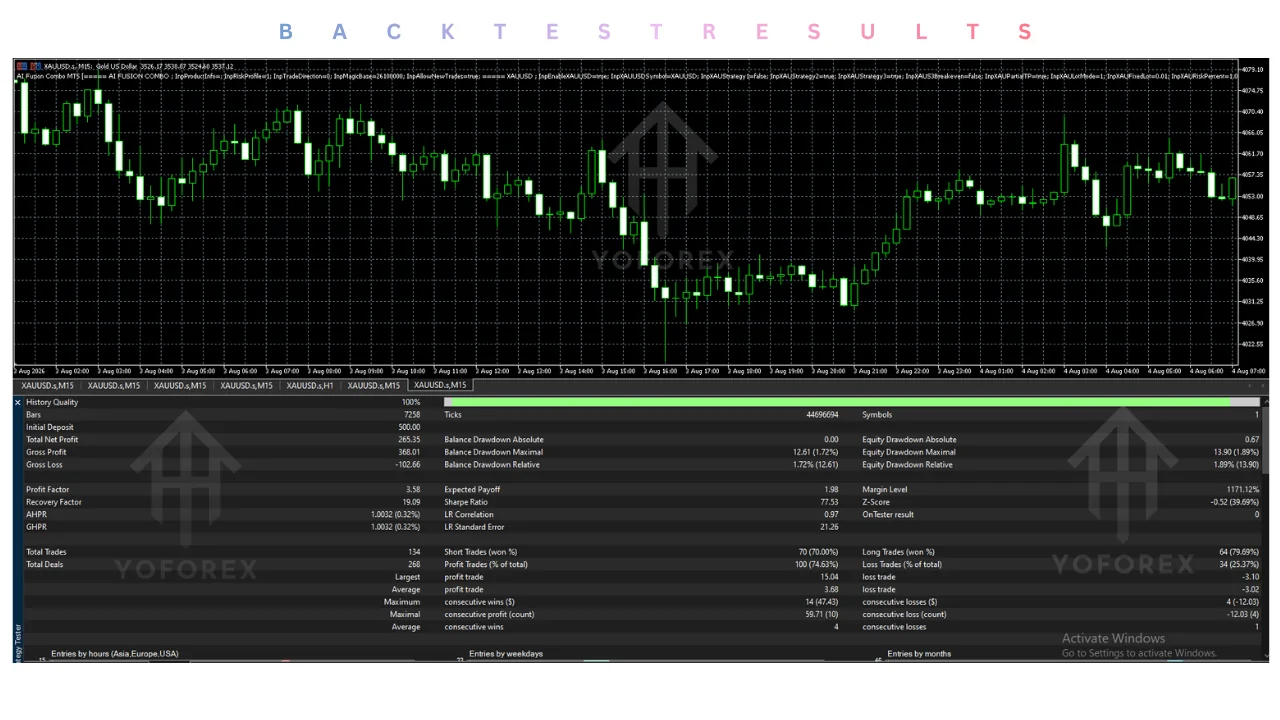
No independently verified backtests, forward tests, or live trading performance records are available for this Expert Advisor in the reviewed evidence. In its 2026 review of AI Fusion Combo MT5, FxRobotEasy states explicitly that it has not traded the software on a live account and publishes no broker-verified record for it.
Traders must distinguish seller-controlled marketing backtests or screenshots from independently audited live accounts. As listing evaluation guidance notes, backtests and static screenshots are not a substitute for an MQL5 live signal running on a real account for three months or longer. Even if verified figures are published later, past results never ensure future outcomes.
Comparison With Manual Trading
Automation changes how orders are triggered and supervised rather than eliminating market risk or monitoring duties. While local MT5 rule execution can handle multiple charts continuously without discretionary hesitation, broker execution costs and drawdown still affect every open trade. Neither automated nor manual trading inherently produces superior returns.
| Aspect | AI Fusion Combo EA | Manual Trading |
|---|---|---|
| Execution | Fully automated | Manual order placement |
| Screen time | Low (monitoring only) | High |
| Consistency | Rule-based | Variable |
| Emotional interference | Minimal | Often present |
| Speed | Instant reaction to signals | Depends on trader |
| Flexibility | Limited to programmed modules | High (can adapt freely) |
| Monitoring | Required but lighter | Continuous |
| Risk management | Portfolio rules + profiles | Trader-dependent |
Who Should Consider It?
Evaluating this Expert Advisor makes sense only for MT5 traders who are willing to verify unconfirmed specifications through structured demo testing. Users familiar with MQL5 Strategy Tester evaluations and broker cost modeling may want to inspect how the four-symbol setup behaves under realistic spread and commission assumptions.
Conversely, this tool is unsuitable for anyone unable to tolerate capital loss, traders seeking hands-off income, or buyers who cannot verify essential parameters and a real-account live signal before deploying capital. Traders who cannot monitor automated drawdown or distinguish adaptive module behavior from high-risk exposure should avoid live deployment.
What to Check Before Buying
Before paying for any license or downloading preset files, confirm every technical, financial, and support detail directly on the official marketplace listing. Key verification points include:
- Exact product name and version: Confirm whether you are evaluating AI Fusion Combo MT5 on MQL5 or a third-party Build 6230 package.
- Strategy and trading logic: Verify how the eleven strategy modules open, average, or close trades.
- Risk controls, drawdown, and performance evidence: Inspect maximum historical drawdown and check for a multi-month live signal.
- MT4/MT5 and broker compatibility: Confirm MT5-only operation—MT4 is not verified—and match raw-spread versus standard account terms.
- VPS requirements: Verify whether continuous server hosting is needed for adaptive trade management.
- Settings and documentation: Obtain official parameter manuals; verified product-specific settings documentation was unavailable in reviewed sources.
- Testing evidence: Review independent forward tests rather than seller screenshots alone.
- Support and updates: Check MQL5 version history and developer replies for active maintenance.
- License and activation limits: Verify how many terminals or accounts a single purchase covers.
- Price and refund terms: Confirm the $99.99 MQL5 price and marketplace refund rules before checkout.
How to Evaluate It
A disciplined, step-by-step evaluation helps uncover execution issues before real funds are exposed to market volatility. Follow this sequence using official MQL5 testing tools rather than relying on promotional summaries:
- Confirm MetaTrader 5 build compatibility and verify whether your broker offers the spread and commission structure suited to the strategy.
- Review the official listing documentation, input parameters, license activation count, and total purchase cost.
- Follow only verified installation instructions provided directly by the developer or official MQL5 Market client.
- Run the free Strategy Tester demo and forward-test the Expert Advisor on a broker demo account.
- Monitor trade execution, slippage, floating drawdown, and risk-control behavior across varying market sessions.
- Decide whether the observed risk profile fits your tolerance before considering live capital, remembering that demo results do not establish live profitability.
Conclusion
AI Fusion Combo EA V1.6 MT5 combines an intriguing local multi-module concept with substantial documentation and verification gaps. Public summaries describe eleven self-contained MT5 modules across four instruments without external API dependencies, while independent review coverage documents a $99.99 MQL5 Market listing and free demo availability.
At the same time, the absence of a broker-verified live track record, undocumented v1.6 settings, and spread-sensitivity warnings mean buyers cannot verify profitability claims from current public evidence. Before making any purchase decision, inspect the official MQL5 Market page, verify live signal history, and review our Risk management guide and FAQ for responsible EA evaluation practices.
Support & Disclaimer
Support:
If you need help installing or configuring your EA, or face any kind of bug, feel free to reach out on:
Telegram Group: Join our community
Disclaimer:
Forex and gold trading involve risk. Past performance doesn’t guarantee future results. Always test robots on demo before live trading and use proper risk management.
REFERRAL
Join the VIP Signals Telegram Channel for real-time expert trading signals and stay ahead in the forex market. Get personalized strategies by becoming a part of our Real Account Management Telegram Channel and optimize your trading experience. If you’re aiming to Pass PropFirm Challenges , join our dedicated channel for tips and proven methods. Start managing your capital effectively with expert advice from our Funded Account Management Telegram Channel. For advanced traders, our HFT EA / Passing Telegram Channel offers high-frequency trading insights and strategies to boost your performance.
FREQUENTLY ASKED QUESTIONS
Collections & Tags
READY TO TEST AI?
Verify spreads, stop-loss controls, and execution on demo first.
Demo-test first on your target broker feed before live capital.
Pritick Saha
Pritick Saha is a content researcher and writer focused on forex trading, Expert Advisors, automated trading, and trading technology. He researches trading products, software features, strategies, and platform-related topics before turning them into clear and engaging articles. Pritick Saha specializes in creating informative, well-structured content that helps traders understand and evaluate modern trading tools.