


The NeonGamer EA V1.40 MT5 is an Expert Advisor built for MetaTrader 5 to automate XAUUSD. An August 2026 write-up frames version 1.40 as a gold-focused bot. Results are not a forecast. Demo-test first. Judge whether the robot fits your style and risk tolerance before any live use.
An educational page dated August 17, 2026 introduces the NeonGamer EA V1.40 MT5 build for gold automation.
NeonGamer EA V1.40 MT5: definition and decision context?
NeonGamer EA V1.40 MT5 is presented as a MetaTrader 5 Expert Advisor for traders who want automated execution on gold rather than all-day chart watching. An August 17, 2026 article introduces the v1.40 build in that context. The same write-up frames the robot as a way to reduce missed entries and emotional decisions when XAUUSD moves quickly. It does not replace a personal risk plan. Readers should treat the page as a product explainer, not as a promise of results.
That article describes an Expert Advisor built for MetaTrader 5 that aims to automate trading on XAUUSD across timeframes such as M5, M15 and H1. It is not described as a multi-pair basket system in the available write-up. Version 1.40 is treated as an updated iteration of the same gold focus. The bot is meant to run after it is attached to a gold chart and algorithmic trading is enabled. Exact indicators and filters for this build are not fully published there. That documentation gap matters before any live lot size is chosen.
In practice, the same explainer says the advisor monitors the selected timeframe and opens trades when internal conditions fire. Trade management, including exits, is described as automated once those conditions are met. One public signal example linked to the name showed a relatively short average hold around one hour, with both long and short positions. That observation is not a specification sheet for every account. You still need your own journal and a written daily-loss cap. Compare this overview with other Blog notes on gold robots before you install anything on a funded login.
Who should consider NeonGamer EA V1.40 MT5?
This robot is only worth considering if you already accept fully automated XAUUSD execution and can survive losing streaks without changing lots mid-drawdown. A public MQL5 signal page labeled NeonGamer EA is vendor-controlled account data, not an independent audit. It should not be read as a personal suitability test. Short holds and gold volatility can still breach a prop-firm daily loss limit. Match the style to your written rules first.
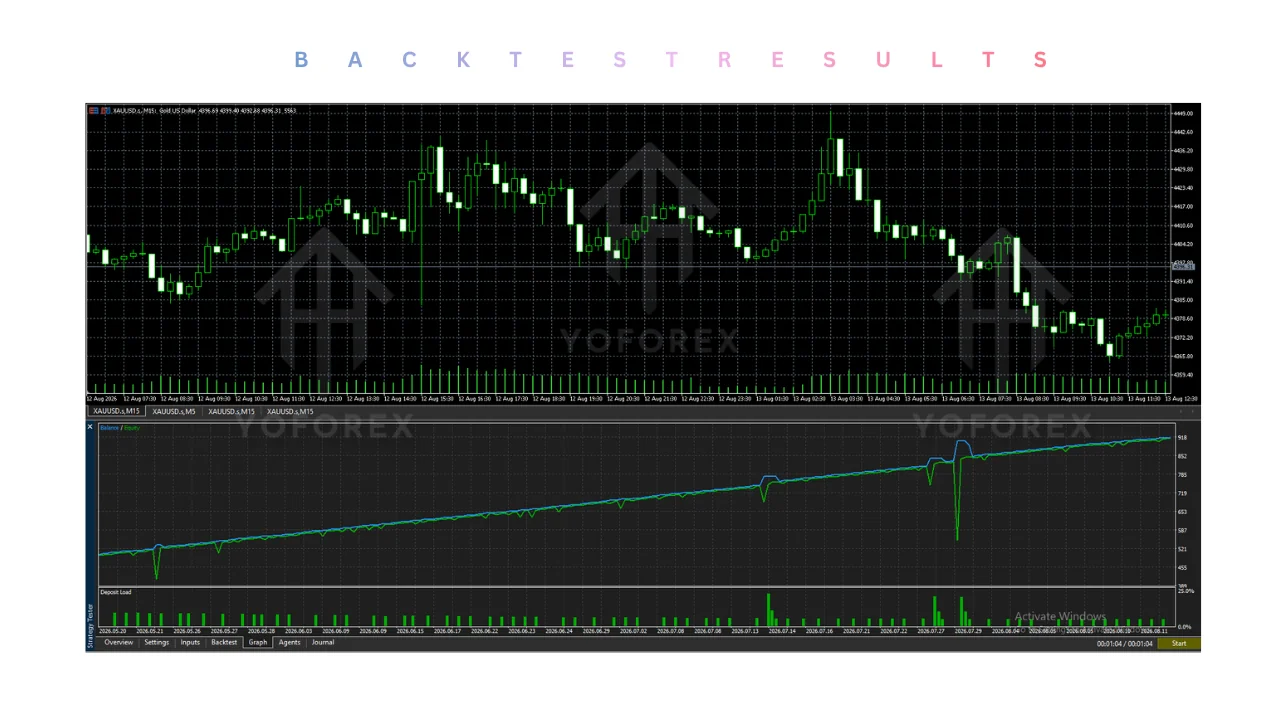
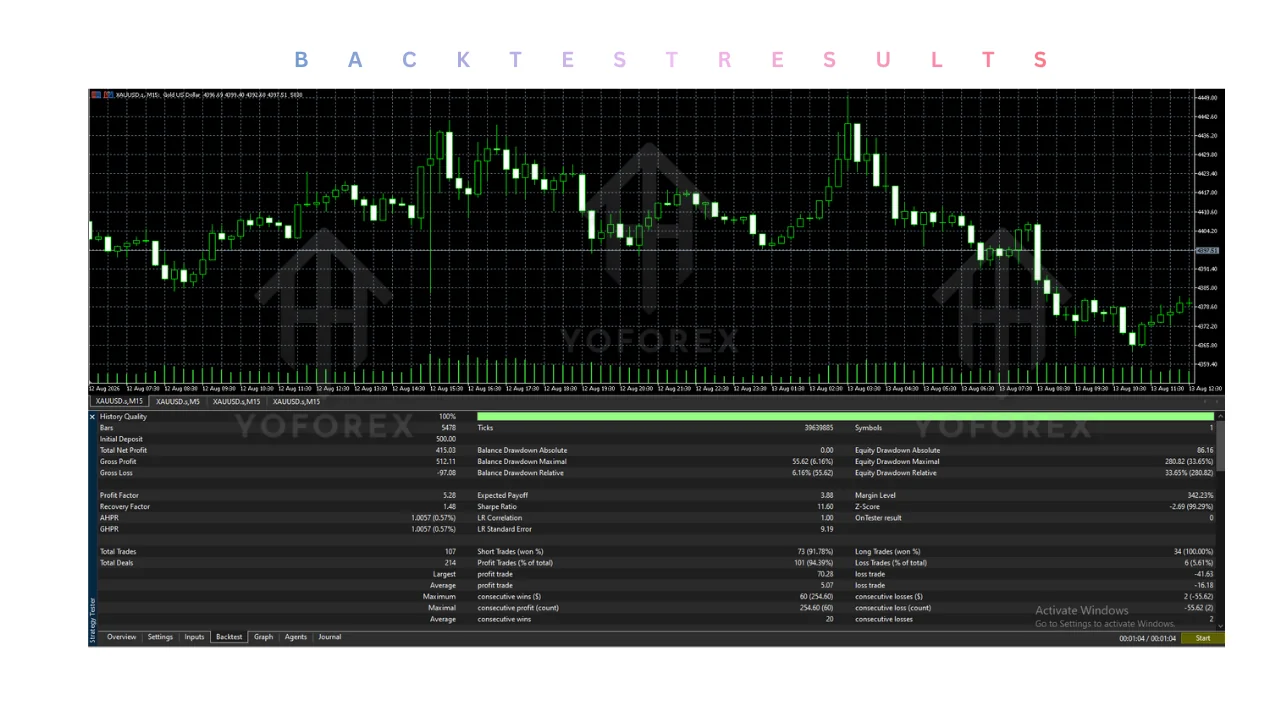
According to that MQL5 listing, copy access was priced at 100 USD per month. The page shows the signal started on 17 May 2026 and had been running for 12 weeks at retrieval, with zero subscribers listed. It reports about 10 trades per week and an average holding time of one hour. All 116 recorded deals are shown on XAUUSD+, and algorithmic trading is listed at 100 percent. Those operational details describe one published account. They do not tell you how the next quarter will look on your broker.
The same listing names Jorge Luiz Guimaraes De Araujo Dias as the signal provider and shows a 1:500 leverage note. Direction mix on that page is skewed toward shorts over longs. Maximum deposit load is shown as a low single-digit percentage, which still does not cap your margin if you change lots. Treat every figure on that page as unverified and not independently audited. If you still want a file, start from the Downloads library on a demo account only, then compare notes with other Prop firm EAs against your challenge contract.
Benefits and practical limitations
A reseller product page describes NeonGamer as a gold grid Expert Advisor that tries to avoid blindly averaging every loser. According to that listing’s filter description, entries are supposed to wait on trend, momentum, volatility, and news checks. Those are marketing claims about design intent. Filters can fail in fast gold spikes. Grid recovery still increases exposure when price trends against the basket.
The same page says the robot is built for XAUUSD on M15 and mentions adaptive ATR-based grid spacing, multi-timeframe EMA alignment, ADX strength filtering, volume analysis, spread protection, and built-in news avoidance. It also claims automatic lot sizing and daily drawdown protection. None of those labels prove the code will respect a prop-firm news rule the way your contract is written. You must read the inputs yourself. Confirm the set file against your broker’s gold contract and the risk management guide before you raise risk.
The listing shows a price range from 70.00 to 599.00 US dollars depending on the package. It also publishes category scores and a high overall mark that should be read as vendor opinion, not a third-party ranking. We do not repeat those scores as facts. Growth rates advertised on store pages are not a forecast. Cross-check any live feed on the Signals page, and keep Grid bots notes nearby so you remember how baskets behave when gold trends for days.
Pros
- Public pages keep the market focus on XAUUSD rather than an undocumented multi-pair basket.
- The store listing describes several filters before extra grid layers are added.
- Daily drawdown protection and automatic lot sizing are named as available controls.
- MT5 targeting is explicit, which simplifies platform and VPS planning.
Cons
- A filtered grid can still expand exposure when gold trends against the open basket.
- Exact v1.40 entry rules are not fully published on the explainer page.
- Store scores and advertised growth blurbs are not independent audits.
- The MQL5 signal statistics are vendor-controlled and cover a short published window.
- Default news and lot behavior may not match a prop-firm rulebook.
Free forex EA and the reader decision
A free or cheap forex EA is still a leveraged system that can drain an account. The educational write-up’s stated goal is a fit check against your style and risk tolerance, not a push to go live. That is the right decision frame. A free file does not make the logic safer. Compare this gold-only automation with other Gold EAs using the same journal rules and the same daily-loss cap.
Use a simple gate before AutoTrading is enabled. If you cannot explain the stop, grid step, and daily loss cap in one paragraph, keep the robot on demo. Installation on MT5 is ordinary file placement, not a shortcut around risk. Load any vendor set file only after you read every input. Keep news windows and max spread in view. Run a Guides checklist beside the chart so the preset cannot hide a dangerous lot multiplier.
- Open MetaTrader 5 on a demo account and turn on algorithmic trading in the toolbar.
- Copy the Expert Advisor file into the MQL5/Experts folder, then refresh the Navigator.
- Attach the robot to an XAUUSD chart on the timeframe you actually intend to test.
- Load the matching set file and read every risk, news, and lot input before you press OK.
- Journal at least one full volatility week and compare the equity path with your written loss limit.
Demo first for enough trades to see how the basket behaves when gold trends, not only when it mean-reverts. A VPS resources setup helps only if the robot must stay online; it does not improve a weak rule set. Log every change to lots and filters. If you are in a challenge, map the worst swing you can actually observe against the firm’s daily and overall limits. When those numbers are missing from public pages, treat the gap as a reason to stay on demo.
Forex gump EA Free download and the reader decision
A search for a forex gump EA free download is a different product hunt and should not be blended with this gold robot’s files. Mixing presets from unrelated names is a common way to break risk controls. Keep each download in its own folder. Rename every set file with the symbol, timeframe, and test date. If two robots share a marketing adjective, assume nothing about shared logic.
The same caution applies when adjacent queries point at other free packs. People often install the first file that matches a phrase, then blame the chart when the inputs belong to another strategy family. Do not paste a scalper preset onto a grid chart. Do not reuse a gold lot table on a major-pair test. If you are browsing Scalpers or AI trading pages, treat those as separate evaluation tracks. Your journal should show one robot, one set, and one account story at a time.
Prop-firm readers should add a second filter that has nothing to do with branding. Ask whether the strategy needs overnight baskets, news trades, or martingale-style recovery. If the answer is unclear from the inputs, the file is not ready for a challenge login. Write the firm’s daily loss, maximum positions, and news rule on paper. Then see whether the EA can be configured to stay inside those lines. When it cannot, leave it on demo. That decision is about contract fit, not about a download title.
For the latest pricing, licence terms, or to download , visit yoforex.net — the official YoForex platform where their Expert Advisors and related trading tools are listed.
Conclusion
Public pages describe NeonGamer EA V1.40 MT5 build as gold-focused automation, with one explainer dated mid-August 2026 and a store listing that emphasizes filtered grid entries. That is enough to decide whether the concept matches your market and platform. It is not enough to size a live account. Treat store scores, copy-signal statistics, and missing rule sheets as reasons to slow down. Demo remains the only responsible next step.
If you continue, install on MT5 with a written loss cap, a clean set file, and a journal that records every input change. Compare the robot with other gold and grid material on this site, including the FAQ, without borrowing lots from a different product. Past results are not indicative of future results. Automated systems can lose money. Stop if you cannot explain the risk in plain language.
- Expert Advisor (EA)
- A program that can place and manage trades automatically inside MetaTrader once AutoTrading is enabled.
- XAUUSD
- The gold versus US dollar symbol commonly used for gold CFDs and forex-style gold contracts.
- Grid
- A method that may add positions at spaced intervals, which can increase exposure in a strong trend.
- Set file
- A saved input preset for an EA; it should be read line by line before use on any account.
- VPS
- A remote computer used to keep a platform online; it does not make a strategy safer by itself.
Support & Disclaimer
Support
If you need help installing or configuring your EA, or face any kind of bug, feel free to reach out on:
WhatsApp: Click here
Telegram Group: Join our community
Disclaimer:
Forex and gold trading involve risk. Past performance doesn’t guarantee future results. Always test robots on demo before live trading and use proper risk management.
REFERRAL
Join the VIP Signals Telegram Channel for real-time expert trading signals and stay ahead in the forex market. Get personalized strategies by becoming a part of our Real Account Management Telegram Channel and optimize your trading experience. If you’re aiming to Pass PropFirm Challenges , join our dedicated channel for tips and proven methods. Start managing your capital effectively with expert advice from our Funded Account Management Telegram Channel. For advanced traders, our HFT EA / Passing Telegram Channel offers high-frequency trading insights and strategies to boost your performance.
Sources
- NeonGamer EA V1.40 MT5 - FREE DOWNLOAD — yoforex.org
- NeonGamer EA MT5 with SetFiles (Latest version) — yoforexea
- NeonGamer EA V1.40 MT5 - PRICE — yoforex.net