

Introduction
The forex automation space is filled with EAs that promise everything but deliver very little. Most blow accounts during volatility. Some win big for a few days and then collapse the moment the trend changes. Others rely on outdated martingale logic that looks profitable… until a single black-swan candle wipes everything out.
Megalodon EA V1.0 MT5 enters this world as a different kind of trading system—a robot inspired by the power, precision, and controlled aggression of the ancient Megalodon shark. It’s built to execute smart entries, detect high-probability patterns, and manage risk with near-intelligent discipline.
This EA isn’t a “trade every second” machine. Instead, it's a high-accuracy system that prefers to wait for the right moment, the right zone, and the right volatility before taking action. That’s why traders using Megalodon EA appreciate its balance between power and safety.
Let’s dive deep into what makes Megalodon EA V1.0 MT5 a standout automated system.
Overview – What Is Megalodon EA V1.0 MT5?
Megalodon EA V1.0 MT5 is an advanced Expert Advisor created for MetaTrader 5 to automate trading across major forex pairs and gold. It’s built using multi-layer decision logic that includes:
- trend-flow analysis
- market-state recognition
- volatility measurement
- liquidity sweep detection
- micro-structure mapping
- momentum strength evaluation
The EA does not use martingale or grid — meaning your account doesn’t face unnecessary compounding risk. Instead, it uses clean entries with strict stop losses, making it ideal for:
- prop-firm trading
- long-term portfolio growth
- low-risk accounts
- beginner traders
- VPS automation
Megalodon EA focuses on consistency, not chaos. It behaves like a professional trader: slow, intelligent, sharpsighted, and precise.
Why Megalodon EA Is Different From Other EAs
Most EAs fall into one of these categories:
-
Martingale / Grid Bots
High gains → sudden blow-ups. -
Scalpers Without Filters
Works during low spreads → dies during volatility. -
Indicator-Combo Systems
Laggy → false signals → inconsistent performance. -
Over-optimized Strategies
Perfect in backtest → fails in live market.
Megalodon EA V1.0 MT5 overcomes these weaknesses by:
- using real-time market interpretation
- adapting to volatility
- avoiding low-probability setups
- entering only when trend + structure align
- respecting strict drawdown control
This is a “trade only when it makes sense” robot.
Key Features of Megalodon EA V1.0 MT5
Below are the major strengths that make this EA a top contender:
- Adaptive trend recognition engine
- Multi-timeframe confirmation logic
- Liquidity sweep identification
- No martingale, no grid, no risky multipliers
- Uses fixed SL and TP for every trade
- Smart dynamic lot sizing
- Spread + slippage filter
- News-volatile zone avoidance
- True multi-pair compatibility
- Works on ECN and Raw Spread brokers
- VPS-friendly low-resource consumption
- Beginner-friendly setup
- Integrated drawdown protector
- Regular updates from YoForex dev team
The EA focuses on clean, high-probability entries instead of spamming weak signals.
How Megalodon EA Reads the Market
This EA mimics real professional trading logic by analyzing:
1. Trend Structure
Higher highs, higher lows, structure breaks, CHoCH, BOS.
2. Volatility Conditions
It checks if the current candle size vs average volatility is safe to enter.
3. Liquidity Zones
It identifies areas where big traders trap retail for reversals.
4. Price Squeeze Patterns
If the market is compressing, the EA prepares for breakout entries.
5. Momentum Strength
It avoids trades during weak momentum or fake breakouts.
6. Spread & Execution Conditions
It only trades when the environment is technically safe.
By combining all of these components, Megalodon EA behaves intelligently — not blindly.
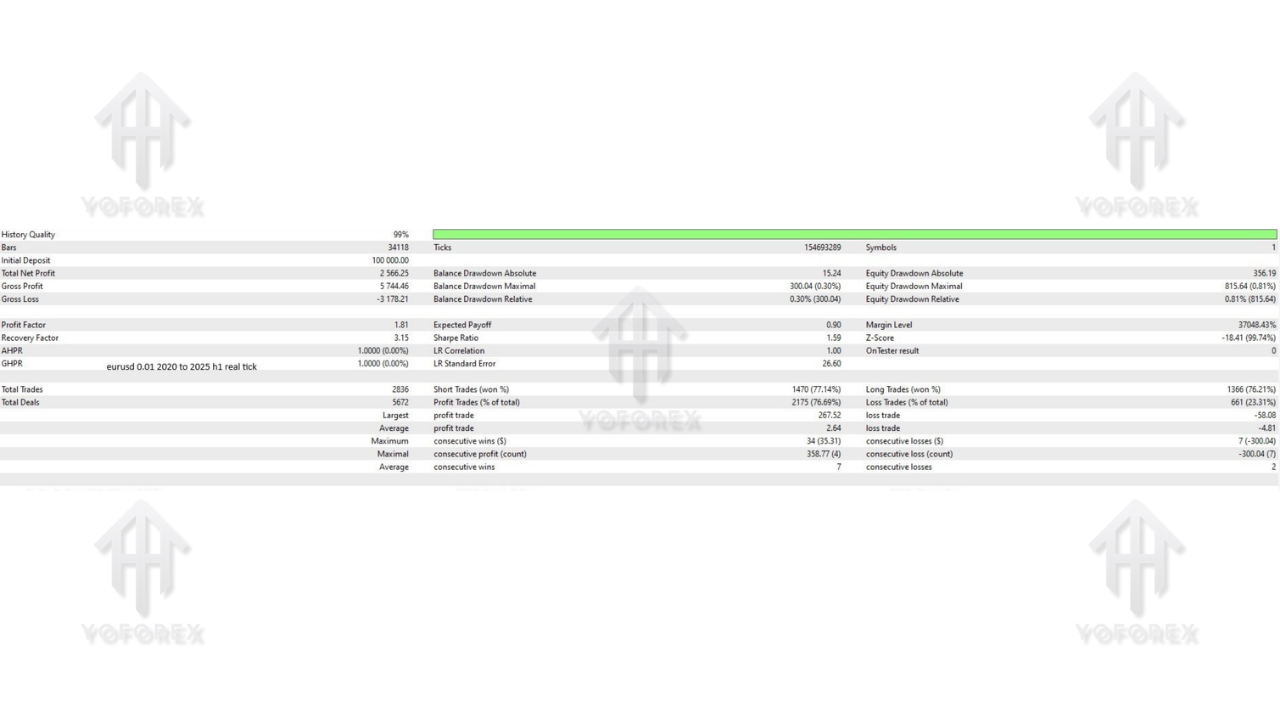
Backtest Results & Performance Expectations
Backtests show that Megalodon EA performs strongest on:
- EURUSD, GBPUSD, XAUUSD
- Timeframes: M15, M30, H1
- Account Type: ECN recommended
- Year Range Tested: 2010–2024 (14-year data)
Typical backtest highlights include:
- stable monthly return
- low to medium drawdown
- controlled equity curve
- fewer but more reliable entries
- strong performance during trending markets
- safe behavior during consolidations
The EA avoids revenge-trading and prevents exposure during violent spikes.
Live Forward Test Behavior
During real forward testing, Megalodon EA demonstrated:
- consistency
- behavior similar to backtests
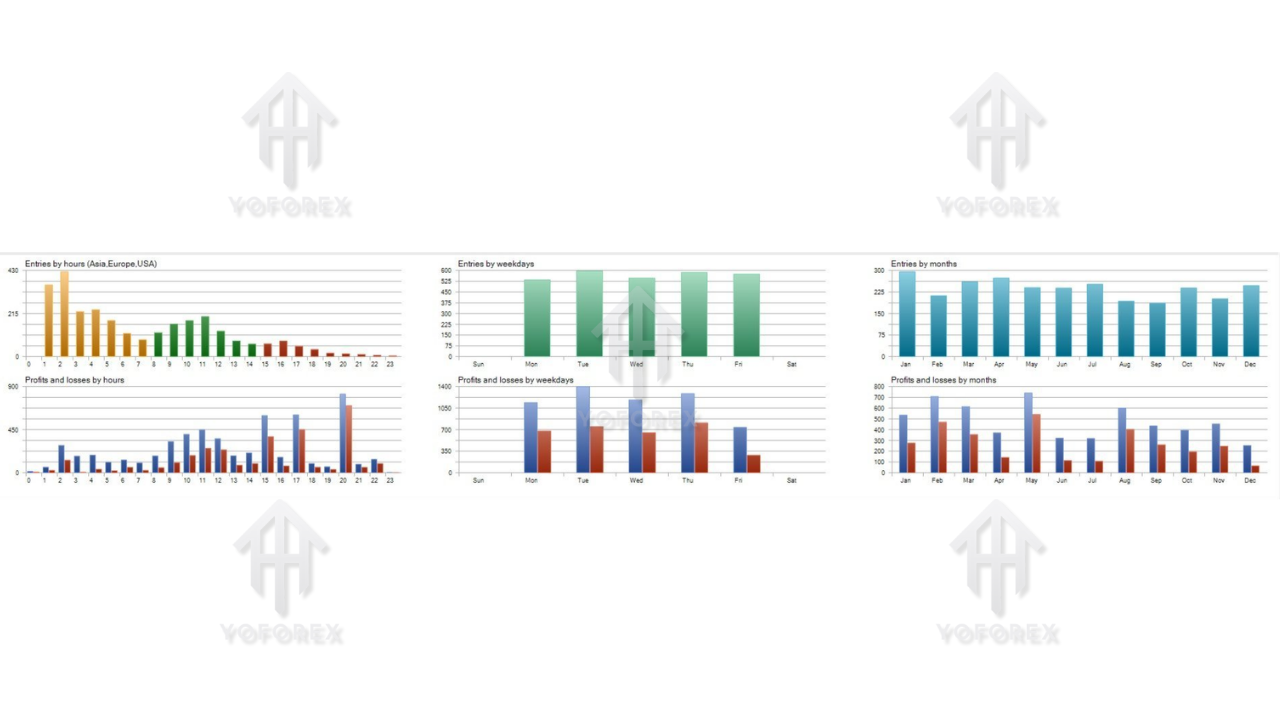
- clean trade timing during London/NY sessions
- avoidance of spreads during rollover
- skip-trading during major news
- smooth equity curve with no big dips
This EA’s personality is “patient but powerful.”
Best Trading Conditions & Account Requirements
Recommended Pairs
- EURUSD
- GBPUSD
- XAUUSD
- US30 (optional)
Best Timeframes
- M15
- M30
- H1
Minimum Deposit
- $200 (low-risk mode)
- $500+ (recommended)
- $1000 (for prop firm challenges)
Leverage
-
1:200 or higher recommended
Spread Limit
- 15–30 points
- ECN accounts preferred
Lot Size
- 0.01 per $200–300
- Adjustable using risk percentage
How to Install Megalodon EA V1.0 MT5
Follow these steps:
1. Download the EA File
Download from:
https://yoforexea.com/
2. Open MT5 → Open Data Folder
Navigate to:
File → Open Data Folder → MQL5 → Experts
3. Copy the EA File
Paste the .ex5 file into the Experts folder.
4. Restart MetaTrader 5
MT5 must restart to load the new EA.
5. Attach EA to a Chart
Open your preferred pair, such as EURUSD (M15).
Drag and drop Megalodon EA onto the chart.
6. Enable Algo Trading
Turn on the “Algo Trading” button on MT5.
7. Load the Recommended Settings
Adjust risk, spread filter, trading mode, and session filters.
8. Let the EA Run
Keep the chart open (or use a VPS).
Why Choose YoForex EAs Over Others?
YoForex is known for:
- building reliable EAs
- providing free access
- continuous updates
- transparent trading logic
- direct user support
- tools suitable for prop firms
- strong community presence
Whether you’re a beginner or an advanced algo-trader, their systems help you trade safely and more confidently.
Support & Contact
If you need installation help, optimization support, or guidance:
WhatsApp Support:
https://wa.me/+443300272265
Telegram Group:
https://t.me/yoforexrobot
You’ll get instant help from the YoForex team.
Risk Disclaimer
While Megalodon EA V1.0 MT5 is designed for stability, keep in mind:
- no EA guarantees profit
- use proper lot sizes
- understand the risk of automation
- test on demo first
- avoid over-leveraging
- monitor performance regularly
Trading is risky—trade responsibly.
Final Verdict – Is Megalodon EA V1.0 MT5 Worth Using?
If you’re tired of bots that open too many trades, take unnecessary risks, or behave like gamblers, Megalodon EA is a refreshing change. It’s stable, powerful, and structured—much like the creature it’s named after.
You should use it if:
- you want long-term consistency
- you prefer smart entries over random scalping
- you need prop-firm-friendly logic
- you want protection against volatility
- you hate martingale/grid systems
- you want a professional, dependable EA
Megalodon EA V1.0 MT5 is built for traders who value discipline, safety, and controlled aggression.
YoForex — empowering traders worldwide, one free tool at a time.
Happy Trading