FTLM HIST ARROW Indicator MT4: Precision Histogram Arrow Signals
Are you tired of second‐guessing your entry and exit points on MetaTrader 4? The FTLM HIST ARROW Indicator MT4 is here to change the game. Designed for traders who want clear, visual cues without cluttering their charts, this histogram arrow indicator delivers on both accuracy and simplicity. Whether you’re a day trader hunting for quick scalp opportunities or a swing trader aiming for bigger moves, the FTLM HIST ARROW Indicator MT4 provides you with intuitive arrow signals directly on the histogram, so you never miss a beat.
In this guide, we’ll dive deep into how this MT4 indicator works, explore its standout features, walk you through the installation and customization process, and share best practices to help you make the most of its signals. By the end, you’ll know exactly why the FTLM HIST ARROW Indicator MT4 belongs in your arsenal—and how it can streamline your decision-making for more consistent results.
Overview of FTLM HIST ARROW Indicator MT4
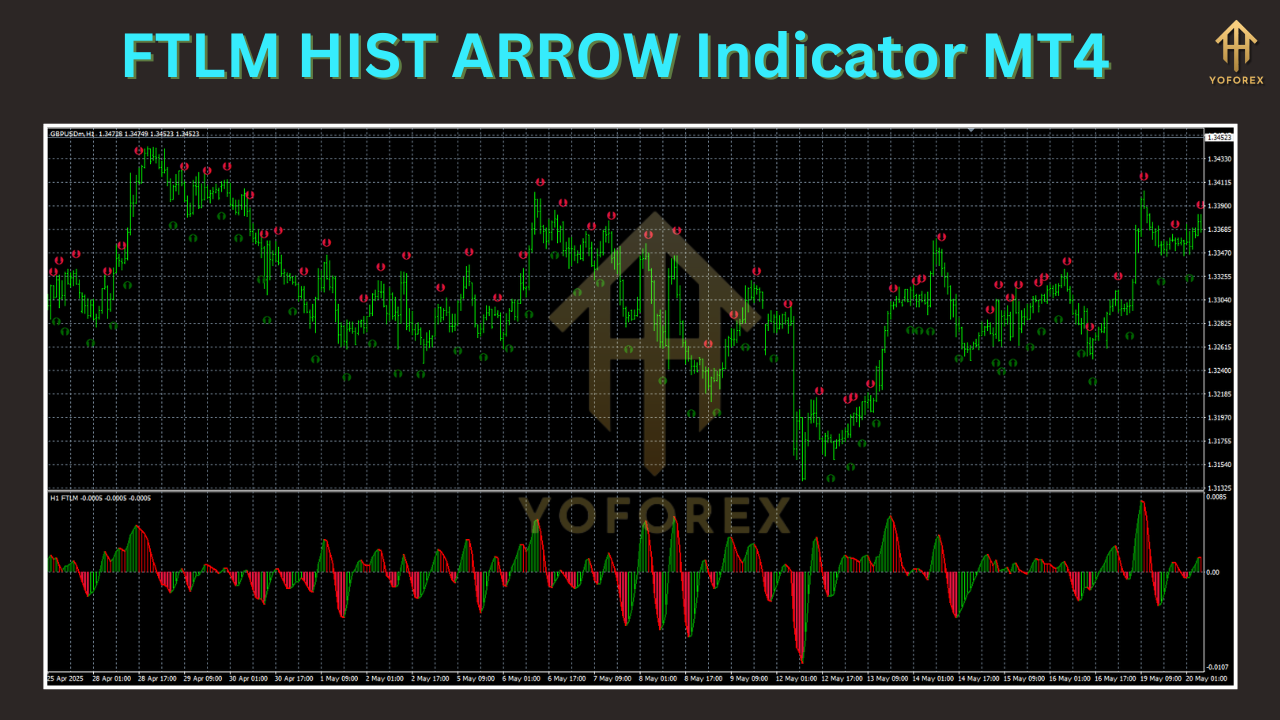
The FTLM HIST ARROW Indicator MT4 is a technical analysis tool that overlays arrow signals on an oscillator‐style histogram. Unlike traditional arrow indicators that might repaint or lag excessively, this one uses adaptive threshold levels and smoothing filters to pinpoint momentum shifts. When the histogram crosses a preset level—either bullish or bearish—the indicator plots a clear arrow above or below the histogram bars. This visual cue helps you act quickly on momentum changes without staring at raw numbers.
Built exclusively for MetaTrader 4, the FTLM HIST ARROW Indicator MT4 is coded in MQL4 for efficiency, ensuring minimal CPU usage even when applied to multiple charts. It’s compatible with all asset classes—forex, commodities, indices, and cryptocurrencies—making it a versatile addition to any trading strategy.
Key Features
- Adaptive Histogram Thresholds for dynamic market conditions
- Clear Arrow Signals positioned directly on histogram bars
- No Repainting Logic—arrows remain fixed once plotted
- Customizable Timeframes—works on M1 through MN charts
- Low CPU Footprint even on intensive multi-chart setups
- Built-in Alerts (pop-up, email, push) when arrows appear
- Color-coded Bullets for bullish (green) and bearish (red) signals
- User-friendly Inputs for smoothing periods and sensitivity
How to Install FTLM HIST ARROW Indicator MT4
-
Download the Indicator File
-
Get the
FTLM_HIST_ARROW.ex4file from your trusted source (e.g., your member area or signal provider).
-
-
Copy to MT4 Folder
-
In MT4, go to File → Open Data Folder → MQL4 → Indicators, then paste the file there.
-
-
Refresh or Restart MT4
-
Right-click on “Indicators” in the Navigator panel and choose Refresh, or simply restart the platform.
-
-
Attach to Chart
-
Drag FTLM HIST ARROW Indicator onto your preferred chart. A settings window will pop up—this is where you’ll customize parameters.
-
-
Enable Alerts (Optional)
-
In the Alerts tab of the indicator settings, configure pop-ups, sounds, or email notifications when arrows occur.
-
Once attached, you’ll immediately see histogram bars with arrows marking potential reversals or continuations in momentum.
Customizing the Indicator Settings
The FTLM HIST ARROW Indicator MT4 offers several inputs to tailor signals to your trading style:
- Fast Period & Slow Period: Adjust these to control the histogram’s sensitivity. Lower values generate more arrows but may lead to noise.
- Smoothing Factor: A moving average applied to the histogram to filter out minor fluctuations.
- Threshold Levels: Define the positive and negative levels at which arrows will trigger. Higher thresholds reduce false signals in ranging markets.
- Arrow Size & Style: Choose your preferred arrow icon and size for clarity on different screen resolutions.
- Alert Options: Toggle pop-up alerts, email alerts, or push notifications to your mobile device for on-the-go monitoring.
Experiment with these settings on a demo account to find the balance between signal frequency and accuracy that suits your preferred timeframe.
Interpreting the Histogram Arrow Signals
The core logic behind the FTLM HIST ARROW Indicator MT4 lies in detecting momentum shifts:
- Bullish Arrow (Green) appears below the histogram when upward momentum crosses your set positive threshold.
- Bearish Arrow (Red) shows above the histogram when downward momentum breaches your negative threshold.
To confirm a signal:
- Look for supporting price action (e.g., a bullish candlestick pattern when you see a green arrow).
- Check higher-timeframe trend direction; arrows that align with the major trend tend to perform better.
- Use additional filters like a moving average or RSI to reduce false positives in choppy markets.
By combining the histogram arrow signals with your preferred confirmation tools, you’ll increase the probability of entering high-quality trades.
Best Practices and Trading Tips
- Use Multiple Timeframes: Scan with a higher timeframe (H4 or D1) for trend direction, then fine-tune entries on M15 or H1 using FTLM HIST ARROW arrows.
- Set Logical Stop‐Loss Levels: Place stops just above or below recent swing highs/lows. The histogram arrow doesn’t define your risk; you do.
- Avoid Overtrading: If you see too many arrows in a ranging market, tighten your threshold levels or switch to a trending environment.
- Backtest Thoroughly: Run the FTLM HIST ARROW Indicator MT4 on historical data for at least 500 trades to gauge performance metrics like win rate and drawdown.
- Combine with Volume: A histogram arrow appearing on increased volume bars often signals a stronger move.
- Demo Before Going Live: Always test your settings and strategy tweaks on a demo account to understand how the indicator behaves in different market conditions.
Support, Updates and Community Resources
The developer of FTLM HIST ARROW Indicator MT4 is committed to ongoing improvements. Check the official support thread or member portal for:
- Version Updates with bug fixes and performance tweaks
- User Forums to discuss strategies and share custom settings
- Video Tutorials demonstrating optimal installation and tuning
- Premium Signal Channels that leverage FTLM HIST ARROW signals in live market conditions
Staying connected ensures you benefit from the latest enhancements and community-driven insights.
Conclusion
The FTLM HIST ARROW Indicator MT4 stands out as a precision histogram arrow indicator that simplifies momentum analysis on MetaTrader 4. With adaptive thresholds, non-repainting arrows, customizable alerts, and low system impact, it equips both novice and experienced traders with clear entry and exit cues. By following the installation steps, fine-tuning your settings, and applying best‐practice trading tips, you can integrate the FTLM HIST ARROW Indicator MT4 into your workflow for more confident, data-driven trades. Give it a try in your demo account today—and see how sharper signals can transform your trading edge.