

Bollinger Bands Mean Reversion with Walk Feature EA V1.18 MT5 — M1 Gold Setup & Pro Tips
Platform: MT5
Core idea: Mean reversion using Bollinger Bands with a “Walk” feature that controls how quickly the EA steps into/through a move.
Primary target: XAUUSD (Gold) on M1
Key setting: N (number of bars) to adjust walk sensitivity — 3–4 bars is optimal on M1 Gold.
When Gold gets choppy on the one-minute chart, price loves to stretch beyond the Bollinger Bands and snap back toward the middle. This EA is built to exploit exactly that behavior—fade the stretch, capture the snap, and manage the exit before the next burst of noise. The twist is the Walk Feature: instead of firing impulsively at the first touch, the EA “walks” with price for N bars, ensuring the stretch is genuine before committing. Think of it as an anti-FOMO delay that filters weak tags and refines entries.
How the Strategy Works (Plain English)
- Detect Stretch
Price expands to (or past) an outer Bollinger Band (default 20-period with 2σ is common, but you can tune). That suggests an overextension relative to recent volatility. - Walk Confirmation (
Nbars)
The Walk logic waits N bars on M1 to confirm the move is sustained rather than a one-tick poke. - Smaller N (e.g., 1–2): faster entries, more signals, higher noise.
- Recommended N = 3–4: sweet spot for M1 Gold, balancing patience vs. missed moves.
- Larger N (5+): very selective, fewer trades; can be safer but risks late entries.
- Enter Mean Reversion
After the walk, the EA opens a counter-move position (short after upper band stretch, long after lower band stretch). No martingale required—this is about timed fades, not escalation. - Manage Risk & Exit
- Stop-Loss beyond band/ATR-scaled buffer (avoid tight, arbitrary pips on Gold).
- Take-Profit near the middle band (the “mean”) or a fixed R-multiple (e.g., 1.2R–1.8R).
- Optional partial take-profit at the midline plus trail the remainder if momentum continues.
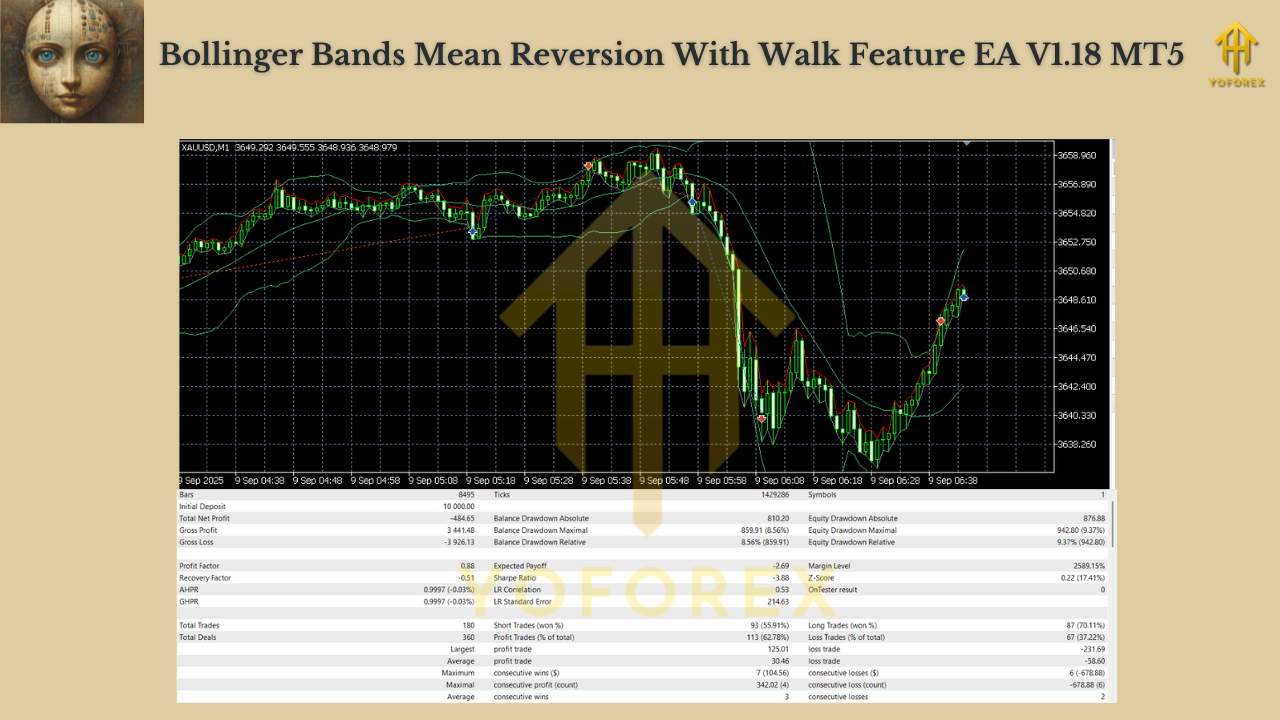
Why the Walk Feature Matters on M1 Gold
Gold’s microstructure often shows multi-bar pushes where price crawls along the band before snapping back. Entering too early gets you chopped. The Walk delay lets price prove it’s truly stretched. On M1, 3–4 bars is often that Gold “prove-it” window—long enough to avoid a fake tick, short enough to still catch the snap.
- 3 bars: Responsive; good for active sessions (London/NY).
- 4 bars: Slightly stricter; helps cut entries during thin or whippy minutes.
If you notice more false starts, bump N from 3 → 4. If you miss too many trades, try 4 → 3.
Recommended Starter Settings (M1 XAUUSD)
You can adapt these as you forward-test with your broker:
- Bollinger Bands:
- Period: 20
- Deviation: 2.0 (try 2.2–2.5 if you need a stricter stretch)
- Price: Close
- Walk Sensitivity (
N): 3–4 bars (optimal starting point on M1 Gold) - Risk & Sizing:
- Risk per trade: 0.25%–0.5% (Gold is fast; keep it modest)
- Max concurrent trades: 1–2 (avoid stacking exposure on the same micro-move)
- Stops & Targets:
- SL: ATR(14) × 1.2–1.6 beyond the band breach (or a fixed buffer that matches your broker’s typical M1 volatility)
- TP:
- Conservative: Middle band touch (high hit rate, smaller wins)
- Balanced: Midline partial (50–70%), trail the rest behind midline or a slow ATR
- Aggressive: Fixed 1.5R–1.8R if you prefer R-multiple consistency
- Filters (optional):
- Spread cap (disallow entries when spread > your threshold)
- Session window (London & NY preferred)
- News pause (avoid CPI/FOMC/NFP minutes)
- Infrastructure:
- Broker: low-spread ECN/Raw preferred
- VPS: recommended for uptime and low latency
Installation (MT5)
- MT5 → File → Open Data Folder →
MQL5/Experts→ paste EA file. - Restart MT5 so the EA loads.
- Open XAUUSD (Gold) on M1.
- Drag Bollinger Bands Mean Reversion With Walk Feature EA V1.18 onto the chart.
- Tick Allow Algo Trading and ensure the toolbar Algo Trading button is green.
- In Inputs, set
N = 3–4, confirm BB/ATR settings, risk %, filters, and magic number.
Playbook: Tuning N by Regime
- Choppy, fake-out minutes (post-news fade, illiquid times): Increase to 4 to avoid traps.
- Clean sessions with directional crawls along the band: Keep at 3—you’ll still filter a poke without giving up too much early edge.
- Spiky latency/spread periods (rollover, holidays): consider pausing or tighten spread filter.
Remember: N is your patience knob. Adjust it first before you start overhauling everything else.
Backtesting & Forward Testing Tips
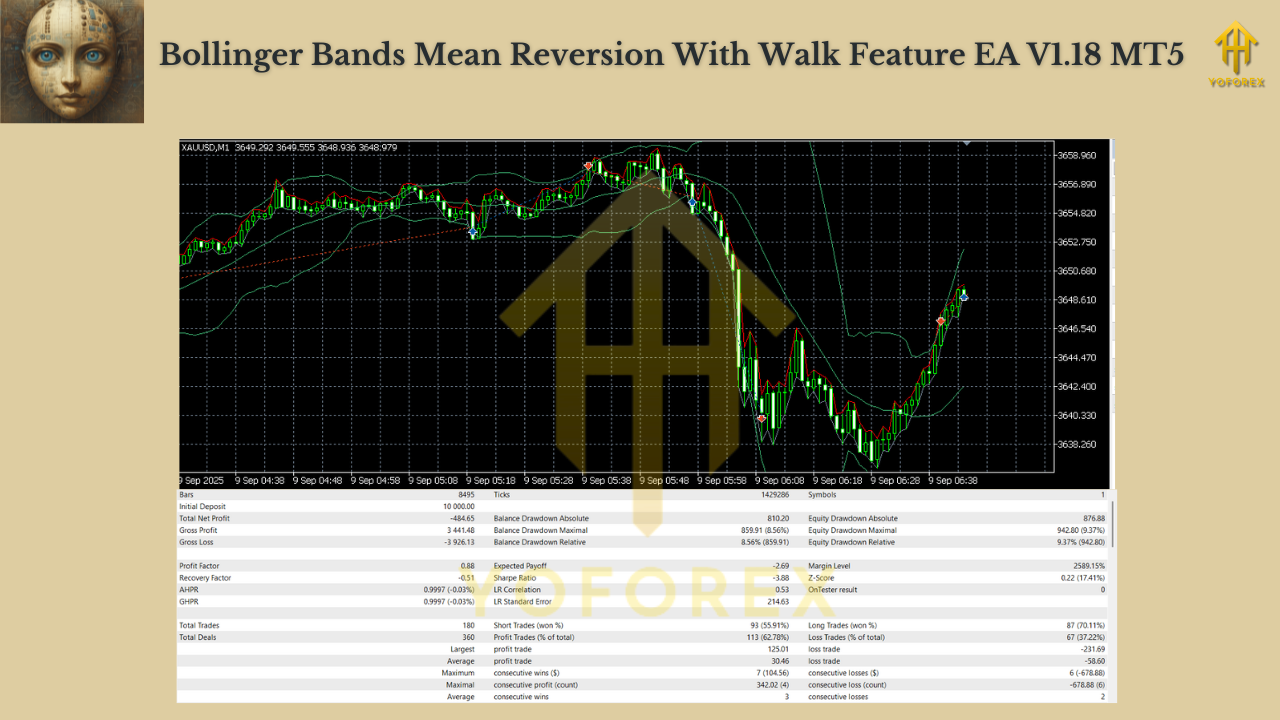
- Use tick data and enable real-spread modeling if available—M1 Gold is spread-sensitive.
- Test multiple regimes: calm weeks vs. high-vol weeks (FOMC/NFP).
- Measure by batches, not single trades: review 30–50 trades before judging changes.
- Track:
- Max drawdown (absolute & %)
- Win rate vs. average R
- Profit factor
- Average time in trade (are you overstaying?)
- Performance by session (London/NY should usually dominate)
Risk Management (non-negotiables)
- Keep risk per trade tiny (0.25–0.5% is enough on M1 Gold).
- Define a daily loss stop (e.g., –2%) and honor it.
- Avoid stacking multiple mean-reversion bots on the same symbol/timeframe (correlated risk).
- No martingale. If you’re tempted, walk away—mean reversion can chain losses in trend bursts.
FAQs
Is N timeframe-dependent?
Yes—recommendations here are for M1. On higher TFs, N can be smaller relative to bar size, but test it. For M1 Gold, 3–4 is the proven starting lane.
Do I need to change Bollinger settings?
You can keep 20/2 as a baseline. If you see too many entries, try 2.2–2.5 deviations or increase N.
Fixed TP at the midline or trail?
Both are valid. A midline TP boosts win rate; partial at midline + trail balances winners and reduces “gave it all back” pain.
VPS necessary?
Strongly recommended. M1 execution consistency matters.
Final Word
Bollinger Bands Mean Reversion With Walk Feature EA V1.18 (MT5) distills a classic idea—fade the stretch, capture the snap—and layers in a Walk control so you enter after the market proves the stretch is real. On M1 Gold, start with N = 3–4, keep risk tiny, and let a few dozen trades tell you what to tweak next. Resist over-optimization; small, principled adjustments beat wholesale parameter churn.
Risk disclaimer: Trading involves risk. Past results don’t guarantee future returns. Always backtest and forward-test before going live.
Join our Telegram for the latest updates and support
