

Why Beat The Market EA V5.7 MT4 Caught Attention
The forex market is tough, and MT4 traders often look for automated systems that can at least support their overall strategy. Beat The Market EA V5.7 MT4 was introduced to help traders navigate inconsistent volatility by applying a combination of trend signals, momentum tracking, and protective risk logic. Instead of wild high-risk systems, this EA aims for gradual growth—tho of course nothing is ever guaranteed in trading.
The upgraded version V5.7 focuses heavily on refining its entry conditions. It reduces fake breakouts, avoids choppy market sequences, and waits for cleaner confirmations before placing trades. Many traders prefer this conservative approach, especially when trying to protect capital.
Another reason this EA gained traction is its ability to operate without complicated settings. Beginners often get stuck adjusting inputs, but Beat The Market EA tries to keep things simple so they can plug-and-play. Despite the simplicity, it still provides enough control for traders who want to tweak behaviour.
Overview of Beat The Market EA V5.7 MT4
Beat The Market EA is an automated MT4 Expert Advisor designed for steady intraday and swing trading. It uses multiple layers of confirmation—trend direction, momentum strength, volatility levels, and candle structure—to decide when to enter or exit trades. The idea is to eliminate emotional mistakes and let the strategy take over.
The EA works on several major forex pairs, and traders can choose their timeframe depending on risk appetite. While the robot’s goal is to “beat the market,” this doesn’t mean unrealistic monthly returns. Instead, the focus is on structured, consistent performance.
The key improvements in V5.7 include:
- Smarter entry algorithm
- Lower trade frequency during unstable conditions
- Better behaviour during news-driven spikes
- Improved exit logic
- Optimized stop-loss placement
YoForex’s community has discussed this EA widely because of how flexible and beginner-friendly it is. Many traders who struggle with timing find this bot appealing.
Key Features of Beat The Market EA V5.7 MT4
- Fully automated Expert Advisor for MT4
- Works on major forex currency pairs
- Uses volatility filters to avoid dangerous market moments
- Smart trend confirmation algorithm to reduce false entries
- Customizable risk percentage and lot allocation
- No martingale or doubling strategies
- Improved V5.7 exit engine
- Stop-loss always active for safety
- Designed for beginners and intermediate traders
- Works with any MT4 broker
- Low system resource usage, ideal for VPS setups
These features make it suitable for traders who want controlled trading rather than aggressive high-risk systems.
Performance Behaviour & Backtest Style Overview
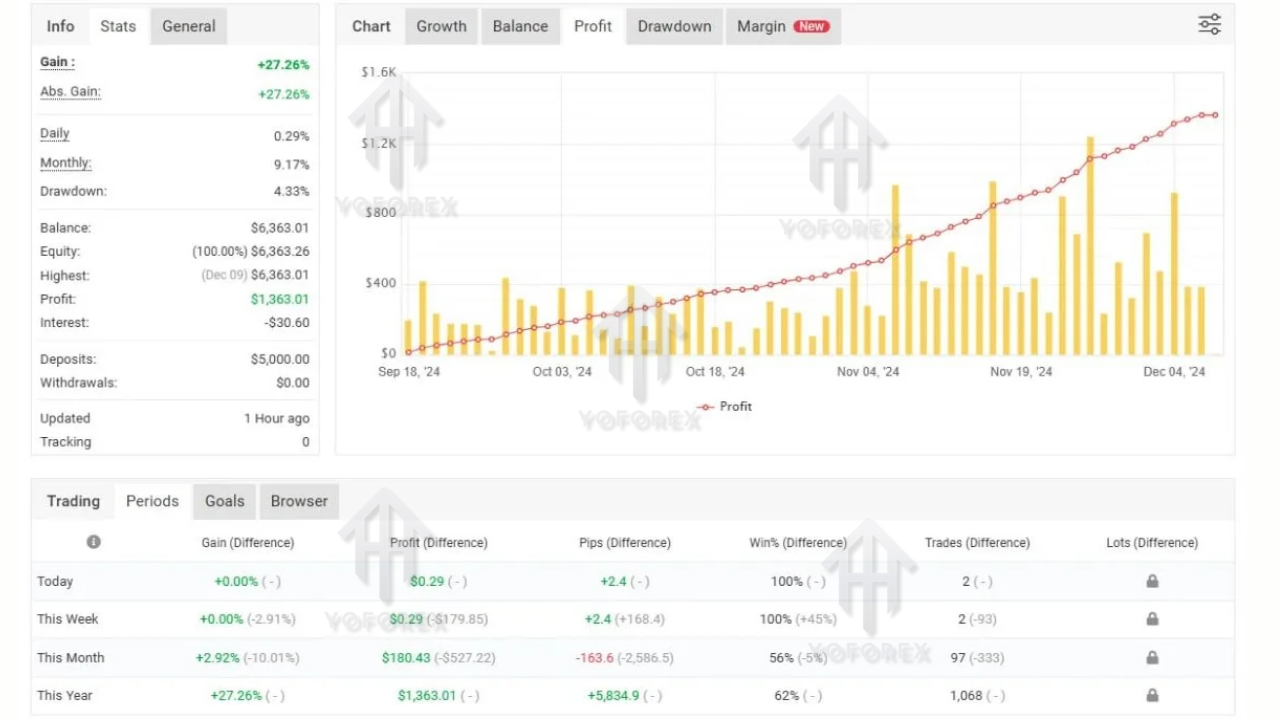
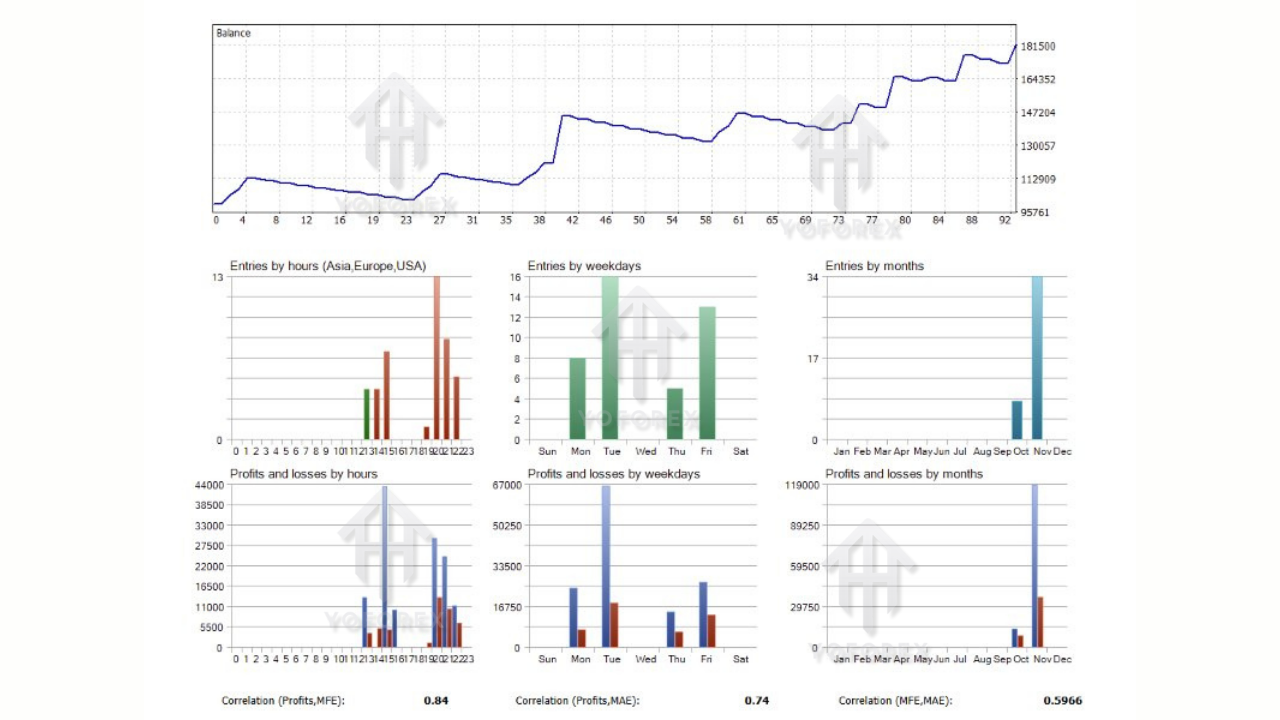
Beat The Market EA V5.7 MT4 generally performs with a steady equity curve when tested on liquid pairs such as EURUSD or GBPUSD. The updated version prioritizes safety—so you won’t see a huge number of trades, but the quality of setups tends to improve.
In typical backtest conditions, the EA:
- Shows consistent upward movement with moderate drawdown
- Handles directional shifts better than earlier versions
- Avoids taking trades during extreme market noise
- Places stop-loss at logical technical zones
- Improves its accuracy with longer-term settings
The EA doesn’t aim for explosive growth; instead, it tries to deliver sustainable monthly returns. It’s ideal for traders who prefer gradual compounding rather than risky bursts.
How to Install & Configure Beat The Market EA V5.7 MT4
Installation is simple, even if you’re just starting out with MT4. Follow the steps below:
Step 1 – Download the EA
Download Beat The Market EA V5.7 MT4 from the provided link on YoForexEA.
Step 2 – Open MT4 and Access Data Folder
Open MT4
Navigate to File → Open Data Folder
Step 3 – Move the EA File
Go to:
MQL4 → Experts
Paste the .ex4 EA file here.
Step 4 – Restart MT4
Restarting ensures the EA loads properly into the system.
Step 5 – Attach EA to the Chart
Open the pair and timeframe you want to trade
Drag Beat The Market EA V5.7 MT4 from the Navigator panel onto the chart
Step 6 – Allow Algo Trading
Enable algo trading from the toolbar
Make sure “Allow Live Trading” is enabled inside the EA settings
Step 7 – Configure Settings
Choose lot size or risk percentage
Adjust stop-loss and take-profit if needed
Set your preferred trading hours (optional)
Step 8 – Run EA Continuously
Keep MT4 open or use a VPS for uninterrupted performance.
Recommended Settings
While traders can experiment, the general recommendations are:
- Timeframes: M15, M30, H1
- Pairs: EURUSD, GBPUSD, USDJPY
- Risk: 1–2% per trade
- Stop-loss active
- Slippage limit set moderately
You can test different settings in demo mode before going live, coz every trader’s style is different.
Why Traders Prefer Beat The Market EA V5.7 MT4
1. Beginner-friendly design
Many EAs require complex configuration, but Beat The Market EA keeps things accessible.
2. No high-risk methods
No martingale, no grid stacking, no over-leveraging logic.
3. Smarter filtering
The V5.7 version reduces unnecessary entries, which can help avoid losses during whipsaw sessions.
4. Runs smoothly on most systems
Low CPU usage makes it suitable for basic laptops or VPS servers.
5. Regular community-driven updates
YoForex’s trading audience often provides feedback, helping shape new improvements.
Pros and Cons of Beat The Market EA
Pros
- Simple to install
- Uses multiple confirmation factors
- Good for beginners
- Safer risk approach
- Suitable for prop-firm friendly setups (based on user configurations)
Cons
- Limited number of trades when the market is slow
- Requires a stable internet connection
- Works best with a good spread environment
Support & Assistance
If you ever face glitches, questions, or want configuration help, YoForex provides active support channels.
WhatsApp: https://wa.me/+443300272265
Telegram Group: https://t.me/yoforexrobot
You can reach out anytime for guidance, troubleshooting, or settings advice.
Important reminder: Always test in demo first. Past performance does not guarantee future profits.
Final Thoughts – Should You Use Beat The Market EA V5.7 MT4?
Beat The Market EA V5.7 MT4 is a solid pick if you want an automated trading system that focuses more on consistency than hype. It’s not built for reckless risk; instead, it tries to deliver stable performance with updated logic and practical decision-making filters. Beginners can start easily, and experienced traders can tweak it deeply.