

Introduction
If you've been battling with inconsistent results in forex trading, jumping from one strategy to another, or spending endless nights watching charts move like crazy… you’re honestly not alone. Most retail traders face this exact frustration. And that’s where automated trading systems like Azath EA V1.0 MT4 step in—not as magic-profit machines, but as stable, rule-based trading tools that remove emotional decision-making.
Azath EA V1.0 MT4 is one of those rare Expert Advisors built with a balanced approach: not too aggressive, not too slow, and definitely not the type that blows an account overnight. Its structure focuses on adaptive grid logic, trend confirmation filters, and risk-managed automation, making it suitable for both beginners and intermediate traders looking for consistent performance.
In this detailed review, we’ll dive deep into everything—how Azath EA works, its strategies, risk controls, recommended settings, pros and cons, and how to install it on MT4 properly. So, grab a coffee, coz this guide is packed with real insights.
Overview of Azath EA V1.0 MT4
Azath EA V1.0 is a fully automated Expert Advisor created specifically for the MetaTrader 4 platform. It uses a mix of trend-following logic, market structure recognition, and a non-martingale grid approach that helps capture profits in ranging and trending phases—but without doubling lot sizes recklessly like traditional martingale EAs do.
The core idea behind Azath EA is precision and safety. Instead of opening random trades, it waits for:
- Volatility alignment
- Trend confirmation
- Healthy retracement zones
- Low-risk entry levels
Once the setup matches its internal logic, it executes trades automatically and manages them using pre-defined risk rules. Traders don’t need to interfere manually.
Why Was Azath EA Created?
Most grid EAs are martingale-based and therefore extremely risky. Azath EA was built to solve that issue:
- It does not use martingale.
- It caps drawdown using dynamic lot sizing.
- It filters bad entries using a trend/volatility model.
- It avoids trading during dangerous market conditions such as high spreads or low liquidity zones.
This focus on preservation plus steady returns is what makes it stand out.
Suitable for Beginners? Absolutely.
Even tho advanced traders also love it, beginners get a lot of benefits:
- Plug-and-play functionality
- Simple risk settings
- Low monitoring needed
- Clean and straightforward logic
You just attach it to the chart, adjust lot size and risk, and let it run.
Key Features of Azath EA V1.0 MT4
Below are the most important features, broken down simply:
- Non-Martingale Grid System – Trades are layered, but lot sizes remain controlled instead of doubling dangerously.
- Adaptive Trend Recognition – The EA only trades when the broader market structure supports the setup.
- Volatility Filter – Avoids trading during unpredictable price spikes.
- Automatic Risk Management – Built-in SL, TP, trailing stop, and equity-based protection.
- News Filter Logic (Optional) – Helps avoid high-impact news spikes.
- Works on Major Pairs – EURUSD, GBPUSD, USDJPY, XAUUSD (depending on broker).
- 24/5 Automated Trading – No need for manual chart-watching.
- Optimized for Low Spread ECN Brokers – For best results.
- Beginner-Friendly Setup – Just drag, drop, and configure risk.
- Stable Performance Curve – Designed for slow, steady growth without major equity dips.
Trading Strategy Behind Azath EA V1.0 MT4
Azath EA uses a 3-layered structure to execute trades:
1. Trend Detection Module
Before opening any trade, Azath EA examines:
- Short-term trend flow
- Higher timeframe direction
- Market structure highs/lows
- Momentum strength
If the market is choppy, uncertain, or reversing violently, the EA stays silent.
This is one of the reasons traders praise its patience.
2. Non-Martingale Grid Entry Logic
When price retraces into a favorable zone (controlled distance), the EA opens a series of small buy or sell positions.
BUT…
It does not increase lot size aggressively.
It does not chase losing trades blindly.
It does not stack unlimited orders.
It uses:
- Capped grid layers
- Uniform lot sizes
- Controlled spacing
- Exit-based TP on basket logic
This reduces the risk massively compared to a martingale EA.
3. Dynamic Exit Management
Instead of relying on fixed TP/SL for every single trade, Azath EA uses:
- Basket take profit
- Equity protection stop
- Trailing exit based on volatility fade
- Trend continuation TP logic
This creates a smooth equity curve and controlled drawdown—exactly what most traders look for.
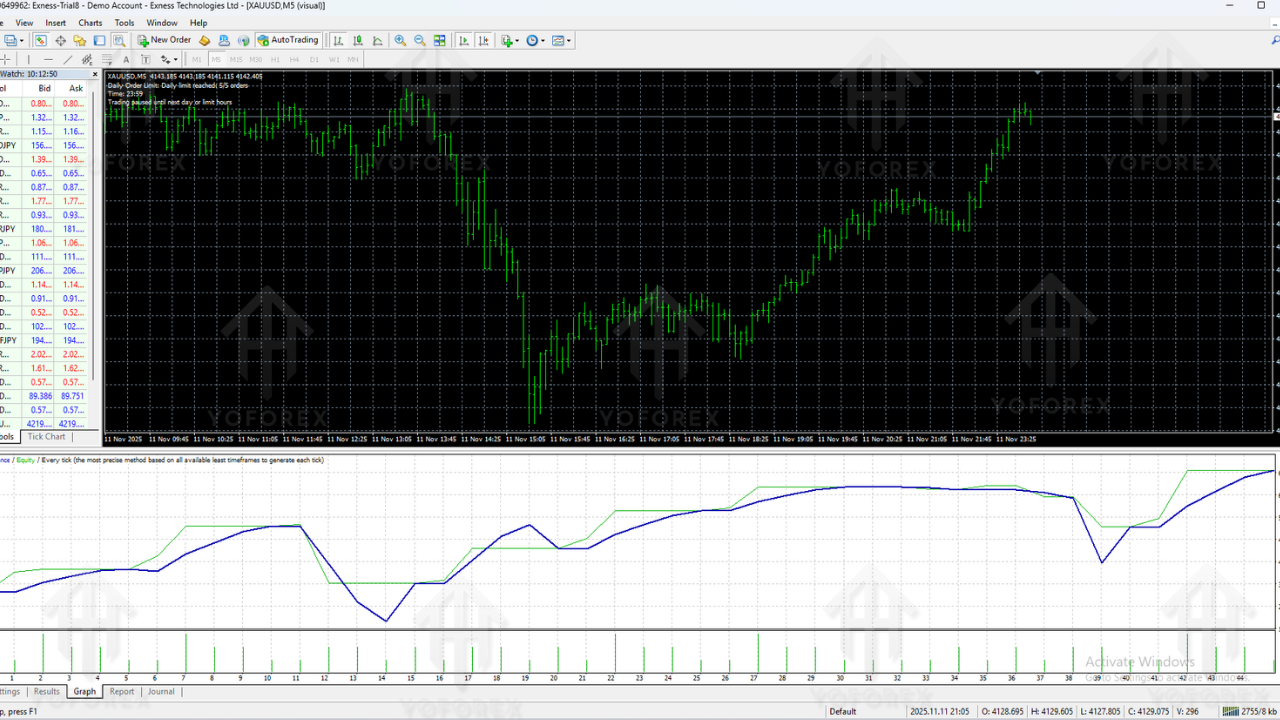
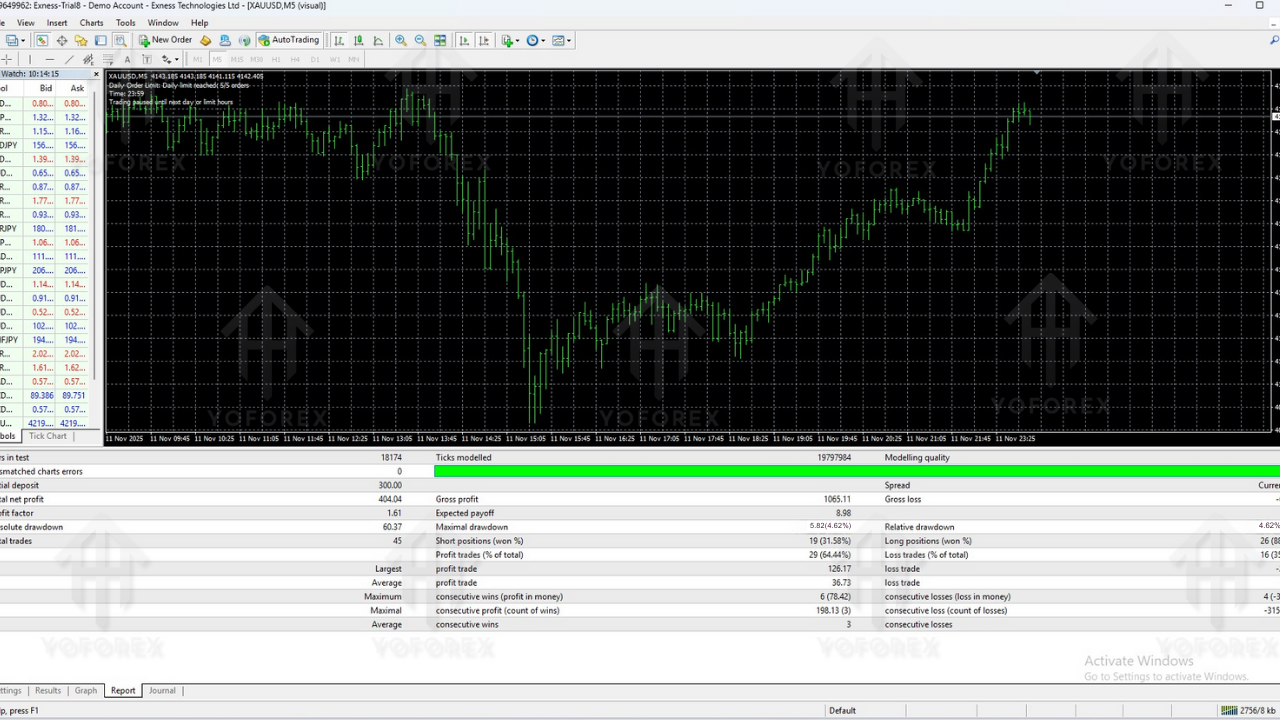
Performance & Practical Results (General Behaviour)
While results always vary based on broker, spread, and volatility, Azath EA generally behaves like this:
- Small but frequent profits
- Steady upward equity curve
- Low drawdown if used with recommended risk
- Rare losing streaks because entries are filtered
- Better performance during trending or semi-ranging markets
It is not a get-rich-quick EA. Instead:
It’s a slow-growth, low-risk bot ideal for long-term trading.
This consistency is valuable, especially for traders who hate aggressive bots that burn accounts.
Recommended Settings for Azath EA V1.0 MT4
These are general recommendations based on typical usage:
Account Type
- ECN or RAW Spread
- Leverage 1:200 or above
- Hedging enabled (if possible)
Minimum Deposit
- $300 standard risk
- $500+ safer risk
Timeframe
- M15 or H1 (depends on broker liquidity)
Currency Pairs
- EURUSD
- GBPUSD
- USDJPY
- XAUUSD (optional, only if spreads are low)
Risk Settings
- Lot size: 0.01 per $300 balance
- Max grid layers: 3–5 (default)
- Take profit mode: Basket TP recommended
- Stop loss: Default EA logic (don’t disable it)
How to Install Azath EA V1.0 MT4 (Step-by-Step Guide)
Even if you’re not techy, relax—it’s super easy.
1. Download the EA File
Get the file from your trusted source or official site.
2. Open MT4 Platform
Go to:
File → Open Data Folder
3. Navigate to MQL4 Folder
Open:MQL4 → Experts
4. Paste the Azath EA File
Drop the .ex4 or .mq4 file inside the Experts folder.
5. Restart MT4
This helps the EA load properly.
6. Enable AutoTrading
Click the AutoTrading button (it must be green).
7. Drag Azath EA onto Your Chart
Choose the correct pair and timeframe.
8. Allow DLL Imports and Algo Trading
Tick:
- “Allow Live Trading”
- “Allow DLL Imports”
9. Adjust Inputs (Risk, Lot Size, etc.)
Once settings look good, hit OK.
And you're done. The EA now begins monitoring the market.
Advantages & Disadvantages of Azath EA V1.0 MT4
Advantages
- Low-risk non-martingale grid approach
- Smooth equity growth over time
- Strong trend & volatility filters
- Beginner-friendly setup and operation
- Works on multiple pairs
- Customizable risk levels
- No need for constant monitoring
- Avoids trading in dangerous conditions
Disadvantages
- Not a high-profit, high-speed scalping EA
- Requires low-spread brokers for best results
- Performance may slow down during long consolidations
- Needs a VPS for uninterrupted trading
- Not suitable for traders seeking very aggressive monthly returns
Who Should Use Azath EA V1.0 MT4?
This EA is perfect for:
- Traders who prefer slow but steady profit
- Funded-account traders who must protect equity
- Beginners afraid of blowing accounts
- People with full-time jobs who can't watch charts
- Anyone wanting stress-free automated trading
It’s not ideal for traders looking for 20–40% monthly profits. Azath EA is built more for safety, sustainability, and precision.
Final Verdict – Is Azath EA V1.0 MT4 Worth Using?
If you’re tired of risky bots, martingale disasters, or EAs that win fast but blow up faster, Azath EA may feel like a breath of fresh air. It’s stable, thoughtful, and built with risk control at its core.
It won’t make you rich in a month—but it can help you grow an account steadily without emotional stress. And honestly, that’s what most serious traders want nowadays.
With disciplined usage, a good broker, and correct risk settings, Azath EA V1.0 MT4 can become a reliable long-term trading partner.
Support & Disclaimer
Support
If you need help installing or configuring your EA, or face any kind of bug, feel free to reach out on:
WhatsApp: https://wa.me/+443300272265
Telegram Group: https://t.me/yoforexrobot
Disclaimer: Forex and gold trading involve risk. Past performance doesn't guarantee future results. Always test robots on demo before live trading and use proper risk management.