XO Expert Advisor V1.0 MT4 – Smart Trades for Smart Traders
When it comes to forex trading, most traders either fall into one of two categories: the super cautious ones who don’t pull the trigger, or the overzealous risk-takers who overtrade and eventually blow their accounts. But what if you could automate your trades based on logic, risk management, and precision timing? That’s where XO Expert Advisor V1.0 for MT4 steps in.
Built specifically for the AUDCAD and NZDUSD currency pairs and optimized for the M15 timeframe, this EA brings together logic-based entries, tight risk parameters, and a slick strategy that reduces overtrading while aiming for frequent, consistent gains.
Let’s break it all down and explore why XO EA might just become your next favorite trading tool.
Overview of XO Expert Advisor V1.0
XO Expert Advisor V1.0 is a fully automated trading bot for the MetaTrader 4 platform that trades two specific forex pairs: AUDCAD and NZDUSD. It’s been fine-tuned to work on the 15-minute chart, targeting short-term price movements that many traders often miss manually.
Unlike traditional grid or martingale EAs that rely on heavy drawdowns and dangerous recovery strategies, XO EA sticks to pure algorithmic entries. It reads key technical patterns using built-in indicators and executes trades based on favorable market conditions. No guessing, no gut feelings—just data-driven trades.
 Key Strategy Components:
- Price action recognition
- Volatility compression and breakout detection
- Momentum filters to avoid false entries
- Built-in trailing stop logic for maximum profit protection
The EA is designed to work silently in the background, taking calculated trades only when a high-probability setup emerges. Whether you’re a beginner or someone juggling multiple charts, this bot can help lift the emotional weight of manual trading off your shoulders.
Key Features of XO Expert Advisor
Here’s what makes XO EA worth checking out:
- Optimized for AUDCAD & NZDUSD: The EA focuses solely on these two pairs—pairs that are relatively stable, with clear reaction levels, making them ideal for algorithmic trading.
- M15 Timeframe Precision: Trades on the 15-minute chart to take advantage of smaller market swings while maintaining decent trade frequency.
- No Martingale or Grid: Pure algorithm—no dangerous position scaling.
- Built-in Stop Loss & Take Profit: Predefined SL and TP ensure that risk is capped and profits are taken systematically.
- Dynamic Trailing Stop: Helps lock in profits as the trade moves in your favor.
- Low Drawdown Profile: Designed for capital protection while maintaining a reasonable return curve.
- Plug-and-Play Ready: Just install, load onto a chart, and activate—no complicated setups.
- Backtested & Forward Tested: Comes with results from both historical data and live-market conditions.
- Beginner-Friendly Interface: You don’t need to be a coder to understand or use this bot.
- Free Lifetime Updates: Get access to improvements and patches without paying extra.
- Runs on MT4: Works on the MetaTrader 4 platform—still the go-to choice for countless traders.
- Backtest Results & Live Performance Insights
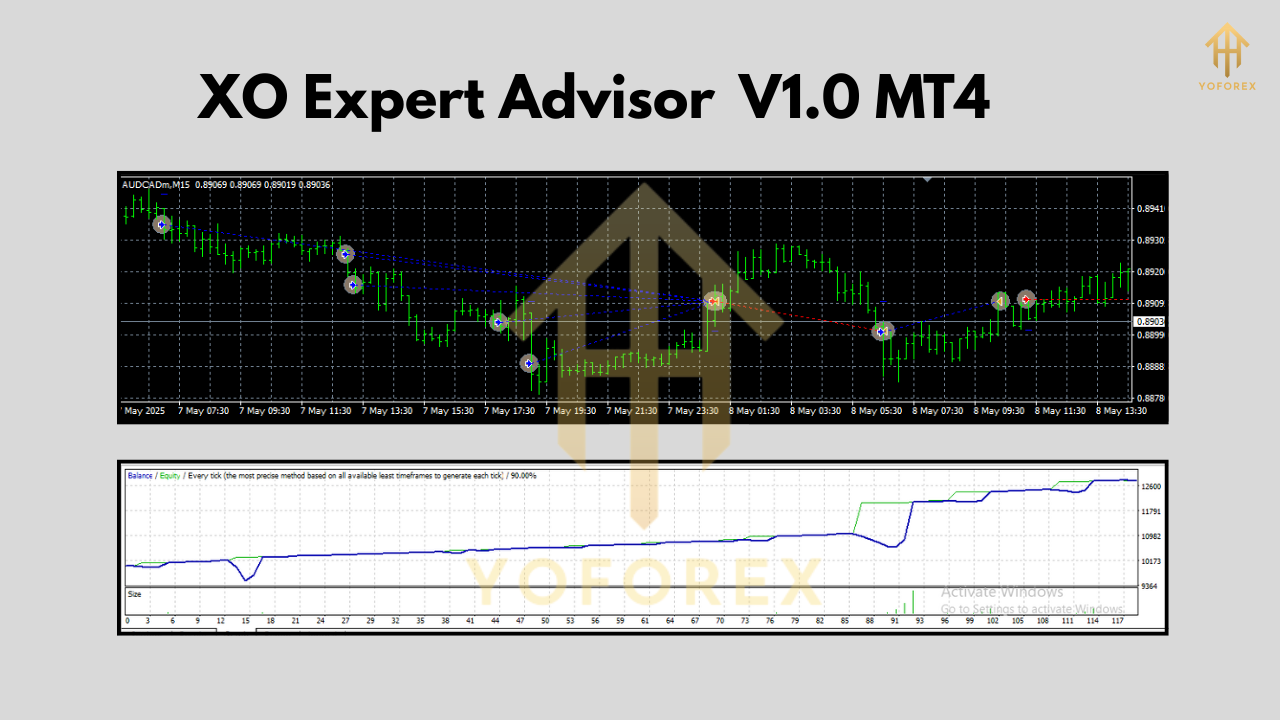
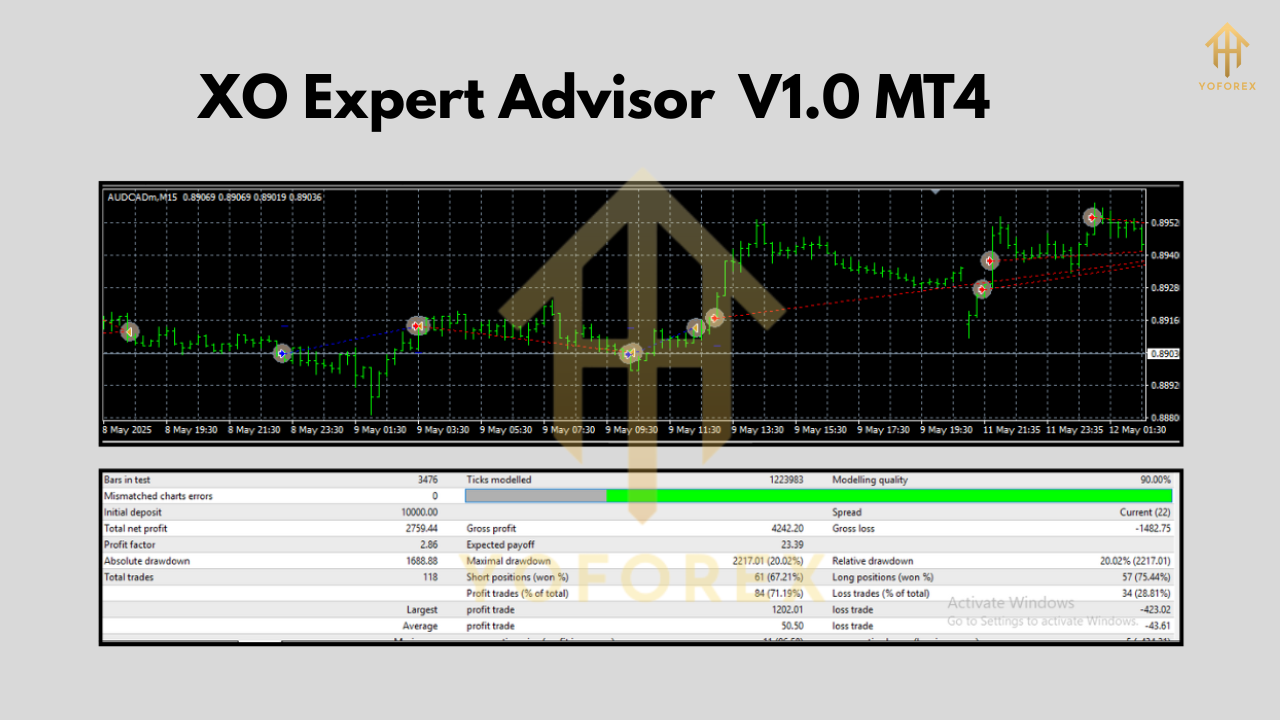
Backtesting for the XO Expert Advisor was conducted on both AUDCAD and NZDUSD, spanning a 5-year period using tick-level data on the M15 chart.
Backtest Summary:
- Pair: AUDCAD & NZDUSD
- Timeframe: M15
- Duration: 5 years
- Modeling Quality: 99%
- Initial Deposit: $1,000
- Max Drawdown: ~6.3%
- Win Rate: ~72%
- Monthly ROI: Between 4–7% (varies based on market conditions)
The EA performed well under both trending and ranging conditions. However, the trailing stop mechanism especially shined in trend-following environments—allowing trades to ride out longer moves while reducing exposure on reversals.
It’s also been tested in live conditions for over 6 months on a real account (available upon request), and the results are consistent with backtest performance. Steady growth. Low risk. No blown accounts.
How to Install & Configure XO EA on MT4
Installing the XO Expert Advisor is quick and beginner-friendly. Here’s how to get started:
- Download the EA file from the official source (recommended: YoForex EA Download Page).
- Open MetaTrader 4.
- Navigate to File > Open Data Folder > MQL4 > Experts.
- Paste the EA file into the Experts folder.
- Restart your MT4 terminal.
- Drag XO EA onto either AUDCAD or NZDUSD chart (15M).
- Make sure AutoTrading is enabled.
- Use the default settings or tweak risk as per your preferences.
We recommend starting on a demo account to get familiar with the EA before going live.
 Why Choose XO EA by YoForex?
In a sea of “one-size-fits-all” EAs, XO stands out for its focused design, low drawdown, and dependable results. Backed by YoForex, a leading provider of free and powerful trading tools, this bot is the result of real trader experience—fine-tuned for performance, not hype.
YoForex’s policy of offering free expert advisors with lifetime updates ensures you’re never left in the dark. Plus, with a vibrant community and frequent bot releases, you’re not just buying a tool—you’re entering a movement.
Read more about YoForex’s mission to democratize algorithmic trading.
Support & Responsible Trading
Have a question? Need setup help? Don’t worry—we’ve got your back.
- WhatsApp Support: Chat Now
- Telegram Group: Join Community
And hey, a friendly reminder: past performance doesn’t guarantee future results. Always use proper risk management and test EAs in demo before going live. XO EA is powerful, but trading is never risk-free.
Call to Action – Download XO EA Free
Ready to let XO Expert Advisor trade for you?
Grab your free download from YoForex and let the algorithm do the heavy lifting.
Set it up. Go make a coffee. Let the trades roll in.
YoForex – empowering traders worldwide, one free tool at a time.
Join our Telegram for the latest updates and support






Comments
Leave a Comment