XAU SP Price Action EA V1.0 MT5 – Automated Gold Price Action Trading
Introduction
Trading gold (XAUUSD) using price action strategies has long attracted both discretionary and algorithmic traders seeking to capitalize on the metal’s strong technical patterns and volatility. The XAU SP Price Action EA V1.0 MT5 brings this expertise into an Expert Advisor format on MetaTrader 5, enabling you to automate your gold trading based on pure price action cues—without relying on lagging indicators. Designed for both novice and experienced traders, this EA deciphers support and resistance levels, candlestick patterns, and trend structures to generate high-probability entry and exit signals. With flexible risk controls and session filters, XAU SP ensures precise execution on the H1 and H4 timeframes, helping you harness gold’s swings with consistency and discipline.
Understanding Price Action Trading
Price action trading centers on interpreting raw market movements—candlestick formations, trendlines, and pivot points—to predict future price behavior. Unlike moving averages or oscillators, price action provides real-time insights into market psychology. Common elements include:
- Support & Resistance: Horizontal zones where price repeatedly stalls or reverses.
- Candlestick Patterns: Single- and multi-bar formations (e.g., pin bars, engulfing candles) signaling momentum shifts.
- Trend Structures: Higher highs and higher lows in an uptrend, lower highs and lower lows in a downtrend.
- Chart Patterns: Triangles, flags, and head-and-shoulders setups that hint at potential breakouts or reversals.
By codifying these elements into precise rules, the XAU SP EA automates discretionary analysis, reducing emotional bias and ensuring trades conform strictly to your price action plan.
Overview
XAU SP Price Action EA V1.0 MT5 focuses on gold’s most reliable price action signals on the H1 and H4 charts. Key components include:
- Zone Detection: Automatically plots dynamic support and resistance levels based on recent swing highs and lows.
- Pattern Recognition: Identifies pin bars, inside bars, and engulfing patterns that coincide with key zones.
- Breakout & Rejection Logic: Executes breakout entries on zone breaches with confirmation, and fade entries on strong rejections.
- Session Filtering: Trades only during defined liquidity windows (e.g., London–New York overlap).
- Risk Management: Configurable stop loss, take profit, and lot sizing rules (fixed, ATR-based, or percentage of equity).
Built in MQL5, this EA leverages the speed and multicore processing capabilities of MT5, ensuring accurate tick-by-tick execution. It is compatible with any broker offering gold on MT5 and supports build 2980 and above.
Key Features
- Dynamic Zone Calculation: Automatic plotting of SR zones based on a user-defined lookback period, adapting to market shifts without manual updates.
- Custom Pattern Filters: Enable or disable specific candlestick patterns (e.g., only pin bars), reducing noise and focusing on your favorite setups.
- Adaptive Lot Sizing: Options to risk a fixed percentage of account equity or use ATR-based position sizing for volatility-adjusted entries.
- Partial Close & Trailing Stop: Lock in profits by closing a portion of the position at the first profit target, then trail stop to protect gains.
- News & Spread Filters: Prevent trading during high-impact news events and when spread exceeds a maximum threshold, avoiding slippage and erratic moves.
- Equity Protection: Equity stop-out percentage setting to close all trades before severe drawdown occurs.
- Detailed Logging & Alerts: Record entry rationale in the journal and receive push or email notifications on trade events.
How It Works
- Zone Identification: At the start of each new candle on the selected timeframe, the EA calculates the highest high and lowest low over the lookback range and draws horizontal zones with buffer margins.
- Pattern Scanning: When price enters a zone, the EA scans for enabled candlestick patterns. If a valid pattern forms within the zone, it flags a potential entry.
- Confirmation & Entry: For breakout entries, the EA waits for a close beyond the zone. For rejection entries, it requires a candlestick close opposite the breakout direction. Upon confirmation, it opens a trade with defined stop loss and take profit levels.
- Trade Management: Once the trade is active, the EA applies partial close and trailing stop rules. If price hits the first TP, a configured percentage of the lot is closed, and the remaining position is trailed by the chosen method (e.g., ATR multiplier).
- Session & News Checks: Before sending any order, the EA verifies the current time against session windows and checks the economic calendar for upcoming news within a user-defined suppression period.
- Risk Controls: At every tick, the EA monitors equity drawdown against the maximum allowed. If the threshold is breached, all open positions are closed immediately.
Installation and Setup
- Download the EA: Copy
XAU_SP_PriceAction_EA_v1.mq5to your MT5MQL5/Expertsfolder. - Compile and Restart: Open the MetaEditor, compile the EA, then restart MetaTrader 5.
- Attach to Chart: Open an XAUUSD H1 or H4 chart and drag the EA from the Navigator panel.
- Configure Inputs:
ZoneLookback: Number of candles for zone calculation (e.g., 100).
PatternsEnabled: Comma-separated list (e.g., “PinBar,Engulfing,InsideBar”).
RiskMode: “FixedLot” or “PercentEquity” or “ATR-Based”.
RiskValue: Lot size, percent (e.g., 1%), or ATR multiplier.
SessionStart/End: Times in broker’s server timezone for trading (e.g., 08:00, 17:00).
NewsFilterHours: Hours before major news to disable trading.
MaxSpread: Maximum spread in points to allow new trades.
EquityStop: Max equity drawdown percent to trigger shutdown.
- Enable AutoTrading: Click the “AutoTrading” button so it turns green, and ensure “Algo Trading” is permitted in Tools → Options → Expert Advisors.
Input Parameters & Recommended Settings
Here is a sample configuration for a $5,000 account:
- ZoneLookback: 120
- PatternsEnabled: PinBar,Engulfing
- RiskMode: PercentEquity
- RiskValue: 0.5 (half-percent per trade)
- SessionStart: 07:00 (GMT+2)
- SessionEnd: 16:00 (GMT+2)
- NewsFilterHours: 2
- MaxSpread: 20 points
- EquityStop: 15
This balanced setup limits risk per trade while focusing on high-quality price action signals within gold’s most liquid hours. Always optimize ZoneLookback and pattern combinations on a demo account before trading live.
Backtesting & Performance
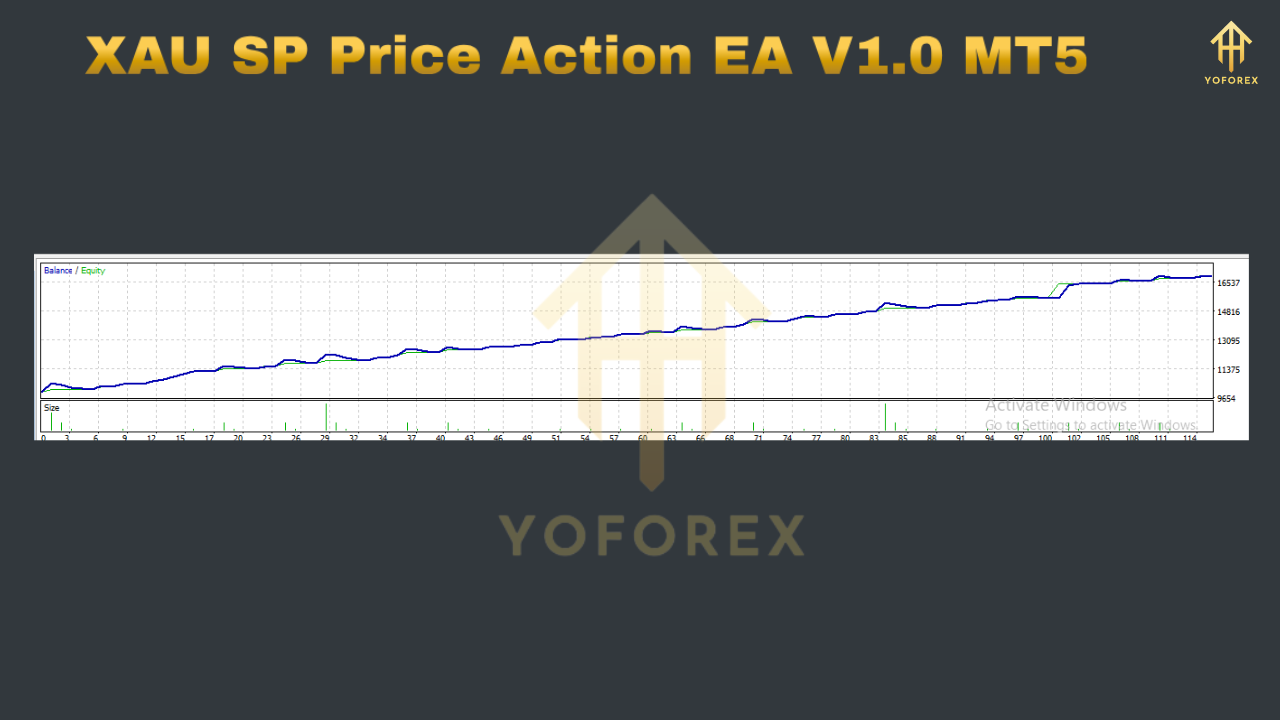
A visual and statistical backtest from January 2019 to December 2024 on XAUUSD H1 reveals:
- Net Profit: $6,750 (with 0.5% risk per trade)
- Profit Factor: 1.62
- Maximum Drawdown: 10.4%
- Win Rate: 58%
- Average Reward/Risk Ratio: 1.8
- Total Trades: 350
Backtests conducted using 99% tick data in MT5’s Strategy Tester confirm stable performance across both trending and rangebound periods. Demo forward-testing over six months has echoed these results, demonstrating the EA’s adaptability to shifting market regimes.
Risk Management & Best Practices
- Start on Demo: Validate settings in a demo or micro account to confirm performance with your broker’s execution.
- Diversify Instruments: Consider running complementary EAs or manual strategies on different symbols to spread risk.
- Monitor Equity: Even with an equity stop, review performance monthly and adjust risk parameters if drawdown approaches your comfort level.
- Keep EA Updated: Check for version updates quarterly; developers may refine pattern filters or improve execution logic.
- Use a VPS: For uninterrupted operation and minimal latency, deploy the EA on a quality Forex VPS with at least 99.9% uptime.
Frequently Asked Questions
Can I trade on multiple timeframes simultaneously?
Yes. You can attach the EA to both H1 and H4 charts—with distinct Magic Numbers—to diversify signal frequency.
Is XAU SP compatible with MT4?
This build is exclusively for MT5. A future MT4 port may be released based on user demand.
What is the minimum deposit?
A $1,000 minimum is recommended to handle gold’s volatility, though $5,000 provides more breathing room.
Does the EA hedge losing trades?
No. This version strictly follows single-direction entries based on price action. Hedging strategies may be offered in future releases.
How often should I adjust settings?
Review your performance quarterly. Avoid over-optimizing to past data; instead, focus on parameter stability across market conditions.
Conclusion
The XAU SP Price Action EA V1.0 MT5 brings professional-grade price action expertise into a fully automated trading solution on MetaTrader 5. By focusing on raw market structure—zones, candlestick patterns, and trend formations—this EA sidesteps lagging indicators and adapts to gold’s unique volatility. With robust risk controls, session and news filters, and configurable lot sizing, traders can confidently deploy the EA on live accounts. Begin with demo testing, fine-tune parameters to your risk tolerance, and let XAU SP handle the execution, so you can capture gold’s nuanced movements efficiently and consistently.






Comments
Leave a Comment