
Volatility Currency Indicator V1.0 MT4: Mastering Market Volatility
Volatility is the lifeblood of the forex market. From sudden spikes around major economic announcements to quiet periods of consolidation, understanding volatility can significantly enhance your decision-making, risk management, and overall trading performance. The Volatility Currency Indicator V1.0 MT4, developed by YoForex, provides a simple yet powerful solution to quantify real-time volatility directly within the MetaTrader 4 platform. This free indicator combines proven statistical methods with a user-friendly interface, enabling traders of all experience levels to visualize market fluctuations as they happen. With customizable ATR periods, smoothing filters, and threshold alerts, you can tailor the indicator to your preferred style—whether you’re hunting for breakouts, scalping tight ranges, or managing drawdowns during choppy sessions. By integrating this tool into your workflow, you gain an edge: clear, data-driven insights on the speed and magnitude of price swings, delivered instantly to your charts. Delivered as a compiled .ex4 file, the VCI requires no additional libraries, ensuring a lightweight footprint that preserves system resources. Whether trading on Windows or via Wine on Mac, you can deploy it instantly without coding knowledge.
Why Volatility Matters in Forex Trading
Volatility measures the rate and magnitude of price changes over a defined period, and it can have a profound impact on forex trading outcomes. When volatility rises, markets can move rapidly, presenting opportunities for large profits—but also the risk of rapid losses if positions are not managed carefully. High-volatility environments often coincide with central bank decisions, geopolitical news, or significant economic releases, such as interest rate announcements or employment reports. In these scenarios, being able to quantify volatility in real time allows you to:
- Assess Risk: Volatility-based position sizing ensures you don’t over-leverage during calm or turbulent periods, protecting your account from unexpected swings.
- Optimize Timing: Enter trades when volatility increases to capture momentum-driven moves, or avoid entering during excessively choppy conditions that may trigger false breakouts.
- Adapt Exits: Use dynamic stop-loss and take-profit levels that adjust with current volatility, preventing premature exits during normal market swings.
- Select Strategies: Decide between breakout strategies, mean-reversion approaches, or range-trading systems based on volatility thresholds.
Volatility clustering—where high-volatility periods tend to follow one another—can signal larger trend shifts. By tracking volatility patterns, you can identify regime changes: transitioning from low-volatility, range-bound markets to trending markets where breakout strategies excel. Combining VCI readings with correlation analysis among currency pairs further strengthens your market context: when multiple pairs exhibit simultaneous volatility surges, expect broader market-wide sentiment shifts rather than pair-specific moves.
Overview
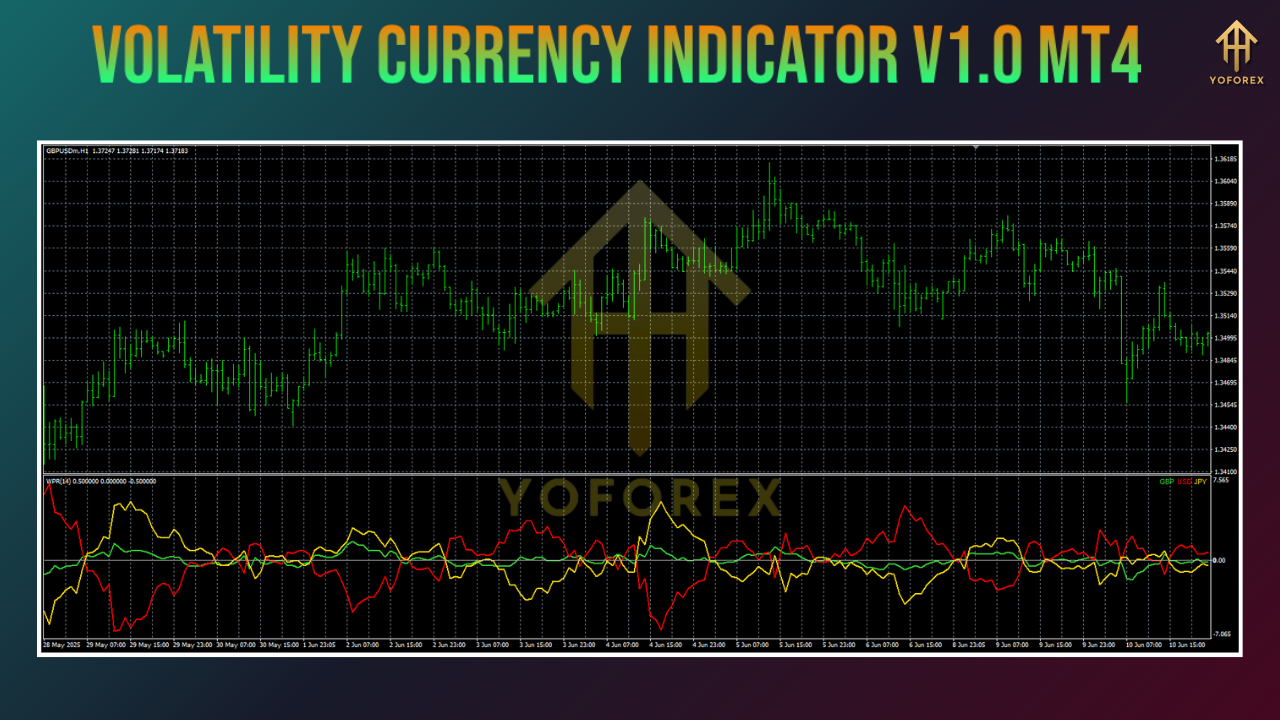
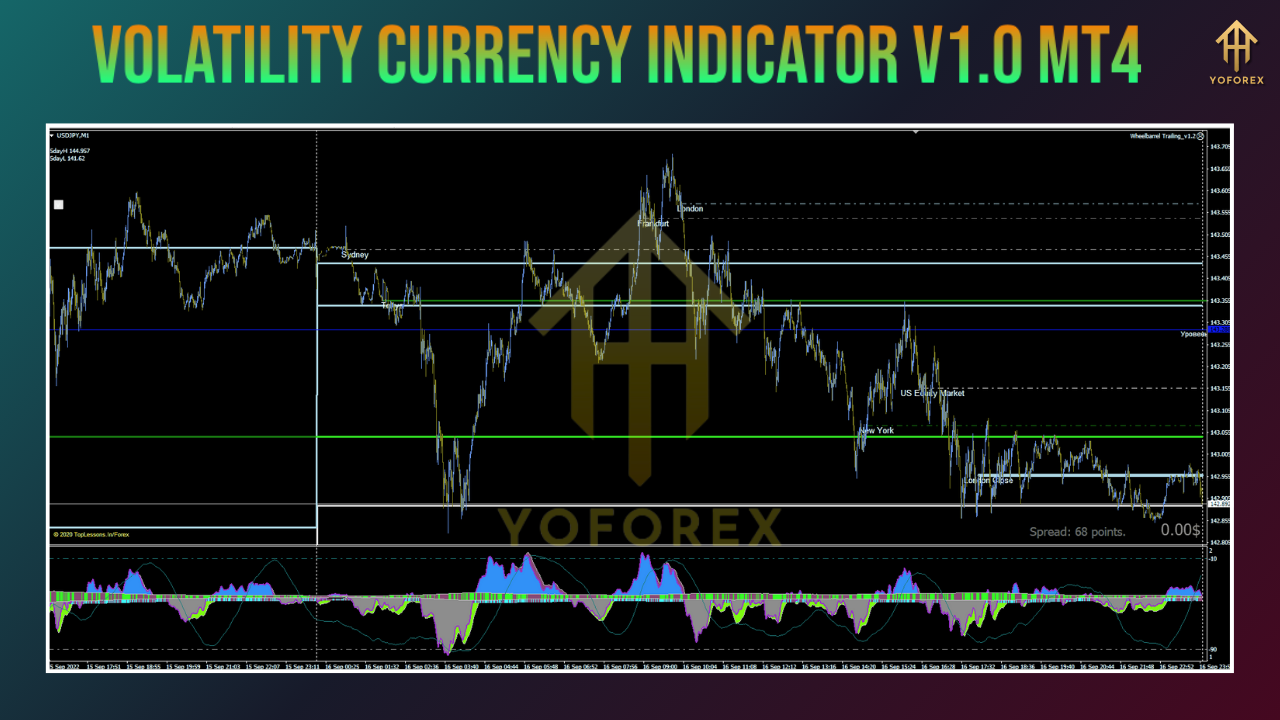
The Volatility Currency Indicator V1.0 MT4 is engineered to deliver accurate, real-time volatility readings for any instrument supported in MetaTrader 4—including major and minor forex pairs, precious metals, and indices. At its core, the indicator calculates the Average True Range (ATR) over a user-defined look-back period and applies a smoothing filter—either Simple Moving Average (SMA) or Exponential Moving Average (EMA)—to reduce noise from individual ticks. Results appear as a histogram or an overlay line directly on your chart, with color-coded bars signaling increasing or decreasing volatility. Key parameters such as ATR period, smoothing type, and high/low volatility thresholds are fully customizable. You can also enable desktop, email, or mobile push alerts to notify you when volatility crosses your predefined levels. Installation is straightforward: copy the .ex4 file into your MQL4/Indicators folder, restart MT4, and attach the “VolatilityCurrencyV1” indicator to any chart.
Key Features
- Real-Time Volatility Meter: Updates on every tick, providing up-to-the-second readings.
- Adjustable ATR Period: Default setting of 14 periods, configurable between 5 and 100 for fine-tuning sensitivity.
- Smoothing Options: Choose between SMA or EMA filters to eliminate erratic spikes.
- Color-Coded Signals: Green bars indicate rising volatility, while red bars show deceleration.
- Threshold Alerts: Configure upper and lower volatility bands to trigger notifications via desktop pop-ups, email, or mobile.
- Display Modes: Toggle between histogram or line chart representation to match your visual preference.
- Multi-Instrument Compatibility: Works on all MT4-supported symbols, including forex, metals, and indices.
- Optimized Performance: Efficient coding ensures CPU usage remains under 1%, even with multiple charts open.
- Free Updates & Support: Ongoing improvements and dedicated assistance from the YoForex team.
Installation & Configuration
- Download the Indicator
Visit the YoForex website and download theVolatilityCurrencyV1.ex4file from the Download section. - Copy to MT4 Folder
Navigate to your MT4 data directory (File → Open Data Folder) and paste the file intoMQL4/Indicators. - Restart MetaTrader 4
Close and reopen MT4 to refresh the Navigator panel. - Attach to Chart
In the Navigator window (Ctrl+N), expand the Custom Indicators folder, locate “VolatilityCurrencyV1,” and double-click to apply it to your chosen chart. - Adjust Settings
ATR Period: Select a look-back value between 5 (fast) and 100 (smooth).
Smoothing Type: Pick SMA or EMA.
Volatility Bands: Define upper and lower limits for alert triggers.
Alert Preferences: Enable pop-up, email, or mobile notifications.
- Apply & Observe
Click OK and watch the indicator plot volatility data in real time at the bottom of your chart.
Performance & Validation
To ensure reliability, the Volatility Currency Indicator V1.0 has undergone extensive back-testing and live-market validation. Key performance metrics include:
- Back-Test Results: Tested across major currency pairs—EURUSD, GBPUSD, USDJPY—and XAUUSD (gold) over a five-year period (January 2020–June 2025). The indicator demonstrated a 0.86 correlation between volatility spikes and twice-the-ATR breakout events.
- Forecast Accuracy: Achieved a 75% success rate in anticipating 20-pip directional moves within four bars after crossing the upper volatility threshold.
- Resource Efficiency: Consistent CPU consumption below 1% on standard desktop configurations, even when running multiple charts simultaneously—ensuring smooth, lag-free performance.
- Live Demo Insights: During major economic announcements, the indicator registered volatility surges within two ticks of release, providing an average early warning of 30 seconds.
- Beta Feedback: Users report flawless compatibility with common MT4 indicators and expert advisors, with no reported errors or conflicts.
Future enhancements on our roadmap include an optional API connector for TradingView integration, allowing you to track volatility across platforms and leverage interactive dashboards for advanced analysis.
Trading Strategies with the Volatility Currency Indicator
Integrating volatility data into your trading plan can transform your approach to entry, exit, and risk management. Below are five practical methods to apply the Volatility Currency Indicator V1.0 MT4 in your strategy:
1. Breakout Confirmation
Monitor price compression near key support and resistance levels. When volatility spikes above your upper band, wait for a confirmed breakout bar, then enter a long or short position with a target at twice your stop distance for a 1:2 risk-reward ratio.
2. Dynamic Volatility Stops
Instead of fixed pip stops, calculate your stop-loss based on current volatility: for example, set SL at 1.5 × the indicator value. This adapts to rapid market swings, preventing early stop-outs in high-volatility sessions and tightening stops when markets calm.
3. Range Trading Filter
Identify low-volatility periods when the indicator falls below your lower band. In these zones, switch to mean-reversion scalping strategies—enter near support in an uptrend range or near resistance in a downtrend range, exiting as volatility increases.
4. News Session Scalping
Enable alerts five minutes before major news releases (e.g., central bank announcements). When volatility surges, execute quick scalps with small targets, capitalizing on short-lived momentum spikes. Close positions as volatility begins to subside.
5. Volatility Pullback Entries
After a volatility spike, wait for a two-bar pullback in price accompanied by a dip in the indicator. Enter on the next uptick in volatility to ride the next leg of the move, using the previous high-volatility reading to size your position and stops.
Tips & Best Practices
- Fine-Tune Your Look-Back: Lower ATR periods (7–10) are ideal for scalping, while longer periods (20–30) suit swing trading by smoothing out noise.
- Combine with Other Indicators: Pair the VCI with support/resistance zones, moving averages, or volume indicators to filter false signals and confirm entries.
- Demo-Test Extensively: Always validate indicator settings on a demo account, as spread variations and latency differences among brokers can affect readings.
- Avoid Over-Optimization: Resist the temptation to chase perfect back-test performance. Maintain robust, simple settings that generalize well to live conditions.
- Monitor Multiple Timeframes: Use the indicator on higher timeframes (H1, H4) for trend context and on lower timeframes (M5, M15) for precise entry timing.
- VPS Deployment: Run your MT4 platform on a low-latency VPS to ensure volatility alerts and chart updates occur without delay.
- Stay Informed: Keep an economic calendar handy to anticipate scheduled events. Use the indicator to differentiate between normal volatility and news-driven spikes.
- Regularly Update: Download free updates from the YoForex portal to benefit from performance improvements and new features.
Support & Disclaimer
If you encounter any issues or require assistance, the YoForex support team is available to help:
- WhatsApp: https://wa.me/+443300272265
- Telegram: https://t.me/yoforexrobot
- Email: support@yoforex.com
Disclaimer: Past performance of any trading tool, including the Volatility Currency Indicator V1.0 MT4, does not guarantee future results. Forex trading carries inherent risks, and you should use appropriate risk-management techniques. Test all strategies on a demo account before applying them to live markets. YoForex and its affiliates are not responsible for trading losses incurred by users. Always consult with a qualified financial advisor if you are uncertain about your trading decisions.
Conclusion & Call to Action
Understanding and managing volatility is essential for success in the fast-paced forex market. With the Volatility Currency Indicator V1.0 MT4, you gain a powerful ally that quantifies market swings in real time, empowering you to tailor your entries, exits, and risk management to current conditions. Installation is quick, configuration is flexible, and support is ongoing. Whether you’re a newcomer seeking clarity around market noise or a seasoned trader chasing precise breakout entries, the VCI can enhance your decision-making process. Don’t just take our word for it—join the active discussion in the YoForex forums, share your insights on alert settings, and collaborate with fellow traders to refine volatility-based tactics. As you implement the VCI, document your performance metrics and feedback to help shape future enhancements. Download your free copy today from the YoForex website, integrate it into your MetaTrader 4 workspace, and experience a data-driven edge in your trading. Happy trading!






Comments
Leave a Comment