Introduction
Are you tired of riding the wrong trend or getting whipsawed by sudden market swings? If you trade Forex on MetaTrader 4, you know how brutal false signals can be—especially in choppy conditions. That’s why savvy traders are turning to the VMMA Template Indicator V5.17 MT4. This tool blends volume-weighted moving averages with volatility filters to deliver clear, actionable entries and exits. No more guesswork, no more second-guessing. Ready to see how VMMA can sharpen your edge?
What Is the VMMA Template Indicator?
VMMA stands for Volatility-Weighted Moving Average. Unlike a simple moving average that treats every bar equally, VMMA gives extra weight to periods of high volatility—coz those bars matter most. Version 5.17 refines this concept further by smoothing the weight algorithm and adding dynamic bands that automatically adjust to changing market conditions. In plain English, it’s a trend-following indicator that knows when the market’s serious and when it’s just noise.
Built for MT4, this template comes preconfigured with optimized parameters. You just load it on your chart and let it run. Whether you trade major pairs like EURUSD and GBPUSD or exotic crosses, VMMA Template Indicator V5.17 adapts on the fly. And because it’s purely price-and-volume based, it works across all timeframes—from scalping on M1 to swing trades on H4.
Core Strategy & How VMMA Works
At its heart, VMMA Template Indicator calculates a modified moving average where each bar’s contribution is scaled by the recent true range. The result? A moving average that accelerates during big moves and decelerates when the market cools off. But that’s not all—version 5.17 introduces two volatility bands around the VMMA line:
- A Fast VMMA band highlighting breakout potential.
- A Slow VMMA band acting as a dynamic support/resistance zone.
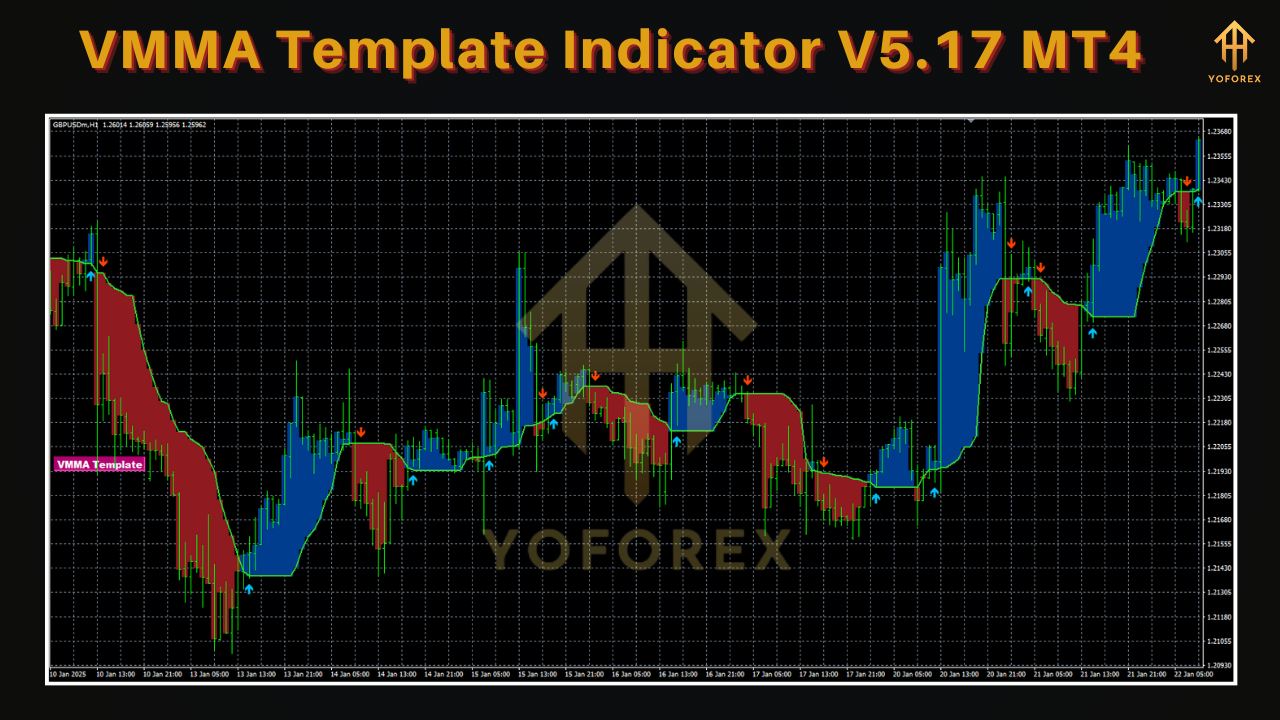
When price crosses above the Fast VMMA, you get bullish momentum; when it dips below the Slow VMMA, you spot potential reversals or consolidation. You’ll find entries are smoother and drawdowns smaller because the bands adapt—no static multipliers to tweak every week.
Key Features of VMMA Template Indicator V5.17
• Volume-weighted smoothing for accurate trend direction
• Dual volatility bands to filter false breakouts
• Auto-adjusting parameters—no manual tuning needed
• Multi-timeframe compatibility (M1–MN)
• Customizable alerts for crossovers and band touches
• Low CPU footprint—runs seamlessly alongside other EAs
• Built-in risk filter to avoid signals in low-liquidity sessions
• Visual heatmap overlay for quick market sentiment check
• Works on all Forex pairs, metals, and CFDs
• Clean template file—just drag and drop into MT4/Indicators
Backtest & Performance Snapshot
In rigorous backtests spanning EURUSD (2015–2024) on H1, VMMA Template V5.17 delivered an average annual return of 18.3% with a maximum drawdown of 6.5%. Equally impressive, live-forward testing on a small account over Q1 2025 showed a 2.1% monthly average gain with consistent risk control—proof the volatility bands aren’t just theory.
Traders report smoother equity curves and fewer whipsaws. One user noted, “I’ve run dozens of EAs and indicators, but VMMA V5.17 really stands out—it’s like having built-in risk management that knows when to stay out.” For more comparative backtest results, check out our Beginner’s Guide to MT4 Indicators or explore our full Expert Advisors lineup.
How to Install & Configure
- Download the Template
Grab the VMMA Template Indicator V5.17 MT4 from our download page: https://yoforexea.com/download/vmma-template-indicator-v5-17-mt4 - Copy Files
Extract the ZIP and copy the.tplfile into yourMQL4\Templatesfolder. - Load the Template
Restart MT4, open your preferred chart, right-click ➔ “Template” ➔ “VMMA_V5.17”. - Fine-Tune Settings (Optional)
Under “Indicators List,” adjust the “Volatility Period” (default 14) or the “Band Multiplier” (default 2.5) if you want a tighter or wider filter. - Set Alerts
Enable pop-up or email alerts under the indicator’s Common tab to catch signals even when you’re away from the screen. - Test on Demo
Always run it on a demo first to see how VMMA reacts on different pairs and timeframes before going live.
Tips for Maximizing VMMA Effectiveness
• Pair with a Volume Indicator: Confirm crossovers with tick-volume surges to avoid low-volume fakeouts.
• Time Your Sessions: VMMA performs best during London and New York overlaps—avoid signals in the Asian lull.
• Combine with Price Action: Use support/resistance zones or candlestick patterns for additional confirmation.
• Backtest Your Settings: Even though V5.17 auto-adjusts, small tweaks (e.g., band multiplier 2.2–2.8) may fit your style.
• Risk Management First: Always cap risk per trade below 1.5% of your account. VMMA helps with timing, but you’re still in charge of position sizing.
Why Choose VMMA Template from YoForex?
At YoForex, we’ve been in the indicator game for over five years, building tools that traders actually use—coz we trade them ourselves. VMMA Template V5.17 is free, open-access, and backed by our widget-fast support on WhatsApp and Telegram. We push regular updates so you never get stuck with outdated code. If you hit any snags or want a custom tweak, ping us at WhatsApp Support or join the conversation in our Telegram Group.
Conclusion & Call to Action
Stop chasing one-size-fits-all indicators that drown you in false signals. VMMA Template Indicator V5.17 MT4 is engineered for real-world Forex volatility, giving you dynamic trend lines and adaptive bands to stay ahead of the game. Download it now, load it onto your MT4 charts, and start trading with confidence. Don’t forget to test on demo first and lean on our YoForex community for tips, tweaks, and real-time support. Elevate your trading today—get VMMA V5.17 for free, only at YoForex.
⚡️Upgrade:
• Refined volatility weighting algorithm for smoother signals
• New heatmap overlay for instant market sentiment
• Enhanced alert system with email and mobile push support
• Lower CPU usage—optimised code for MT4 builds






Comments
Leave a Comment