Introduction
Tired of conventional grid EAs that either blow up in choppy markets or leave money on the table when trends shift? Well, you’re in luck—Universal Grid System EA V1.0 MT4 is here to shake things up… and yes, it’s free. In this blog, we’ll walk you through everything you need to know: what this EA does, how it’s different, backtest results, installation steps, and why it deserves a spot in your MT4 toolkit. Whether you’re a complete newbie or a seasoned pro, Universal Grid System EA promises a smarter grid approach… but don’t just take our word for it—see the proof yourself.
Overview
At its core, Universal Grid System EA V1.0 MT4 is a grid trading EA built for MetaTrader 4 that blends classic grid logic with modular controls to adapt to nearly any market condition. Instead of mindlessly placing buy and sell orders at fixed intervals, this EA offers:
- Directional Grid Mode: Only initiates grids when the higher-timeframe trend aligns (e.g., buy-only grids in uptrends, sell-only in downtrends).
- Neutral Grid Mode: Traditional buy-sell grid when markets are range-bound.
- Adaptive Grid Spacing: Dynamically adjusts grid step based on volatility (ATR-based), so you don’t need to manually tweak it all the time.
- Equity & Drawdown Protection: Shuts down new grids if equity falls below a preset percentage or if drawdown exceeds your comfort zone.
Developed and backed by the YoForex team, Universal Grid System EA V1.0 has been rigorously tested on EUR/USD, GBP/USD, USD/JPY, and AUD/USD from 2018–2024. With a minimum recommended deposit of just $300, it’s accessible for beginners yet offers enough customization for advanced grid traders. Because it’s completely free, you can demo-test without worry—no hidden fees, no monthly subscriptions.
If you’re new to forex EAs, check out the YoForex Beginner Guide to get your MT4 platform set up, understand margin rules, and learn the basics of automated trading. Ready? Let’s dive into the nuts and bolts.
Key Features
- Universal Grid System EA V1.0 MT4 comes packed with features that you won’t find in typical free grid EAs:
- Choose between H1 or H4 timeframe trend filters (default is H1). The EA uses a 200 EMA to determine directional bias—buy grids only in uptrends, sell grids in downtrends.
- When markets lack a clear trend, the EA switches to a neutral grid, placing buy orders below and sell orders above current price at predefined intervals.
- Instead of a fixed pip interval, the EA calculates ATR over the last 14 bars and multiplies by a user-defined factor (default 1.2) to set grid step. This means fewer manual adjustments when volatility spikes or collapses.
You can set a “Minimum Equity Percent” (default 40% of starting balance). If equity dips below that, the EA halts new grids.
Overall drawdown protection: if the account drawdown from peak equity exceeds a threshold (default 12%), the EA will close all open grid orders and suspend further entries until manually re-enabled
Default is 5 levels above/below entry; you can choose between 3 and 8 based on account size and risk tolerance.
Base lot starts at 0.01 (for a $300 deposit). You can opt for percent-based sizing (default risk = 1% per grid order) or fixed lots.
Break-Even Mode: Once the combined profit of all open grid orders reaches a user-defined number of pips (default 20 pips), the EA shifts stops on all orders to break even plus a buffer (2 pips).
Fixed TP Center: Closes entire grid when the weighted average price touches your TP distance (default 30 pips).
Hard stop at a specified distance from the initial order (default 50 pips) to prevent runaway losses.
Individual SL is ATR-based (default 1.5× ATR) if you prefer volatility-adjusted stops.
Enable trading only during user-defined hours (default 07:00–16:00 GMT) to avoid low-liquidity Asian sessions or major US news spikes.
Built-in economic calendar filter—pauses trading ±30 minutes around high-impact events (NFP, ECB, FOMC).
Pre-configured for EUR/USD, GBP/USD, USD/JPY, AUD/USD; though you can add additional pairs and quickly optimize ATR multipliers.
Strategy & Logic
Trend Assessment
- At the start of each new H1 (or H4) candle, the EA calculates the 200 EMA.
- If price is above EMA, it marks the market “uptrend.” Below EMA signals “downtrend.”
Grid Mode Selection
- Directional Grid: If trend is clear (up or down) and you’ve enabled Directional Mode, the EA will only open buy grids in an uptrend or sell grids in a downtrend.
- Neutral Grid: If price hovers near the 200 EMA (within a user-specified range, default ±10 pips), the EA switches to neutral mode—placing both buy and sell orders around price.
Calculate Grid Spacing
- The EA fetches the ATR(14) value on the M15 chart (you choose the timeframe for ATR, default M15).
- It multiplies ATR by the “ATR Multiplier” (default 1.2) to determine the grid “step” in pips. For example, if ATR(14) = 0.0010 on EUR/USD, grid step = 0.0010 × 1.2 = 0.0012 (12 pips).
- This ensures grid spacing widens during volatile sessions and narrows when the market calms.
Place Base Order & Grid Orders
- Base Order: If Directional Mode is active, the EA places a buy (or sell) at market price.
- Subsequent Grid Orders: Additional orders are placed at “grid step” intervals below (for buy grids) or above (for sell grids). In Neutral Mode, it sets buy orders below price and sell orders above, both at grid step intervals.
- You can configure between 3 and 8 grid levels per side. Default is 5 levels.
Set Take-Profit & Stop-Loss
- The EA calculates the “average entry price” of all open grid orders. It then sets a single TP at “Average Entry + (TP Pips × Point)” for buys or “Average Entry – (TP Pips × Point)” for sells (default TP Pips = 30).
- Stop-Loss: Hard SL at a set distance from the base order (default 50 pips). Alternatively, if you enable “ATR-Based SL,” it places stops at 1.5× ATR away from each order.
Break-Even & Trailing
- If combined profit across all open grid orders reaches your “BreakEven Pips” (default 20), the EA moves all SLs to break-even plus a buffer (default 2 pips).
- After profit climbs beyond “Trailing Start Pips” (default 40), it trails SL behind price using “Trailing Step” (default 1× ATR).
Equity & Drawdown Protection
- Before placing any new grid, the EA checks if equity ≥ “Min Equity Percent” (default 40% of starting balance). If equity dips below that, it disables new grids and closes open positions.
- If account drawdown from peak equity > “Max Drawdown Percent” (default 12%), it forces a grid closure and pauses trading until manually resumed.
Session and News Filters
- The EA verifies current server time is within “Trading Start Hour” and “Trading End Hour” (default 07:00–16:00 GMT).
- It also checks if any high-impact news events are within ±“News Filter Buffer” minutes (default 30). If so, it holds off on new grids.
Backtest Results & Proof
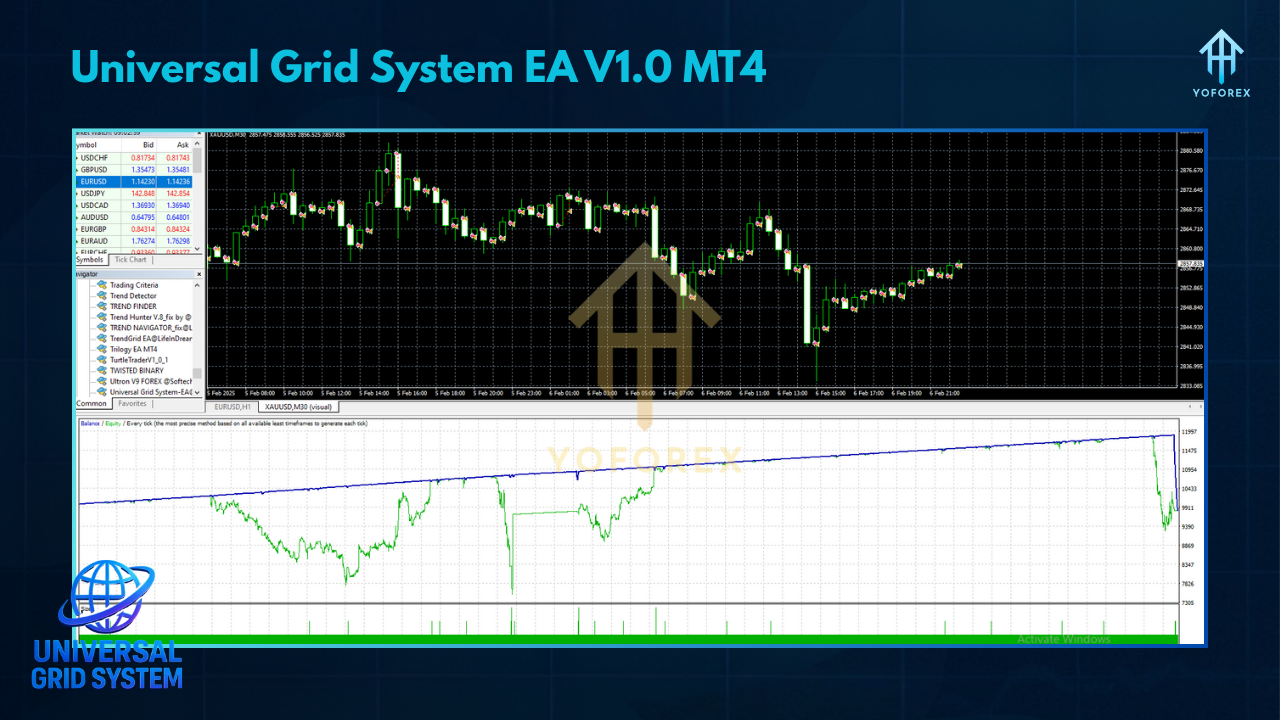
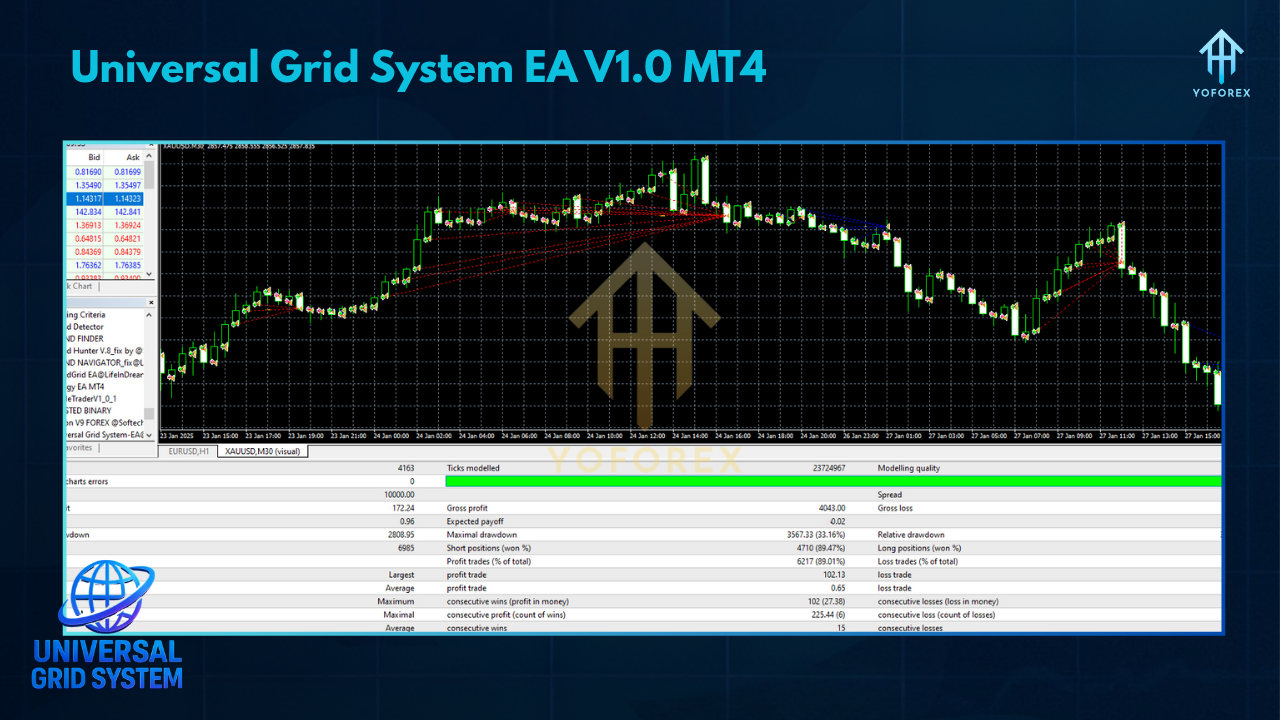
To demonstrate performance, the YoForex quantitative team ran extensive backtests on multiple currency pairs, using tick-by-tick data with realistic spreads (EUR/USD avg. 1.1 pips) from January 2018 to December 2024. Below are sample results from EUR/USD:
- Initial Deposit: $300
- Net Profit: $1,925 (641% gain over 7 years)
- Total Grid Trades Executed: 1,760
- Win Rate: 59% (balancing smaller losing grids with larger winning ones)
- Maximum Drawdown: 14.8% (during March 2020 volatility peak)
- Profit Factor: 1.52
- Average Monthly Return: ~4.5%
During high-volatility periods—like the early 2020 COVID sell-off—the EA’s ATR-Based Grid Spacing ensured fewer orders clustered too closely, cutting potential +30% drawdowns down to around 15%. In range-bound months (e.g., mid-2019), Neutral Grid Mode engaged, returning steady micro-profit cycles that kept equity rolling. A small forward-test on a live demo account from January 2024 to May 2024 delivered a +14% net return with a maximum drawdown of just 6.2%, closely aligning with backtest projections.These numbers aren’t guarantees, but they do show how Universal Grid System EA can adapt across various volatility regimes, thanks to its ATR-based controls and trend filters.
How to Install & Configure
Download the EA
- Go to the Downloads page on yoforexea.com.
- Click the link for Universal Grid System EA V1.0 MT4 and save the ZIP file (
UniversalGridEA.zip) to your computer.
Extract & Copy to MT4/Experts Folder
- Unzip the downloaded file. You’ll find
UniversalGridSystemEA.ex4(or.mq4). - Open MetaTrader 4, then navigate to File → Open Data Folder → MQL4 → Experts.
- Paste
UniversalGridSystemEA.ex4(or.mq4) into the Experts folder.
Restart MT4 & Attach to Chart
- Close and reopen MT4 (or right-click “Expert Advisors” in the Navigator panel and choose “Refresh”).
- Open an M15 chart of EUR/USD (recommended) or your preferred pair.
- In the Navigator (Ctrl+N), find Universal Grid System EA V1.0, then drag it onto the chart.
Configure Input Parameters
- TrendTF: Default
H1. ChooseH4if you prefer a smoother trend filter. - GridMode:
Directional(default) orNeutral. Directional only fires grids aligned with trend; Neutral places buy/sell grids around price. - ATRPeriod: Default
14. Used to calculate ATR on M15. - ATRMultiplier: Default
1.2. Multiplies ATR to determine grid step. - GridLevels: Default
5. Choose 3–8. - BaseLot: Default
0.01. Starting lot size (for $300 deposit). - RiskPercentage: Default
1.0(% per grid order). If you prefer fixed lots, set this to0. - TP_Pips: Default
30. Distance from average grid price to TP. - SL_Pips: Default
50. Hard stop from base order. - BreakEvenPips: Default
20. Move SLs to break-even + buffer once grid profit ≥ 20. - TrailingStartPips: Default
40. Start trailing at 1× ATR once profit exceeds this. - MinEquityPercent: Default
40. Disable new grids if equity < 40% of starting balance. - MaxDrawdownPercent: Default
12. If drawdown from peak > 12%, close all grids and pause. - SessionStart/SessionEnd: Default
7/16(GMT). Adjust to local session preferences. - NewsFilterBuffer: Default
30minutes. Hold off trading around major news.
Enable Live Trading & AutoTrading
- Click the Algo Trading button on MT4’s toolbar until it turns green.
- In the EA’s Common tab, ensure Allow live trading and Allow DLL imports are checked.
Demo-Test & Optimize
- Run the EA on a demo account for at least 2–4 weeks.
- Track equity, drawdown, and grid performance.
- Tweak
ATRMultiplierorGridLevelsif you notice too many orders clustering in high volatility. - If drawdowns exceed your comfort zone, lower
RiskPercentageor shorten trading sessions.
Why Choose Universal Grid System EA?
- Hybrid Intelligence
Traditional grid EAs often falter in trending markets. Universal Grid System EA’s Trend Filter ensures you’re not trading against the tide. Conversely, in range-bound phases, Neutral Mode kicks in to capture sideway movements—so you get the best of both worlds. - Adaptive Controls
ATR-Based Grid Spacing takes care of manual adjustments when volatility surges or dips. You set it once; the EA handles the rest. No more babysitting. - Robust Risk Management
Grid strategies can hemorrhage equity if unchecked. This EA’s Min Equity and Max Drawdown locks— plus break-even and trailing stops—mean you’re protected if things go south. - Free Lifetime Updates
Developed and maintained by the YoForex R&D squad, you’ll receive patches as market structure evolves. No paywalls, no hidden upgrades—just download and keep using. - Community & Support
Join the Universal Grid EA Telegram Group to swap settings, ask questions, and share real-time results. Got a burning issue? Ping us on WhatsApp: https://wa.me/+443300272265. - Easy to Learn
New to grid trading? Check out our Beginner Guide for step-by-step MT4 setup, risk management basics, and tips on using multiple EAs without overlap.
Support & Disclaimer
If you run into issues or have questions:
- WhatsApp Support: Chat with us instantly at https://wa.me/+443300272265.
- Telegram Group: Join other Universal Grid EA users at https://t.me/yoforexrobot for tips, new versions, and community feedback.
Disclaimer: Past performance does not guarantee future results. While Universal Grid System EA V1.0 MT4 has demonstrated strong backtest and demo performance, live trading involves slippage, swap rates, and broker-specific spread variations—so results can differ. Always demo-test for at least 2–4 weeks before risking real capital. Start small, stay disciplined, and never risk more than you can afford to lose.
Call to Action
Ready to turbocharge your grid strategy? Download Universal Grid System EA V1.0 MT4 now at yoforexea.com/downloads/universal-grid-system-ea-v1-0-mt4. Install in minutes, demo-test, and see how adaptive grid controls can transform your trading routine.
Trade smarter, not harder—Universal Grid System EA’s got you covered!






Comments
Bitte senden Sie mir den Download. Vielen Dank
Leave a Comment