Trigger Zone EA V1.0 MT5 — Daily High/Low Breakouts With Real Risk Controls
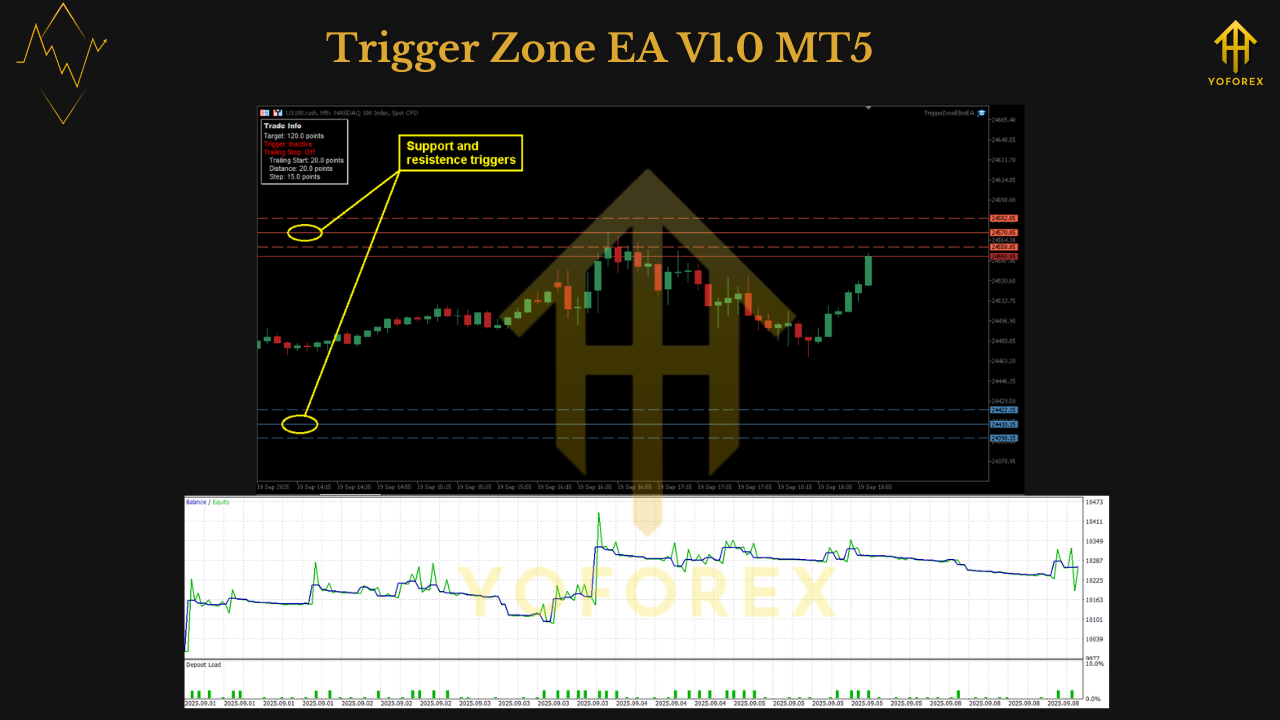
If you love clean, rules-based trading on indices and you’re tired of chasing noisy signals, Trigger Zone EA V1.0 (MT5) gives you a crisp blueprint: breakout entries of the daily high/low, smart trend filters, and adaptive trailing stops—wrapped in guardrails like daily profit/loss protection and session control. It runs on any instrument, but it’s especially at home on US100 (Nasdaq) and US30 (Dow). For other markets, you can absolutely use it—just expect to optimize a few parameters to the asset’s behavior.
Below you’ll find what it does, how to set it up right, and a practical playbook for indices.
What Makes Trigger Zone EA Different
- Daily High/Low Breakout Engine
The EA watches the current day’s high and low and triggers when price clearly breaks those levels. No vague “close your eyes and click”—we’re talking objective structure everyone sees. - Smart Trend Filters
Not every break is a real move; some are fake taps. The EA’s trend filters (e.g., slope/position relative to a baseline, or volatility gating) help avoid low-quality pokes and focus on genuine expansions. - Adaptive Trailing Stop
Once you’re in profit, the stop adapts—loosening when volatility expands and tightening as momentum fades. It’s designed to keep you in the meat of the move without suffocating winners. - Daily Profit & Loss Protection
Define a daily max loss and daily profit cap. When reached, the EA will stop trading for the session. This is a big one for prop rules and personal discipline. - Trading Session Control
Configure start/stop times (e.g., focus on the cash open and overlap windows) and auto-close at end of day to avoid overnight gaps on indices. - Modular & Transparent
Every decision is logged: entries, exits, trail shifts, filter passes/fails. If it didn’t trade, you’ll know why—no black-box mystery.
Best-Fit Markets & Timeframes
- Recommended: US100 and US30 on M5–M30 (many traders like M15/M30 for a cleaner read).
- Also works on: US500, GER40, UK100, and liquid FX majors.
- Other markets: Totally fine—optimize your break buffer, filter sensitivity, and trailing logic.
How It Trades (Plain English)
- Mark the Zones
The EA tracks today’s high and low (optionally including a buffer so you only act on real breaks). - Filter the Noise
It checks trend/volatility conditions. A weak or choppy context may cancel the trade idea to prevent whipsaw. - Trigger the Entry
On a valid break, the EA enters with a hard stop (structure- or ATR-informed). No averaging down, no martingale. - Manage the Winner
The Adaptive Trailing Stop follows price with context. You can also set a breakeven step after a cushion (e.g., +1R) to reduce giveback risk. - Shut Down on Rules
If daily profit target or max daily loss hits, the EA halts new trades. At session end, open trades can be auto-closed per your preference.
Quick Start (MT5)
- Install
MT5 → File → Open Data Folder →MQL5/Experts→ paste EA → restart MT5. - Chart
Open US100 or US30 on M15 (or your preferred TF). - Attach
Navigator → Experts → drag Trigger Zone EA V1.0 to the chart → tick Allow Algo Trading; ensure toolbar Algo Trading is green. - Inputs to Review
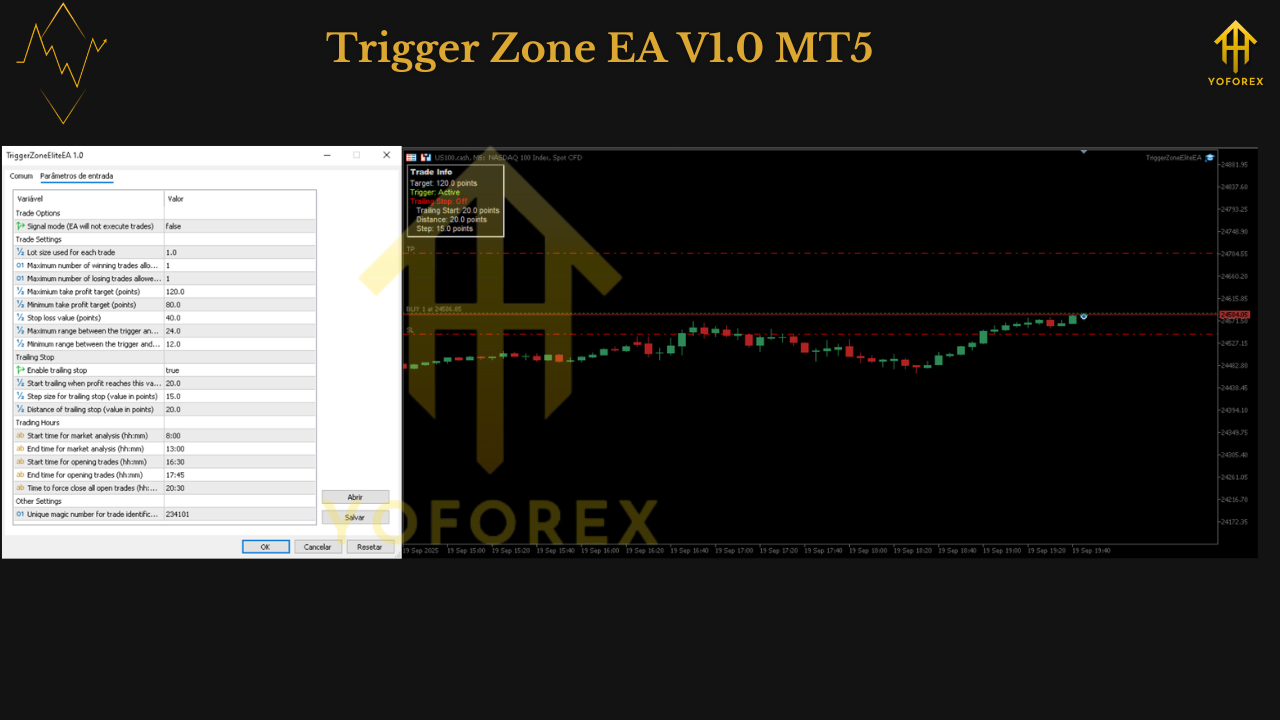
- Break Buffer (points/pips): Small buffer beyond daily high/low to validate real breaks.
- Trend Filter: Strength/slope thresholds; keep modest at first.
- Stop-Loss Mode: ATR or structural (recent swing).
- Adaptive Trailing: On; start with balanced parameters (not too tight).
- Daily Profit/Loss: e.g., +2R cap, –2R stop for the day.
- Session Times: e.g., run 30 min before cash open to 1–2 hours after; auto-close at session end if you don’t want overnight risk.
- Logs
Watch Experts/Journal for confirmations and rule rejections (super helpful while dialing it in).
Recommended Baseline (Indices)
- Timeframe: M15 (blend of frequency and quality)
- Risk per Trade: 0.5% (0.25% if you’re conservative)
- Break Buffer: Small but real (e.g., 0.1–0.25% of price for indices; tune to your broker’s contract)
- Stop-Loss: ATR × 1.5–2.0 or the last swing beyond the break level
- Breakeven: After +1.0R (optional)
- Trailing: Start balanced; allow room during strong pushes, tighten late in trend
- Daily Loss Cap: –2R; Daily Profit Cap: +2R to +3R
- Session: Focus on cash open and NY morning for US indices; auto-close before end of day
Optimization Notes (For Other Markets)
If you’re taking Trigger Zone beyond US indices:
- Break Buffer: Volatile instruments (Gold, crypto) may need a larger buffer to avoid micro-spikes.
- Trend Filter: Increase thresholds when a symbol is prone to fake breaks (e.g., news-spiky pairs).
- Trailing Profile: Fast-moving assets may benefit from a step trail (tighten after an initial surge).
- Session Windows: Align to the product’s most liquid hours; shut down during thin periods.
Keep a change log; adjust one variable at a time and evaluate over 30–50 trades.
Backtesting & Validation
- Tick/Real-Spread Data: Especially important for indices around the open.
- Regimes: Test earnings weeks, macro events, summer lulls—see how the logic behaves.
- Walk-Forward: If you optimize, validate out-of-sample to avoid curve fit.
- Metrics to Track:
- Max drawdown (daily & overall)
- Profit factor and average R/trade
- Win rate vs. average winner/loser size
- Performance by session window (is your “on” window doing the heavy lifting?)
- Slippage around the open (broker-dependent)
Risk, Discipline, and Prop Rules
- Define Daily Limits and let the EA enforce them. That’s the edge—stopping on rules beats emotional tinkering.
- No Martingale/Grid. Keep exposure transparent.
- Correlation: If you run US100 & US30 together, cap total concurrent risk (e.g., ≤ 1–1.5% combined).
- News: Know the calendar. Consider pausing in the minutes around CPI, FOMC, NFP.
FAQ
Does it only work on indices?
No—it works on all instruments. Indices are recommended because daily highs/lows + session windows line up beautifully with their microstructure. For other markets, optimize buffers/filters/trailing.
Timeframe recommendations?
M15/M30 are popular for indices. You can try M5 for more signals—just mind spread/slippage at the open.
Can I hold overnight?
You can, but the EA supports auto-closure at end of day. Many index traders prefer to avoid overnight gaps.
Prop-firm friendly?
Yes—daily profit/loss protection and session control help you respect firm rules. Always confirm EAs and instrument permissions.
Do I need a VPS?
Recommended. The opening minutes on indices are busy; low latency helps execution quality.
Final Word
Trigger Zone EA V1.0 MT5 is a disciplined breakout system with the controls real traders actually need: trend filters, adaptive trailing, daily kill-switches, and session cutoffs. On US100/US30, it delivers a clean, repeatable routine: mark the day’s extremes, wait for a real break, ride the expansion, shut down on rules. If you’ve been craving structure without fluff, this will feel like home.
Risk disclaimer: Trading involves risk. Past performance does not guarantee future results. Backtest thoroughly, forward-test on demo, and scale live only with capital you can afford to risk.
Join our Telegram for the latest updates and support






Comments
Leave a Comment