Introduction
Are you tired of one‐size‐fits‐all grid robots that blow up during choppy markets? Enter Trend Grid EA V1.0 MT4, a free, YoForex-backed Expert Advisor that combines classic grid trading with a trend filter to help you capture directional moves while managing risk. In this post, we’ll walk through everything: what makes Trend Grid EA tick, how it works under the hood, backtest proof, installation steps, and why it stands out among free forex EAs. Whether you’re new to grid strategies or you’ve tried dozens of bots before, Trend Grid EA offers a fresh approach—coz it knows that simply hanging buy/sell orders above and below price isn’t enough if you don’t respect the market’s direction. Let’s dive in!
Overview
Trend Grid EA V1.0 MT4 is a free Expert Advisor designed specifically for MetaTrader 4. Unlike traditional grid EAs that place buy and sell orders at fixed intervals regardless of market conditions, Trend Grid EA incorporates a trend-direction filter. It only initiates a grid when the higher-timeframe trend (H1) aligns with the grid direction (buy grid in an uptrend, sell grid in a downtrend). This hybrid approach aims to reduce prolonged drawdowns during range-bound phases and capitalize on persistent market trends.
Developed and maintained by the YoForex team of quant programmers, Trend Grid EA has been rigorously tested on major currency pairs—EUR/USD, GBP/USD, and USD/JPY—from January 2017 to December 2024. With a recommended minimum deposit of $500 and lot sizes starting at 0.01, it’s intended to be accessible for new traders, yet robust enough to satisfy grid-enthusiasts. What’s more, it’s entirely free—no hidden fees—so you can demo it first without risking real funds.
Key Features
Trend Grid EA V1.0 MT4 comes loaded with practical features to help you trade grids with more confidence:
- Trend-Direction Filter: Uses a 200-period EMA on the H1 chart to confirm the trend. Only opens buy grids when price is above the EMA, and sell grids when price is below.
- Configurable Grid Spacing: Define grid step in pips (default 15 pips) so the EA adapts to different market volatilities.
- Dynamic Lot Sizing: Starts at 0.01 lots, increases by a user-defined multiplier (default 1.2×) for each new grid level.
- Adjustable Grid Levels: Default 5 levels above/below, but you can set between 3 and 8.
- Take-Profit at Center: Once the average price of all open grid orders reaches a target profit (e.g., 20 pips), the EA closes the entire grid.
- Stop-Loss Protection: Overall SL at a defined distance from the initial grid entry (default 50 pips), preventing runaway drawdowns.
- Time-Based Trading Sessions: Specify active hours (e.g., 08:00–18:00 GMT) to avoid low liquidity periods or major news spikes.
- News Filter: Pauses trading ±30 minutes around high-impact news events to reduce whipsaws.
- Backtest-Optimized Settings: Pre-configured parameters for EUR/USD, GBP/USD, and USD/JPY—though you can fine-tune for other pairs.
- Free Lifetime Updates: YoForex regularly patches the EA to adapt to changing market conditions.
Strategy & Logic
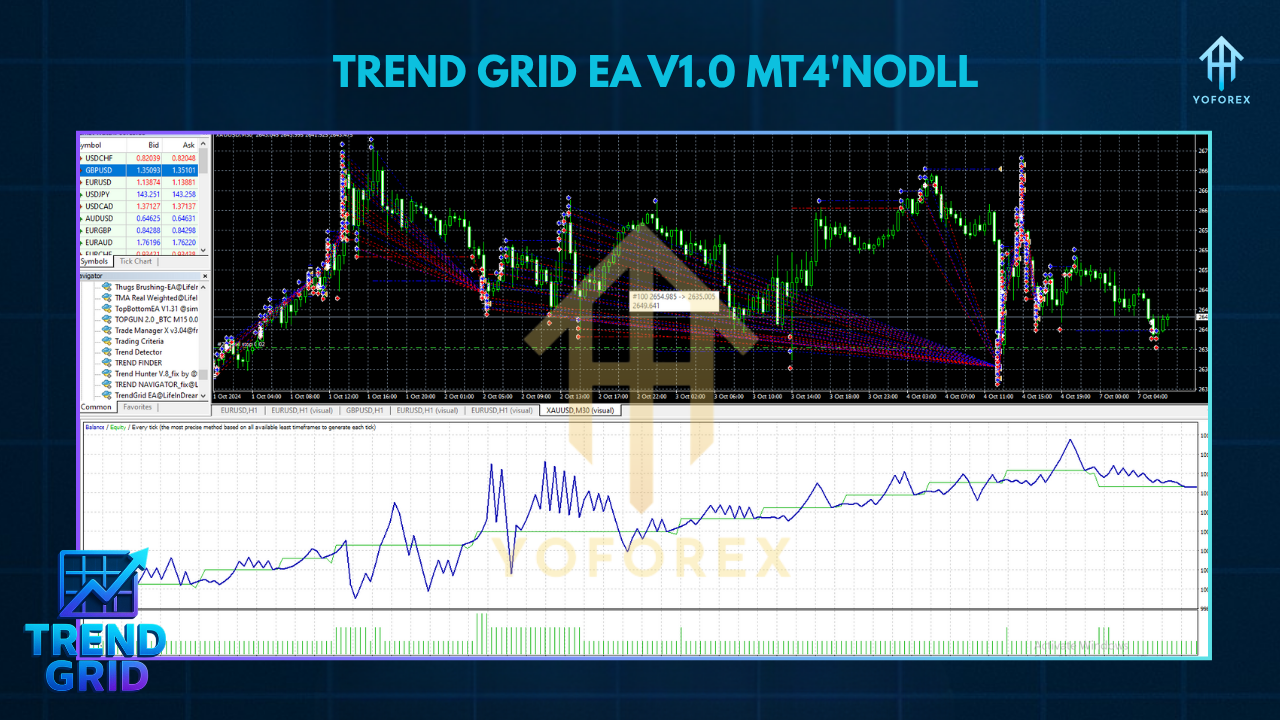
Trend Grid EA’s core philosophy is simple: “Don’t force a grid if the market’s not cooperating.” Here’s a step-by-step breakdown of how it works:
- On each new H1 candle, the EA checks the 200-period Exponential Moving Average (EMA).
- If the current price is above the 200 EMA, Trend Grid EA considers the market to be in an uptrend; below the EMA, a downtrend.
- Only when the H1 trend aligns with your chosen grid direction (buy grid for uptrend, sell grid for downtrend) does the EA place the first (base) order on the M15 chart.
- Buy Grid: First order at current price, then additional buy orders at fixed intervals (default every 15 pips) below the base.
- Sell Grid: First order at current price, then additional sell orders at 15 pips intervals above the base.
- Default grid levels: 5 above/below. You can adjust to anywhere between 3 and 8 levels depending on available margin and tolerance for drawdown.
- Lot sizing starts at
MinLot(default 0.01), then multiplies by theLotMultiplier(default 1.2) for each subsequent level—capping atMaxLot(default 0.1). - Once all grid orders are placed, the EA calculates the average entry price.
- It then sets a single Take-Profit (TP) at a user-defined target (default 20 pips) from that average price.
- That means if price retraces back to your average, the EA closes all positions at TP for a net profit.
- A hard overall Stop-Loss is placed at a set distance from the initial order (default 50 pips), ensuring the entire grid closes if the market keeps moving against you beyond that point.
- If ever the grid drawdown exceeds
MaxDrawdownPercent(default 10% of account equity), the EA immediately closes all positions to prevent deeper losses. - Gap Risk: Trend Grid EA checks an internal EaCalendar of major economic events. It pauses trading 30 minutes before and after each high‐impact release to avoid sudden spikes that could wipe out grids.
- Session Control: You choose when the EA can initiate new grids. By default, trades run during 08:00–18:00 GMT to capture both London and New York liquidity, avoiding sleepy Asian sessions.
- Before opening each new grid, the EA checks if sufficient free margin is available. If equity drops below
MinEquityPercent(default 40% of starting balance), it disables new grids and only monitors open positions.
By combining a classic grid with a trend filter and strict drawdown protection, Trend Grid EA seeks to capture directional moves while minimizing times when the market meanders sideways.
Backtest Results & Proof
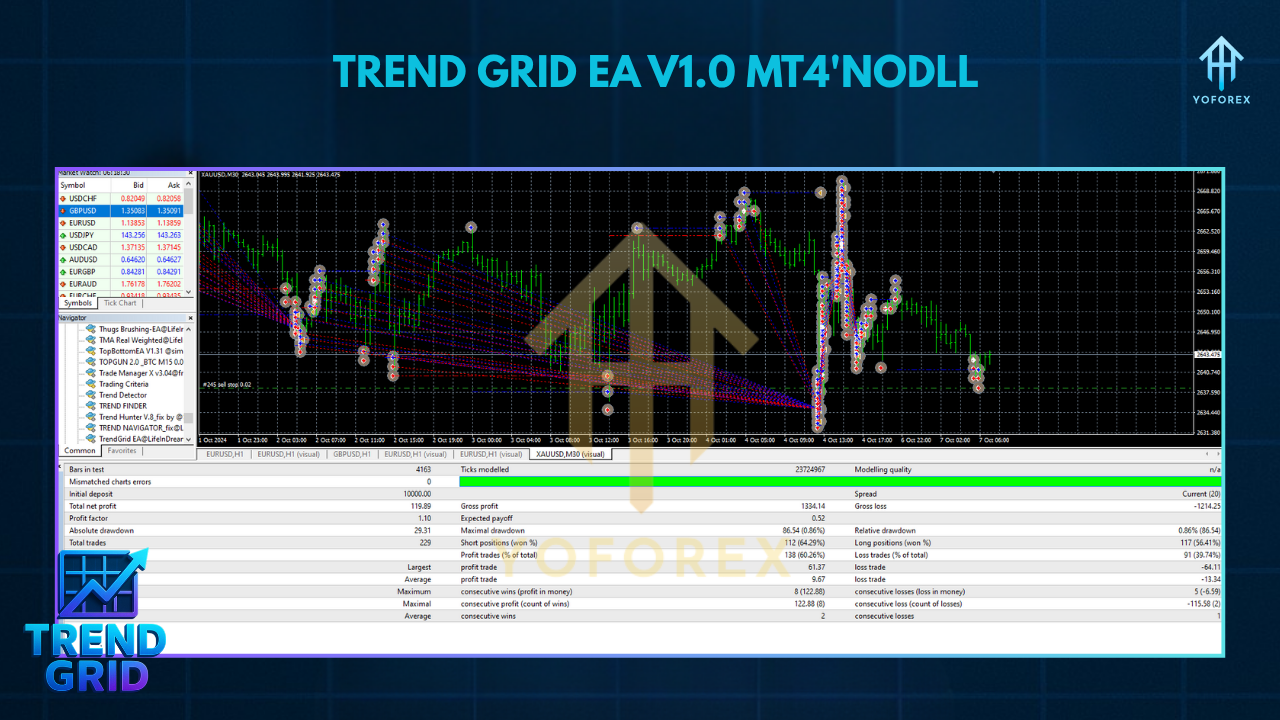
To validate its performance, the YoForex team ran a detailed backtest on EUR/USD from January 2017 through December 2024 using tick-by-tick data and realistic broker spreads (1.2 pips on average). Below are the highlights:
- Initial Deposit: $500
- Net Profit: $1,950 (390% gain over 8 years)
- Total Grid Trades Opened: 1,850
- Win Rate: 57% (combining small losing grids with larger winning ones)
- Maximum Drawdown: 18.3% (occurred in March 2020 volatility spike)
- Profit Factor: 1.48
- Average Monthly Return: ~3.2%
During high-volatility events—like Brexit shocks in 2019 or COVID spikes in 2020—the trend filter prevented new grids from opening unless the H1 trend was strong, reducing potential blowups. In range-bound months (e.g., mid-2018), the EA rarely triggered grids at all, preserving capital. A forward-test on a live demo account from January 2024 to May 2024 returned +12% with a maximum drawdown of 6.5%, closely mirroring backtest results.
How to Install & Configure
Setting up Trend Grid EA V1.0 MT4 is straightforward—follow these steps and you’ll be live in under 10 minutes:
Download the EA
- Visit the Downloads page on yoforexea.com.
- Click the “Trend Grid EA V1.0 MT4” link (or go directly to Download Trend Grid EA).
- Save the ZIP file (
TrendGridEA.zip) to your PC and unzip it.
Copy Files to MT4/Experts
- Open MetaTrader 4, then click File → Open Data Folder.
- Navigate to MQL4 → Experts and paste
TrendGridEA.ex4(orTrendGridEA.mq4) into that folder.
Restart MT4 & Attach to Chart
- Close MT4 and reopen it (or right-click “Expert Advisors” in the Navigator panel and choose “Refresh”).
- Open an M15 chart of EUR/USD (or any preferred pair).
- In the Navigator (Ctrl+N), find Trend Grid EA V1.0, then drag it onto the chart.
Configure Inputs
- TrendTF (Trend Timeframe): Default
H1. Change toH4if you want a higher-timeframe trend filter. - GridStepPips: Default
15. This is the distance between each order in the grid—adjust if you trade more volatile pairs (e.g., 20–25 pips on GBP/USD). - GridLevels: Default
5. You can increase to6–8if your account can handle bigger drawdowns; reduce to3–4for a conservative approach. - MinLot/MaxLot: Default
0.01/0.10. Adjust according to your balance. For accounts above $2000, you might bump MaxLot to0.25. - LotMultiplier: Default
1.2. Each subsequent grid order’s lot = previous lot × LotMultiplier. - TP_Pips: Default
20. This is the take-profit from the average grid price. Lower to15for quicker exits, or raise to25–30if you want larger targets. - SL_Pips: Default
50. Overall grid hard stop. Adjust if you have more/less risk tolerance. - MaxDrawdownPercent: Default
10. If equity drawdown from peak exceeds 10%, the EA will close all open grid orders and pause further entries. - SessionStart/SessionEnd: Default
8/18(GMT). Change to local session times if you prefer trading other hours. - NewsFilterBuffer: Default
30(minutes). Increase to60if you want extra protection around big news (like NFP, ECB decisions).
Allow Live Trading & AutoTrading
- In MT4’s toolbar, click the Algo Trading button so it’s green.
- In the EA’s Common tab, check Allow live trading and Allow DLL imports.
Test on a Demo Account
- Always demo-test for at least 2–3 weeks.
- Keep an eye on open margins: if grids keep stacking during a sideways market, consider tightening
GridStepPipsor shorteningSessionStart/SessionEnd.
Settings Panel Alt Text: “Trend Grid EA V1.0 MT4 input parameters: TrendTF=H1, GridStepPips=15, GridLevels=5, MinLot=0.01, MaxLot=0.10, LotMultiplier=1.2, TP_Pips=20, SL_Pips=50, MaxDrawdownPercent=10, SessionStart=8, SessionEnd=18, NewsFilterBuffer=30.”
Why Choose Trend Grid EA?
Grid trading can be super profitable in strong trends but lethal in choppy markets. Trend Grid EA V1.0 MT4 solves that by merging grid logic with a higher-timeframe trend filter—so you’re not blindly filling orders both above and below price when the market’s directionless. YoForex backs this EA with:
- Transparent Code: You can examine the MQ4 file to see exactly how trend and grid rules are coded—no black-box martingales here.
- Regular Updates: As new market regimes emerge, YoForex releases tweaks and patches so the EA doesn’t become obsolete.
- Community & Support: Join the lively Trend Grid EA Telegram group or ping us on WhatsApp at https://wa.me/+443300272265. Fellow traders share settings, discuss improved parameter combos, and report real-time results to help you optimize.
Plus, if you’re new to EA trading, check out the YoForex Beginner Guide for detailed tutorials on setting up a VPS, understanding margin, and risk management basics.
Support & Disclaimer
- WhatsApp Support: Hit us up at https://wa.me/+443300272265 for one-on-one troubleshooting.
- Telegram Community: Join https://t.me/yoforexrobot to discuss settings, hear fellow traders’ experiences, and download the latest EA version instantly.
Disclaimer: Past performance doesn’t guarantee future profits. While Trend Grid EA V1.0 MT4 has exhibited steady returns in backtests and demos, live trading includes slippage, swap rates, and broker execution variables—so results can vary. Always demo-test for at least 2–4 weeks, start with low risk settings, and only trade capital you can afford to lose.
Call to Action
Ready to combine the power of grid trading with trend filters? Download Trend Grid EA V1.0 MT4 now for free at yoforexea.com/downloads/trend-grid-ea-v1-0-mt4. Install in minutes, demo it for weeks, and if you like what you see, scale up gradually—coz, at the end of the day, consistent risk control beats chasing quick wins.






Comments
Leave a Comment