Trend Following Premium Algo EA V1.0 MT5 — Clean, Consistent Gold Trading on M30
Looking for a no-nonsense way to ride Gold’s directional moves without staring at charts all day? Trend Following Premium Algo EA V1.0 (MT5) is built for exactly that. It’s a disciplined, momentum-first expert advisor you can run on XAUUSD (Gold) with default settings on the 30-minute timeframe (M30). The goal is simple: catch the meat of the move, protect downside, and avoid over-optimization traps that break when the market regime shifts.
Below you’ll find what it does, how to set it up in MT5, practical settings to start with, and a few street-smart tips to keep your equity curve as smooth as possible.
What This EA Is (and Isn’t)
Trend Following Premium Algo EA is a rules-driven system designed to identify trend direction on Gold and participate only when momentum confirms. It doesn’t try to pick tops/bottoms or scalp micro noise. Instead, it focuses on higher-probability follow-through that typically appears after a clean breakout or a pullback into trend structure.
What it is:
- A trend-participation bot you can run on Gold / XAUUSD
- Calibrated to M30 for a balance of signal quality and frequency
- Straightforward enough to use default settings as a baseline
What it isn’t:
- A grid, martingale, or “set-and-forget forever” system
- A counter-trend scalper
- A magic machine that wins every day (no EA is)
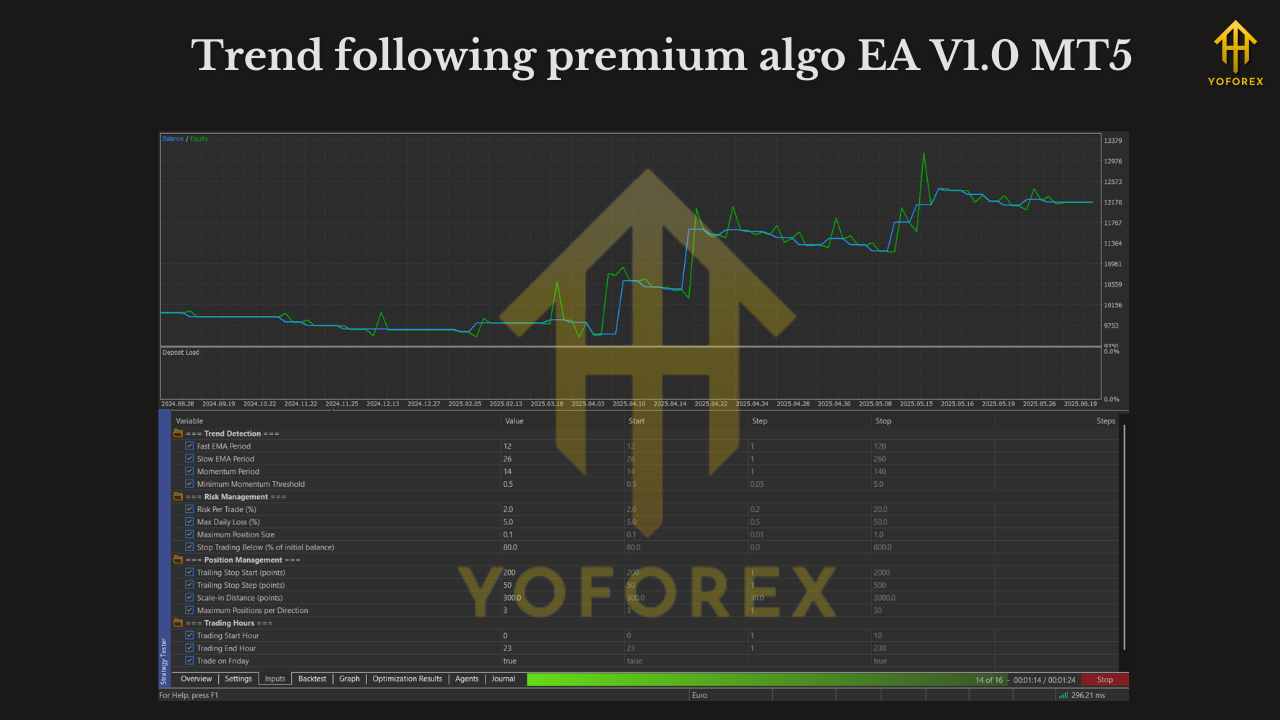
Why M30 for Gold?
Gold can be noisy on ultra-low timeframes and sluggish on high timeframes when you want regular signals. M30 tends to hit a sweet spot:
- Fewer false starts than M1/M5 in choppy hours
- More opportunities than H4/D1, which can be too slow for many traders
- Readable structure for trend filters, ATR stops, and trailing logic
Running the EA with default settings on M30 is a solid starting point—then you can iterate after forward data proves what truly works with your broker and spreads.
Core Approach (Plain English)
- Detect Trend
The EA uses a directional filter (think: moving average slope and/or price position vs. baseline) to avoid counter-trend traps. - Confirm Momentum
It waits for conditions that signal genuine continuation (e.g., candle close beyond a threshold or volatility expansion). This helps skip early breakouts that snap back. - Enter with Risk Defined
Every position uses a hard stop determined by recent structure and/or volatility (ATR-based stops are common for trend followers). - Manage Winners
Once price moves favorably, the EA can trail the stop or lock break-even to protect equity and let trends breathe. - Exit When Trend Fades
If momentum cools or structure breaks, the trade is closed cleanly—no averaging down, no “hope mode.”
Key Features
- Trend-Filter Logic: Trades only in the direction of the established move.
- Momentum Confirmation: Reduces entries on weak or false breaks.
- M30 Gold Focus: Optimized run-flow for XAUUSD (default settings recommended as a baseline).
- Risk Controls Built-In: Fixed SL per trade; no martingale, no grid.
- Trailing Stop & Break-Even Options: Let winners run while defending capital.
- Spread/Slippage Guardrails: Helps avoid poor fills in illiquid moments.
- Session Awareness (Optional): You can limit trading to liquid hours if preferred.
- Clear Parameters: Human-readable inputs so you’re never guessing.
Installation (MT5) — Quick Start
- Copy the EA File
MT5 → File → Open Data Folder →MQL5/Experts→ paste the EA file. - Restart MT5
Close and reopen to register the EA. - Open a Gold Chart (XAUUSD)
Set timeframe to M30. - Attach the EA & Enable Algo
Navigator → Experts → drag the EA onto the chart → tick Allow Algo Trading.
Ensure the main Algo Trading button (toolbar) is green. - Use Default Settings to Begin
Defaults are tuned for M30 Gold. Keep them as-is for the first weeks of testing. - Check Experts/Journal Logs
Confirm successful initialization and that there are no broker rejections.
Recommended First-Run Settings (Start Safe)
You can run default settings out of the box. If you want a little extra conservatism while you learn its rhythm:
- Risk per Trade: 0.5%–1.0% of account equity
- Stop-Loss Mode: ATR or recent-swing structure (default)
- Break-Even: Optional—trigger after ~1R move (adjust to taste)
- Trailing Stop: Moderate trail (avoid too tight; let trends breathe)
- Trading Window: Consider the London–NY overlap for better liquidity
- Max Spread Filter: Set a realistic cap in line with your broker’s typical XAUUSD spread
Tip: If you’re brand new to this EA, start on demo for 2–4 weeks, then go small live. Don’t “optimize by emotion” after one trade—review results by sample size (e.g., 30–50 trades).
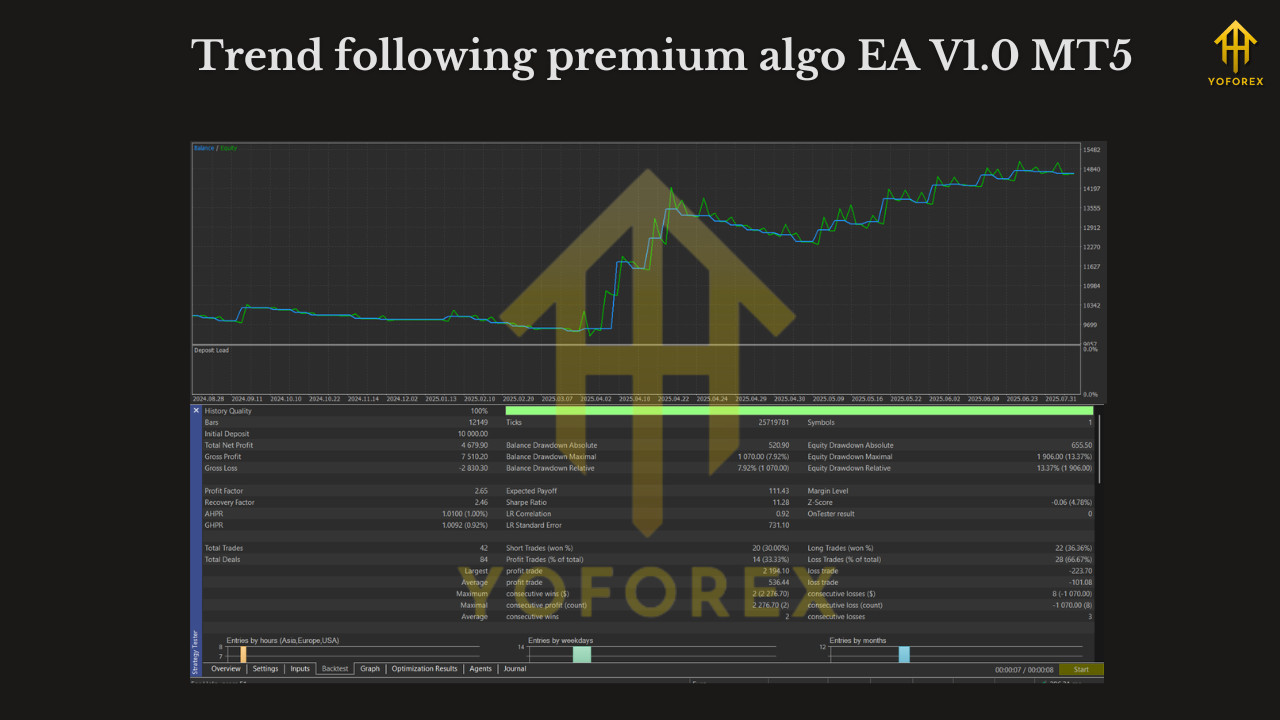
Backtesting & Forward-Testing Checklist
- Data Quality: Use high-quality tick data if possible; Gold is spread-sensitive.
- Period Coverage: Include both quiet and volatile months (summer lulls vs. eventful quarters).
- Walk-Forward Validation: If you optimize inputs, validate on out-of-sample dates.
- Forward Demo: Monitor fills, slippage, and spread behavior in your actual broker environment.
- Metrics to Watch:
- Max drawdown (absolute/%), daily and overall
- Profit factor and average R per trade
- Average trade duration (helps detect overstays)
- Win rate vs. risk-reward balance (don’t obsess over win rate alone)
Real-World Tips for Gold on M30
- Respect News: CPI, FOMC, NFP, and central-bank headlines can whipsaw price. Consider pausing into major events if you prefer a calmer equity line.
- VPS Helps: A stable, low-latency VPS near your broker reduces disconnects and improves execution.
- Broker Matters: XAUUSD can vary widely in spread/commission across brokers. A low-spread ECN/Raw account is often worth it.
- Correlation Risk: If you run multiple Gold EAs simultaneously, watch combined exposure.
Frequently Asked Questions
Does the EA use martingale or grid?
No. It’s a single-entry trend follower with fixed stops.
Is M30 mandatory?
The logic is tuned for M30 on Gold as a starting point. If you experiment with other timeframes later, do it on demo and compare results fairly.
What lot size should I use?
Size by risk percent, not by gut feel. 0.5%–1% per trade is a sensible start for many.
Is it prop-firm friendly?
If your prop allows EAs and Gold, this trend-following style can fit well—especially with daily loss limits and max drawdown rules. Always verify your firm’s policy.
Do I need to optimize?
Not to begin with. Run defaults, gather forward data, then adjust one variable at a time.
A Sensible Workflow
- Install & Run Defaults on XAUUSD M30 (demo).
- Collect Data for at least 2–4 weeks; track equity curve and max daily drawdown.
- Go Small Live with identical settings; keep the same risk % while you confirm live execution matches demo expectations.
- Iterate Slowly (e.g., adjust trailing stop or break-even only after a meaningful sample).
Final Word
Trend Following Premium Algo EA V1.0 MT5 gives Gold traders a clear, repeatable framework to capture directional moves on M30—without gimmicks. Keep risk small, avoid tinkering every other day, and let the data speak. If you’re after a professional, calmer way to trade XAUUSD trends, this EA is a solid place to start—especially with default settings right out of the gate.
Join our Telegram for the latest updates and support






Comments
Leave a Comment