If you’ve been looking for an MT5 Expert Advisor that actually waits for clean, tradable pullbacks instead of chasing every wiggle, meet TPC Bot EA v3.2. The name says it all: Trend–Pullback–Continuation. This version puts discipline first—filtering direction, checking volatility, and green-lighting entries only when structure says “go.” No black-box lottery tricks. Just a practical, rules-driven workflow you can understand, test, and trust.
Below you’ll find a complete, trader-friendly rundown: how TPC Bot thinks, what’s new in v3.2, recommended settings, install steps for MT5, and a risk playbook to keep you in control from day one.
What Is TPC Bot EA v3.2 (MT5)?
TPC Bot v3.2 is a MetaTrader 5 Expert Advisor built to capture trend continuation after logical pullbacks. It combines direction filters, ATR-aware risk sizing, and structure confirmation (e.g., break–retest or strong close) to reduce false starts. Think fewer forced entries, more selective triggers.
Who it’s for
- Traders who want non-martingale automation with transparent logic
- Intraday and swing traders who prefer M15–H1 flows (with optional M5 for advanced users)
- Users who’ll demo forward-test before going live, and who value steady risk
Best-fit symbols
- Majors: EURUSD, GBPUSD, USDJPY
- Gold: XAUUSD (use tighter execution rules)
- Indices (optional): US30, NAS100 on higher TFs if your broker’s specs suit EAs
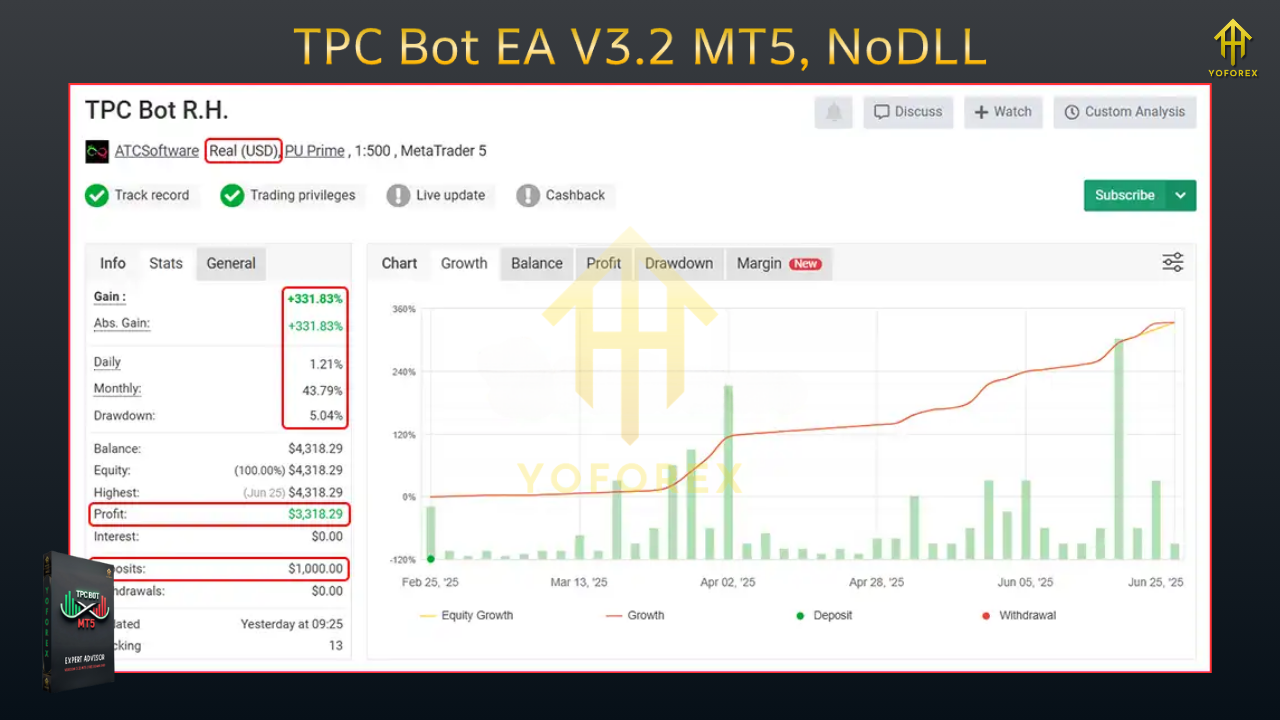
What’s New in v3.2
- Sharper trend baseline: Cleaner bias selection to avoid counter-trend chops
- Improved ATR gating: Skips entries when stops would be impractically wide
- Refined structure triggers: Better recognition of break–retest and decisive closes
- Smarter trailing: Optional ATR/swing-based trail that engages only after +1R
- Equity guard polish: Smoother pause/resume behavior after drawdown events
- Logging/diagnostics: Clearer “why” for entries, exits, and vetoes (great for optimization)
Key Features at a Glance
- Confluence engine: Direction filter + volatility gate + structure confirmation
- No martingale, no grid: Optional light scale-ins on fresh confirmation only
- ATR-aware SL/TP: Stop sizes that adapt to current conditions
- Equity guard & daily stop: Auto-pause new entries beyond your limits
- Spread/slippage caps: Skip trades when execution turns hostile
- Session & news windows: Trade in liquid hours; optionally block red-flag minutes
- Readable logs: Audit every decision—great for learning and tweaking
How the Strategy Works (Under the Hood)
- Directional Bias
A trend baseline (dual-MA structure or channel) plus a small momentum read decides whether long or short setups are even allowed. If price is above the baseline and momentum aligns, long side is opened; below with downside momentum, shorts are allowed. - Volatility Gate (ATR)
The EA checks if a realistic stop (e.g., 1.5×–2.5× ATR) fits your risk. If implied stops are too wide (or unrealistically tiny), the setup is vetoed. This keeps position sizing sane. - Price-Action Confirmation
No confirmation, no trade. TPC looks for simple but robust patterns—break–retest, engulf, or a decisive close beyond micro-structure—to avoid flimsy entries. - Risk Lifecycle
Risk is a % of equity. After entry, the bot can partial-close around +1R (configurable), then trail the remainder behind ATR or last swing structure. If a fresh confirmation appears and your max exposure allows, it may add a light scale-in—never averaging down.
Recommended Settings (Starter Template)
- Broker/account: ECN/Raw spread with low commissions
- VPS: Strongly recommended (stability + low latency)
- Leverage: 1:200–1:500 (use responsibly; leverage ≠ edge)
Symbols & Timeframes
- EURUSD, GBPUSD, USDJPY: M15–H1 (H1 is calmer; M15 is more active)
- XAUUSD (advanced): M15–H1 (consider H1 if spreads/slippage are chunky)
Risk Controls
- Risk per trade: 0.5%–1.0% (new users stick to 0.5%)
- Max concurrent positions (all charts): 3–5
- Daily loss stop: 2%–3% (auto-pause until the next session)
- Equity guard (floating DD): 5%–8% auto-pause
Execution Filters
- Max spread: tune per symbol (e.g., EURUSD ≤ 15–20 points; XAUUSD ≤ 35–60 points depending on quoting)
- Max slippage: 1–3 points (adjust to your feed)
- Sessions: Prioritize London/NY overlap; avoid rollover
- News block (optional): 10–15 min before/after high-impact events (CPI, NFP, FOMC)
Stops & Targets
- SL: 1.5×–2.5× ATR or just beyond last clean swing
- TP: 1.5R–2.0R baseline; partial at +1R then trail
Installation & Setup (MT5)
- Copy EA: Place
TPC_Bot_EA_v3_2.ex5intoMQL5/Experts/in your MT5 Data Folder. - Restart MT5 and confirm the EA appears under Navigator → Experts.
- Enable Algo Trading (toolbar) and permit DLL imports only if your setup needs news/modules.
- Attach to Chart: Open the symbol/timeframe chart → drag TPC Bot v3.2 onto it. Use one symbol per chart.
- Inputs: Load your preset or apply the starter template above.
- Run on Demo: Forward-test 1–2 weeks to validate execution (spreads, slippage, fills) before going live.
Backtesting & Forward-Testing Tips
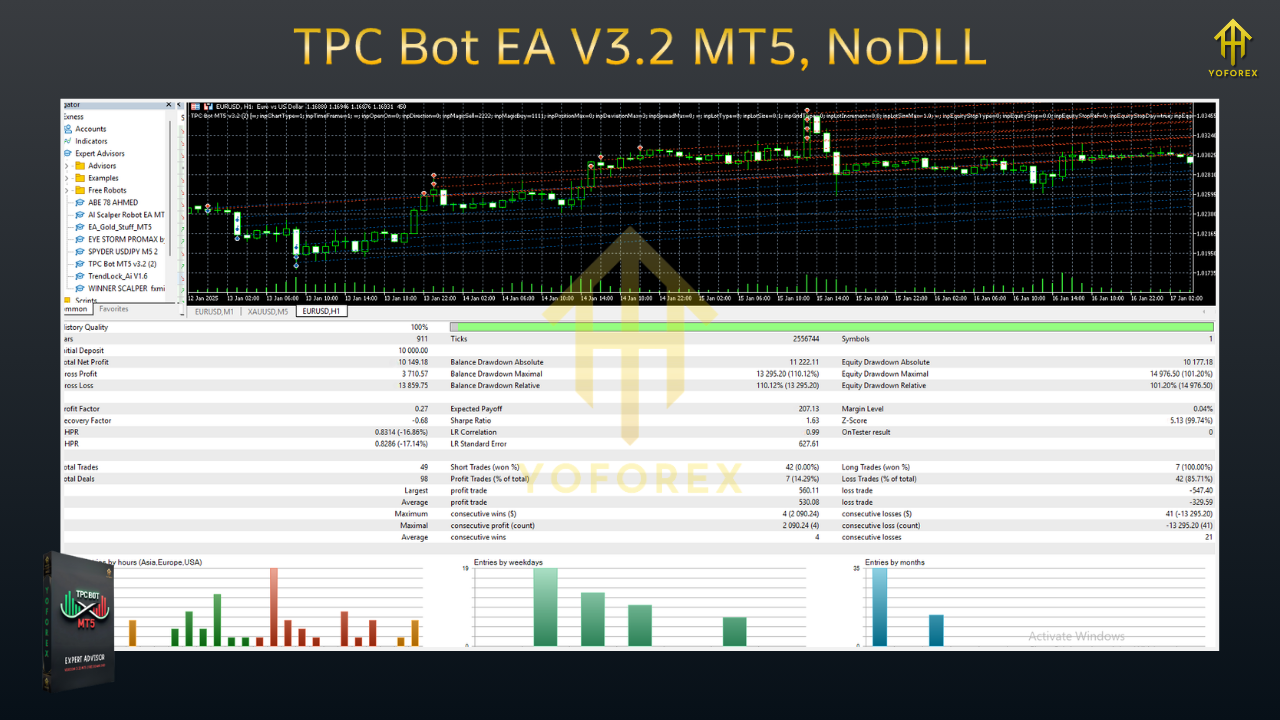
- Use tick-quality data with variable spread if possible; fixed-spread BTs look prettier than reality.
- Consider event windows—CPI/NFP/Fed minutes can distort fills; either block or review those timestamps.
- Test across multiple months and different regimes (trend, range, high vol).
- Forward test on a VPS to mirror real broker behavior (latency, rejects, widening spreads).
Risk Management Playbook (Please Don’t Skip)
- Small, steady risk: 0.5%–1.0% per trade is plenty. Don’t “double after loss.”
- Respect circuit breakers: Daily loss and equity guard exist to pause you.
- Mind the costs: If spread/slippage creep up, reduce risk or pause for that session.
- Avoid over-optimization: The more you curve-fit, the faster it breaks out of sample.
- Withdraw periodically (if live): Keeps your effective risk sane relative to account size.
FAQs
Does TPC Bot v3.2 martingale or grid?
No. It may lightly scale in on fresh confirmation within your max exposure, but it won’t average down losers.
Will it trade every day?
No guarantees—skipping bad conditions is part of the edge.
What account size should I start with?
You can demo with any size. For live, many start around $500–$1,000 with 0.5% risk and a VPS, then scale slowly.
Best timeframe?
H1 is generally calmer (lower trade count, cleaner structure); M15 produces more signals but is more cost-sensitive.
Disclaimer
Trading Forex/CFDs involves risk. Past performance is not indicative of future results. Always test on demo, keep risk small, and never trade money you can’t afford to lose.
Call to Action
Want a bot that plays Trend–Pullback–Continuation with patience and proper guardrails? Install TPC Bot EA v3.2 on MT5, run the starter template on demo, and audit the logs to see how decisions are made. When execution looks solid and you’re comfortable with the behavior, go live gradually—risk first, everything else second.






Comments
Leave a Comment