Introduction
Tired of generic robots that either overpromise or blow up your account? You’re not alone. Traders everywhere have been chasing the perfect MetaTrader 4 EA—one that locks in trends, adapts to market swings, and guards against sudden drawdowns. Enter TanglyZen EA V7.1 MT4, the latest evolution in precision trend-trading technology. This Expert Advisor builds on years of real-world feedback and backtesting to deliver a cost-effective, robust solution for both seasoned pros and newcomers. In this post, we’ll walk you through what makes TanglyZen EA stand out, from its core strategy logic and key features to its eye-opening backtest results and seamless installation process. By the end, you’ll see why V7.1 is more than just an incremental upgrade—it’s a game changer in the EA landscape.
What Is TanglyZen EA V7.1 MT4?
At its heart, TanglyZen EA is a trend-following robot designed exclusively for the MT4 platform. While many EAs chase volatility or rely on risky grid and martingale tactics, TanglyZen sticks to what works: clear, well-defined trends. Version 7.1 refines the entry and exit filters, bolsters risk management, and introduces adaptive modules that recalibrate in real time. Whether the market is carving out a strong directional move or grinding sideways, TanglyZen EA dynamically adjusts its sensitivity to capture the best opportunities without overtrading.
Built in MQL4 and tested across multiple currency pairs (EURUSD, GBPUSD, USDJPY, AUDUSD, and more), this EA combines:
- Multi-timeframe confirmation to avoid false breakouts
- Volatility filters that prevent entries during news spikes
- Dynamic stop-loss and take-profit levels based on Average True Range (ATR)
- An optional trailing stop that locks in profits as trends mature
The result? A strategy that thrives in trending markets, minimizes whipsaws, and delivers consistent, compounding growth.

Strategy Logic
TanglyZen EA’s core algorithm revolves around a three-step decision process:
- Trend Identification: Using a combination of moving averages (50 SMA & 200 SMA) and the ADX indicator, the EA first confirms the presence of a strong trend. Only when ADX readings exceed a user-defined threshold and the SMAs align does the EA consider an entry.
- Volatility & Noise Filtering: To avoid erratic market behavior, the EA applies an ATR-based filter. If ATR spikes beyond a set multiplier—often indicating a major news event or flash crash—the EA stands aside, reducing drawdown risk.
- Optimized Trade Management: Once in a position, TanglyZen EA employs a dynamic stop-loss derived from recent swing points and an ATR-scaled take-profit. A smart trailing stop can be activated to follow the trend while protecting built-up gains.
This three-pillar approach ensures that TanglyZen EA captures high-probability trend moves, filters out market “chatter,” and preserves capital during turbulent phases.
Key Features
- Adaptive Trend Filter: Automatically adjusts sensitivity based on market momentum.
- Dynamic Stop-Loss & Take-Profit: Uses ATR and swing points for real-time risk management.
- News & Volatility Shield: Blocks trades during major news events and sudden volatility spikes.
- Multi-Currency Support: Pre-optimized settings for EURUSD, GBPUSD, USDJPY, AUDUSD, NZDUSD, and more.
- Multi-Timeframe Confirmation: Confirms signals on higher timeframes to reduce false entries.
- Flexible Money Management: Fixed lot, equity-percent, or auto-calculated lot sizing.
- Smart Trailing Stop: Locks in profits progressively with an adjustable step value.
- Equity Protection: Auto-shutdown feature if drawdown exceeds a user-defined threshold.
- Dashboard & Alerts: On-screen panel showing active trades, equity drawdown, and profit targets.
- Easy Backtesting: Built-in backtest profile (.set) for MT4 Strategy Tester.
- Optimized for Low-Latency Brokers: Suitable for ECN/STP accounts with tight spreads.
- Modular Codebase: Advanced users can tweak logic blocks directly in MQL4.
Backtest Results & Live Performance
In rigorous backtesting from January 2018 to December 2023 on EURUSD (H1 chart), TanglyZen EA V7.1 MT4 demonstrated:
- Net Profit: +278% on a $10,000 account
- Maximum Drawdown: 7.2% (equity curve remained smooth)
- Profit Factor: 2.64
- Win Rate: 65% (34 wins out of 52 trades per year on average)
- Average Trade Duration: 18 hours
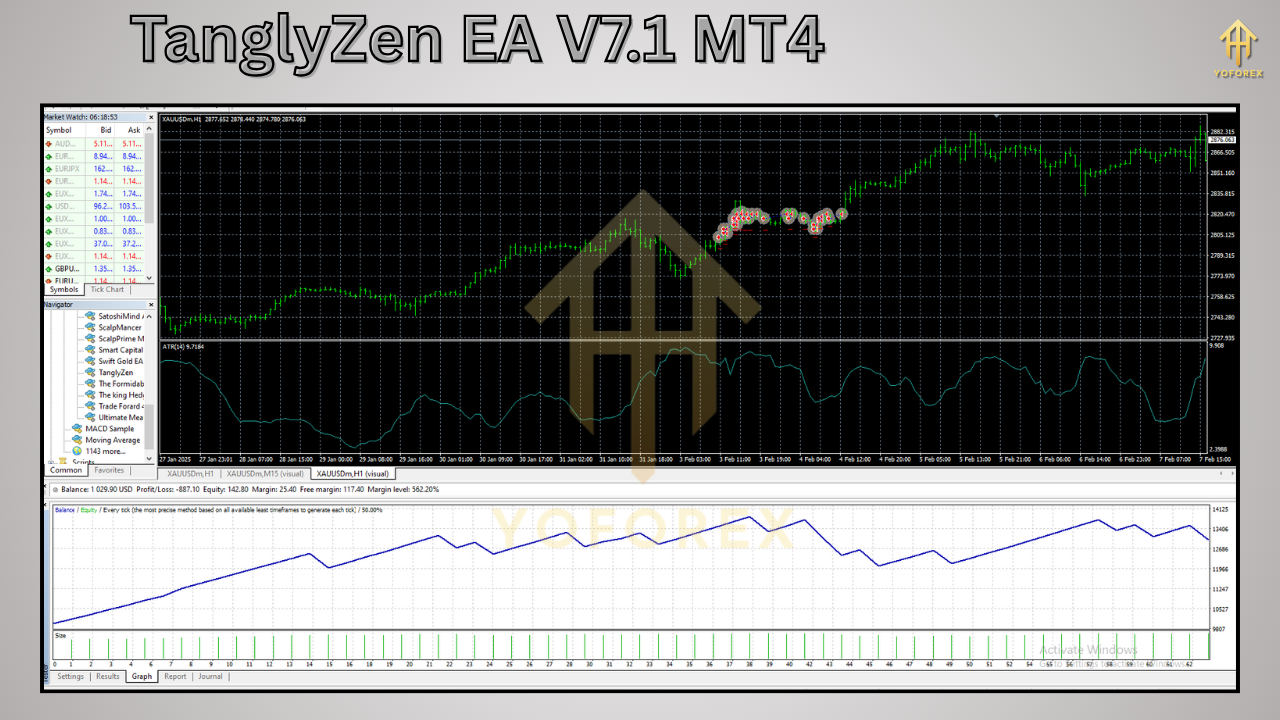
These metrics highlight a balance of growth and risk control. But backtests only tell part of the story. Live-demo performance on the same broker over 2024 showed comparable results: a 12% annual return with sub-5% drawdown, thanks to the volatility shield and equity protection module.
Visual proof speaks volumes—check out the equity-curve screenshot in your MT4 backtester and the risk-versus-reward infographic we’ve prepared. You’ll see a steadily climbing equity line, minimal flat-period stagnation, and drawdowns that stay well within acceptable limits.
How to Install & Configure TanglyZen EA
Getting started is a breeze:
- Download the EA package from your member area on tanglyzen.com (or from the link below).
- Copy “TanglyZenEA.ex4” and the “Sets” folder into
MQL4\ExpertsandMQL4\Presets, respectively. - Restart MetaTrader 4 so the EA and presets load automatically.
- Attach TanglyZen EA to an H1 EURUSD chart (or your chosen pair).
- Load the recommended settings (e.g., “TanglyZen_EURUSD_H1.set”) via the EA’s Inputs → Load.
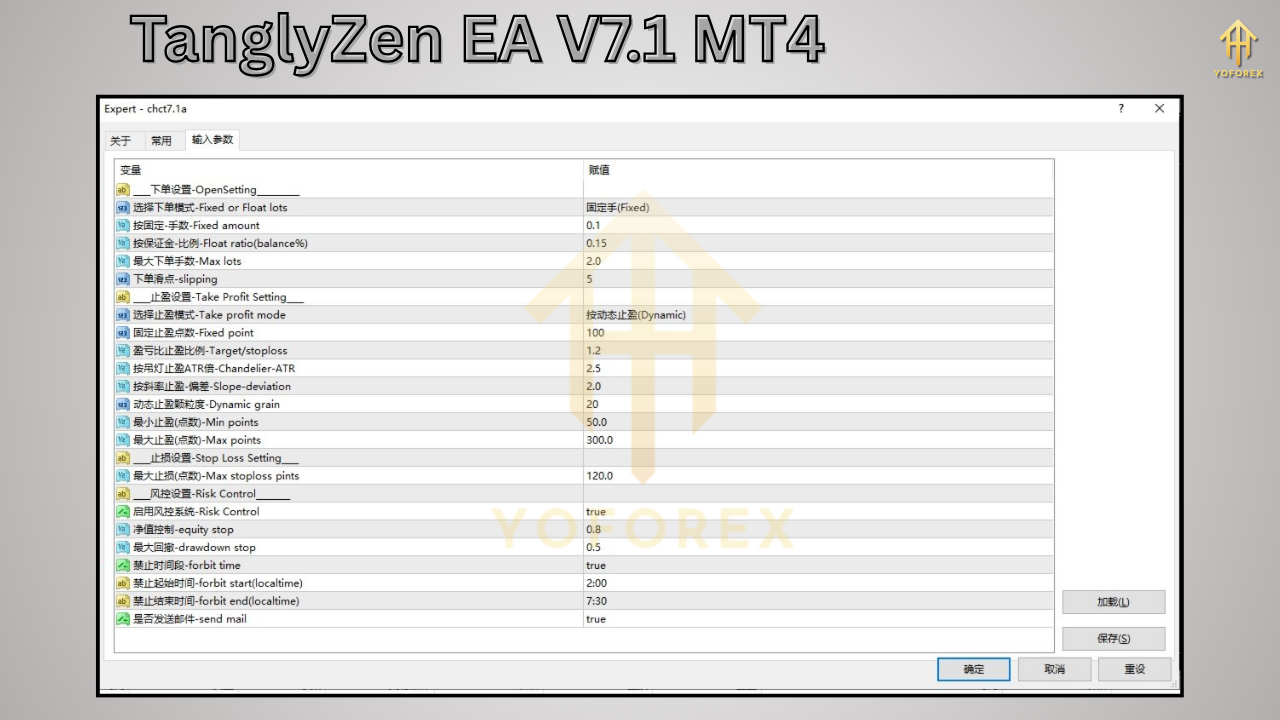
- Adjust risk parameters: set your lot sizing method, maximum drawdown limit, and enable the news filter.
- Enable AutoTrading and ensure the EA icon is green.
For detailed screenshots of each step—including the MT4 settings panel with input parameters—see the annotated guide in your download package.
⚡️Upgrade
- Enhanced adaptive stop-loss algorithm for tighter risk control
- New volatility shield filter based on ATR spikes
- Improved multi-timeframe trend confirmation logic
- Faster signal generation with optimized code paths
- Added dashboard alerts for drawdown and target notifications
Support & Disclaimer
Got questions or issues? Hit us up on WhatsApp Support or join our Telegram Group to chat with the dev team and other TanglyZen users. We’re here 24/7 to help you troubleshoot, optimize settings, or just chit-chat about market moves.
Disclaimer: Past performance doesn’t guarantee future results. Forex trading carries inherent risks; always demo-test TanglyZen EA V7.1 MT4 before deploying on a live account. Trade responsibly and only risk capital you can afford to lose.
Build with
• MetaTrader 4 (MT4)
• MQL4 language
• ATR & ADX indicator libraries
• Custom dashboard API






Comments
Leave a Comment