
SuperTrend Indicator V1.0 MT4 — Complete Guide for Smarter Trend Entries
Pair: Works on all major & minor forex pairs, gold (XAUUSD), indices, and crypto CFDs
Timeframe: M15, M30, H1, H4 (scalpers can try M5; swing traders can use D1)
If you’ve ever found yourself chasing trends a tad late—or exiting right before price runs—then the SuperTrend Indicator V1.0 MT4 might be your new best friend. Built around Average True Range (ATR) dynamics, SuperTrend plots a clean, adaptive line that flips from support to resistance as the trend changes. What you get is a visually simple, rules-friendly way to spot trend direction, time pullback entries, and set dynamic trailing stops. It’s not magic, but it’s darn practical; and unlike some cluttered toolkits, this one doesn’t scream at you with ten signals at once. It’s purpose-built to keep you on the right side of momentum.
In this guide, I’ll walk you through how SuperTrend works, the logic behind its settings, practical strategies, risk management tips, and a few pro hacks to avoid common pitfalls. Whether you’re day-trading EURUSD on M15 or riding multi-day moves on gold, you’ll find a straightforward workflow you can adopt today.
What Is the SuperTrend Indicator?
At its core, SuperTrend uses ATR to estimate market volatility and then overlays a dynamic line above or below price:
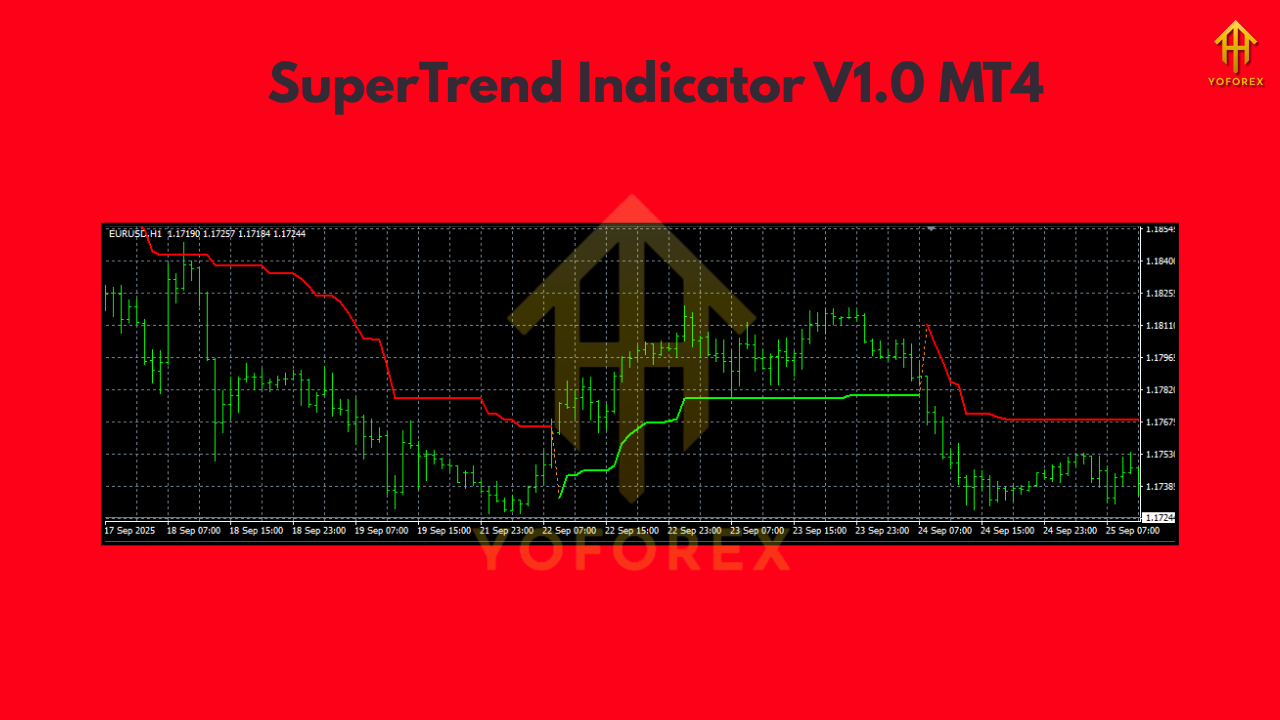
- When price trades above the SuperTrend line, the tool paints a bullish trend (line acts as dynamic support).
- When price trades below the line, it signals a bearish trend (line acts as dynamic resistance).
- A flip occurs when price closes across the line with volatility confirmation—this is your trend change cue.
Because SuperTrend adapts to volatility, it’s great for markets that go from quiet to wild—like XAUUSD or GBP pairs—without requiring you to constantly tweak settings. In short: clean visuals, fast interpretation, and fewer “is this a trend?” moments.
Key Parameters (and What They Mean)
Most MT4 builds of SuperTrend expose two core inputs:
- ATR Period (commonly 7, 10, or 14)
- Controls how quickly the line reacts to volatility changes.
- Lower period = more sensitive (more flips), higher period = smoother (fewer flips).
2. ATR Multiplier (commonly 2.0 to 3.5)
- Expands or contracts the buffer from price.
- Lower multiplier = tighter line (more signals), higher multiplier = wider line (fewer, stronger signals).
Starter presets (balanced):
- M15–H1: ATR Period 10, Multiplier 3.0
- H4–D1: ATR Period 10–14, Multiplier 3.0–3.5
Use these as baselines; then forward-test and adjust based on your pair’s behavior. For example, XAUUSD often benefits from a touch more smoothing (period 10–14, multiplier 3.0–3.5).
How to Read SuperTrend at a Glance
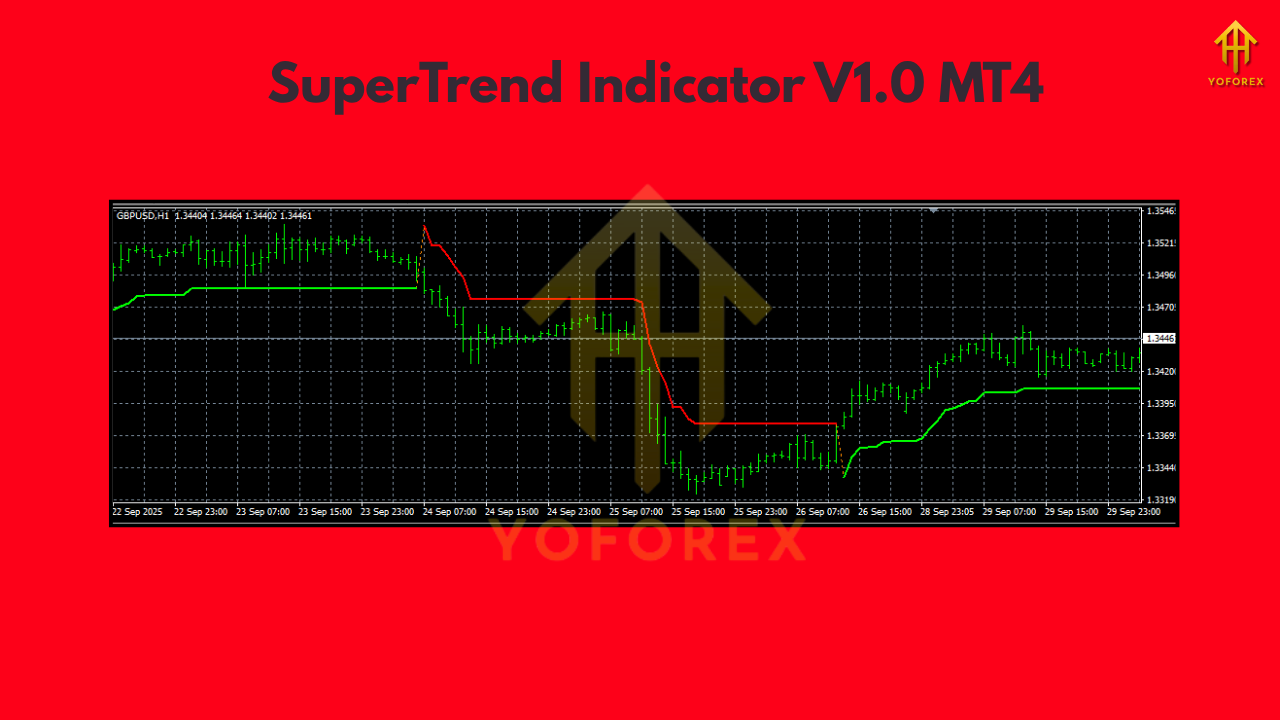
- Line below price (green/up): Bullish bias. Look for buy setups on pullbacks.
- Line above price (red/down): Bearish bias. Look for sell setups on rallies.
- Fresh flip: Possible trend change—confirm with structure (HH/HL for longs, LH/LL for shorts) or a secondary filter like RSI 50 line or a moving average slope.
Entry & Exit Playbook (Step-by-Step)
1) Trend-Following Pullback Entry
- Bias: Trade with the SuperTrend direction.
- Entry: Wait for a pullback toward (or minor poke through) the SuperTrend line, then enter when price re-asserts in trend direction (e.g., bullish candle close off the line).
- Stop-Loss: A few pips beyond the SuperTrend line (dynamic support/resistance).
- Take-Profit:
- Conservative: 1.5R–2R fixed target.
- Trending markets: trail behind SuperTrend to ride extended moves.
2) Break-and-Retest After a Flip
- Bias: Only after a clear flip (line changes sides).
- Entry: Wait for the first retest of the new SuperTrend line; enter with a confirming candle close.
- Stop-Loss: Beyond the line.
- Take-Profit: First key structure level, then trail.
3) Multi-Timeframe Confirmation (MTF)
- Bias: Align lower timeframe entries with higher timeframe trend.
- Example: If H1 SuperTrend is bullish, take M15 long pullbacks only.
- Stop-Loss/TP: As above; MTF alignment reduces false flips and noise.
Practical Settings by Market Type
- Major FX (EURUSD, GBPUSD, USDJPY):
M15/H1 → ATR 10, Mult 3.0 (scalpers can try ATR 7, Mult 2.5). - Gold (XAUUSD):
H1/H4 → ATR 10–14, Mult 3.0–3.5 for smoother signals. - Indices (US30, NAS100):
M15/H1 → ATR 10, Mult 3.0; widen multiplier on high-volatility sessions. - Crypto CFDs:
M30/H1 → ATR 10–14, Mult 3.0–3.5 to filter chop during off-hours.
Risk Management (Don’t Skip This)
- Risk per trade: 0.5%–1% for consistency; max 2% if you’re experienced.
- No martingale: SuperTrend can string multiple signals in ranges—avoid lot escalation.
- News filter: Pause around high-impact releases; ATR can spike, causing whipsaws.
- Trade count cap: Define a max trades/day to prevent revenge trading when the market chops.
Common Mistakes (and Easy Fixes)
- Taking every flip in a range: Add a structure filter (only trade in direction of HH/HL or LH/LL) or a MA slope filter (e.g., 50 EMA must slope up for longs).
- Too-tight settings on volatile symbols: Increase multiplier or period slightly to cut noise.
- Ignoring session context: London/NY overlap behaves differently from Asia—tune expectations accordingly.
Advanced Tips to Boost Win-Rate
- Price action confluence: Pin bars or engulfing candles at the SuperTrend line often foreshadow clean continuations.
- Higher-low / lower-high confirmation: Label swing points; only take pullbacks that respect trend structure.
- Partial profits: Scale out 50% at 1.5R, trail remainder with SuperTrend—best of both worlds.
- Time-of-day filter: Focus on your pair’s most liquid session; SuperTrend behaves best when volume is healthy.
Simple Backtesting Workflow (Manual)
- Pick a pair/timeframe (e.g., EURUSD M15).
- Apply SuperTrend (ATR 10, Mult 3.0).
- Scroll back; mark flip points and pullback retests.
- Record outcomes with a fixed 1.5R target vs. trailing method.
- Note contexts (sessions, news, trend maturity).
- Select the combo (fixed target vs. trailing) that shows the best expectancy.
You’ll likely find that pullback entries in aligned trends outperform raw flip-chasing; and that trailing can supercharge results in persistent trends (gold, indices on strong days).
Installation (MT4)
- Download the SuperTrend Indicator file (
.mq4or.ex4). - In MT4, go to File → Open Data Folder → MQL4 → Indicators.
- Paste the indicator file into Indicators.
- Restart MT4 or right-click Indicators in Navigator and Refresh.
- Drag SuperTrend onto your chart → adjust ATR Period and Multiplier.
- Save a template so you can load the setup quickly on other pairs.
Who Is It For?
- Beginners: Clear, visual trend bias and simple rules cut the learning curve.
- Intermediates: Great backbone for a rules-based system with added structure/MTF filters.
- Pros: Efficient as a trailing stop engine and context filter in multi-indicator stacks.
Final Thoughts
The SuperTrend Indicator V1.0 MT4 is popular for a reason: it’s simple, robust, and flexible across markets. It won’t predict the future (nothing does), but it can keep you biased to the right side of momentum while preventing stubborn “hold & hope” trades. Start with balanced settings, add a dash of structure and MTF alignment, and you’ll likely see cleaner entries and steadier equity curves.






Comments
Leave a Comment