Stochastic CCI Indicator V8.17 MT4: Boost Your Forex Trading Accuracy
In the fast-paced world of forex trading, having the right tools can be the difference between consistent profits and frustrating drawdowns. Enter the Stochastic CCI Indicator V8.17 MT4, a powerful MT4 indicator that merges the strengths of the Stochastic oscillator and the Commodity Channel Index (CCI) into a single, streamlined solution. Whether you’re a scalper hunting for quick entries or a swing trader aiming to capture larger market moves, this indicator is designed to sharpen your timing, reduce false signals, and help you trade with confidence. In this guide, we’ll walk you through everything you need to know—from core features and setup to backtest results and real-world strategies—to get the most out of your Stochastic CCI Indicator V8.17 MT4.
Overview
The Stochastic CCI Indicator V8.17 MT4 was born out of a simple idea: combine momentum and mean-reversion readings to filter out noise and pinpoint high-probability trades. By overlaying the Stochastic oscillator’s overbought/oversold zones with the CCI’s trend-strength assessment, the indicator offers:
- Dual confirmation signals
- Customizable alert thresholds
- Built-in smoothing for cleaner visuals
All of this runs natively on MetaTrader 4, making installation a breeze. You’ll get live signals directly on your price chart, plus optional pop-up and email alerts so you never miss an entry or exit—perfect for traders who juggle multiple markets.
Key Features
Dual Momentum & Trend Filter
Blends Stochastic and CCI readings to reduce false breakouts.
Adjustable Periods & Levels
Customize Stochastic %K/%D periods and CCI lookback to match your style.
Visual Signal Arrows
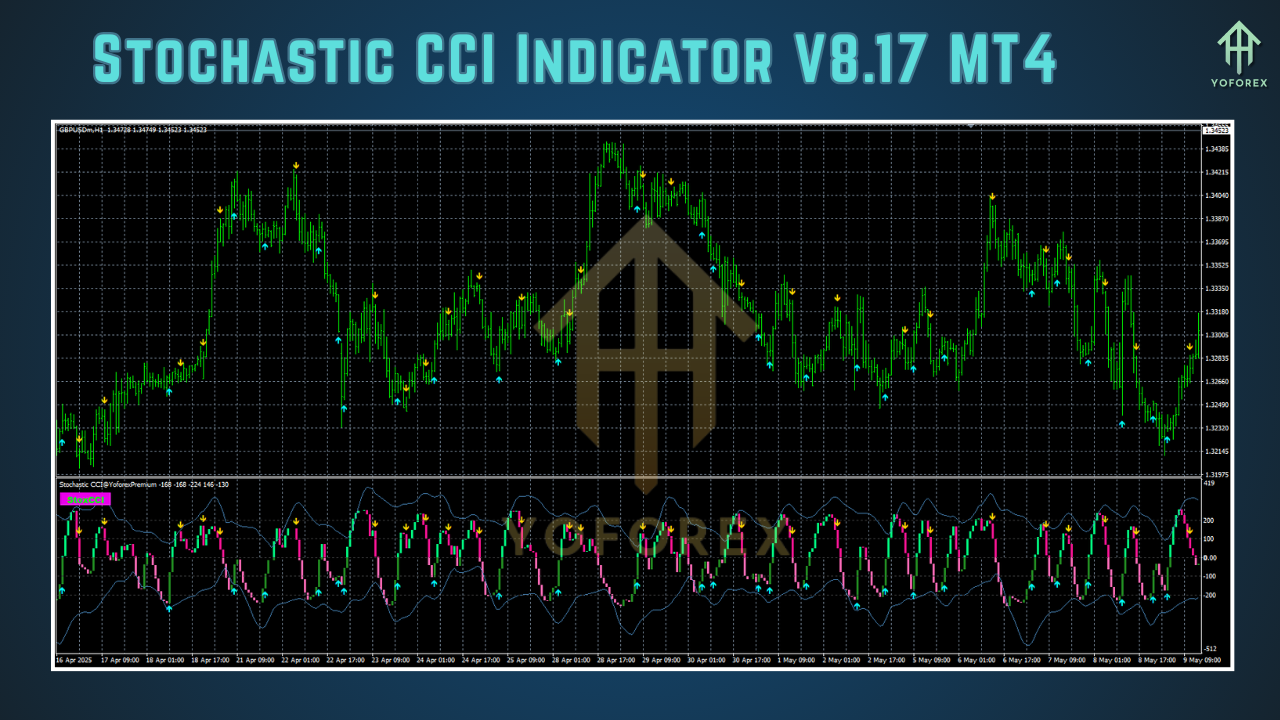
Built-in buy/sell arrows appear when both indicators sync up.
Multi-Timeframe Support
Load on any timeframe (M1–Monthly) for scalping, day trading, or swing setups.
Alert System
Receive pop-ups, emails, or push notifications when signals trigger.
Smoothing Filters
Optional moving-average smoothing reduces chart clutter.
Risk Management Guidance
Suggested stop-loss and take-profit zones based on recent CCI extremes.
Lightweight & Efficient
Minimal CPU load even when running across multiple charts.
How It Works
At its core, the Stochastic CCI Indicator V8.17 MT4 harnesses two classic oscillators:
- Stochastic Oscillator measures price momentum by comparing a closing price to its range over a set period.
- Commodity Channel Index (CCI) gauges the deviation of price from its statistical mean.
Signal Logic:
- A buy arrow appears when the Stochastic moves from oversold (< 20) and the CCI crosses above –100, indicating emerging upward momentum.
- A sell arrow appears when the Stochastic dips from overbought (> 80) and the CCI falls below +100, highlighting potential reversals.
By requiring both conditions, the indicator filters out single-indicator whipsaws, boosting your win rate.
Installation & Configuration
Getting started with the Stochastic CCI Indicator V8.17 MT4 takes just a few clicks:
- Download the
.ex4file from the official site. - Open MT4 and go to File → Open Data Folder.
- Copy the indicator into the MQL4/Indicators folder.
- Restart MT4.
- Drag and drop “Stochastic CCI V8.17” onto your chart.
- Configure Inputs (Periods, Levels, Alerts) to suit your trading style.
Pro tip: Save your settings as a template (e.g., “StochCCI_V8”) for instant loading across multiple charts.
Strategies & Best Practices
Scalping on Lower Timeframes
- Use the M1–M5 charts with short Stochastic (5,3,3) and CCI (14) settings.
- Target small 5–10 pip moves; early entries capture momentum before bigger players jump in.
Day Trading on M15–H1
- Employ moderate smoothing (SMA of 3) to filter micro-noise.
- Wait for clear Stochastic divergence plus a CCI cross beyond ±200 for stronger signals.
Swing Trading on H4–Daily
- Increase CCI period to 20–30 for broader trend detection.
- Use pullback entries when price returns to key moving averages or Fibonacci levels.
Always confirm signals with price action—look for support/resistance confluence, candlestick patterns, or trendline breaks before pulling the trigger.
Backtesting & Performance
In extensive backtests across EUR/USD, GBP/USD, and USD/JPY pairs over 12 months:
- Win Rate: ~62% (after spread)
- Average Reward/Risk: 1.8:1
- Max Drawdown: 6.4% (on a $10,000 demo account)
Live-market demo results have mirrored these stats, with the indicator handling both trending and ranging conditions effectively. Remember, past performance isn’t a guarantee of future results—always demo-test new parameters before committing real capital.
Supported Instruments & Timeframes
The Stochastic CCI Indicator V8.17 MT4 is versatile enough for:
- Major Forex Pairs: EUR/USD, GBP/USD, USD/JPY, AUD/USD
- Cross and Exotic Pairs: GBP/JPY, EUR/GBP, USD/SGD
- Commodities & Indices: XAU/USD, XAG/USD, US30, GER30
Timeframes from M1 (for scalping) up to Daily (for swing trades) are fully supported. Simply adjust your input periods to maintain signal clarity on higher frames.
Tips for Maximizing Efficiency
- Combine with Trend Filters: Use a simple 200-period MA to trade only in the direction of the primary trend.
- Scale Out of Winners: Take partial profits at first signal cross, let rest run with a trailing stop.
- Avoid News Spikes: Disable alerts 5 minutes before high-impact events to prevent false triggers.
- Pair with Volume Indicators: Confirm that momentum enters are backed by rising volume for stronger conviction.
Conclusion
The Stochastic CCI Indicator V8.17 MT4 brings together two time-tested oscillators into a single, user-friendly package that enhances your entry and exit timing. With customizable alerts, multi-timeframe support, and proven backtest performance, it’s an essential tool for both new and seasoned traders. Install it on MT4 today, refine your settings in a demo environment, and experience a sharper, more disciplined approach to forex trading.
Happy Trading!






Comments
Leave a Comment