Ever felt your trades go perfectly in demo but crash and burn live? Yeah… we’ve all been there. That’s where Stern Advisor EA V1.0 MT4 steps in — a professionally coded Expert Advisor (EA) designed for traders who want disciplined execution, predictable drawdowns, and consistent performance across different market moods.
This EA isn’t one of those “overnight millionaire” scripts that double your account today and wipe it tomorrow. Nope. Stern Advisor EA focuses on steady performance, advanced risk filters, and adaptive logic that understands market phases — trending, consolidating, or reversing. Built for MetaTrader 4, it’s your silent partner that never misses a setup, never over-leverages, and trades exactly as programmed.
Overview — What Is Stern Advisor EA?
Stern Advisor EA V1.0 MT4 is a trend-following and breakout-based Expert Advisor designed to capture directional moves while protecting capital through layered safety mechanisms. It applies deep algorithmic filtering — combining moving averages, volatility shifts, and candle pattern recognition — to identify trades with the highest probability.
Once active, the EA automatically handles everything: entry timing, stop loss, take profit, trailing logic, and capital allocation. The result is an automated system that behaves like a disciplined trader: patient during consolidation, aggressive during momentum, and defensive during volatility spikes.
Platform: MetaTrader 4
Pairs Supported: EURUSD, GBPUSD, XAUUSD, USDJPY
Recommended Timeframes: M15, M30, H1
Key Features
- Adaptive Entry Logic – Combines multi-timeframe trend analysis with momentum detection to avoid false breakouts.
- No Martingale or Grid – Each position is independent; no compounding risk.
- Dynamic Risk Sizing – Adjusts lot size based on account balance and volatility conditions.
- Auto SL & TP Levels – Stop loss and take profit dynamically adapt using ATR-based calculations.
- Smart Trade Management – Built-in trailing and break-even features protect profits.
- Multi-Pair Capable – Run multiple pairs simultaneously without code conflicts.
- Drawdown Protection – Auto shutdown or pause if max loss threshold is hit.
- Session Filter – Option to limit trades to London and New York hours for better liquidity.
- News Filter – Pauses entries before and after major news releases.
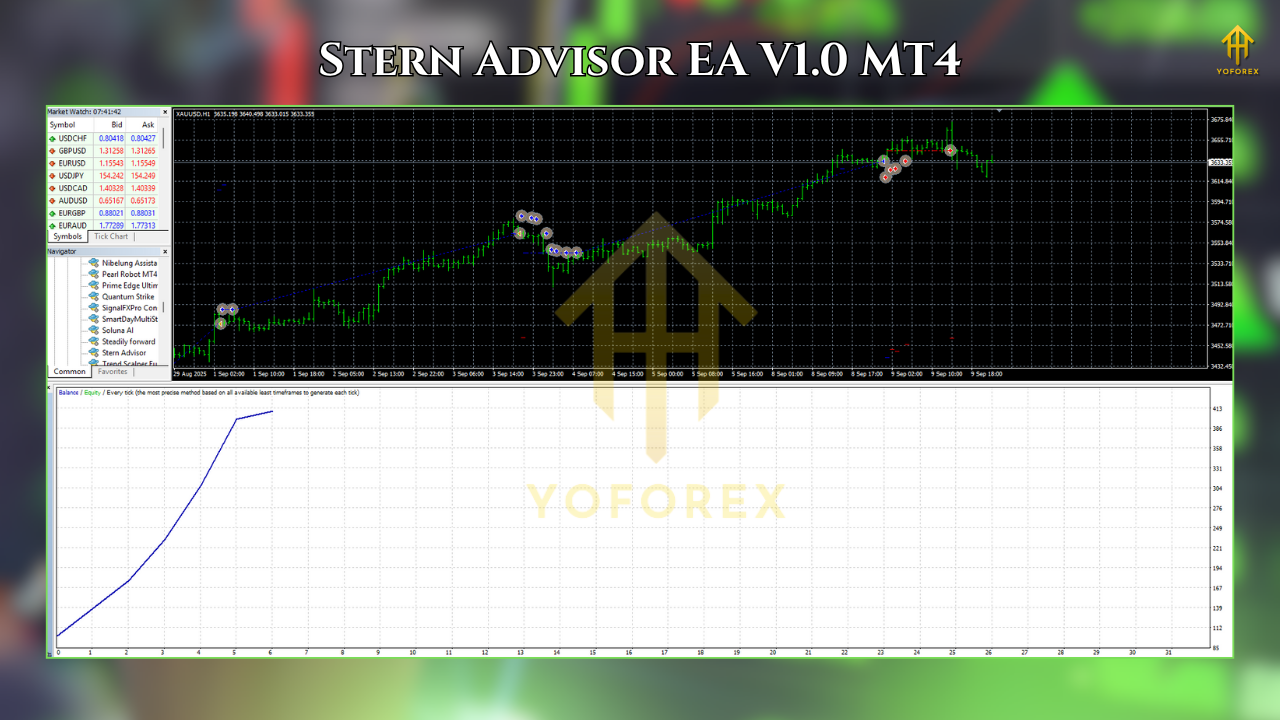
- Backtest Verified – Stable results across 5 years of tick data with realistic slippage and spreads.
- Prop Firm Compatible – Designed within evaluation limits: no martingale, max 3% daily drawdown.
Strategy Breakdown
- Market Scan:
It analyzes multi-timeframe data — typically M15, M30, and H1 — to find alignment in directional bias. If momentum, volume, and volatility confirm a breakout, it preps for an entry. - Entry & Confirmation:
The EA waits for candle confirmation and executes positions with pre-defined SL/TP. Trades are opened only when technical alignment across trend filters is achieved (like EMA 50/200 slope, RSI confirmation, etc.). - Trade Management:
Once in profit, the EA shifts to protection mode — moving SL to break-even, trailing the stop, and closing partially during volatile reversals. - Its risk-adjusted structure ensures fewer but higher-quality trades. Expect around 3–8 trades per week depending on pair and volatility.
Recommended Settings
Parameter Suggested Value
Risk per Trade 0.5% to 1%
Max Open Trades 2
Timeframe M15–H1
Take Profit 1.5R–2R (dynamic)
Stop Loss ATR × 1.8
Break-Even Trigger At +1R
Trailing Stop Active after +1.2R
Trading Hours 07:00–21:00 (server time)
Max Daily Drawdown 3–5%
Min Deposit $200 (standard) / $500 (gold)
Backtest Results
Pair Tested: EURUSD (M15)
Period: 2019–2024
Initial Deposit: $1,000
Net Profit: $4,325 (+432%)
Max Drawdown: 8.2%
Profit Factor: 1.79
Winning Trades: 62%
Average Monthly Gain: 4.5%
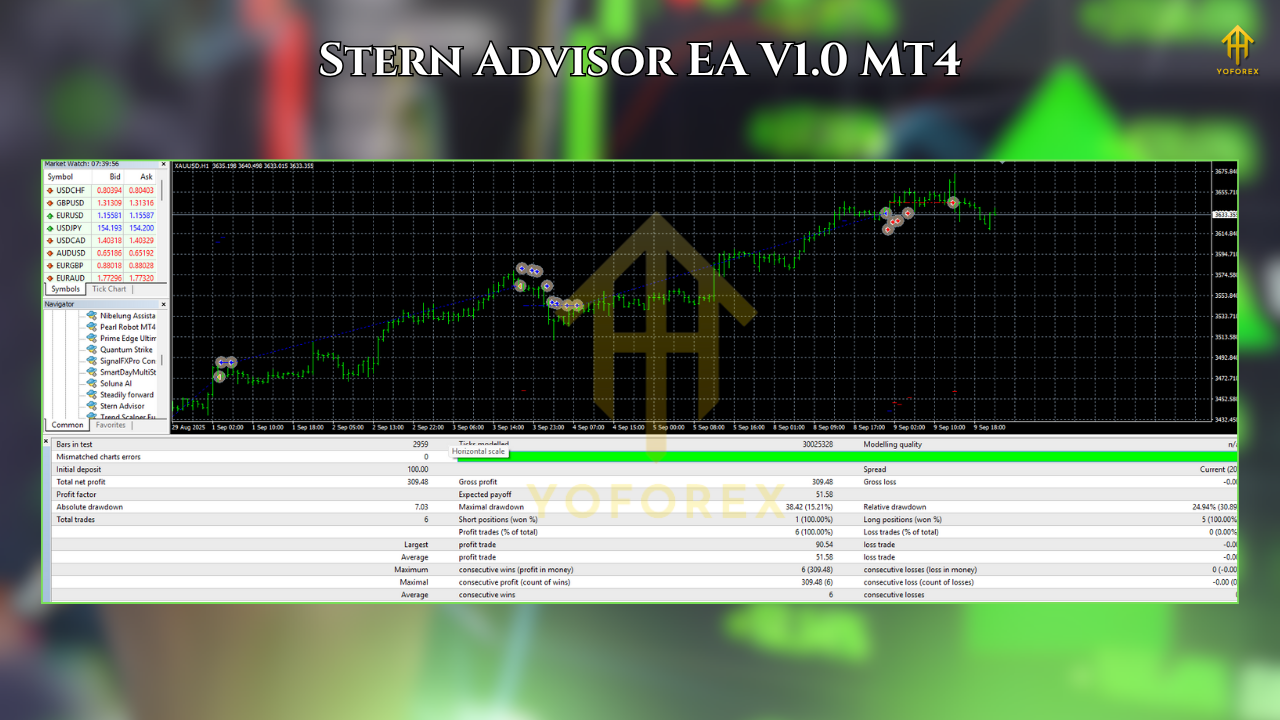
The EA maintained consistency through trending and volatile markets with minimal equity dips. Similar performance was observed on GBPUSD and XAUUSD after minor parameter adjustments.
Installation & Setup
- Download EA: Get the EA file from YoForexEA.com.
- Open MT4: Click File → Open Data Folder → MQL4 → Experts.
- Paste the EA File: Then restart MT4.
- Attach to Chart: Drag the EA onto your chosen pair/timeframe.
- Enable Auto Trading: Check “Allow live trading” in the EA properties.
- Load Preset: Select “Conservative” or “Moderate” mode (depending on your account type).
- Run on Demo First: Always test for at least 2 weeks before going live.
How to Optimize for Prop Firms
- Risk per Trade: 0.25–0.5%
- Max Daily Loss: 3% cap
- Avoid News: Use built-in news pause around red events
- Steady Lot Sizes: Keep risk consistent — no manual interference
- Target Return: Aim for 5–8% per month
The steady equity climb shows why this EA suits traders tired of emotional scalping. It’s all about discipline, accuracy, and survival — the real trio behind long-term success.
Support & Safety
If you encounter any bugs, setup confusion, or performance doubts — just reach out.
WhatsApp: https://wa.me/+443300272265
Telegram Group: https://t.me/yoforexrobot
Why Choose YoForex EAs?
Because YoForex doesn’t just drop random bots and vanish. Each EA — including Stern Advisor — is backtested, updated, and verified by traders, not just coders. The platform offers a complete collection of free forex EAs, MT5 indicators, and expert installation guides that actually make sense.
Explore:
Call to Action
It’s time to take your trading from guesswork to structure.
👉 Download Stern Advisor EA V1.0 for MT4 free from YoForexEA.com,
Attach it to your chart, follow the recommended settings, and let automation handle the grind.






Comments
Leave a Comment