
Introduction
Trading XAU/USD (Gold) can feel like navigating a stormy sea—sudden spikes, false breakouts, and unpredictable volatility often leave traders exhausted and frustrated. You’ve probably tried countless indicators, strategies, even paid for pricey signal services… yet consistency remains elusive. What if there were an automated solution that learns from live data, adapts as markets shift, and manages risk without resorting to risky martingale tactics? Enter SmartChoise EA V1.0 MT4. This Expert Advisor leverages a neural network engine to analyze real-time market conditions on the M15 timeframe, aiming for steady gains and controlled drawdowns. In this post, we’ll dive deep into what makes SmartChoise tick, walk you through its features and settings, and explain how to use it effectively—so you can decide if it’s the missing piece in your gold-trading puzzle.
Overview of SmartChoise MT4
SmartChoise MT4 is the MT4 version of a neural network–driven Expert Advisor originally built for MT5. Due to popular demand, the developer streamlined the MT5 features into a compatible MT4 package—removing some nonessential options but retaining the core technology that enables adaptive, intelligent trading. Designed for traders who value transparency and consistency, SmartChoise MT4 focuses exclusively on XAU/USD (Gold) on the M15 timeframe. It continuously learns from live data to optimize entries, manages drawdowns with an advanced recovery system, and hides take-profit and stop-loss orders to prevent broker interference. The goal isn’t to score massive one-off wins but to deliver sustainable growth over time, making it an ideal choice for those who prefer controlled performance and capital preservation.
Core Technology
- Neural Network–Driven Decisions: At its core, SmartChoise uses a neural network that continually processes live price data—volatility, trend strength, and support/resistance levels—to decide optimal entry and exit points. Unlike static indicators, the neural engine adapts to shifting market regimes, aiming to avoid prolonged drawdowns.
- No Martingale: Many EAs resort to martingale to chase losses, which can quickly blow accounts on a bad streak. SmartChoise MT4 deliberately avoids any form of lot-doubling. Instead, it relies on its recovery logic and dynamic lot sizing to manage risk.
- Dynamic Lot Sizing: Lot sizes are calculated based on equity levels, current volatility, and projected drawdown capacity. This ensures that on calmer days, the EA may scale up slightly, while during high-volatility spikes, it reduces exposure.
- Hidden TP/SL (Virtual Stops): Take-profit, stop-loss, and trailing-stop levels are managed internally. No visible SL/TP orders appear on your broker’s server—this helps prevent premature broker interference or manual stop-hunting by uncertain brokers.
Key Features
- Multiple Risk Levels: Choose from Low (1), Medium (2), High (3), or Extreme (4). Lower risk settings prioritize capital preservation; higher risk settings aim for larger returns but tolerate wider drawdowns.
- Trading Styles: Select Conservative (fewer, higher-probability trades) or Aggressive (more trades, capturing additional opportunities). You can tailor the EA to suit your personal risk appetite.
- Trend Strategy Only: The EA is optimized around a refined trend-following algorithm, rejecting earlier strategies that proved too volatile. The result: a more stable performance curve.
- Advanced Recovery System: If an adverse move triggers multiple losing trades in a row, the recovery system kicks in—opening targeted trades designed to recuperate losses without excessive risk.
- Support/Resistance & Candlestick Detection (Optional): Activate this optional filter to add an extra layer of confidence—only trade when price aligns near key S/R levels or meets specific candlestick criteria.
- News Filter: Automatically pauses trading around high-impact news events. You can customize a buffer (e.g., 15 minutes before and after) to avoid erratic price spikes during economic releases. Be sure to enable WebRequest in MT4 to let the EA fetch live news headlines.
- Panel Buttons for Manual Overrides: The built-in panel lets you place manual entries or trigger manual recovery trades on the fly. Perfect for experienced traders who want occasional hands-on control.
Important Notes & Usage Tips
• Account Size Considerations: SmartChoise’s recovery logic may not be suitable for very small accounts (e.g., under $500) because limited drawdown capacity could trigger early stops. If you run a small account, stick to Low or Medium risk, and consider disabling the recovery system.
• Use Hard Stop %: Always set a Hard Stop % (daily loss limit). For example, a setting of 20 means the EA will halt trading for the day if equity drops by 20%. This layer of protection prevents catastrophic losses.
• Virtual SL/TP Caveat: Remember that backtesting on MT4 cannot replicate the neural network’s adaptive behavior perfectly. Always forward-test on a demo account first to see how the EA behaves in real-time conditions.
• Disabling Recovery or Fixed Lot: If you prefer a simpler TP/SL structure, disable the recovery feature and fix your lot size. The EA will then operate as a basic trend-based TP/SL bot, closing trades only when your specified profit or stop levels are reached.
Recommended Usage Scenarios
- Small Accounts ($500–$2,000)
- Use Risk Level Low (1) or Medium (2).
- Disable advanced recovery if drawdown capacity is limited.
- Focus on capital preservation—let the neural network identify small, consistent micro-trends.
- Larger Accounts (>$5,000) / Experienced Traders
- Explore High (3) or Extreme (4) risk settings for bigger returns.
- Keep recovery system enabled to handle short-term drawdown clusters.
- Use Conservative style initially to gauge EA behavior, then switch to Aggressive if comfortable.
Basic Configuration Guide
- Risk Level:
- 1 = Low (capital preservation focus)
- 2 = Medium (balanced)
- 3 = High (seeking higher returns)
- 4 = Extreme (maximum return potential, wide drawdowns)
- Trading Style:
- C = Conservative (fewer trades, lower risk)
- A = Aggressive (more trades, higher risk)
- Hard Stop %: Define your daily loss limit. Example: enter “20” to halt after a 20% equity drop.
- Max Spread: Set a maximum spread threshold (e.g., 15 pips) to prevent trades during unreasonably wide market conditions.
- Virtual (Hidden) Stops: Keep these enabled for stealthy TP/SL management—no visible levels on your broker’s platform.
- News Filter Settings: Activate and customize buffer time (e.g., 15 minutes before/after high-impact events). Ensure “Allow WebRequest” is enabled under MT4→Options→Expert Advisors, and add the required news URL.
News Filter & Trade Comments
When the News Filter is enabled, the EA fetches headlines from the configured source. It suspends entries if a high-impact event (e.g., central bank rate announcement) is scheduled within your buffer period. Each trade is tagged with a comment—important for log analysis:
- NN = Neural Network–based entry
- TR = Trend Strategy entry
- R = Recovery trade
- M = Manual entry (from the panel)
- MR = Manual recovery (triggered via panel)
For instance, a comment likeSmartChoise_4A_NNmeans: - Risk Level 4 (Extreme)
- Style A (Aggressive)
- Strategy NN (Neural Network)
Backtesting vs. Forward Testing
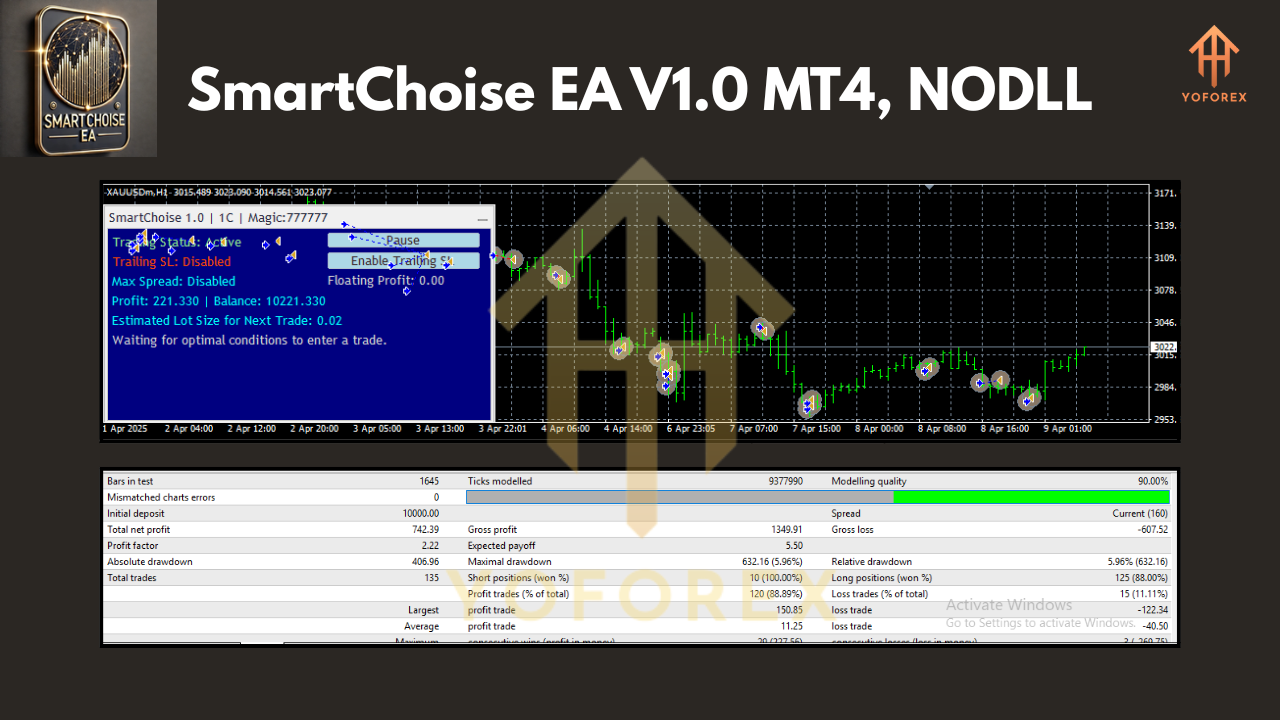
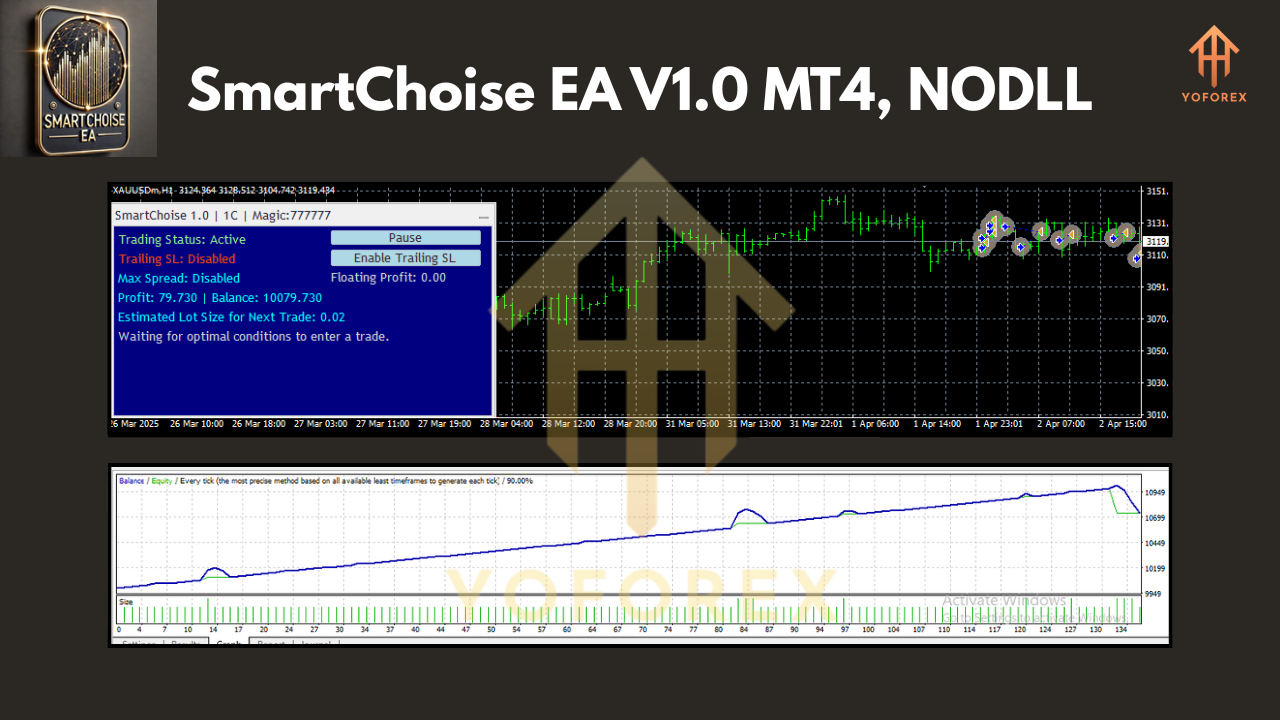
Because SmartChoise’s neural engine continuously adapts to live tick data, you won’t get 100% accurate backtest results. Historical price patterns in MT4 can’t account for real-time data feeds, variable spread, or slippage exactly. Here’s what to do:
- Backtest Overview: Run a quick backtest on a demo or strategy tester to verify basic behavior—ensure it’s not opening illogical trades or hitting errors.
- Demo Forward Test: Load SmartChoise on a Demo XAU/USD M15 chart for at least two weeks. Use your intended risk settings, and monitor trade frequency, drawdown peaks, and net profit. Evaluate if you’re comfortable with occasional streaks of losses.
- Compare Live vs. Demo: Once satisfied with the demo, try a small Live account (e.g., $1,000) with Low risk. Verify real order execution, spread handling, and broker slippage match your demo experience.
Installation & Setup
- Download & Copy Files: Download the SmartChoise EA package from the link provided in your profile. Copy the
.ex4(or.mq4if available) and any required.dllfiles into your MT4’sExpertsfolder. - Chart Attachment: Open MT4, drag SmartChoise EA onto an M15 XAU/USD chart. Ensure AutoTrading is enabled.
- Input Settings: Set your desired Risk Level, Trading Style (C/A), Hard Stop %, and Max Spread. Enable or disable Recovery and News Filter as needed.
- Allow WebRequest: Go to MT4 → Tools → Options → Expert Advisors. Check “Allow Algo Trading” and enable “Allow WebRequest for listed URL.” Add the news source URL to the list if using News Filter.
- Activation: Once settings are confirmed, click “OK” and watch the EA initialize. You’ll see a small panel in the top left, showing status and allowing manual entries.
Why SmartChoise Stands Out
Unlike static grid or martingale EAs, SmartChoise V1.0 MT4 is built on a neural network foundation—meaning it learns and adapts in real time. Other EAs either blindly double down on losses (martingale) or rely solely on rigid indicator crossovers. SmartChoise blends trend analysis with real-time data processing, then layers in a sophisticated recovery system to maintain capital. By hiding SL/TP orders, it prevents unwanted broker interference or stop-hunting. Whether you’re new to automated gold trading or an experienced pro, SmartChoise’s focus on controlled growth—rather than chasing home-run wins—could be the balance your strategy needs.
Potential Drawbacks
• Limited to XAU/USD on M15: If you wanted BTC/USD or EUR/USD support, you’ll have to look elsewhere; SmartChoise specializes in gold only.
• Recovery Drawdown Risk: The recovery system can deepen drawdowns temporarily before rebounding. If you’re highly averse to any drawdown beyond 5%, use Low risk and disable recovery.
• Broker Compatibility: Hidden SL/TP features rely on precise tick data and low-latency execution. Test on your broker’s server to ensure no unexpected requotes or order delays.
Frequently Asked Questions
Q1: Can I run SmartChoise on multiple M15 XAU/USD charts with different Magic Numbers?
A1: Yes. Diversifying risk through multiple charts (e.g., one on Medium risk + Conservative style, another on High risk + Aggressive style) can smooth equity fluctuations. Just ensure each chart uses a unique Magic Number to avoid order conflicts.
Q2: Why doesn’t SmartChoise show visible take-profit or stop-loss levels?
A2: The EA uses virtual (hidden) stops to protect against broker stop-hunting and accidental manual closures. It manages SL/TP internally based on live data, which can’t be backtested exactly.
Q3: How often should I update the EA?
A3: Check your provider’s announcements—neural network models improve over time. Typically, updates coincide with optimized trend algorithms or improved recovery logic. If you see a notification in your profile, download and replace the older .ex4 file.
Q4: What drawdown should I expect?
A4: At Low risk, maximum drawdown rarely exceeds 5–8%. At Medium, you might see 10–15%. High and Extreme risk settings may experience 20–30% drawdowns before recovery. Monitor demo results first to see real-world behavior.
Conclusion & Final Thoughts
SmartChoise EA V1.0 MT4 is more than just another grid or martingale script—it’s a neural network–powered gold trader designed for sustainable performance. By focusing on XAU/USD M15 trades, hiding SL/TP orders, and offering layered risk controls, SmartChoise aims to deliver steady growth while mitigating brute-force losses. If you’re tired of unpredictable drawdowns or rigid indicator-based EAs, give SmartChoise a thorough demo test. Adjust your risk settings, experiment with recovery on/off, and eventually run it on a small live account. With disciplined risk management and realistic expectations, this neural network EA could be the partner your gold portfolio needs. Remember: always demo-test before going live.
Join our Telegram for the latest updates and support






Comments
Leave a Comment