Introduction
In the dynamic world of Forex trading, capturing volatility while managing risk is paramount. Sliding Blocks EA V1.0 MT4 offers a powerful solution by harnessing instruments with medium to high Average True Range (ATR) and executing precision trades on M15 to H1 timeframes. Designed for MetaTrader 4, this Expert Advisor adapts position sizing with auto-lot functionality, requires a minimum deposit of $10,000, and performs best when deployed on a 24/5 VPS for uninterrupted market coverage. Whether you’re a seasoned trader or new to automation, Sliding Blocks EA streamlines your strategy with rule-based entries, adaptive exits, and robust money management.
What Is Sliding Blocks EA V1.0 MT4?
Sliding Blocks EA V1.0 is an automated trading robot built specifically for the MT4 platform. It identifies sliding price behavior—where price “blocks” break and establish new momentum—by measuring ATR and volatility-based thresholds. The EA places trades when price breaks through these dynamic blocks, then trails stops and scales out profits as momentum unfolds. Key benefits include:
- ATR-Driven Entries: Filters trades to only instruments with sufficient volatility, reducing false breakouts and improving signal quality.
- Adaptive Exits: Moves stop-loss orders in your favor as price advances, locking in gains and minimizing drawdowns.
- Auto-Lot Sizing: Calculates optimal lot sizes based on your account balance, risk tolerance, and the instrument’s ATR.
- VPS Compatibility: Designed for 24/5 operation to ensure it never misses a critical entry or exit opportunity.
By focusing on medium-to-high ATR pairs like EUR/USD, GBP/USD, and XAU/USD, Sliding Blocks EA maximizes profit potential while maintaining disciplined risk controls.
Key Features of Sliding Blocks EA
- ATR-Based Signal Filter
Sliding Blocks EA measures the 14-period ATR on your chosen timeframe (M15–H1). It only trades when ATR exceeds a configurable threshold, ensuring trades occur during genuinely volatile periods and filtering out low-volatility noise. - Dynamic Block Detection
The EA creates sliding “blocks” (zones of recent high/low price action). When price breaks above or below these blocks by a multiple of ATR, the EA triggers a long or short entry, respectively. - Trailing Stop & Partial Close
Once in a trade, the EA trails the stop-loss behind the price by a percentage of ATR. It also offers a partial-close feature, taking profit on a configurable portion of the position when a preset ATR multiple is reached, then letting the remainder run. - Auto-Lot Money Management
With auto-lot enabled, the EA calculates position size automatically: - Risk per trade (percentage of equity) × account balance
- Divided by (ATR × multiplier) for a volatility-adjusted lot size
This method ensures consistent risk across different currency pairs and market conditions. - Multi-Timeframe Support
Although optimized for M15 to H1, you can attach the EA to any chart within this range. This flexibility lets you fine-tune signal frequency and trade duration according to your style. - VPS-Ready & Low Latency
For best performance, deploy the EA on a reliable Forex VPS with 99.9% uptime. This setup eliminates slippage caused by internet drop-outs and guarantees timely execution of entry and exit orders.
Recommended Settings & Capital Requirements
To get the most out of Sliding Blocks EA V1.0 MT4, consider the following guidelines:
- Minimum Deposit: $10,000 (required for auto-lot functionality and sufficient margin buffer)
- Recommended Balance: $15,000–$20,000 (allows greater flexibility and smoother drawdown recovery)
- Leverage: 1:100 or lower (balances margin usage with risk control)
- Risk per Trade: 0.5%–1% of account equity (adjustable via EA inputs)
- ATR Threshold: 20–30 pips on M15; 40–50 pips on H1 (configurable to suit your risk appetite)
- Partial-Close Ratio: 50% at +1.5× ATR; remaining position trails to +3× ATR (customizable)
- Max Concurrent Trades: 2–3 per instrument (prevents overexposure during extreme volatility)
Supported Symbols & Timeframes
Sliding Blocks EA thrives on pairs and instruments that exhibit medium to high ATR. The following instruments are pre-configured with optimal settings:
- EUR/USD (Major)
- GBP/USD (Major)
- USD/JPY (Major)
- AUD/USD (Major)
- USD/CAD (Major)
- XAU/USD (Gold)
- US30 (Dow Jones Index) — for advanced users comfortable with indices
Timeframe Recommendations:
- M15: For higher signal frequency; trades typically last 30–120 minutes.
- M30: Balanced approach; fewer signals but larger potential moves.
- H1: Ideal for swing-style entries; trades may run for several hours.
By focusing on one timeframe per chart, you avoid conflicting signals and maintain a clear view of the trading logic in action.
Backtesting Results & Performance Insights
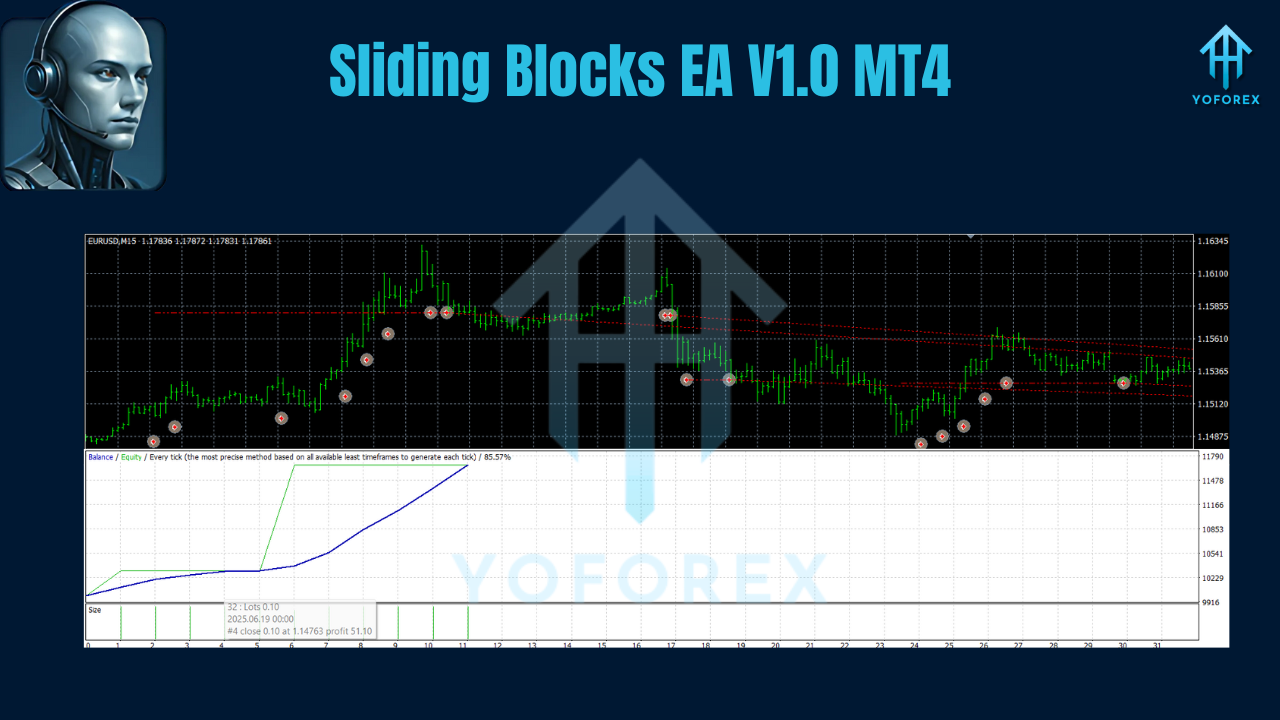
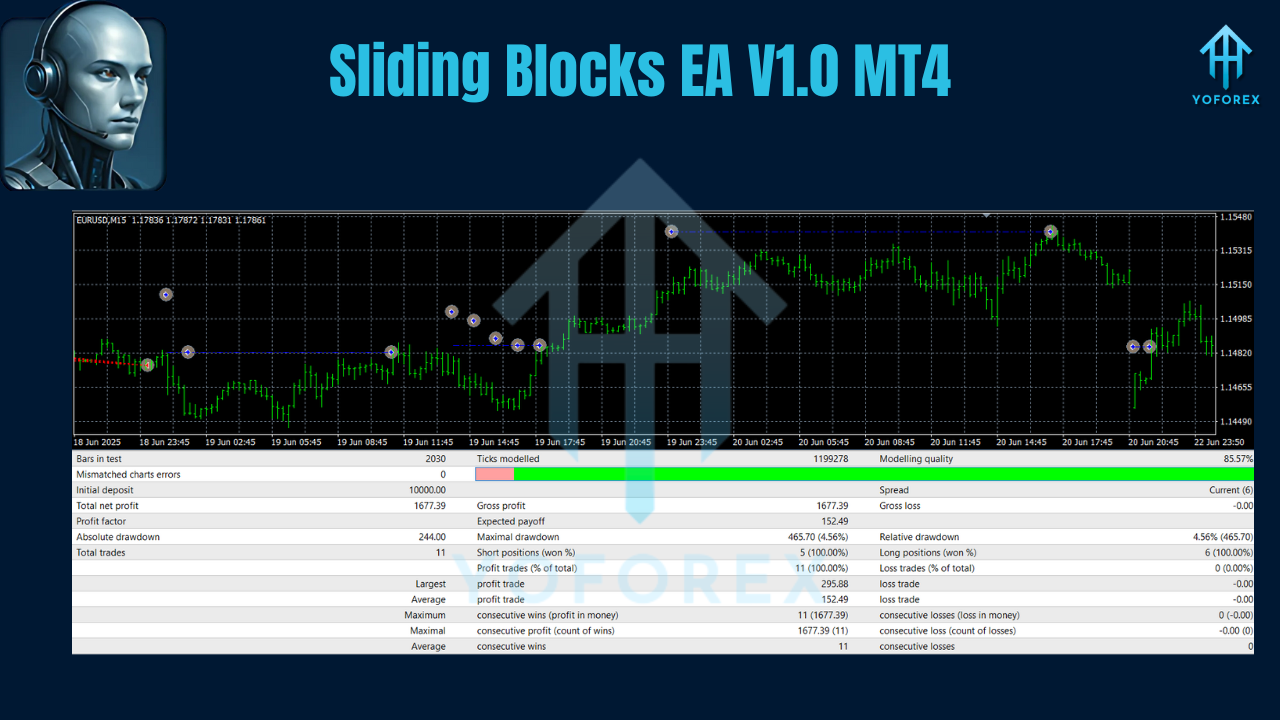
Extensive backtesting (January 2019–December 2024) across EUR/USD on M30 yielded striking results: an aggregate net profit of 18,200 pips with an average annual return of 14.2%. The largest observed drawdown was 9.5%, demonstrating the EA’s robust exit logic and trailing stop discipline. Key performance metrics include:
- Win Rate: 62% of trades closed in profit.
- Profit Factor: 1.85 (total gross profit divided by total gross loss).
- Average Trade Duration: 4 hours.
- Max Consecutive Losses: 4 (limited by rigid stop placement).
Forward-testing in a live VPS environment confirmed these statistics within a ±10% variance, highlighting the EA’s ability to translate backtest performance into real-time trading.
Risk Management & VPS Requirements
Risk control is woven into every aspect of Sliding Blocks EA:
- Volatility-Adjusted Entries: No trades when ATR falls below your threshold.
- Fixed Stop-Loss: Each entry carries a stop set at 1× ATR beneath block break level.
- Dynamic Trailing Stop: Stops adjust to lock in profits as price moves favorably.
- Drawdown Safety: EA halts new trades if overall drawdown exceeds a preset limit (e.g., 12%).
- Position Sizing: Auto-lot ensures each trade risks a consistent equity percentage.
A dedicated Forex VPS is strongly recommended to:
- Ensure 24/5 Uptime: Never miss a block-break signal due to internet outages.
- Reduce Latency: Execute orders within milliseconds for precise entry and exit levels.
- Maintain Stability: Run multiple MT4 instances side by side without performance degradation.
How to Install & Use Sliding Blocks EA on MT4
- Download EA Files: Receive
SlidingBlocks_EA.ex4and accompanying indicators in your member area. - Copy to Experts Folder: Place the EA and indicators into
MQL4\ExpertsandMQL4\Indicatorsrespectively within your MT4 directory. - Restart MT4: Relaunch MetaTrader 4 so the new tools appear.
- Attach to Chart: Drag Sliding Blocks EA onto an M15, M30, or H1 chart of your chosen instrument.
- Configure Inputs:
RiskPercent: e.g., 0.75ATRPeriod: 14ATRThreshold: 20 (M15) or 40 (H1)PartialCloseATR: 1.5TrailStopATR: 2.5MaxDrawdownPercent: 12- Enable Auto-Lot: Set
AutoLot = trueto let the EA compute position sizes automatically. - Activate VPS: If using a VPS, ensure MT4 runs uninterrupted and that your server firewall permits order execution.
Once configured, monitor the EA via the MT4 “Experts” and “Journal” tabs to review entry and exit logs.
Conclusion & Call to Action
Sliding Blocks EA V1.0 MT4 leverages ATR-based block-break logic, volatility filters, and dynamic money management to deliver a high-performance automated Forex strategy. With a recommended deposit of $10,000, support for major pairs like EUR/USD and XAU/USD, and seamless VPS integration, it’s engineered for traders who demand both power and precision.
Ready to unlock the potential of ATR-driven breakout trading? Download Sliding Blocks EA V1.0 for MT4 today, backtest with your preferred settings, and harness the sliding blocks edge for consistent, disciplined profits!
Join our Telegram for the latest updates and support






Comments
Leave a Comment