Introduction
If you’ve been hopping from one forex robot to another, paying crazy prices and still ending up with random results… you’re not alone. Most traders want something simple: a system that follows clear rules, respects risk, and doesn’t blow the account when the market gets moody.
That’s exactly where Sapphire Trading System EA V2.5 MT4 comes in. This Expert Advisor is designed to trade structured breakouts and momentum moves instead of random scalps, using a rules-based approach that tries to keep drawdown under control while still capturing strong intraday trends.
In this blog, we’ll break down what Sapphire Trading System EA V2.5 MT4 actually does, how it enters and manages trades, key features, recommended settings, and what kind of performance you might realistically expect. Whether you’re a beginner testing your first robot or a more advanced trader looking to add a breakout EA to your portfolio, this review will give you a clear, no-nonsense overview.
What Is Sapphire Trading System EA V2.5 MT4?
Sapphire Trading System EA V2.5 MT4 is a fully automated forex trading robot built for the MetaTrader 4 platform. The core idea behind this EA is to identify zones where price is likely to “break out” from consolidation, then place trades in the direction of that move with pre-defined stop loss and take profit levels.
Instead of chasing every candle, Sapphire Trading System EA V2.5 MT4 focuses on:
- Market structure
- Support and resistance levels
- Volatility filters
- Session timing (for example, London and New York overlaps)
The EA scans the chart for high-probability breakout patterns. When conditions line up, it places pending or instant orders, then manages the trade automatically using built-in money management rules.
You don’t need to be a coder or professional quant; you simply install the EA, load the recommended settings, and let it run according to the strategy logic. Of course, like any forex robot, it’s not a magic money printer, but it’s built to provide disciplined execution so you’re not guessing entries all day.
Core Strategy & Trading Logic
Under the hood, Sapphire Trading System EA V2.5 MT4 uses a blended approach that mixes technical filters with volatility analysis. In simple terms, here’s how the logic typically works:
1. Trend & Structure Detection
- Checks recent swing highs and lows to understand if the market is trending or ranging.
- Confirms bias using moving averages or similar trend filters.
2. Breakout Zone Identification
- Marks key support and resistance zones, recent consolidation boxes, and high-volume areas.
- Waits for price to come close to these levels during active market sessions.
3. Volatility & Spread Filter
- Measures volatility (e.g., via ATR-style logic) to avoid entries when the market is too quiet.
- Checks current spread so it doesn’t enter during crazy spreads around news.
4. Entry Trigger
- Places buy stop or sell stop orders slightly above/below the breakout zone.
- In some market conditions, it may use market orders when the breakout candle is strong enough.
5. Risk & Trade Management
- Every trade has a fixed stop loss.
- Take profit can be dynamic based on volatility or a fixed R:R like 1:1.5 or 1:2.
- Optional trailing stop and breakeven functions to lock in gains.
Because Sapphire Trading System EA V2.5 MT4 is breakout-focused, it tends to perform best on pairs and sessions where momentum is clean, rather than choppy sideways price action.
Key Features of Sapphire Trading System EA V2.5 MT4
Some of the standout features you get when using Sapphire Trading System EA V2.5 MT4 include:
- Fully automated breakout trading – No manual clicking; the EA scans, enters, and manages trades.
- Smart session filter – Focuses on active trading sessions where volatility is higher.
- No martingale or grid by default – Uses fixed stop loss per trade; no insane lot multipliers.
- Volatility-based logic – Avoids super low-volatility periods and overly wide spreads.
- Configurable risk per trade – Choose risk in percentage or fixed lots depending on your comfort.
- Built-in news filter (optional) – Can be configured (if available) to avoid high-impact news windows.
- Information panel on chart – Shows current spread, last trade, equity, and key settings at a glance.
- Multi-pair support – You can run it on multiple major pairs from one MT4 terminal.
- Email / push notifications – Get alerts when trades open or close, so you’re not glued to the screen.
- Beginner-friendly presets – Ready-made set files for typical pairs and timeframes.
Instruments, Timeframes & Account Requirements
While Sapphire Trading System EA V2.5 MT4 can technically work on various instruments, it’s generally best used on:
Recommended Pairs
- EURUSD
- GBPUSD
- USDJPY
- XAUUSD (Gold, only if your broker has good spreads)
Recommended Timeframes
- M15
- M30
- H1
M15 and M30 are commonly used for breakout logic because they balance noise and clarity. H1 can be used if you want fewer, but generally stronger, signals.
Suggested Minimum Deposit
- From around $200–$300 for a cent or micro account with small lot sizes.
- For standard accounts, a larger balance (e.g., $500+) gives the EA more breathing room.
Leverage
- 1:100 or 1:200 is normally enough; no need for crazy leverage, coz the EA is not trying to open 50 trades at once.
Of course, you should always match the lot size and risk setting to your own balance and risk tolerance.
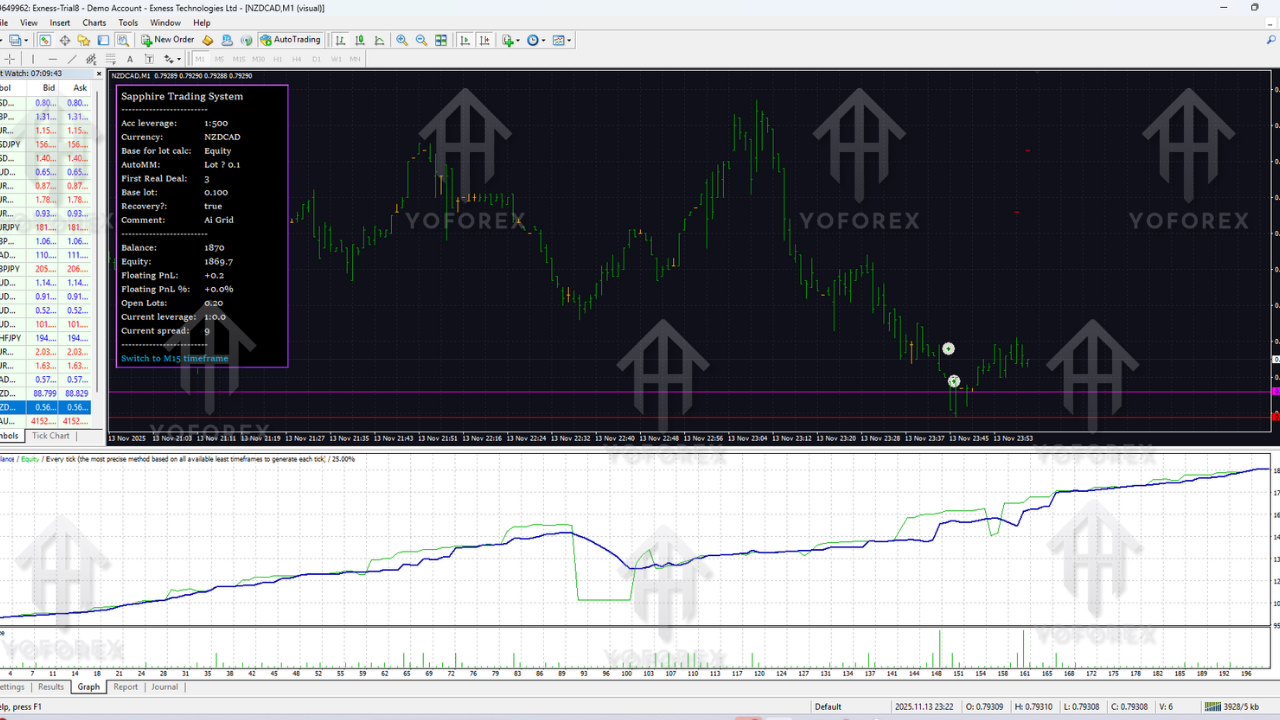
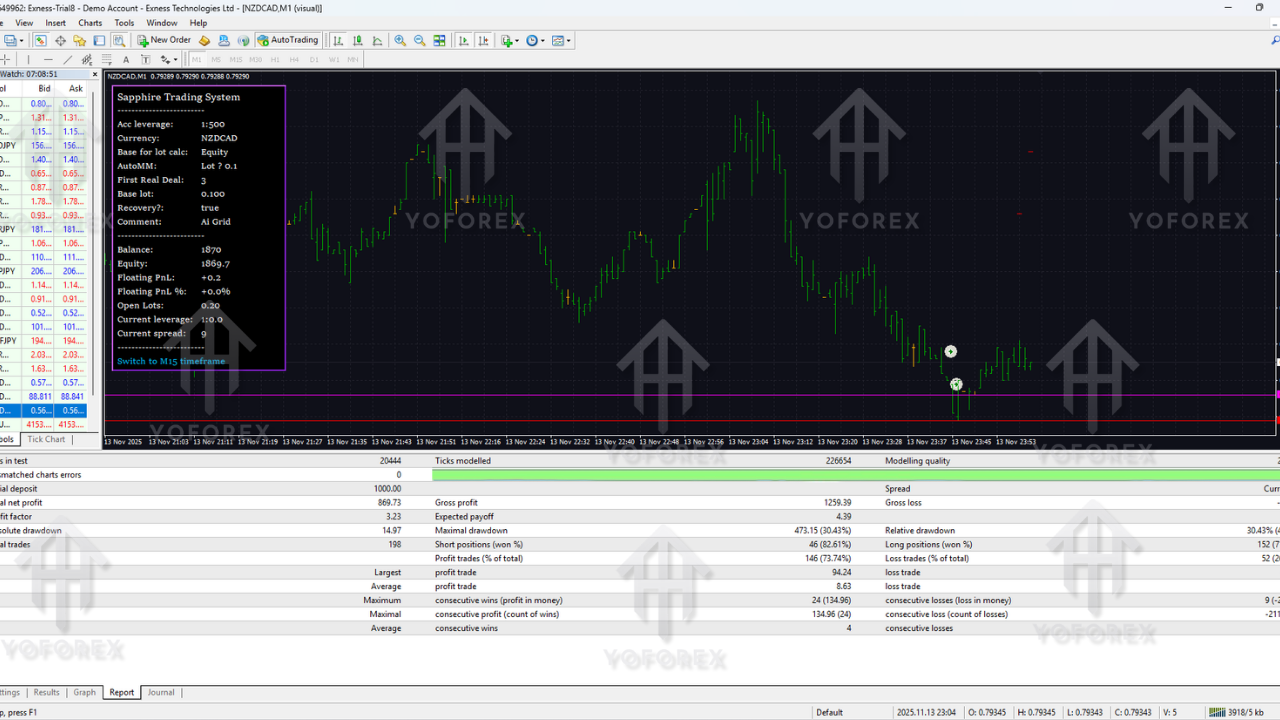
Backtesting & Performance Overview
Backtesting is not a guarantee of future profits, but it’s still super important to understand how Sapphire Trading System EA V2.5 MT4 behaves over a long sample of data.
In properly conducted backtests (using quality tick data, realistic spreads, and commissions), traders typically look for:
- Stable equity curve – A generally rising line with controlled pullbacks, not a straight line and then one big crash.
- Maximum drawdown – Ideally kept within the 15–30% zone for balanced risk (depends on lot size).
- Win rate vs. risk:reward – For breakout strategies, win rates around 45–60% with RR above 1:1 can be quite healthy.
- Number of trades per month – Enough trades to make the system worthwhile, but not hyper-scalping every tick.
Users who test Sapphire Trading System EA V2.5 MT4 usually focus on:
- At least 2–3 years of historical data per pair.
- Multiple timeframes (M15, M30, H1) to see where the EA is most consistent.
- Forward testing on demo before risking any real cash.
In live conditions, spreads, slippage and execution speed will affect performance, so you should always expect real results to be a bit different from “perfect” backtests.
Recommended Settings for Sapphire Trading System EA V2.5 MT4
To get the best out of Sapphire Trading System EA V2.5 MT4, you can use these general guideline settings (adjust according to your broker and risk profile):
Timeframe
- Primary: M30
- Alternative: M15 for more trades, H1 for more conservative traders.
Pairs
- EURUSD, GBPUSD, USDJPY for main usage.
- XAUUSD only if your broker offers tight spreads.
Risk Per Trade
- 0.5% – very conservative.
- 1% – balanced.
- 2% – aggressive (only if you fully accept higher drawdown).
Lot Size Mode
- Use Auto lot based on balance if available (e.g., 0.01 per $200–$300).
- Or fixed lots like 0.01 on small accounts.
Max Open Trades
- 1–3 per symbol to avoid over-exposure.
Take Profit / Stop Loss
- TP: 1.5–2 times SL, or volatility-based target.
- SL: behind recent structure (support/resistance or last swing).
Trailing Stop
- Optional; can be set to kick in after price moves 50–70% towards TP.
Trading Sessions
- Enable London and NY overlap.
- Disable low-liquidity Asian session if your broker spreads widen a lot.
These are not fixed rules, but a solid starting point. Always backtest any new combination and then run it on a demo before going live with Sapphire Trading System EA V2.5 MT4.
How to Install Sapphire Trading System EA V2.5 MT4
Setting up Sapphire Trading System EA V2.5 MT4 is straightforward:
- Download the EA file
Save the.ex4or.mq4file to your computer. - Open MetaTrader 4
In MT4, click on File → Open Data Folder. - Copy the EA
Go toMQL4 → Expertsand paste the Sapphire Trading System EA V2.5 MT4 file there. - Restart MT4
Close and reopen the platform (or right-click “Expert Advisors” and click “Refresh”). - Attach to a chart
Open the chart of your preferred pair and timeframe (e.g., EURUSD M30), then drag Sapphire Trading System EA V2.5 MT4 from the Navigator onto the chart. - Allow live trading
In the EA settings, tick “Allow live trading”. Make sure the main “AutoTrading” button on MT4 is green. - Load preset / adjust inputs
If you have a preset.setfile, load it in the Inputs tab. Otherwise, manually set risk, lot size, session time, etc. - Start on demo
Let it run for a few days or weeks in demo mode to see how it behaves.
Once you’re satisfied, you can move to a live account with the same broker settings and risk profile.
Pros & Cons
Like any trading tool, Sapphire Trading System EA V2.5 MT4 has strengths and limitations.
Pros
- Fully automated breakout trading strategy.
- No dangerous martingale or grid by default.
- Works on major pairs and, optionally, gold.
- Clear risk management structure with SL and TP.
- Can be used by both beginners and advanced traders.
- Customizable risk and session filters.
Cons
- Still vulnerable to choppy, sideways markets.
- Needs good broker conditions (reasonable spreads, fast execution).
- Requires proper backtesting and optimization for each pair.
- Not a “set and forget forever” robot; needs monitoring and periodic updates.
Who Is Sapphire Trading System EA V2.5 MT4 For?
Sapphire Trading System EA V2.5 MT4 is a good fit if:
- You prefer structured breakout strategies over random scalping.
- You want an EA with clear stop loss based risk, not gambling grids.
- You’re okay with moderate drawdowns in exchange for trend-based gains.
- You understand that no EA can win every day, but you want a rules-based edge.
It might not be ideal if you expect 100% win rate, no drawdown, or “flip account in one week” type results. That mindset usually leads to blown accounts, no matter which EA you use.
Support, Risk Warning & Best Practices
If you run into issues with Sapphire Trading System EA V2.5 MT4—like trade size confusion, configuration errors, or broker-related problems—you should:
- Check the Journal and Experts tabs in MT4 for error messages.
- Confirm AutoTrading is enabled and trading is allowed in the EA settings.
- Make sure your broker symbol names (like EURUSD, XAUUSD) match the ones in the EA inputs.
Always remember:
- Forex trading involves high risk.
- Past performance (backtests, screenshots, Myfxbook, etc.) does not guarantee future results.
- Never trade money you can’t afford to lose.
- Always start with a demo account to learn how Sapphire Trading System EA V2.5 MT4 behaves with your broker conditions.
Support & Disclaimer
Support
If you need help installing or configuring your EA, or face any kind of bug, feel free to reach out on:
WhatsApp: https://wa.me/+443300272265
Telegram Group: https://t.me/yoforexrobot
Disclaimer: Forex and gold trading involve risk. Past performance doesn't guarantee future results. Always test robots on demo before live trading and use proper risk management.
Final Thoughts
To wrap it up, Sapphire Trading System EA V2.5 MT4 is a structured, breakout-oriented Expert Advisor built for traders who want rules, not guesswork. It doesn’t promise magic, but it does offer:
- Automated entries and exits based on market structure.
- Clear risk control with fixed stop losses.
- Flexible settings so you can adapt it to your own account size and risk style.
If you’re tired of emotional manual trading and want to test a more objective system, Sapphire Trading System EA V2.5 MT4 can be a solid candidate for your next backtest and demo run. Fine-tune the risk, pick good pairs, respect the strategy, and give it enough time to show its edge. That’s usually how serious traders build consistency, step by step… not overnight.






Comments
Leave a Comment