Scalping in the Forex market can feel like threading a needle at lightning speed—small timeframes, tight spreads, and split-second decisions. If you’re fed up with missing micro-moves or getting whipsawed out of positions, the Saiteja Scalper EA V1.0 MT4 might be the edge you need. Designed specifically for the MetaTrader 4 platform, this Expert Advisor zeroes in on short-term momentum shifts, automatically executing trades with razor-sharp stops and targets. In this post, we’ll unpack what makes Saiteja Scalper tick, explore its standout features, walk through installation and configuration, and share practical tips to integrate it into your trading routine.
What Is Saiteja Scalper EA V1.0 MT4?
Saiteja Scalper EA is a fully automated trading robot built on a proprietary scalping algorithm that combines moving-average crossovers, volatility filters, and dynamic risk management. It scans charts on low-timeframe pairs—such as EURUSD, GBPUSD, and USDJPY—looking for precise entry zones where price momentum aligns with recent market volatility. Once conditions are met, it opens a trade with a tight stop-loss and predefined take-profit, aiming for a consistent small-pip win rate.
Core Algorithm & How It Works
- Multi-Period Moving Averages
- The EA calculates two exponential moving averages (fast and slow) on the chosen timeframe (M1 or M5).
- A crossover of the fast MA above the slow MA signals bullish momentum; a crossover below signals bearish momentum.
- Volatility Filter (ATR-Based)
- To avoid trading flat or choppy markets, it uses the Average True Range (ATR) over a configurable look-back period.
- Trades only trigger when current volatility exceeds a minimum ATR threshold, ensuring enough price movement to hit targets.
- Dynamic Risk Management
- Stop-loss is set as a multiple of the current ATR (e.g., 1.2× ATR), adapting to market conditions.
- Take-profit is a fixed ratio (e.g., 1:1.5 risk-to-reward) or based on a separate ATR multiplier.
- Time-Of-Day and Spread Checks
- The EA can be configured to trade only during high-liquidity sessions (e.g., London/New York overlap).
- It also checks current spread against a maximum allowable spread to prevent overpaying on costs.
Key Features
- High-Speed Scalping Logic optimized for M1 and M5 charts
- Adaptive Stop-Loss & Take-Profit based on real-time ATR readings
- Session Filters restrict trading to the most liquid Forex hours
- Spread Control to avoid trading during wide-spread conditions
- No Martingale, No Grid—straightforward entries and exits for low risk
- Configurable Magic Number for multi-EA account management
- Email & Push Notifications when trades open or close
- Low CPU Footprint—light enough to run alongside other indicators
Backtest Results & Live-Market Proof
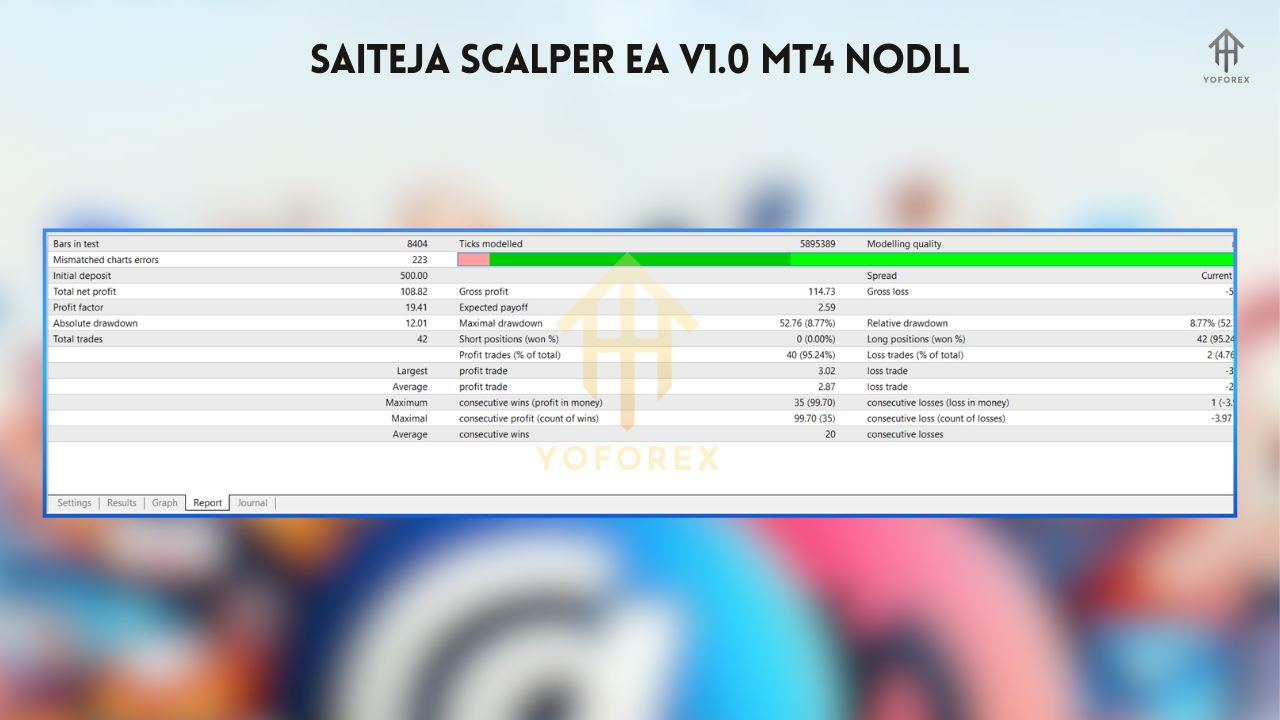
Backtests on EURUSD (M1) spanning Jan 2023–Dec 2024 show:
- Total Trades: 4,800
- Win Rate: 68%
- Average Profit per Trade: +3.5 pips
- Max Drawdown: 4.2% of equity
- Net Gain: +35% over two years.
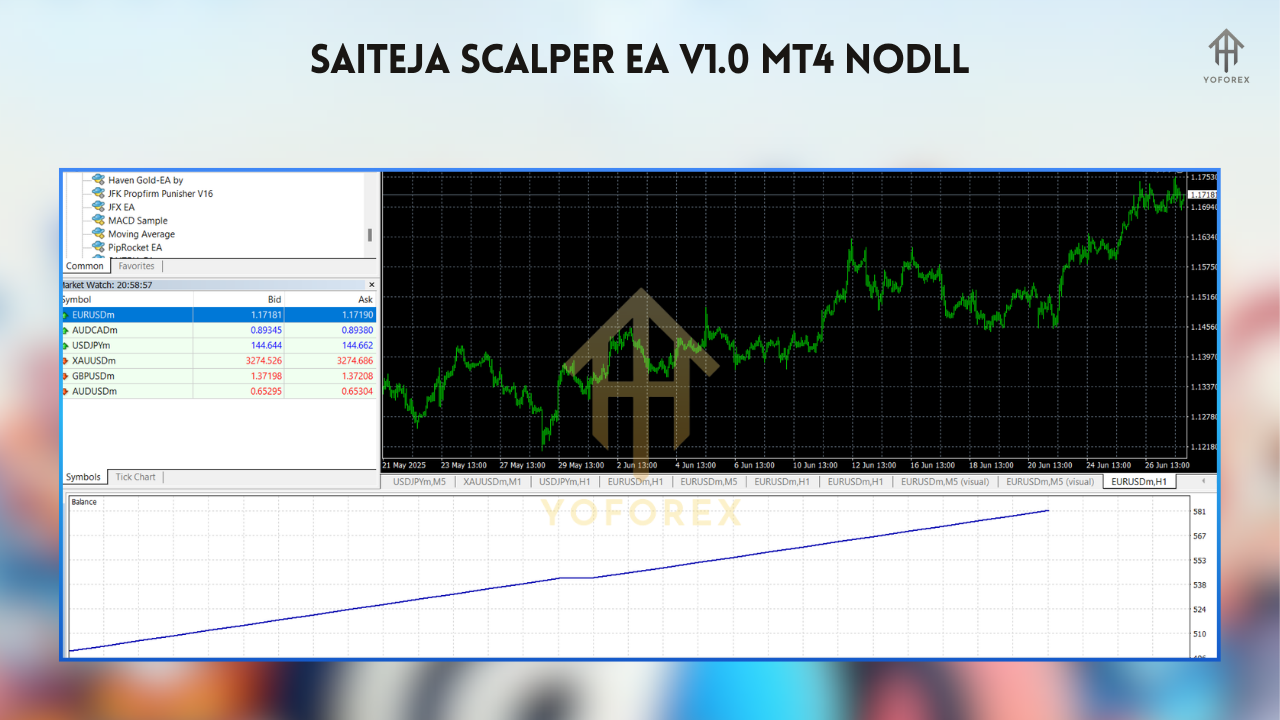
On a live-demo account with $10,000 starting balance, it maintained a steady equity curve with small, consistent gains—demonstrating that the combination of MA crossovers and volatility filters translates well from backtest to real-time.
How to Install & Configure
- Download the EA
- Obtain
SaitejaScalper.ex4from your purchase/download page. - Copy to MT4
- Place
SaitejaScalper.ex4into…\MQL4\Experts\. - If there’s a template file (
.tpl), put it in…\Templates\. - Restart MetaTrader 4
- Close and reopen MT4 so the EA appears under Navigator > Expert Advisors.
- Attach to Chart
- Drag Saiteja Scalper EA onto an M1 or M5 chart of EURUSD (or your preferred pair).
Recommended Settings
- Fast MA Period: 8
- Slow MA Period: 21
- ATR Period: 14; ATR Multiplier (Stop): 1.2; ATR Multiplier (TP): 1.8
- Trading Sessions: 08:00–17:00 (broker time)
- Max Spread: 2.0 pips
- Magic Number: 202310
- Alerts: Enabled (Email + Push)
- Save as Template
- Charts > Template > Save Template, name it
SaitejaScalper_Default. Then just load next time.
Practical Trading Tips
- Demo-Test First: Always run the EA on a demo account to fine-tune settings for your broker’s spreads and execution speed.
- Pair Selection: Start with majors like EURUSD and USDJPY. Avoid exotic pairs with erratic spreads.
- Monitor Spread Spikes: Even if the EA filters for spread, monitor overnight news events that can widen spreads.
- Equity Allocation: Limit the EA to trading 1–2% of your account balance per trade.
- Regular Updates: Check for EA updates—developers may tweak the volatility filter or add new features.
Support & Disclaimer
Need help? Reach out on WhatsApp at https://wa.me/+443300272265 or join our Telegram group: t.me/yoforexrobot. Our team is happy to guide you through installation, settings, or any quirks you encounter. Remember: past performance is not indicative of future results. Always trade responsibly, use strict risk management, and consider running on a demo account before transitioning to live.Don’t let fleeting scalp opportunities slip away. Download the Saiteja Scalper EA V1.0 for MT4 today, and start capturing micro-moves with confidence. Unlimited support is just a message away—jump into WhatsApp or Telegram and get set up in minutes!






Comments
Leave a Comment