Tired of staring at a dozen moving averages trying to guess the real trend? Ribbon Indicator V1.1 for MT4 stacks multiple MAs into a single, color-coded trend ribbon so you can see direction, strength, and pullback zones at a glance. It’s built for clarity: quick read, fewer second-guesses, and zero clutter. Use it to time entries, trail exits, or simply stay out when the market’s messy. No signals spam, no repainting on the current timeframe—just a reliable visual guide you can trust.
Below you’ll find a practical walkthrough: what the ribbon shows, how to use it for entries/exits, recommended settings, install steps, playbooks for different styles (trend, pullback, breakout), FAQs, and copy-paste meta data for your blog/CMS.
What Is the Ribbon Indicator?
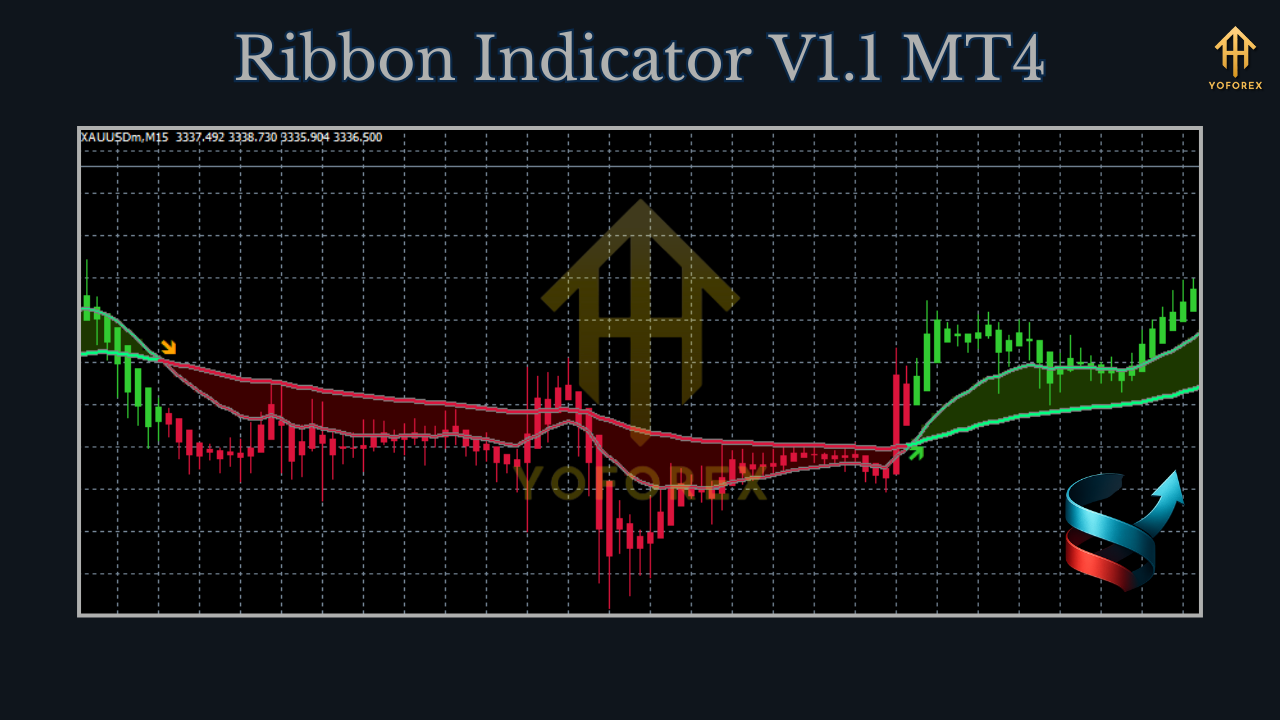
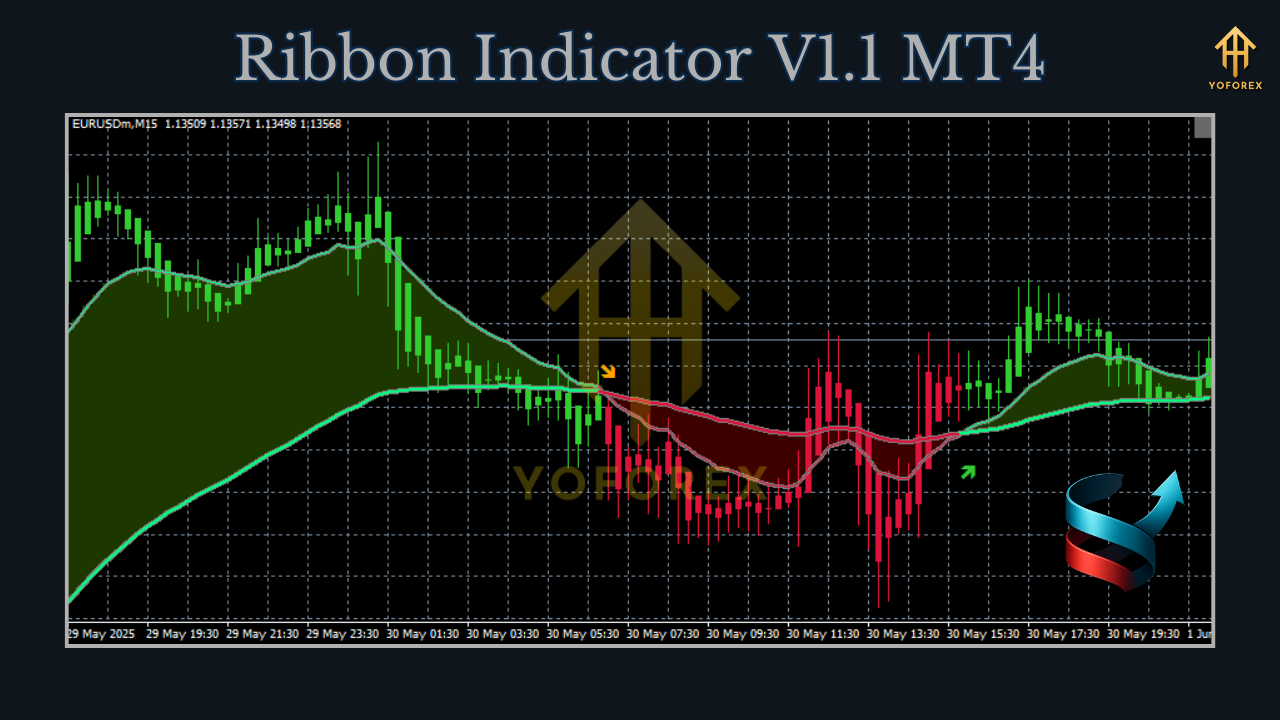
Ribbon Indicator V1.1 (MT4) plots a bundle of moving averages (your choice of EMA/SMA/SMMA) and compresses the read into a color state:
- Bullish state: ribbon fans out upwards (fast > medium > slow), color = green
- Bearish state: ribbon fans out downwards (fast < medium < slow), color = red
- Neutral/compression: ribbon narrows or flips frequently, color = amber/gray (chop alert)
Optionally, the indicator prints a mini dashboard (top-left) with: current trend state, slope score, ATR snapshot (volatility), and higher-TF alignment (if enabled).
Best use cases
- Trend identification (stay with the dominant move)
- Pullback timing (rejoin trend near the ribbon)
- Breakout confirmation (enter once ribbon flips + expands)
- Exit/Trail helper (trail behind the slow band or color flip)
Pairs & Timeframes
- EURUSD, GBPUSD, USDJPY → M15–H4
- XAUUSD (Gold) → M30–H1/H4 (cost-aware)
- Works on indices/CFDs too (check broker specs).What’s New in V1.1
- Smoother coloring on small flips (less flicker during micro pullbacks)
- Slope score panel (0–100) to quantify trend quality at a glance
- Optional ATR filter to mute “trend” when vol is too low/high
- Higher-TF confirmation (uses closed higher-TF bars to avoid repainting)
- Alert suite: pop-up, sound, push/email for trend change, pullback touch, slope threshold
- Performance bump: optimized loop; better handling on M1/M5 charts
How It Works (Under the Hood)
- The ribbon stacks fast/medium/slow averages (e.g., EMA 9/21/50/100/200) and checks ordering + slopes.
- Bullish if fast lines sit above slow ones and average slope > threshold; bearish if mirrored.
- The slope score blends gradient + alignment so you can filter weak trends from strong runs.
- If MTF confirm is on, the ribbon only paints “strong” when the higher-TF ribbon agrees (based on closed bars—no cheating).
Key Features
- Multi-MA ribbon (EMA/SMA/SMMA options; choose periods & count)
- Color states: bull, bear, neutral (configurable colors & opacity)
- Slope score & fan-out width meter (gauges strength vs. compression)
- MTF confirmation (1–2 steps up, closed bars only)
- ATR filter (min/max volatility band to avoid dead or reckless phases)
- Pullback bands (shaded zone between fast/medium—great for re-entries)
- Alerts for: trend flip, pullback touch, slope threshold breach
- Mini dashboard with state, slope, ATR, MTF status
- Lightweight code for multi-chart setups
Recommended Settings (Starter Templates)
A) Swing (H1/H4, FX Majors)
- Averages: EMA 9/21/50/100/200
- Slope threshold: 30 (0–100)
- ATR filter: enable; ATR(14), min 0.3×, max 3.0× (pair-dependent)
- MTF confirm: ON (e.g., H1 chart confirmed by H4)
- Alerts: Trend flip + Pullback touch
B) Intraday (M15/M30, FX Majors)
- Averages: EMA 8/13/21/34/89
- Slope threshold: 25
- ATR filter: min 0.2×, max 2.5×
- MTF confirm: optional (M15 confirmed by H1)
- Alerts: Pullback touch; Slope>40
C) Gold (XAUUSD, M30/H1)
- Averages: EMA 10/20/50/100/200
- Slope threshold: 35
- ATR filter: min 0.5×, max 3.5× (gold is spicy)
- MTF confirm: ON (H1 confirmed by H4)
- Alerts: Trend flip + Pullback touch; widen alert cooldown
Playbooks (How to Trade the Ribbon)
1) Trend-Follow Pullback
- Context: Ribbon green, slope ≥ threshold, fan-out widening.
- Trigger: Price pulls back into the pullback band (fast→medium zone) and shows a rejection candle or micro break-retest.
- Stop: Below the slow band or last swing.
- Exit: Trail under slow band or flip to amber/red; partial at structural levels.
2) Breakout Confirmation
- Context: Ribbon just flipped from red→green (or vice versa); slope rising.
- Trigger: Price closes above/below a local range high/low with follow-through.
- Stop: Beyond the breakout level or under slow band.
- Exit: Target 1.5R–2R, then trail via slow band.
3) “Do-Nothing” Filter
- Context: Amber/gray ribbon or slope < threshold; ATR outside band.
- Action: Skip. The ribbon is telling you it’s likely chop or dangerous volatility.
Installation (MT4)
- Copy
Ribbon_Indicator_V1_1.ex4intoMQL4/Indicators/. - Restart MT4 → Navigator → Indicators → verify it’s listed.
- Drag onto a chart → set MA type/periods, colors, slope threshold, ATR filter, MTF confirm, and alerts.
- (Optional) Save a Template so you can apply the ribbon style across symbols fast.
Best Practices
- Use closed bars. Judge flips on candle close to avoid noise.
- Tune slope once per symbol. Too low = whipsaws; too high = missed moves.
- Costs matter (especially gold). If spreads widen, step up a timeframe.
- Journal screenshots. Mark where you entered/exited vs. ribbon state—patterns pop fast.
- Don’t over-optimize. The ribbon’s power is simplicity + consistency.
FAQs
Does it repaint?
On the current timeframe with closed candle logic, no. With MTF confirm, the higher-TF state only finalizes on its bar close.
Can I use SMA or SMMA instead of EMA?
Yes—choose per input. EMAs react faster; SMAs/SMMA are smoother.
Good for scalping?
Yes, on M5/M15 with a higher slope threshold and tight ATR filter. Remember: execution costs are king on lower TFs.
How do I set alerts?
Enable pop-up/push/email in MT4 (Options → Notifications/Email), then toggle alert types inside the indicator inputs.
Disclaimer
Indicators guide; they don’t guarantee profits. Trading Forex/CFDs involves risk. Test on demo first, size positions responsibly, and never trade money you can’t afford to lose.
Call to Action
Want cleaner trend reads and simpler timing? Install Ribbon Indicator V1.1 on MT4, load the Swing or Intraday template above, and journal a week of trades. You’ll see the difference when your entries line up with a clear, stable ribbon—less doubt, fewer chops, better discipline.






Comments
Leave a Comment