Mastering Market Trends with Range Detector Indicator MT5
In the fast-paced world of forex trading, spotting when price is consolidating within a tight band versus breaking out into a trending move can make all the difference between a profitable trade and a frustrating loss. Enter the Range Detector Indicator MT5—a purpose-built tool designed to alert traders when markets are moving sideways, so you can adapt your strategy on the fly and avoid getting chopped up by whipsaws. Whether you’re a scalper hunting for breakout opportunities or a swing trader looking to fade the edges of a consolidation, this MT5 indicator gives you clear visual cues and optional alerts to help you stay one step ahead. In this post, we’ll dive deep into what the Range Detector Indicator MT5 is, why it matters, how to install and configure it, and share best practices to integrate it into your trading arsenal. By the end, you’ll know exactly how to put this free forex indicator to work for you.
What is the Range Detector Indicator MT5?
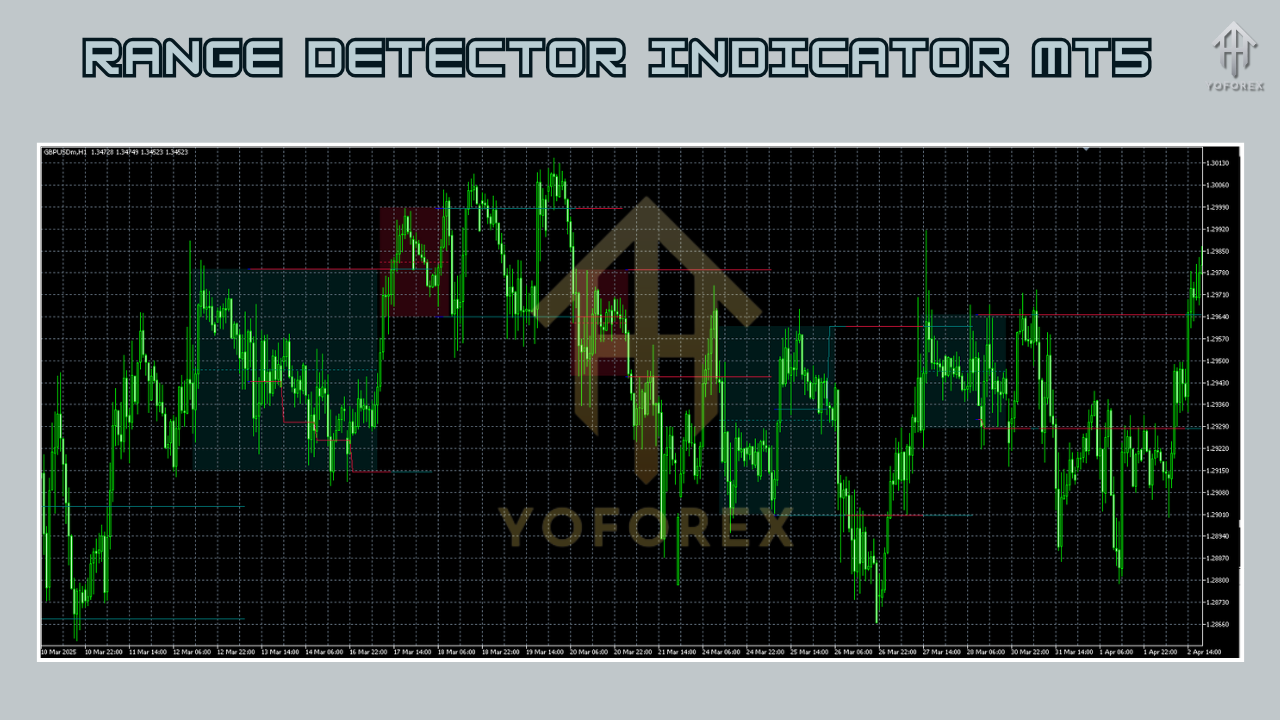
The Range Detector Indicator MT5 is a custom MetaTrader 5 indicator that analyzes price action in real time to determine when the market is trading within a defined horizontal range. It uses a combination of volatility filters and statistical analysis of recent high-low swings to draw upper and lower boundary lines on your chart, marking the “trading box” where price is constrained. Unlike generic oscillators that can lag during low-volatility phases, this range trading indicator adapts to changing market conditions by recalculating its thresholds on each new bar. Key outputs include:
- Dynamic upper and lower range bands
- Color-coded background shading to highlight consolidation zones
- Optional audio and pop-up alerts when price enters or exits the detected range
Because it’s an MT5 indicator, it integrates seamlessly with all of MetaTrader 5’s built-in features, including strategy testers, profile templates, and multi-timeframe charts. You can run it alongside your favorite oscillators, moving averages, or volume tools to build a robust, rules-based approach to trading.
Key Features
- Adaptive Range Calculation — Automatically adjusts its calculation window based on recent price action, ensuring the range zone is always relevant to current market conditions.
- Visual Clarity — Displays clear horizontal lines and optional shaded boxes, so you can instantly see when price is trapped within side-ways movement.
- Customizable Alerts — Choose pop-up, email, or push notifications for range breaches, helping you react fast without staring at the screen all day.
- Multi-Timeframe Support — Apply the indicator on any timeframe—from M1 scalping charts up to D1 and W1 for swing traders.
- Lightweight Code — Optimized for minimal CPU usage, so it won’t slow down your trading platform even when running on multiple instruments.
- User-Defined Sensitivity — Fine-tune the indicator’s sensitivity, deciding how narrow or wide you want the range filter to be before signaling.
- Backtest Compatibility — Fully supported in MT5’s strategy tester, allowing you to quantitatively evaluate performance over historical data.
- Free Forex Indicator — Available as a no-cost download, making it accessible to both beginner and experienced traders.
How to Install and Use Range Detector Indicator MT5
Download the Indicator File
Visit the official download page on YoForex EA:
https://yoforexea.com/range-detector-indicator-mt5
Click “Download” and save the
.ex5file to your computer.
Copy to MT5 Indicators Folder
Open your MetaTrader 5 terminal.
Go to File → Open Data Folder.
Navigate to MQL5 → Indicators and paste the downloaded
.ex5file.
Restart MetaTrader 5
Close and reopen MT5 to refresh the custom indicator list.
Attach to a Chart
In the Navigator panel under Indicators, locate Range Detector Indicator MT5.
Drag it onto your desired chart (e.g., EURUSD H1).
Configure Inputs
Range Period: Sets the look-back window (e.g., 20 bars by default).
Volatility Threshold: Adjusts how much price movement is required before updating the range.
Alert Settings: Toggle pop-up, email, or push alerts on/off.
Visual Style: Customize line colors, background shading transparency, and label fonts.
Save as Template
Once you’ve dialed in your preferred settings, right-click the chart → Template → Save Template.
Next time, apply the template to instantly load your Range Detector Indicator MT5 configuration.
Best Settings and Customization Tips
• Range Period: For shorter-term strategies, try a 15–30 bar range on M5–M15 charts. Longer periods (50–100 bars) work well on H4–D1.
• Volatility Threshold: Lower values will detect tighter ranges (good for scalpers), while higher values filter out minor wobbles for swing traders.
• Alerts: Enable mobile push notifications if you trade multiple instruments—you’ll get instant updates wherever you are.
• Combine with Volume: Add a volume-based indicator to confirm that breakouts from the range are supported by higher trading activity.
• Use Multi-Chart Layouts: Monitor the Range Detector Indicator MT5 across several correlated pairs (e.g., EURUSD and GBPUSD) to avoid false breakouts.
• Time Filter: Only trade breakout signals during high-liquidity sessions (London/New York overlap) to reduce slippage.
Benefits of Using a Range Trading Indicator
Relying solely on trend-following indicators can leave you vulnerable during choppy, non-directional markets. A dedicated range trading indicator like the Range Detector Indicator MT5 offers several advantages:
- Clarity in Consolidation — It highlights periods of indecision, so you can switch from trend-following tactics to mean-reversion or breakout strategies.
- Risk Management — Knowing the exact boundaries of a consolidation zone lets you place stop-loss orders just outside the range, reducing the chance of getting prematurely stopped out.
- Improved Entry Timing — By waiting for range breaks or bounces off the detected boundaries, you can filter out low-probability trades and focus on high-probability setups.
- Adaptable Framework — Because the indicator recalculates dynamically, it works across all timeframes and instruments, from forex majors to indices and commodities.
- Automation Potential — Combined with MT5’s Expert Advisor infrastructure, you can automate range-based entries and exits, removing emotional bias from your trading.
Real-World Applications and Trading Strategies
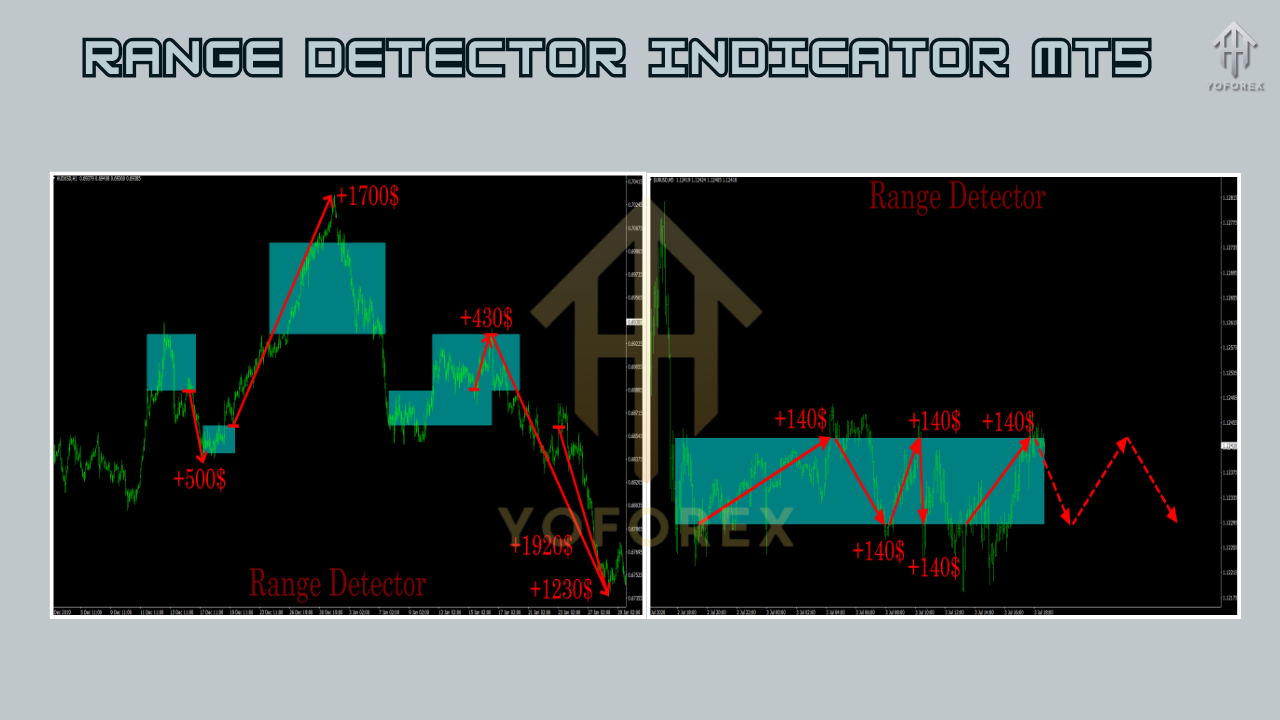
- Breakout Strategy: Place a buy stop a few pips above the upper range line and a sell stop below the lower line. Use volatility-based position sizing to adjust lot sizes.
- Range Fade: In truly sideways markets, consider selling near the top boundary and buying at the bottom. Confirm with a momentum oscillator (e.g., RSI divergence) for higher win rates.
- Multi-Pair Confirmation: Look for simultaneous range breaks on correlated pairs (EURUSD and EURJPY) to validate the move.
- Session Overlay: Combine the Range Detector Indicator MT5 with time filters—only take setups that align with London or New York open.
- News Avoidance: Use the indicator to spot tight consolidations before major news releases. Avoid trading at the moment of release and instead prepare for possible breakouts.
Where to Download Range Detector Indicator MT5
Ready to enhance your trading edge? Download the free Range Detector Indicator MT5 today from YoForex EA’s official site:
https://yoforexea.com/range-detector-indicator-mt5
Installation takes less than a minute, and you’ll immediately gain a powerful tool for identifying consolidation zones, timing breakout entries, and managing risk more effectively.
Support & Disclaimer
Got questions? Hit us up on WhatsApp at https://wa.me/+443300272265 or join our Telegram group: https://t.me/yoforexrobot. Our team’s ready to help you refine settings or debug install issues.
Disclaimer: Past performance isn’t a guarantee of future results. Range Detector Indicator MT5 is a tool to assist your analysis—not a “set and forget” profit machine. Always demo-test any strategy before risking real capital.
Conclusion & Call to Action
The Range Detector Indicator MT5 is a versatile, easy-to-use MT5 indicator that brings clarity to sideways markets—helping you know exactly when to switch tactics or prepare for a breakout. Whether you’re scalping on M15, swing trading on H4, or automating with EAs, this free forex indicator is a must-have addition to your toolkit. Don’t let choppy price action erode your account balance. Download the Range Detector Indicator MT5 now and start trading with greater confidence.






Comments
Leave a Comment