Introduction
If you’re tired of staring at charts all day, missing entries, or closing trades too early just because emotions kicked in, then an automated solution like Quantum MatriX EA V3.3 MT5 can seriously change the game for you.
This Expert Advisor is built for the MetaTrader 5 platform and focuses on doing all the heavy lifting: market scanning, trade entries, position management, and exits – based on pre-coded logic and risk rules. Instead of guessing or over-trading, Quantum MatriX EA V3.3 MT5 aims to bring structure, consistency and repeatability into your trading process.
Rather than relying on a single fragile setup, the EA combines technical filters, volatility analysis and trend confirmation to find higher-probability opportunities. You still control risk, lot size and symbols, but the execution becomes fully automated. For traders who want a more “hands-off but smart” kind of trading, this style of MT5 expert advisor is often a perfect fit.
In this blog, we’ll break down how Quantum MatriX EA V3.3 MT5 works, its key features, suggested settings, performance expectations, and who it’s most suitable for.
Core Concept of Quantum MatriX EA V3.3 MT5
At its core, Quantum MatriX EA V3.3 MT5 is designed to combine trend-following logic with volatility-based entries and dynamic money-management. That sounds fancy, but in simple terms:
- It tries to trade in the direction of the dominant trend, not randomly against it.
- It waits for pullbacks or volatility “pockets” to enter with better pricing.
- It uses protective stop losses and adjustable take profits.
- It can use partial closes or trailing stops (depending on settings) to lock in profit.
Typical usage scenarios for Quantum MatriX EA V3.3 MT5:
- Timeframes: M15, M30, H1 (most traders will stick to M15–H1 for balance between signal quality and frequency).
- Pairs: Major pairs like EURUSD, GBPUSD, USDJPY, XAUUSD (Gold) – depending on your risk appetite and broker conditions.
- Minimum Deposit: Often recommended from $200–$300 and above for cent or standard accounts with sensible risk.
The main goal of Quantum MatriX EA V3.3 MT5 isn’t to flip a small account overnight; instead, it aims for more realistic and sustainable growth with controlled drawdowns.
Key Features of Quantum MatriX EA V3.3 MT5
Here are the standout features that make Quantum MatriX EA V3.3 MT5 attractive to both beginners and experienced algo traders:
- Fully Automated Trading
Once you attach the EA to a chart and configure settings, it handles entries, stop loss, take profit, and trade management without manual intervention. - Multi-Pair & Multi-Timeframe Support
You can attach Quantum MatriX EA V3.3 MT5 to multiple charts – for example, EURUSD M15, GBPUSD H1, XAUUSD M30 – to diversify risk across pairs and timeframes. - Trend + Volatility Logic
The EA uses indicators and volatility filters to identify when the market is trending and attempts to enter on retracements rather than chasing moves blindly. - No Martingale or Dangerous Grid (if configured properly)
The logic is designed to be used without doubling lot sizes aggressively. You can keep it on fixed lots or safe auto-lot risk based on account balance. - Customizable Risk Management
Fixed or percentage-based lot sizing, user-defined stop loss and take profit, plus optional trailing stop and break-even features. - News / Volatility Filter (Depending on Version Settings)
Some configurations of Quantum MatriX EA V3.3 MT5 allow you to reduce trading during extremely high-impact news windows to avoid random spikes and spread explosions. - Built-In Info Panel
The EA usually displays an on-chart panel showing spread, magic number, status (waiting / trading), and maybe recent performance, making it easier to monitor. - Broker-Friendly Logic
Quantum MatriX EA V3.3 MT5 is typically compatible with ECN, STP and most standard MT5 brokers, as long as your broker allows algorithmic trading and has reasonable spreads. - Low VPS / PC Load
The EA is light and can run on a VPS, giving you 24/5 uptime even if your personal computer is off. - Beginner-Friendly Setup
Even if you’re new to MT5 expert advisors, the installation and basic configuration of Quantum MatriX EA V3.3 MT5 is straightforward.
Strategy & Performance Overview
Trading Logic
Quantum MatriX EA V3.3 MT5 generally follows this type of logic flow:
- Trend Detection
The EA analyses moving averages or similar tools to check whether the market is trending up, trending down, or ranging. - Signal Confirmation
It then uses additional filters such as oscillator readings, volatility bands, or candle patterns to confirm that a potential entry is not just noise. - Entry Point
Once conditions align, Quantum MatriX EA V3.3 MT5 places a buy or sell order with pre-defined stop loss and take profit based on your configuration (for example, 30–60 pips or dynamic, depending on pair). - Trade Management
Trailing stop can move SL closer as price moves in your favor, break-even function can shift SL to entry after certain pips, and partial close (if enabled) can secure partial profit and leave a runner open. - Exit Conditions
If take profit or stop loss is hit, or if trend conditions reverse strongly, the EA exits according to the rules coded.
Backtest-Style Expectations
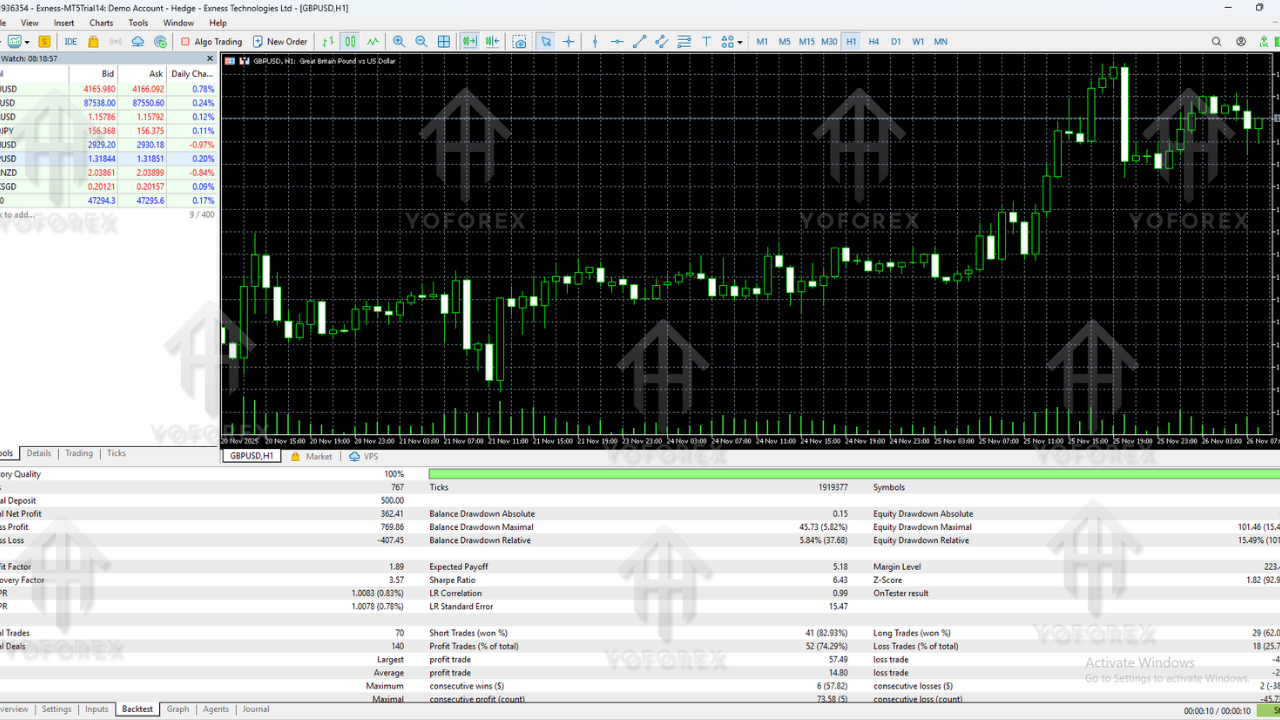
Because every broker and spread condition is different, exact results will vary. But in a typical, properly configured backtest for Quantum MatriX EA V3.3 MT5, you might aim for:
- Average Monthly Return: 5–15% (depending on risk).
- Max Drawdown: Ideally kept below 20–30% with conservative settings.
- Win Rate: Around 55–70% depending on pair and timeframe.
- Trade Frequency: From a few trades per week to several per day per pair, based on volatility.
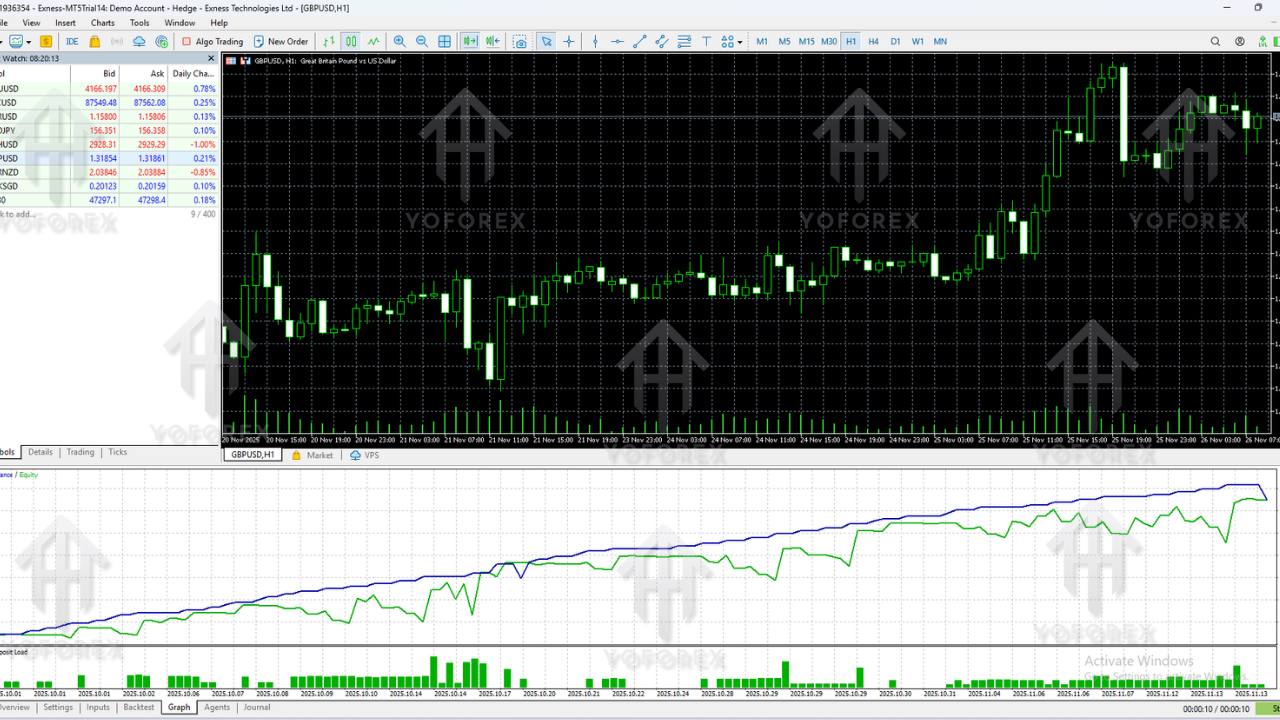
The main emphasis is smooth equity growth rather than lottery-ticket style risk. If you crank the risk too high, obviously both profits and drawdown will spike, so it’s always smarter to start low and scale once you’re comfortable with how Quantum MatriX EA V3.3 MT5 behaves.
Recommended Settings for Quantum MatriX EA V3.3 MT5
Here’s a general guideline you can adapt; always test first on demo.
1. Account Type & Deposit
- Account Type: ECN or Raw spread is preferred, but standard accounts can also work.
- Minimum Deposit:
Low risk: From $300–$500+ on a standard account.
Higher risk: Can be run on smaller deposits, but volatility and drawdown will feel larger.
2. Timeframes
- Recommended: M15, M30, or H1
- For Gold (XAUUSD): M15 or M30 is often a good compromise between speed and stability.
- For major pairs (EURUSD, GBPUSD, USDJPY): H1 can give cleaner signals and less noise.
3. Currency Pairs
Common choices for Quantum MatriX EA V3.3 MT5:
- EURUSD – Stable, low spread, great for testing.
- GBPUSD – More volatile, higher potential but higher risk.
- USDJPY – Often clean trends, good for intraday logic.
- XAUUSD (Gold) – For traders who like volatility and bigger moves; use sensible SL and smaller lot size.
4. Lot Size / Risk
- Fixed Lot: 0.01 per $300–$500 account is a conservative starting point.
- Auto Lot: 0.01 per $1,000 (or similar) if your EA supports balance-based calculation.
Avoid over-leveraging; Quantum MatriX EA V3.3 MT5 is powerful but not magic – risk management still matters.
5. Other Inputs
Depending on the version, you may see:
- Max Open Trades: Limit number of simultaneous orders.
- Max Spread Filter: For example, don’t trade if spread > 20 points.
- Trade Time Filter: Restrict trading to London/NY session if desired.
- News Filter On/Off: Optional, depending on your preference.
How to Install Quantum MatriX EA V3.3 MT5 on MetaTrader 5
Setting up Quantum MatriX EA V3.3 MT5 is pretty simple. Follow these steps:
- Download the EA File
You’ll usually receive a.ex5file for the EA. Save it somewhere easy to find. - Open MT5 and Navigate to Data Folder
In MetaTrader 5, click File → Open Data Folder, then go toMQL5 → Experts. - Copy the EA File
Paste the Quantum MatriX EA V3.3 MT5 file into theExpertsfolder. - Restart MT5
Close and reopen MetaTrader 5, or right-click in the Navigator and choose Refresh. - Attach EA to Chart
Open the pair and timeframe you want (e.g., EURUSD M15). Find Quantum MatriX EA V3.3 MT5 under Navigator → Expert Advisors, then drag and drop it onto the chart. - Enable Algo Trading
Make sure Algo Trading is enabled at the top of MT5. In EA settings, check “Allow Algo Trading” or “Allow live trading.” - Configure Inputs
Set lot size, risk percent, SL/TP, magic number, etc., then click OK to start the EA.
If the smiley/robot icon on the chart is happy and the status says “Running” or similar, Quantum MatriX EA V3.3 MT5 is now live and ready to trade.
Who Is Quantum MatriX EA V3.3 MT5 Best For?
This EA is ideal if:
- You understand forex basics but don’t want to manually monitor every candle.
- You prefer structured, rule-based trading instead of emotional scalping.
- You’re comfortable with medium-term growth, focusing on consistency and capital protection.
- You can let the EA run on a VPS or a dedicated system with stable internet for 24/5 operation.
It may not be for you if:
- You want ultra-aggressive flipping of accounts in a few days.
- You constantly interfere with EA trades, closing early, and changing settings every hour.
Quantum MatriX EA V3.3 MT5 works best when you treat it like a serious trading system: plan, test, deploy, and monitor calmly.
Tips to Get the Most Out of Quantum MatriX EA V3.3 MT5
- Start on Demo: Always first run it on a demo account to get familiar with trade frequency, drawdown and behavior.
- Use a Reliable VPS: To avoid disconnections that could impact open positions and execution.
- Track Your Results: Export account history weekly, check profit factor, drawdown, and your risk settings.
- Avoid Over-Optimization: Don’t curve-fit backtests to perfection; real markets are messy.
- Scale Slowly: If it’s performing well on conservative risk, only then think about gradually increasing lot size.
Risk Disclaimer & Final Thoughts
Even though Quantum MatriX EA V3.3 MT5 is designed to trade with logic, discipline, and robust risk features, it’s still trading in the real market. There will be losing trades, drawdowns, and periods of sideways performance – that’s completely normal.
- Past performance is not a guarantee of future results.
- Never risk money you cannot afford to lose.
- Test on demo and use lower risk until you fully understand how Quantum MatriX EA V3.3 MT5 behaves on your broker.
Used correctly, this MT5 expert advisor can help remove emotional decision-making, give you a more professional risk profile, and free up your time from staring at charts 24/7. Treat Quantum MatriX EA V3.3 MT5 like a tool in a serious trading business, not a quick-rich shortcut.
Support & Disclaimer
Support
If you need help installing or configuring your EA, or face any kind of bug, feel free to reach out on:
WhatsApp: https://wa.me/+443300272265
Telegram Group: https://t.me/yoforexrobot
Disclaimer: Forex and gold trading involve risk. Past performance doesn't guarantee future results. Always test robots on demo before live trading and use proper risk management.






Comments
Leave a Comment