PythonX M1 Scalper XAUUSD EA V5.0 MT5 – Ultra-Fast Gold Scalping with Engulfing Entries
If you’ve been hunting for a serious gold scalper that can actually keep up with XAUUSD’s speed on the 1-minute chart, PythonX M1 Scalper XAUUSD EA V5.0 (MT5) is built for that reality. It’s a high-frequency Expert Advisor designed to spot quick momentum shifts using engulfing candlestick pattern detection, then execute with tight risk and rapid exits. The idea is simple: react fast, aim small, repeat often—without the reckless stuff (no martingale, no runaway grids). In volatile sessions—especially London and New York overlaps—PythonX tries to capture those micro-bursts that trend for a handful of candles and then fade.
Below, you’ll find how it works, features, configuration, risk suggestions, optimization ideas, and a practical workflow for both prop-firm challenges and live accounts.
What is PythonX M1 Scalper XAUUSD?
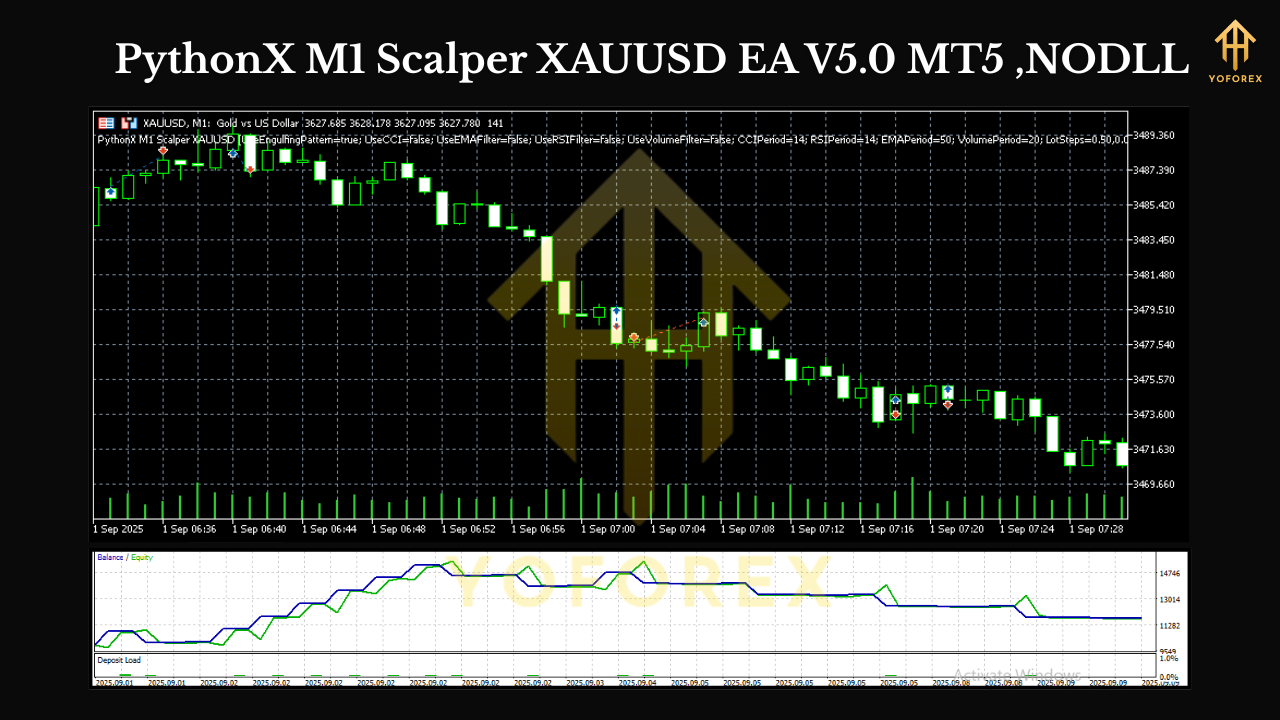
PythonX is a price-action-first EA for MetaTrader 5 that focuses on short-term momentum in XAUUSD on the M1 timeframe. Rather than using laggy multi-indicator confluence, it looks for bullish or bearish engulfing patterns at intraday inflection points and fires trades with predefined stop loss and dynamic or fixed take profit. The goal isn’t to hold positions for hours—it’s to grab high-probability bursts of movement minutes after the pattern forms, then flatten risk quickly.
Who it’s for:
- Traders who prefer many small trades over a few long swings
- Prop-firm challenge runners who need strict risk control and consistent stats
- Anyone who likes mechanical, repeatable rules with minimal discretionary bias
Core Strategy: Engulfing on M1 (the fast lane)
At the heart of PythonX is a ruleset that detects engulfing candles (where the current candle’s body fully covers the previous candle’s body), signaling potential momentum continuation or reversal. On M1 gold, that signal can be powerful—but only if combined with discipline:
- Context filter: The EA can be configured to avoid low-liquidity windows, major news spikes, or spreads above a threshold.
- Entry logic: When an engulfing forms and spread/volatility are within limits, PythonX executes a market or pending order with tight SL.
- Exit logic: You can use fixed TP, dynamic RR (e.g., 1:1.2 to 1:2), or time-based exits to cap exposure.
- Safety rails: Optional cooldown after consecutive losses, max trades per session, and daily loss lock help protect the equity curve.
Key Features
- M1 Gold Focus: Optimized for XAUUSD on 1-minute, where micro-trends can stack profits across the session.
- Engulfing Detection Engine: Clean, rules-driven entries—no martingale, no grid.
- Tight Risk Control: Fixed SL per trade, max daily loss and max daily trades parameters.
- Spread & Slippage Filters: Avoids unfavorable liquidity; you define the maximum allowable spread/slippage.
- Session Filters: Limit trading to London, NY, or the overlap for more reliable volatility.
- News Avoidance Window: Disable trading a set number of minutes before/after high-impact releases.
- Dynamic or Fixed Take Profit: Choose a risk-reward target (e.g., 1:1.5) or a fixed TP in points.
- Partial Close & Breakeven: Optional scale-out and auto-BE after price moves in your favor.
- Equity Protection: Daily DD lock, cooldown after losses, and hard stop for the day.
- VPS-Ready: Lightweight, designed to run 24/5 on a low-latency VPS.
Minimum Requirements & Environment Setup
- Platform: MetaTrader 5 (build updated in recent months recommended).
- Symbol & Timeframe: XAUUSD, M1 only (core logic is tuned for M1 gold).
- Broker: ECN/RAW spread accounts with fast execution; aim for < 20–25 points average spread on XAUUSD during liquid hours.
- Leverage: 1:200 to 1:500 is typical for scalpers (observe your region’s regulations).
- VPS: Strongly recommended. Look for latency < 20ms to your broker’s server.
- Capital & Risk: Start small, e.g., $300–$1000 on live; use 0.01–0.03 lots per $1000 until you establish stats.
Installation (MT5):
- Copy the EA file to MQL5/Experts.
- Restart MT5 → open XAUUSD M1.
- Enable Algo Trading, attach the EA, allow DLL/Algo if needed.
- Load the provided set file (if you have one) or use the recommendations below.
- Check Journal/Experts tabs for any warnings before going live.
Recommended Settings (starter baseline)
- Risk per trade: 0.5% (new users) or max 1% (experienced).
- Stop Loss: 150–250 points (depends on broker digits); keep it tight but not suffocating.
- Take Profit: Start with RR = 1:1.2 to 1:1.8; adjust after 2–3 weeks of stats.
- Max trades/day: 5–12 (prop users lean to the lower side).
- Trading sessions: London + NY overlap; avoid Asia unless you’ve tested.
- Spread filter: Block trades above 30–40 points; tighten during news hours.
- Slippage: 2–5 points (broker-dependent).
- Breakeven: Move to BE after 0.8R–1.0R; optional partial close at +1R.
- News filter: Disable trading 10–15 minutes before/after red-flag events.
Risk Management & Prop-Firm Notes
The EA can generate many small trades, which is great for smoothing the equity curve—but only if your daily max drawdown is protected. For prop rules:
- Daily loss lock: If equity hits –2% to –3%, stop for the day (EA parameter).
- Cool-down after 2 losses: Reduce size by 50% or halt until next session.
- Consistency over size: Keep lot sizes stable; avoid big jumps that trigger risk flags.
- No martingale: PythonX doesn’t use it—and you shouldn’t add it. Prop dashboards don’t like it.
Backtesting & Optimization Workflow
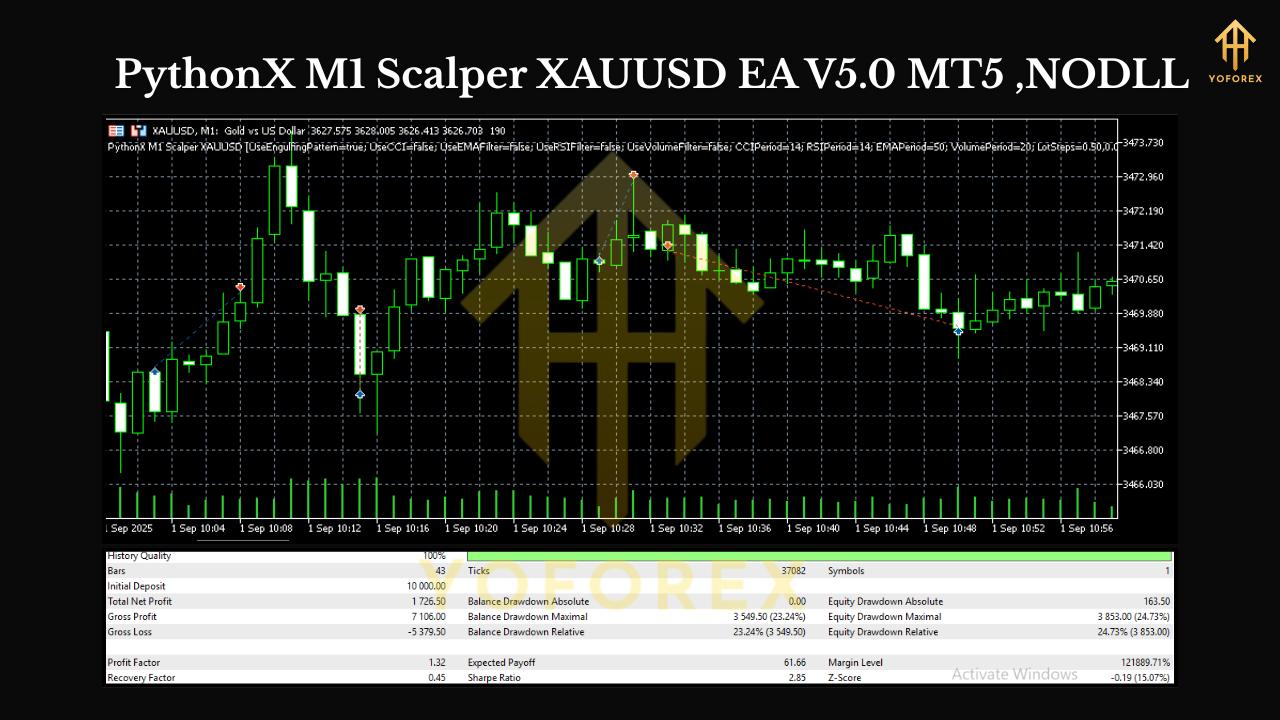
Backtest Period: Use at least 12 months of M1 data if possible; 3–6 months minimum for a quick read.
Model: “Every tick based on real ticks” in MT5 for accuracy.
Key metrics to examine:
- Win rate: 45–60% is typical with RR > 1.0.
- Average trade length: Often 3–25 minutes.
- Profit factor: Aim ≥ 1.3; better after set tuning.
- Max drawdown: Keep it under 10–15% with modest risk.
- Expectancy: Positive and stable across months, not just one hot streak.
How to tune:
- Start with fixed RR (e.g., 1:1.4), tweak SL/TP ranges ±20%.
- Test different spread limits (25 vs 35 points).
- Compare session windows (London only vs London+NY).
- Trial breakeven and partial close—they can smooth results but may clip winners.
Live Trading Tips
- First 2 weeks on demo. Confirm broker fills and spread behavior.
- Start tiny. 0.01–0.02 lots to collect live stats; scale after 100–200 trades.
- Track slippage. If you see frequent negative slippage, consider a better server or broker.
- Avoid NFP/FOMC. Even with filters, spreads can explode; better to be flat.
- Review daily. If you hit daily target (e.g., +1% to +1.5%), consider stopping—don’t give it back.
Pros & Cons (honest take)
Pros
- Built for speed and discipline on M1 gold
- Clear, replicable engulfing rules—less curve-fitting than many “AI mystery” bots
- Strong risk controls and session filters out of the box
- VPS-friendly and light on resources
Cons
- Slippage/spread sensitive—needs a good broker connection
- Requires strict news management to avoid spikes
- M1 can be noisy; you live and die by execution quality
- Will not suit traders who prefer longer holds or very few trades
Conclusion: Built for disciplined speed on XAUUSD
PythonX M1 Scalper XAUUSD EA V5.0 is a focused tool: spot engulfing, act fast, secure the gain, cap the risk, and do it again when conditions align. If you like a clean, no-nonsense approach to M1 gold—with robust guardrails and predictable behavior—this EA gives you the structure to trade fast markets without drama. Start on demo, gather data, optimize modestly, and scale only when your stats say you should.






Comments
Leave a Comment