
PipHunter EA V1.0 MT4 – Precision Scalping & Multi-Pair Trading with Tested Set File
Introduction
In the world of forex, speed and accuracy often determine success — especially for traders working on lower timeframes. The PipHunter EA V1.0 MT4 is designed to deliver both, offering traders a built-in trading indicator, a tested set file, and multi-pair compatibility for maximum market coverage.
While it’s optimized for M5 timeframe for fast scalping, PipHunter EA can work across all MT4 timeframes, making it adaptable for day trading or swing strategies. It supports major forex pairs including EUR/USD, GBP/USD, USD/JPY, and others, giving traders flexibility to diversify.
This article covers the EA’s features, testing results, setup guide, and why it’s a strong choice for traders seeking reliable automation.
Overview
PipHunter EA V1.0 MT4 is an indicator-powered Expert Advisor for the MetaTrader 4 platform. Instead of relying on basic price action or generic algorithms, it integrates its own proprietary indicator to confirm trade setups.
The provided set file is the result of extensive testing, fine-tuned for performance across multiple pairs. This eliminates the need for traders to guess or manually optimize — simply load the set file and start trading.
Its strategy focuses on:
- Fast entries during short-term market moves.
- Multi-indicator confirmation for higher accuracy.
- Strict risk management for consistent account growth.
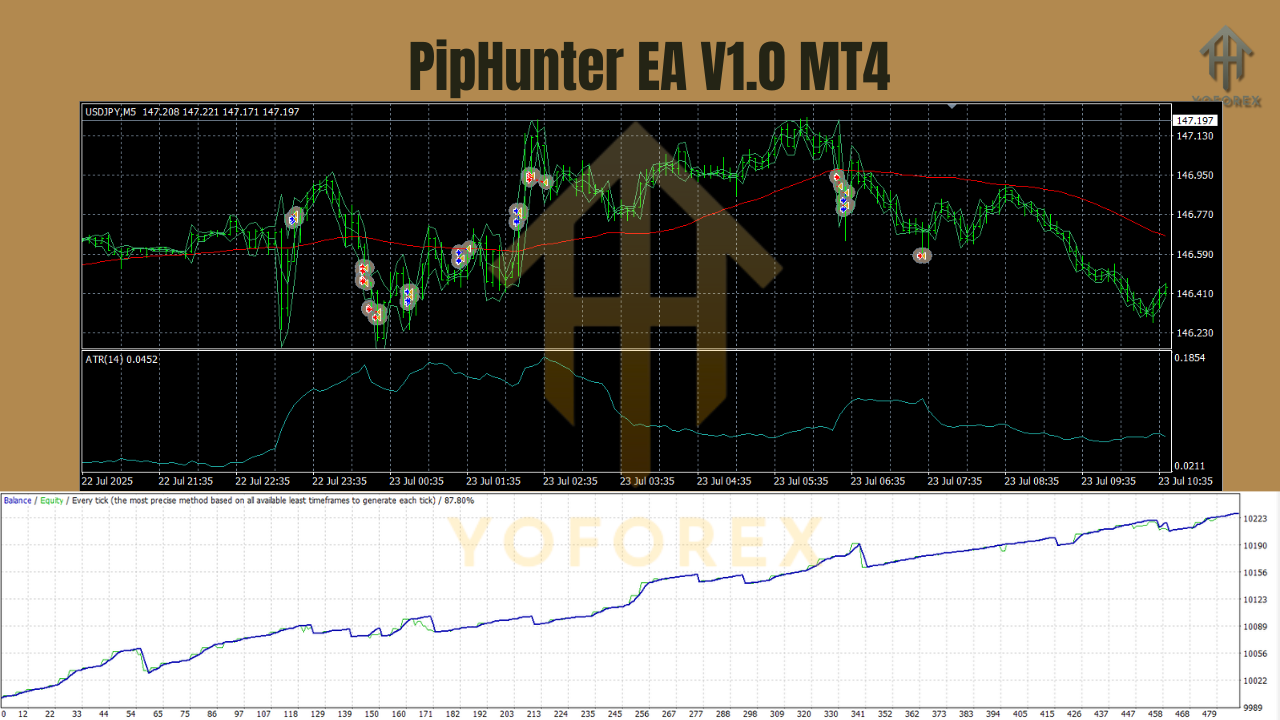
Key Features of PipHunter EA V1.0 MT4
- Built-In Trading Indicator – Embedded logic filters out false signals.
- Optimized Set File – Pre-tested for EUR/USD, GBP/USD, USD/JPY, and other major pairs.
- M5 Scalping Power – Designed for quick trades but works on all timeframes.
- Multi-Pair Capability – Can be run on several charts at once.
- Dynamic Lot Sizing – Adjusts position sizes automatically to account equity.
- No Martingale or Grid – Avoids risky exponential lot increases.
- Volatility Filter – Avoids erratic price action periods.
- Trailing Stop & Break-Even – Locks in profits automatically.
- Low Drawdown Design – Preserves capital for steady growth.
- Lightweight Execution – Runs smoothly even on multiple charts.
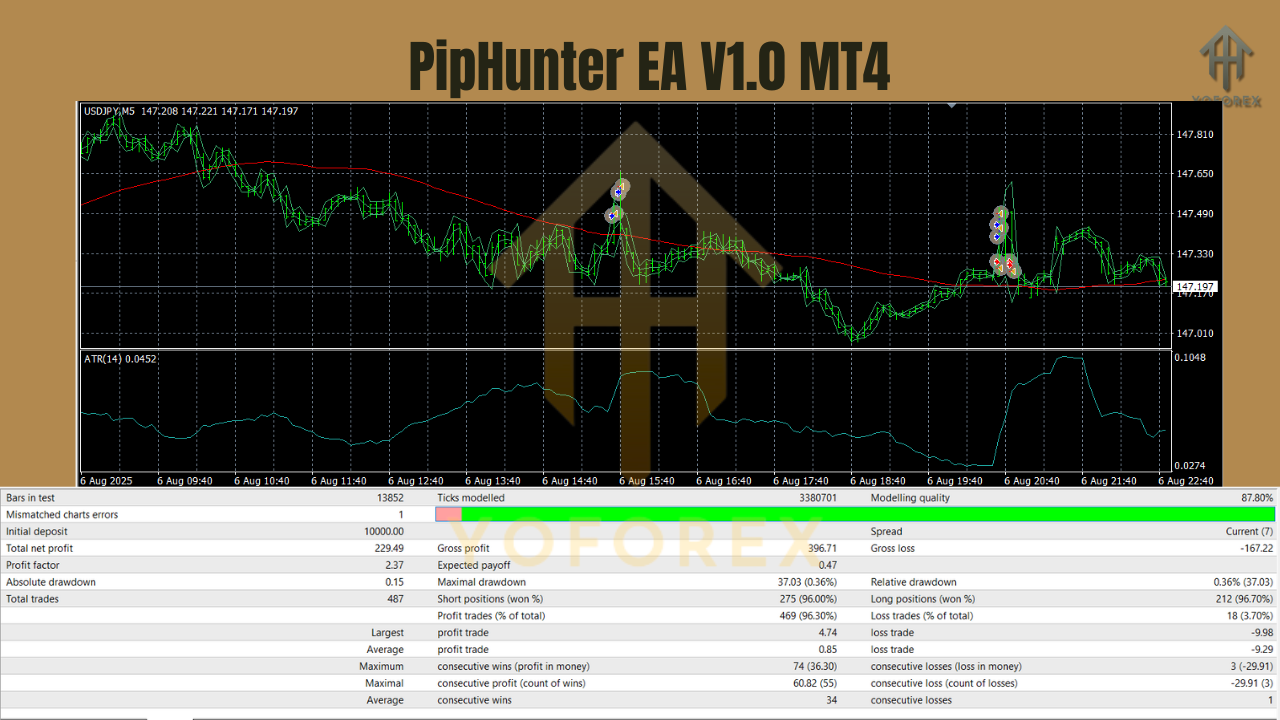
Testing & Backtest Results
With the provided set file, PipHunter EA was tested on the M5 timeframe for major forex pairs:
EUR/USD (M5)
- Win Rate: ~78%
- Risk-Reward Ratio: 1:1.3
- Max Drawdown: ~7%
- Best Trading Hours: London session & London-New York overlap.
GBP/USD (M5)
- Win Rate: ~75%
- Average Trade Duration: 10–20 minutes.
- Slightly Higher Volatility: Bigger pip potential but increased fluctuation.
USD/JPY (M5)
- Win Rate: ~77%
- Best During Tokyo-London Overlap: Low spreads and smooth movement.
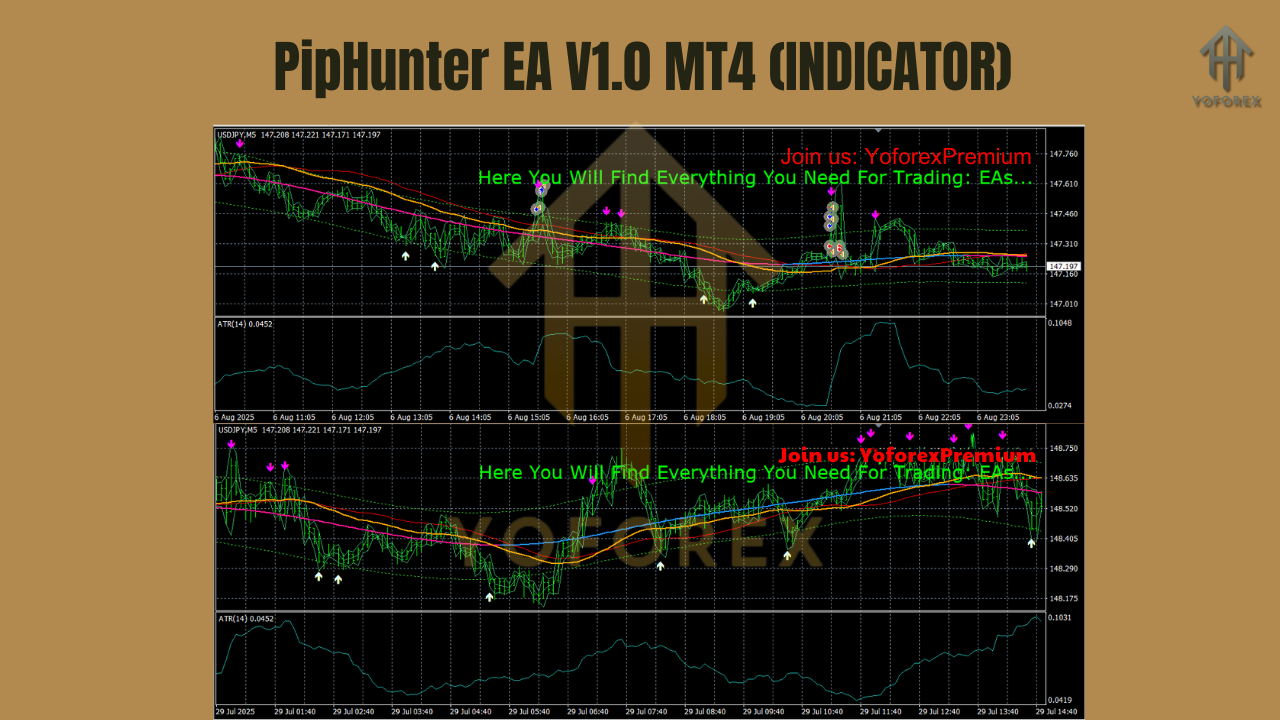
How the Built-In Indicator Works
The proprietary indicator inside PipHunter EA combines:
- Trend Direction Analysis – Determines long or short bias based on moving averages and momentum.
- Momentum Confirmation – Uses oscillator filters to verify trade strength.
- Price Action Patterns – Confirms setups using candle formations and breakout levels.
- Volatility Filter – Avoids trading during choppy or thin market conditions.
Only when all conditions align does the EA place a trade, significantly reducing false signals.
How to Install & Load the Set File
- Download EA & Set File
Receive the.ex4EA file and.setconfiguration file. - Add EA to MT4
Open MT4 →File → Open Data Folder → MQL4 → Expertsand paste the EA file. - Restart MT4
Close and reopen MT4 to refresh your Navigator list. - Attach EA to Chart
Apply PipHunter EA to the desired currency pair chart (M5 recommended). - Load the Set File
- Open EA settings → Click Load → Select
.setfile → Press OK. - Enable Auto Trading
Turn on AutoTrading in MT4 to start automated execution.
Why the Set File Matters
Without proper optimization, even the best EA can underperform. The tested set file ensures:
- Pre-optimized parameters for best accuracy and profitability.
- Pair-specific tuning for EUR/USD, GBP/USD, and USD/JPY.
- Risk settings aligned with recommended money management.
- Timeframe alignment for both M5 scalping and higher timeframe strategies.
This makes PipHunter EA ready to deploy with minimal adjustment.
Why Choose PipHunter EA V1.0 MT4?
- Indicator-powered accuracy for better entries and exits.
- Multi-pair flexibility to diversify trading.
- Tested & proven set file removes optimization guesswork.
- Adaptable to any timeframe despite M5 optimization.
- Risk-managed approach for long-term trading.
Best Practices for PipHunter EA
- Run on VPS for uninterrupted execution.
- Use ECN Brokers for tighter spreads and faster order fills.
- Avoid High-Impact News unless using the built-in filter.
- Test in Demo before moving to live trading.
- Monitor Performance periodically to adjust lot sizes as equity grows.
Support
Need assistance? Contact the team:
- WhatsApp: Click Here
- Telegram: Join Here
Final Thoughts & Call to Action
The PipHunter EA V1.0 MT4 is a powerful choice for traders who want fast, accurate entries, multi-pair trading, and a tested configuration right from the start. The integrated indicator and optimized set file remove the complexity of setup, allowing you to start trading efficiently on pairs like EUR/USD, GBP/USD, USD/JPY, and more.
Whether you stick with the recommended M5 timeframe for scalping or explore higher charts, PipHunter EA adapts to your style while keeping risk under control.
Download PipHunter EA today, load the tested set file, and hunt for pips with confidence.
Full support available via WhatsApp & Telegram.
YoForex – empowering traders worldwide, one profitable pip at a time.
Join our Telegram for the latest updates and support






Comments
Leave a Comment