
PhonzieGrid EA V1.0 MT4 – Smart Grid Trading with Risk Management
Turn Market Ranges into Profit Opportunities
Trading in a ranging or directionless market can often feel like a guessing game. Many traders find themselves entering positions in hopes of a breakout, only to get caught in frustrating price reversals or sideways movement. However, what if you could make such markets your ally instead of your enemy?
That’s where PhonzieGrid EA V1.0 for MetaTrader 4 (MT4) comes in. Designed specifically to take advantage of range-bound conditions, this Expert Advisor (EA) offers a smarter way to automate your trading using a grid-based strategy with advanced risk management and logic.
This article will walk you through everything you need to know about PhonzieGrid EA — from how it works, to its core features, setup process, and why it could be the perfect addition to your trading arsenal.
What Is PhonzieGrid EA V1.0 MT4?
PhonzieGrid EA V1.0 is an automated trading robot that implements a non-directional grid trading strategy. Rather than predicting price direction, it opens a series of buy and sell orders at predefined intervals (or grids) across price levels. These trades aim to capture profits from price movements within those ranges, regardless of whether the market trends or not.
Unlike many traditional grid bots that rely on risky martingale techniques (doubling trade sizes after losses), PhonzieGrid EA introduces a safer and more modern approach with:
- Fixed or customizable lot sizing
- Dynamic grid spacing
- Built-in loss controls
- Optional SL and TP settings
This structure makes it suitable for both novice and experienced traders looking to extract steady returns from low-trend or ranging markets.
Key Features
PhonzieGrid EA is packed with advanced features designed to offer flexibility, control, and safety. Here are the highlights:
1. No Martingale Strategy
- Avoids the dangerous practice of increasing lot sizes after losses.
- Maintains consistent and manageable exposure across grid layers.
2. Pair & Asset Flexibility
- Works on most forex pairs including EURUSD, GBPUSD, USDJPY.
- Also supports commodities like XAUUSD (Gold) and even certain indices.
3. Adaptive Grid Logic
- Automatically adjusts spacing between grid levels based on market volatility.
- Reduces overexposure during trending phases.
4. Auto Lot Calculation
- Option to base lot sizes on a percentage of account equity.
- Ideal for risk-based portfolio management.
5. Dynamic Take Profit & Stop Loss
- Traders can configure TP/SL per trade or by position basket.
- Helps in locking profits and limiting downside.
6. Time-Based Trading Filters
- Allows trading only during specific market sessions.
- Avoids trading during news spikes or illiquid hours.
7. Built-In Risk Controls
- Features such as equity stop-loss, max open trades, and daily profit/loss limits.
- Empowers traders to define clear safety thresholds.
8. Recovery Mode
- In cases of adverse price movement, the EA uses controlled spacing and lots to recover gradually.
- Completely avoids risky exponential lot increase.
9. News Filter Compatibility
- Can be integrated with third-party news filters.
- Automatically pauses during major economic releases.
10. Lightweight for VPS Use
- Optimized to run on low-spec Virtual Private Servers.
- Supports 24/7 operation with minimal resource usage.
11. Intuitive Dashboard
- Displays real-time information on open positions, equity drawdown, and grid status.
- Makes monitoring easy and accessible for all users.
Understanding the Grid Trading Strategy
PhonzieGrid EA operates on a principle known as grid trading. Instead of relying on market direction, it benefits from price oscillations within a certain range. Here’s how it works:
- The EA places multiple buy and sell orders at fixed or dynamic price intervals (the “grid”).
- As price fluctuates up and down, these orders are gradually closed for profits.
- If price continues in one direction, the EA strategically places new orders within the predefined grid range.
- The EA aims to close multiple trades in profit during the next price reversal or retracement.
This approach works exceptionally well in sideways markets or small trending environments, giving traders the edge without requiring perfect market prediction.
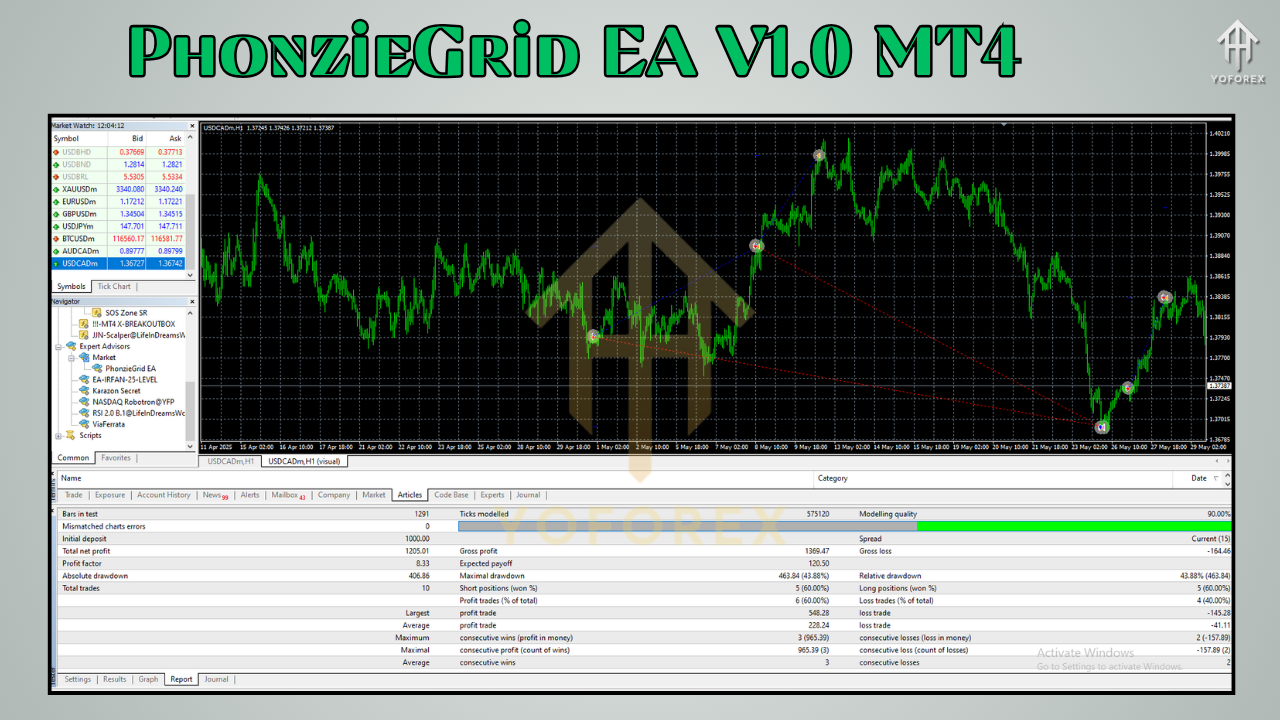
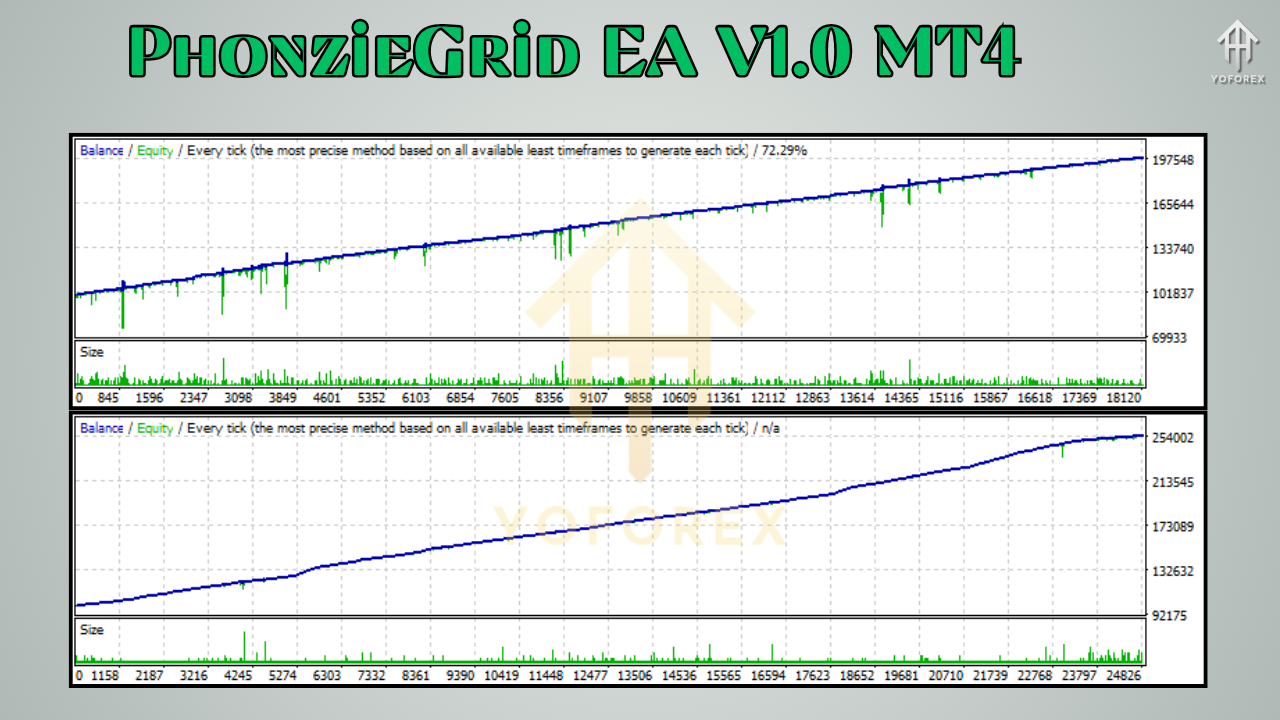
Backtest Results & Performance Highlights
PhonzieGrid EA has been extensively tested on pairs such as EURUSD and XAUUSD. Here’s a summary of notable findings:
EURUSD (M30 Timeframe)
- Profit Factor: 2.1
- Max Drawdown: 6.5%
- Win Rate: Around 78%
- Testing Period: 2019–2023 (4 years)
- Lot Type: Fixed
XAUUSD (M15 Timeframe)
- Profit Factor: 1.85
- Max Drawdown: 9.8%
- Average Monthly Return: 7–10%
These results show consistent performance with low drawdown and steady monthly returns — a strong sign of a well-optimized EA.
Note: Always run the EA on a demo account for 1–2 weeks before deploying on live capital. Market behavior can differ between demo and live environments.
How to Install and Configure PhonzieGrid EA V1.0
Getting started with PhonzieGrid EA is simple. Follow the steps below to install and launch it on your MetaTrader 4 platform:
Step-by-Step Installation
- Download the EA file from the official source (forexfactory.cc or mql5.software).
- Open MT4 and go to File > Open Data Folder.
- Navigate to MQL4 > Experts and paste the
.ex4file. - Restart MetaTrader 4.
- Attach the EA to any chart (recommended timeframes: M15 or M30).
- Enable AutoTrading.
- Input your risk parameters and lot preferences in the EA settings window.
- Load optimized presets or use the default settings for supported pairs.
Recommendations
- Use a low-spread ECN broker for best performance.
- Consider VPS hosting for uninterrupted operation.
- Adjust risk settings according to your account size and trading goals.
Why Traders Are Choosing PhonzieGrid EA
In a market saturated with high-risk bots and shady promises, PhonzieGrid EA stands out by offering a combination of:
- Safety: No martingale, limited drawdown.
- Performance: Backtested results that show consistent profit.
- Transparency: Free to download, no upselling or gimmicks.
- Usability: Easy to configure and suitable for all experience levels.
Additional Benefits
- Ongoing development and regular updates.
- Helpful community on Telegram and support via WhatsApp.
- Optimized presets provided for various market conditions.
If you’ve been burned by overhyped EAs before, PhonzieGrid EA is a refreshing change that emphasizes risk control, transparency, and long-term trading viability.
Support and Risk Disclaimer
Need Help?
For installation help or trading questions, reach out through:
- WhatsApp Support – Get help directly from the development team.
- Telegram Community – Connect with fellow traders using the same EA.
Risk Notice
PhonzieGrid EA is a trading tool — not a guaranteed profit machine. While backtests and forward results are promising, forex trading is inherently risky. Always practice good money management, start with a demo, and only trade capital you can afford to lose.
Final Thoughts: Is PhonzieGrid EA Right for You?
If you're seeking a non-directional trading system that doesn’t rely on dangerous martingale logic, and you want a hands-free approach to range-bound markets, then PhonzieGrid EA V1.0 MT4 is worth serious consideration.
Its intelligent design, built-in risk management, and adaptability make it an ideal solution for traders who value stability, consistency, and ease of use.
And the most attractive part?
It’s completely free — no license keys, no trial limits, and no surprise costs.
Call to Action
- Download PhonzieGrid EA V1.0 MT4 today and automate your grid strategy like a pro.
- Need help? Reach us on WhatsApp or join the Telegram group for real-time assistance.
- Start smart — use a demo account first and experience the power of structured grid trading.
Let PhonzieGrid EA handle the complexity of grid trading while you focus on strategy and growth.






Comments
Leave a Comment