Introduction
In the world of high-frequency forex trading, milliseconds matter. Traders constantly seek precision, speed, and a competitive edge in the market. That’s exactly what Phantom XPE EA V12.0 MT5 delivers – a stealth-mode, ultra-fast scalping Expert Advisor that thrives on the M1 chart with low latency execution. Built for traders who demand performance without relying on traditional indicators, Phantom XPE takes automation to the next level.
Let’s explore what makes this powerful EA stand out from the crowd and why it’s gaining traction among professional scalpers.
What is Phantom XPE EA V12.0 MT5?
Phantom XPE EA is a high-frequency trading bot developed for MetaTrader 5. It uses proprietary logic based on price-action triggers rather than indicators like RSI or MACD. This makes it lightning-fast, reliable, and adaptive to changing market conditions.
Unlike many EAs that rely on static SL/TP settings, Phantom XPE implements Stealth Risk Control. It scales positions adaptively and auto-liquidates at key thresholds – making it highly versatile and less detectable by brokers.
Minimum Deposit & Timeframe
- Minimum Deposit: $100
- Supported Platform: MetaTrader 5
- Timeframe: M1 (One-Minute Chart)
- Recommended Pairs: EURUSD, GBPUSD
- Leverage: 1:500 preferred
Key Features of Phantom XPE EA (Hidden Mechanics)
Here’s what makes Phantom XPE EA a stealth powerhouse:
- No SL/TP – Stealth Risk Control
- This EA doesn’t place visible stop-loss or take-profit orders. Instead, it uses internal thresholds to auto-close trades, making it nearly invisible to brokers and price hunters.
- Dynamic Lot Sizing
- Position size is calculated based on equity percentage, compounding factors, and random variance, reducing exposure to repetitive risk patterns.
- Price-Activated Triggers
- Trades are only executed when specific candle formations and retracement patterns occur, helping to filter out market noise.
- Asymmetric Grid Logic
- Phantom XPE EA manages multiple positions with a unique grid-style logic that uses weighted averaging to find optimal exit zones – without overexposing capital.
- Profit-Locking Algorithm
- The EA auto-closes trades when the account reaches 20% growth in single positions or when a 9:1 reward-to-risk ratio is achieved in multiple trades.
How Phantom XPE Works (Without Revealing Full Strategy)
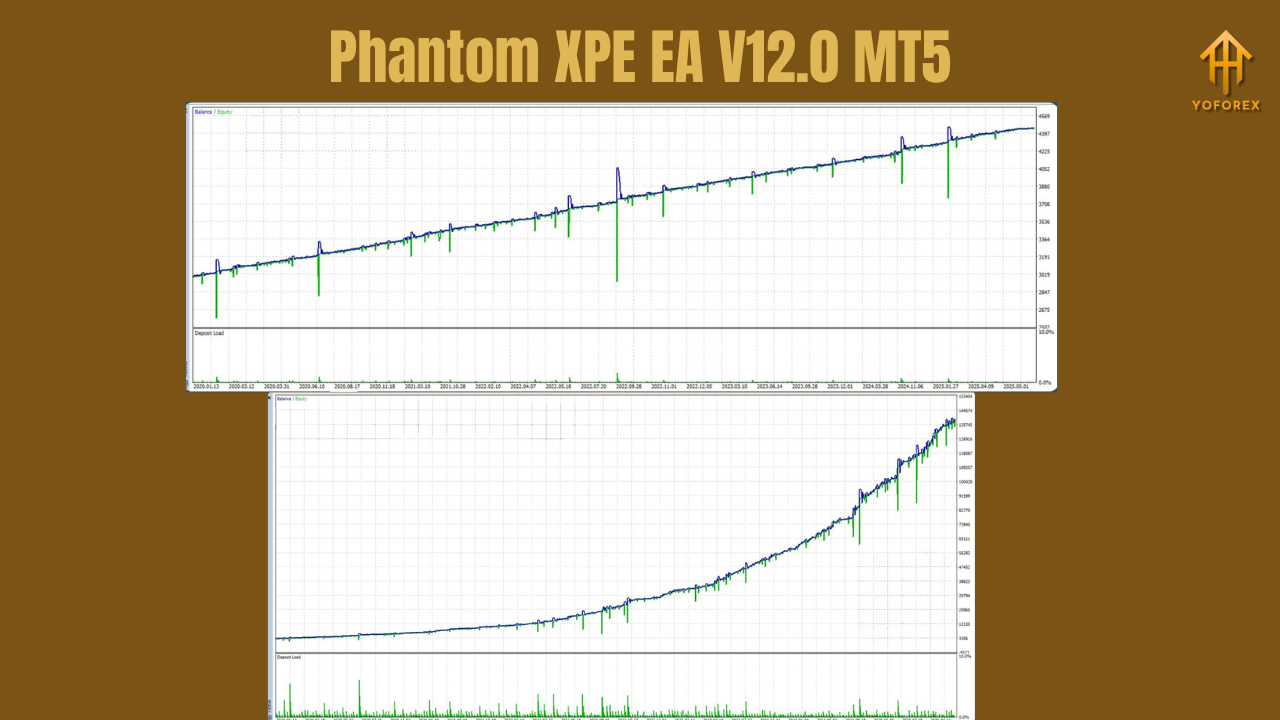
The internal logic of Phantom XPE EA is what makes it both unique and hard to replicate. Here’s a high-level overview of its core mechanics:
Entry Logic
- Scans M1 candles for a specific combination of open, close, and retracement levels (based on hidden algorithms).
- Dynamic thresholds based on pip movement (e.g., 1000 pips rule) are used to trigger trades only during valid setups.
- Avoids entry during high-volatility candles or false breakouts.
Exit Logic
- Uses partial closing to secure profits during favorable movements.
- Full closure occurs when:
- A single trade hits 20% profit relative to the account.
- Multiple trades are averaging out losses, and the EA detects a 9:1 profit-to-loss ratio.
Broker Compatibility & Technical Requirements
To achieve optimal results, the EA requires:
- Low Spread Broker: ECN or Raw Spread accounts are highly recommended.
- Instant Execution: No requotes – must support fast order routing.
- Micro Accounts Support: Minimum lot size should be ≤ 0.01.
- VPS Hosting: A stable VPS ensures low latency and uninterrupted operation.
Market Conditions to Avoid
- Avoid trading during high-impact news events as the EA has no built-in news filter.
- Not suitable for high-spread, high-slippage brokers.
- Works best during high-liquidity sessions like London and New York overlaps.
Optimization Parameters
To fine-tune Phantom XPE EA for your setup, the following parameters can be adjusted:
- Magic Number: Assign a unique ID to prevent trade interference if using multiple EAs.
- Risk Percentage: Customize the equity percentage used per trade (e.g., 1–2%).
- Trading Model: Default is high-frequency scalping; custom options may include aggressive or conservative modes.
Risk Management Formula
Phantom XPE uses a robust risk formula to calculate lot sizes dynamically:
This formula helps reduce overexposure while diversifying the entry volume across various setups. If the margin used exceeds 95% of free margin, the EA will reduce the lot size automatically to ensure safety.
Who Should Use Phantom XPE EA?
This EA is perfect for:
Scalpers looking for high-frequency, low-latency execution
Advanced traders who prefer stealth-mode trading without public SL/TP
Prop firm traders needing a consistent, low-risk scalping strategy
Automated strategy enthusiasts wanting non-indicator-based systems
However, beginners should consider backtesting thoroughly before going live.
Backtesting & Forward Testing
Before deploying Phantom XPE EA on a live account:
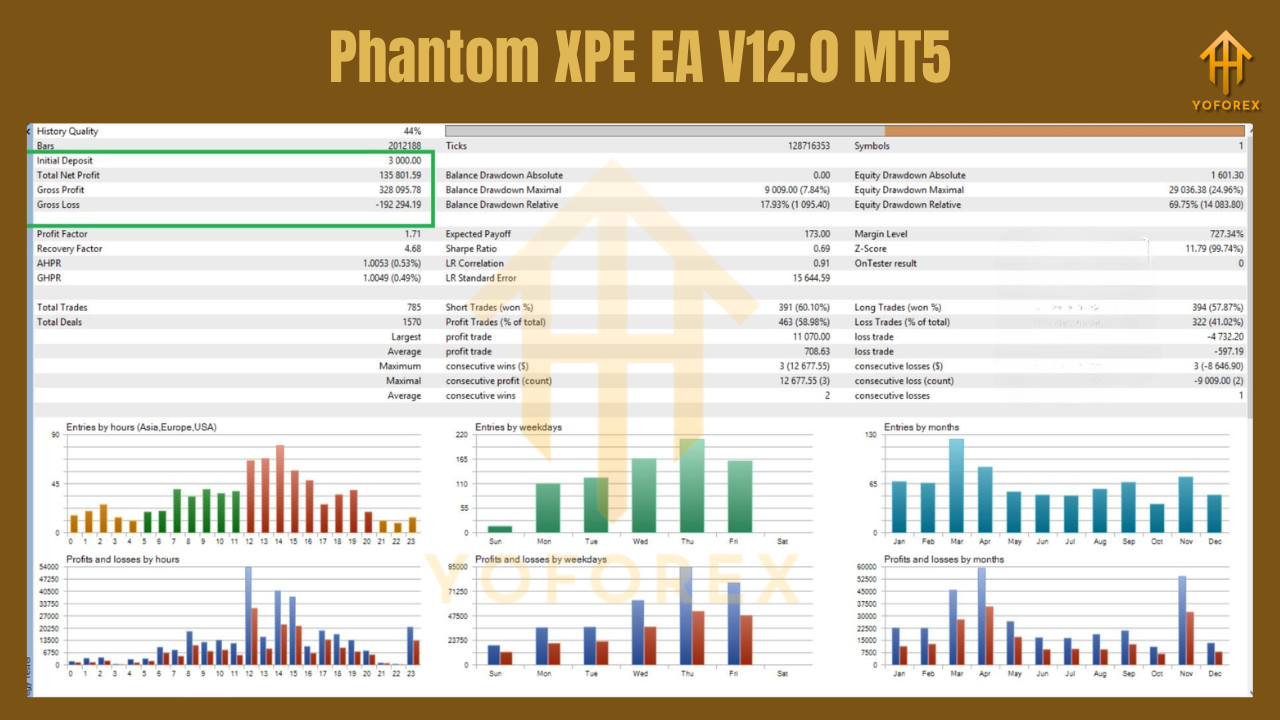
- Run robust backtests using real tick data on EURUSD M1 and GBPUSD M1.
- Use forward testing on a demo account for at least 1–2 weeks to observe performance during different sessions.
- Monitor drawdown behavior closely under varying spreads and conditions.
VPS & Hosting Recommendations
Since this is a high-frequency scalping EA, low-latency VPS is crucial. Recommended VPS services:
- FXVM
- ForexVPS
- Ultraspeed VPS (1ms latency)
Ensure the VPS is located near your broker’s server (e.g., London for IC Markets).
Summary
Phantom XPE EA V12.0 MT5 offers an intelligent, stealth-based scalping solution for professional traders. With its dynamic lot sizing, price-action entry, and no-indicator logic, it’s designed for ultra-fast trading on the M1 chart. While it requires precision setup and proper brokerage conditions, those who configure it correctly can enjoy highly consistent and low-risk returns.
If you're ready to move beyond traditional EAs and experience true high-frequency trading—Phantom XPE might just be your secret weapon.
Download & Installation
You can download Phantom XPE EA V12.0 MT5 from:
ForexFactory.cc
YoForex.org (For licensed users)
After downloading:
- Copy the
.ex5file to yourMQL5/Expertsfolder. - Restart MT5.
- Attach it to an M1 chart (preferably EURUSD or GBPUSD).
- Configure your risk settings and magic number.
- Enable AutoTrading and watch it run.
Final Verdict
Phantom XPE isn’t for the faint-hearted. It’s for serious traders seeking precision, speed, and results. Its stealth-mode trade logic and adaptive grid system provide an edge that few bots can replicate.
Don’t miss out – give Phantom XPE EA V12.0 a shot and redefine how you scalp the markets.
Join our Telegram for the latest updates and support






Comments
Leave a Comment