
PATTOR EA V1.0 MT4 — a calm, rules-first forex robot you can actually understand
Sick of robots that look genius in ads and chaotic on your charts? Same. PATTOR EA V1.0 for MT4 takes a simpler route: clear entries, visible risk, no wild martingale spirals. It’s built for traders who want structure first, profits second; the idea is to let the algorithm do the heavy lifting without turning your account into a roller coaster.
In this long-form guide, you’ll get a practical overview of how PATTOR EA thinks about the market, what settings matter (and which don’t), how to install it cleanly on MetaTrader 4, and a realistic approach to testing and risk. No hype, just step-by-step clarity… coz that’s what traders actually need.
What is PATTOR EA V1.0 MT4?
PATTOR EA is an automated trading system for MetaTrader 4 that focuses on structure-aware entries and tight risk control. Instead of firing dozens of orders or averaging-down, it looks for clean momentum or pullback conditions based on price action and volatility filters. When conditions match, it opens a single trade (or a small, pre-defined sequence if you enable scaling), attaches a stop loss immediately, and manages the exit with either fixed TP/SL or a trailing model.
Who it’s for
- Day traders and swing traders who prefer one position at a time (or very few).
- Newer algo users who want plain-English parameters and a predictable equity curve.
- MT4 users who want an EA that’s lightweight, spread-aware, and VPS-friendly.
Who it’s not for
- Folks chasing sky-high win rates via martingale.
- Anyone expecting “set and forget” to magically beat news whipsaws every week.
- Traders who never backtest or paper trade; you still need a plan.
How PATTOR EA thinks (the short version)
- Market context check — reads trend bias using a blend of moving structure and volatility channels.
- Signal formation — enters on breakouts or pullbacks when price + volatility + spread line up.
- Risk assignment — fixed lot or risk-percent sizing; SL is placed instantly.
- Trade management — optional trailing stop, breakeven shift, and time-based exit rules.
- Session filter — keeps activity to your chosen hours; no random 24/7 scalping.
No grids. No martingale. No “revenge” logic. Just repeatable steps.
Key features (quick hits)
- Single-position logic (no martingale, no dangerous grids).
- Fixed lot or %-risk per trade for consistent exposure.
- Spread and slippage filters to avoid messy fills.
- Time/session filter (e.g., London + NY, skip low-liquidity periods).
- Optional news-avoidance window (manual time blocks around events).
- Trailing stop + breakeven shift for dynamic exits.
- NFA-compatible (hedging toggle off) and prop-firm-friendly settings.
- Works on majors & gold; typical timeframes: M15–H1.
- Clean parameter names, sensible defaults, and helpful chart labels.
- Error-safe: won’t place trades if broker conditions fail basic checks.
- VPS-friendly; minimal CPU/memory footprint.
- Built-in safety cap on max open trades (you choose, default: 1).
Recommended setup (pairs, timeframe, risk)
Pairs: EURUSD, GBPUSD, USDJPY for consistency; XAUUSD if your broker’s spreads are tight.
Timeframes: Start with M15 or H1. M5 can work, but spreads and noise matter more.
Account size: From $200+ to learn on demo/live-micro; scale gradually.
Risk model: 0.5%–1% per trade on standard accounts; conservative accounts can run 0.25%.
Broker tips: Low spread + fast execution. A VPS close to your broker helps a lot.
Tiny tweak that helps: set a max spread threshold (e.g., 15–25 points on 5-digit brokers for majors; custom value for gold). If spread exceeds your threshold, PATTOR just waits. That patience adds up.
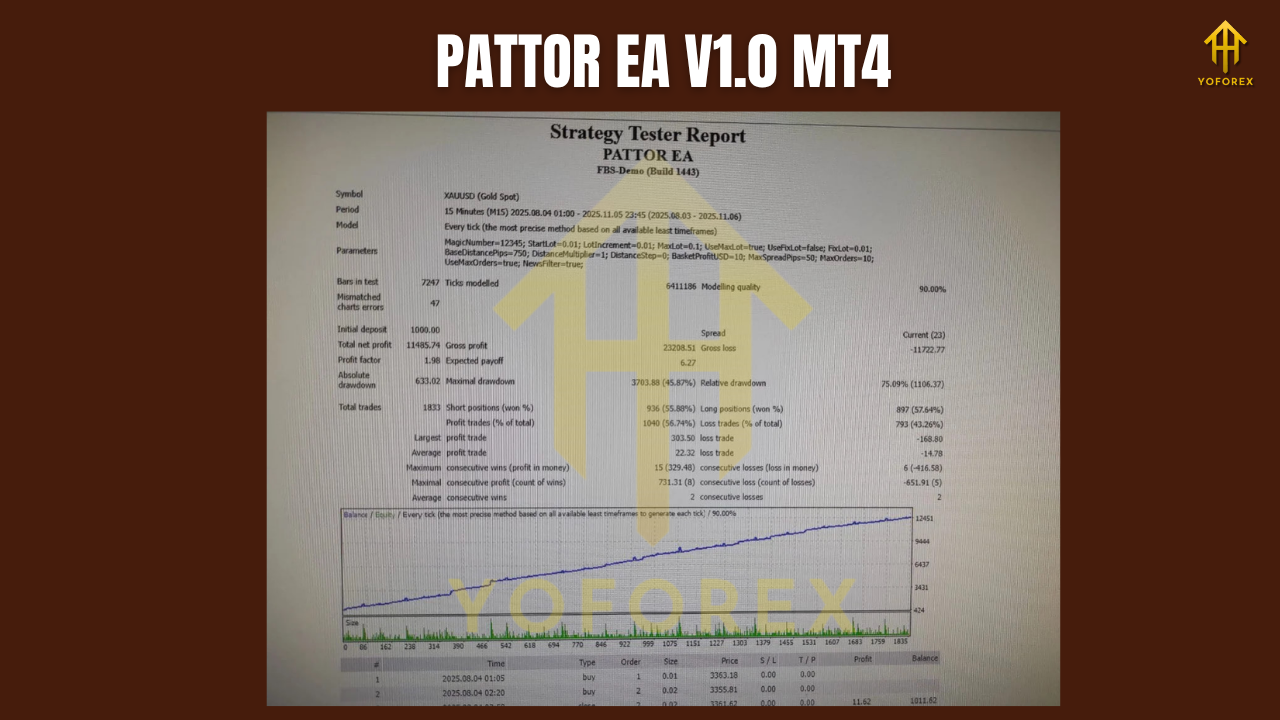
Backtesting & forward testing the smart way
Backtests are useful when you treat them like research, not a lottery ticket. Here’s a no-nonsense process:
1) Data & modeling
Run at least 2–3 years of quality data per symbol. For a first pass, M15 with good tick data is plenty. Note rough stats: number of trades, average R:R, max drawdown, and longest losing streak.
2) Baseline settings
Keep it boring first: trend filter ON, trailing OFF, fixed TP/SL (e.g., TP 1.2–1.8× SL). Tune after you see the baseline curve.
3) Stress test
Shift the time window (e.g., only London, only NY). Change spread assumptions +5–10%. Nudge SL/TP by ±10–20%. If equity shape stays similar, you’ve got a robust core.
4) Forward test
Run demo or cent live for 2–4 weeks. Compare live slippage vs. backtest assumptions. Only then consider size increases.
What you want to see: a steady equity curve with drawdowns that match your risk appetite, not a saw-tooth curve that recovers only through luck. If gold looks choppier on your broker, dial risk down or focus on majors first. Simple.
Installation (MT4) in under 3 minutes
- Open MT4 → File → Open Data Folder.
- Go to MQL4 → Experts and copy
PATTOR-EA.ex4into that folder. - Restart MT4 (or right-click “Expert Advisors” → Refresh).
- Drag PATTOR EA onto your chart (M15/H1).
- Tick Allow live trading and Allow DLL imports if the EA needs it.
- Load a starter preset (if provided) or use defaults and tweak gradually.
- Confirm a smiling face icon in the top right of your chart; check Experts tab for any warnings.
Tip: If your broker uses suffixes (e.g., “EURUSD.m”), that’s normal. Just ensure the chart symbol matches what you intend to trade.
Parameter highlights (what actually matters)
- RiskPercent / FixedLot — choose one. For % risk, start at 0.5–1.0%.
- MaxSpread — prevents entries in bad liquidity; adjust per pair.
- SessionStart/End — keep your trading windows consistent; many users prefer London open + early NY.
- UseTrailingStop — off for baseline; on once you know the pair’s behavior.
- MoveToBreakeven — great on volatile pairs; test your trigger distance.
- NewsBlockMinutes — optional manual buffer around high-impact events (NFP, CPI, FOMC).
Risk management you’ll actually stick to
- Cap daily loss (e.g., 2–3R). When it’s hit, stop trading for the day.
- Limit concurrent symbols until you learn the EA’s rhythm.
- Use a VPS if you’re serious; connection drops mid-trade are the worst.
- Withdraw wins occasionally, or at least journal them. Keeps psychology clean.
You won’t “win every day.” That’s fine. You need to win correctly over many trades.
Realistic expectations (and common pitfalls)
Expect: flat days, small scratches, then solid trend days that make the week.
Don’t expect: straight-line growth or 90% win rates. PATTOR is rules-driven, not magic.
Avoid: bumping risk after a win streak, running it through red-flag news, or enabling too many pairs at once “just to see.” That curiosity costs.
Final thoughts
PATTOR EA V1.0 MT4 is that rare “adult in the room” bot: a tighter playbook, plain parameters, and a risk-first mentality you can live with day after day. If you’re done babysitting grid ladders at 3 a.m. and want a calmer path to automated trading, this is a clean place to start. Keep the risk small at first, respect your daily limits, and iterate like a pro. You’ll feel the difference in your journal, not just your equity curve.






Comments
Leave a Comment