
Padma Gold EA V7.0 MT4 – Smart Gold Trading on Autopilot
If you’ve been jumping from one gold robot to another, tweaking set files all night and still not getting consistent results, you’re not alone. Gold (XAUUSD) is crazy volatile, and most EAs either over-risk with martingale or scalp blindly without any proper risk control.
Padma Gold EA V7.0 MT4 comes in exactly to solve that mess. It’s a fully automated Expert Advisor built specifically for gold trading on the M5 timeframe, with dynamic risk control, trade filters, and equity protection designed to keep drawdown in check while targeting steady growth over time.
In this blog, we’ll walk through what Padma Gold EA does, how it trades, recommended settings, and how you can use it safely on your MT4 account for both normal trading and prop-style challenges.
What Is Padma Gold EA V7.0 MT4?
Padma Gold EA is a specialized Expert Advisor created purely for XAUUSD (Gold) on the MetaTrader 4 platform. Instead of trying to handle dozens of pairs, it focuses on one asset and one timeframe – M5 – so the internal logic can be optimized around gold’s unique volatility and price behavior.
The EA is designed to:
- Scan gold price action on lower timeframe (M5)
- Identify trend and volatility patterns
- Open trades automatically with built-in risk calculations
- Manage positions with dynamic Take Profit, Trailing Stop, and equity protection
Version 7.0 is the current release and brings more refined entries, improved lot-multiplier control, and better stability for larger accounts or challenge-style trading.
In short: if you want a hands-off, rules-based system for gold, Padma Gold EA V7.0 is built exactly for that use case.
How Padma Gold EA Trades Gold
Padma Gold EA doesn’t randomly spam trades. It uses a mix of trend logic + volatility filters and then manages positions with a semi-aggressive but controlled lot multiplier system.
Core Trading Logic (Simplified)
- Trend & structure detection
The EA reads short-term trends on M5 and identifies key price zones where continuation or reversals are likely. - Smart entries
It opens trades when price action aligns with its internal logic, aiming to catch medium-range moves rather than tiny scalps. - Dynamic TP & Trailing Stop
- Default TP is around 400 points
- Trailing Stop around 200 points
So as soon as price moves in your favor, the EA starts locking in profit while still giving room for the trend to breathe.
4.Lot Multiplier (Controlled Martingale)
The EA can increase lot size after losses to recover quicker, but with configurable limits and equity-based safety. This is not a blind, infinite martingale – the idea is controlled risk, not endless grid gambling.
5. Equity & Time Protection
Padma Gold EA can stop trading or close positions if:
- Drawdown reaches your set threshold (e.g., 5%)
- A trade is stuck for too long (up to ~72 hours)
This helps avoid long, stressful floating losses and protects the account from extreme conditions.
Key Features of Padma Gold EA V7.0 MT4
Here’s what makes Padma Gold EA stand out from generic gold robots:
- ✔ Fully automated trading
Just attach it to your XAUUSD M5 chart, set your risk, and let it run. No manual entries needed. - ✔ Optimized exclusively for Gold (XAUUSD)
Instead of being “OK” on everything, it’s tuned for one thing and does that well. - ✔ Smart money management
Choose between:
- Fixed lot
- Auto lot (risk-based, using your balance/equity)
- ✔ Lot multiplier with control
Uses a multiplier to recover and compound but lets you define how aggressive it should be. - ✔ Dynamic TP & Trailing Stop
Built-in trailing system helps to lock profits when price runs in your favor. - ✔ Equity protection
You can set a maximum allowed drawdown (for example 5%), after which the EA stops trading to protect your capital. - ✔ Trade time limit
Automatically exits positions that stay open beyond a set time window, helping avoid “stuck” trades. - ✔ Up to ~30 open trades
It can manage a basket of trades intelligently when conditions demand it, not just one position. - ✔ Suitable for big accounts & challenge style
Its risk logic is designed to work on 20k, 50k, 100k+ style accounts when configured properly. - ✔ Beginner-friendly setup
Despite the advanced logic, installation is standard MT4 EA style – even new traders can get it running.
Recommended Settings & Account Setup
These are general guidelines; always test on demo before going live.
1. Trading Instrument & Timeframe
- Pair: XAUUSD (Gold)
- Timeframe: M5 (required)
Don’t try to run it on EURUSD or H1 just to “experiment”; it’s tuned specifically for gold M5.
2. Minimum Recommended Capital
The original configuration targets relatively larger accounts, but you can scale down:
- For $100,000 account → starting lot around 0.05
- For $20,000 account → starting lot around 0.01
For smaller accounts, you can still use it, but you should:
- Reduce starting lot
- Possibly reduce lot multiplier
- Be more conservative with risk settings
3. Basic Risk Parameters
Some sensible starting points (you can tweak later):
- Initial Lot Size:
- 0.01 per 20k (or 0.01 per 10k if you’re cautious)
- Auto Lot: Enabled only if you clearly understand % risk per trade
- Max Trades: 20–30 (default is around 30; you may lower this)
- Equity Drawdown Limit: 5–10% (depending on your risk appetite)
4. Broker & Execution
Padma Gold EA works best with:
- Low spread / low commission accounts
- Fast execution
- Reliable VPS if you can’t keep your PC on 24/5
(You don’t need some fancy special broker name – just a serious, ECN-type broker with tight gold spreads.)
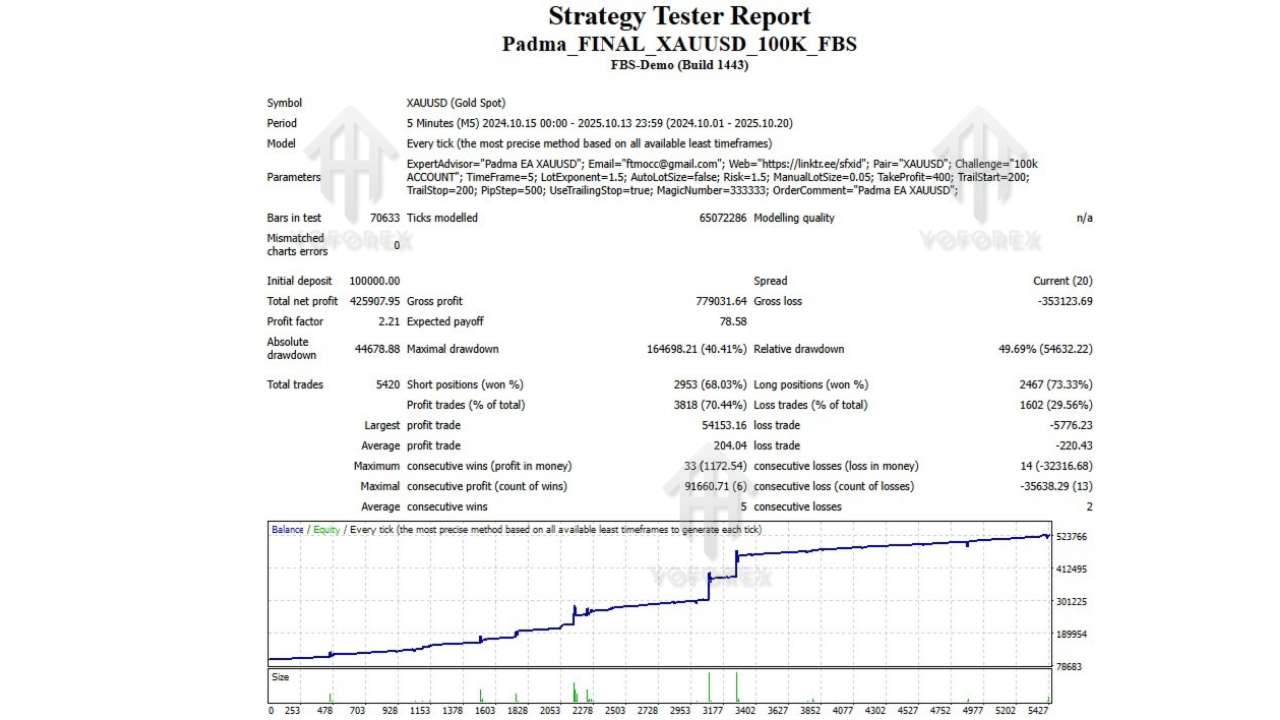
Backtesting & Performance Perspective
The official concept behind Padma Gold EA is steady growth with controlled drawdown, not crazy one-week account flipping.
When you backtest on XAUUSD M5 with reasonable risk (e.g., 0.01 lots per 10k–20k, moderate multiplier, 5–10% equity protection), you can typically expect:
- A smooth equity curve with occasional pullbacks
- Controlled drawdown due to:
- Equity stop
- Time-based trade exit
- Dynamic TP/Trailing Stop system
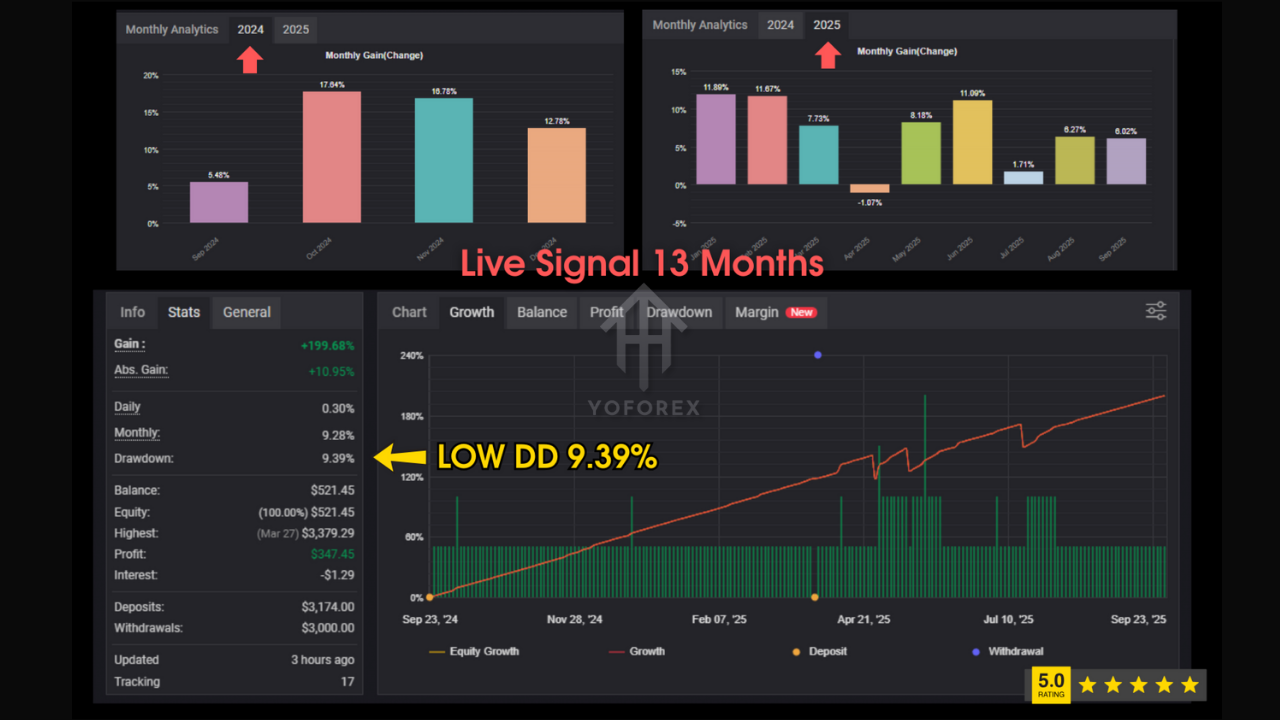
Live Myfxbook-style stats found online for Padma Gold EA show relatively low drawdown and modest growth when used conservatively, confirming it’s more about consistency than lottery-style profits.
Important: Backtests are not a guarantee of future results, but they help you understand how the EA behaves during trends, consolidations, and high-volatility spikes.
For best insight:
- Run at least 1–3 years of backtest on XAUUSD M5.
- Then run it on demo for 2–4 weeks with your intended settings.
- Only after that, consider using it on a live or challenge account.
How to Install Padma Gold EA on MT4
If you’re new to EAs, here’s a quick setup flow:
Step 1 – Add the EA to MT4
- Open MetaTrader 4
- Go to File → Open Data Folder
- Navigate to:
MQL4 → Experts - Copy the Padma Gold EA V7.0 file (
.ex4or.ex5) into that folder - Restart MT4
Step 2 – Attach the EA to Gold Chart
- Open a XAUUSD M5 chart
- In the Navigator panel, under Expert Advisors, find Padma Gold EA
- Drag and drop it onto the XAUUSD M5 chart
- In the settings window, enable:
- “Allow live trading”
- “Allow DLL imports” (if required by the EA)
Step 3 – Configure Settings
Inside the Inputs tab:
- Set your initial lot (e.g., 0.01 or 0.05 depending on account size)
- Adjust lot multiplier to match your risk comfort
- Define max trades, take profit, trailing stop, equity stop, and max trade duration (hours) as per your strategy
Click OK, then ensure AutoTrading is turned ON in MT4.
Who Is Padma Gold EA For?
Padma Gold EA V7.0 MT4 is best suited for:
- Gold-focused traders who want to automate their XAUUSD strategy
- Traders with mid to large accounts (or funded-style balances) looking for systematic, repeatable performance
- Semi-passive traders who don’t want to sit on charts all day but still care about risk
- Challenge / prop-style traders (when configured conservatively) who want an EA with equity protections instead of blind martingale
If you’re looking for an “all pairs, all timeframes” robot or a super-high-risk flip bot, this EA isn’t built for that. It’s designed more like a structured system for serious gold traders.
Tips for Using Padma Gold EA Safely
A few practical points before you go all-in:
- Always start on demo
Get familiar with the EA behaviour before risking real money. - Keep risk per trade low
Even with a lot multiplier, small initial lots can still generate good profits on large accounts. - Don’t max out leverage just because you can
Use high leverage as a tool for margin flexibility, not as an excuse to over-lot. - Avoid running multiple heavy gold EAs on the same account
Overlapping strategies can create unplanned exposure. - Monitor for major news
Although the EA can handle volatility, you may choose to pause it before high-impact gold news if you’re conservative.
Conclusion – Is Padma Gold EA V7.0 MT4 Worth It?
If your main focus is trading gold on MT4 and you want a fully automated EA that:
- Is tailored to XAUUSD M5
- Has equity and time protection
- Uses intelligent money management instead of blind martingale
- And can be tuned for both personal and challenge accounts
…then Padma Gold EA V7.0 is definitely worth testing in your toolbox.
Use realistic risk, let it run over enough data, and treat it like a professional system, not a magic money button. With the right settings and discipline, Padma Gold EA can be a solid backbone for your gold-focused trading plan.
Happy Trading






Comments
Leave a Comment