Nagara Experts EA V2.0 MT4 Review: Sophisticated Forex Automation for Precise Trading
In the fast-paced world of Forex trading, manual strategies can leave you tethered to your screen, obsessing over every tick and second-guessing each entry. Emotional impulses often creep in, causing hesitation or overzealous risk-taking. If you’ve ever felt burnt out from constant chart monitoring or frustrated by missed opportunities, you’re not alone.
Nagara Experts EA V2.0 MT4 is designed to relieve you of these burdens by automating high-probability trade executions on the industry‑standard MetaTrader 4 platform. Built on six years of development and real-world testing, this Expert Advisor (EA) uses a blend of proven technical indicators and proprietary algorithms to navigate both trending and range‑bound markets seamlessly—24 hours a day, five days a week.
In this comprehensive review, we’ll explore:
- What makes Nagara Experts EA V2.0 MT4 unique
- Its core features and strategic approach
- Backtest and live‑demo performance metrics
- Recommended risk settings and installation steps
- Why it deserves a place in your trading arsenal
Whether you’re a novice seeking disciplined trade management or a veteran looking to diversify into automation, you’ll find actionable insights here to help you decide if Nagara Experts EA V2.0 MT4 is the right tool for your trading goals.
What Is Nagara Experts EA V2.0 MT4?
Nagara Experts EA V2.0 MT4 is a fully automated trading robot engineered for MetaTrader 4. It combines multi‑timeframe analysis with adaptive entry logic, offering a balanced mix of trend‑following and breakout strategies. Key highlights include:
- Multi‑Timeframe Validation
Scans M15, H1, and H4 charts to confirm trade setups and filter out false signals. - Adaptive Entry Thresholds
Dynamically adjusts to market volatility, ensuring entries align with current conditions. - Smart Money Management
Calculates position sizes based on a user‑defined risk percentage, helping you maintain consistent exposure. - Improved Signal Filtering
V2.0 delivers tighter filters and faster execution compared to its predecessor, reducing slippage in volatile markets. - User‑Defined Parameters
Customize key settings—such as risk per trade, trading hours, and spread limits—directly in the MT4 Inputs panel.
By blending these capabilities, the EA adapts to trending and ranging environments without constant manual parameter tweaks. Whether you prefer major pairs like EURUSD and GBPUSD or exotic crosses, Nagara Experts EA V2.0 MT4 automates the heavy lifting, so you can focus on strategic oversight.
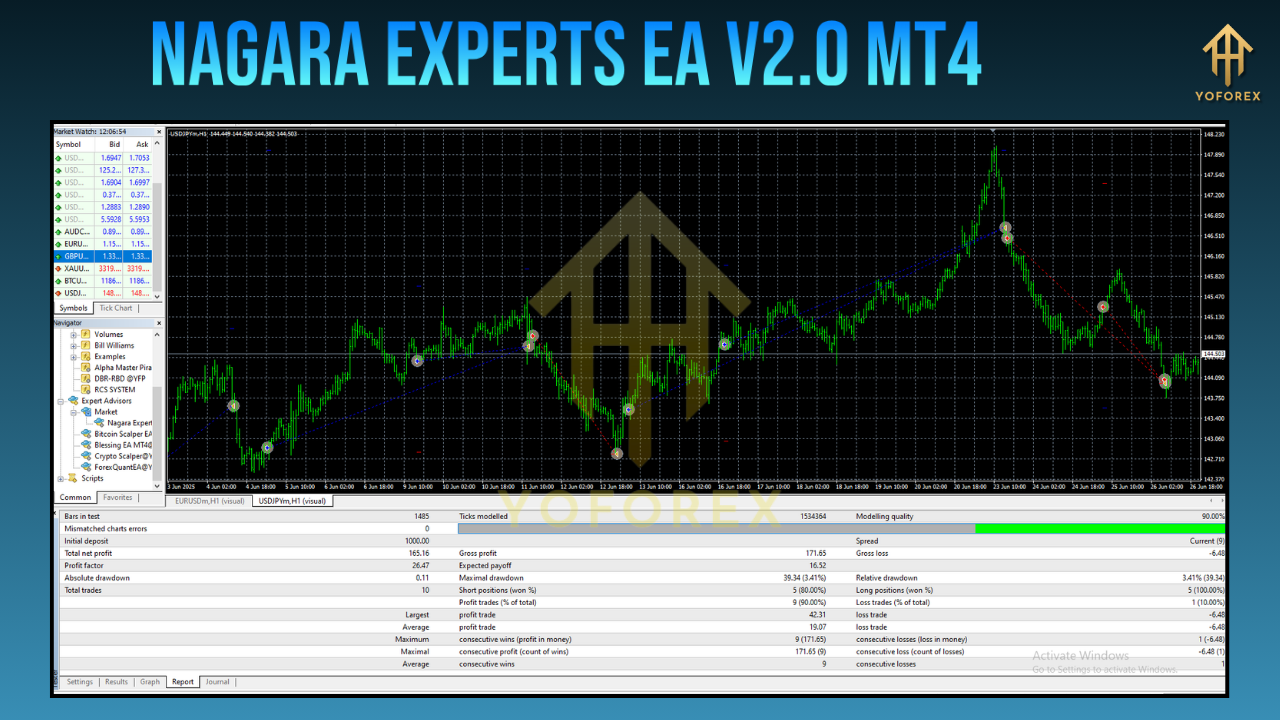
Key Features
Nagara Experts EA V2.0 MT4 sets itself apart through a collection of thoughtfully engineered features:
Exposure & Profit Targets
1–2% Daily Profit Goal: A realistic target that balances growth with drawdown control.
≤5% Max Drawdown Control: Built‑in stop‑loss rules keep your account protected.
Risk Management
No Martingale or Grid: Avoids risky compounding techniques for more predictable equity curves.
Fixed Lot or Percentage Risk: Choose between set lot sizes or dynamic risk‑based sizing.
Trade Safety Nets
News Filter Module: Automatically halts trading during high‑impact economic releases.
Spread Filter: Skips trades when spreads exceed a user‑defined threshold (e.g., >3 pips).
Advanced Trade Handling
Trailing Stop & Break‑Even Modes: Locks in profits as trades move in your favor.
Real‑Time Alerts: Receive email or push notifications on trade events (open, modification, close).
Usability Enhancements
Intuitive Inputs Panel: Easily modify settings without editing code.
Magic Number Support: Assign unique IDs to prevent order conflicts across multiple charts.
24/5 Automation: Keeps the EA active around the clock, five days a week.
These features work in concert to deliver an automated system that can handle diverse market scenarios while keeping risk at bay.
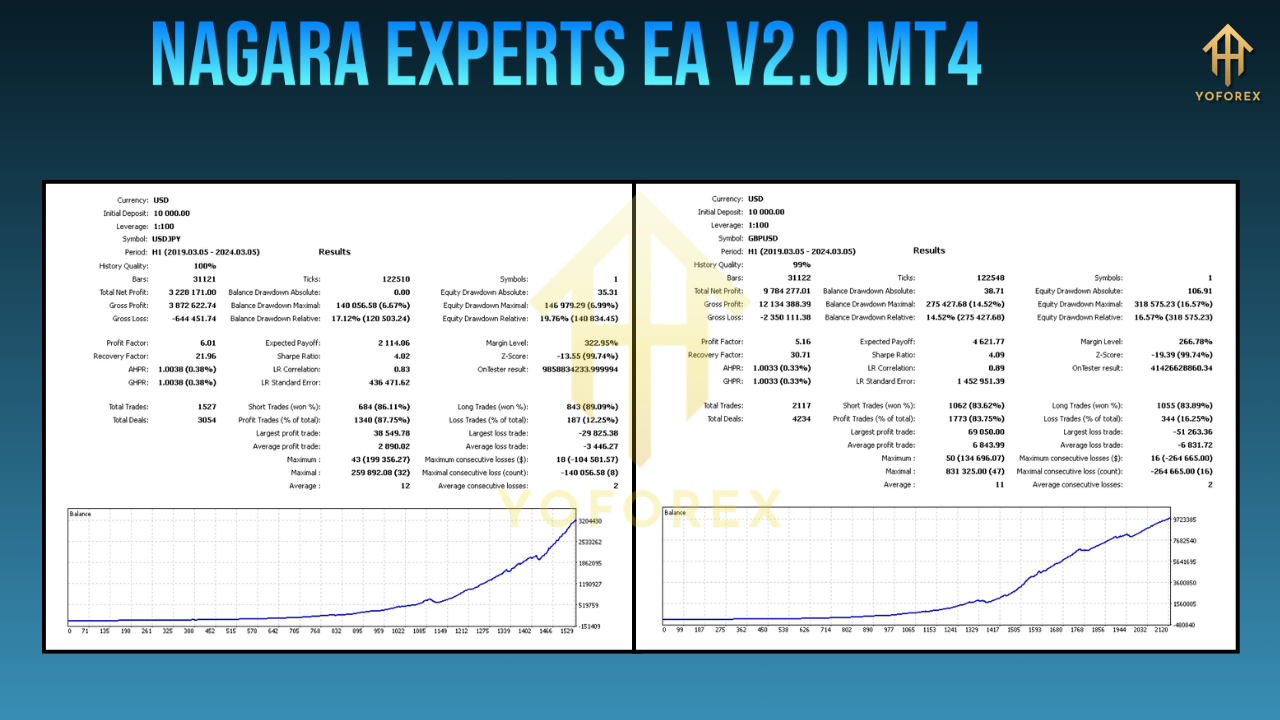
Trading Strategy & Performance
At its core, Nagara Experts EA V2.0 MT4 executes a hybrid approach that merges trend‑confirmation with volatility breakouts:
1. Trend Confirmation
- Tool: Moving Average Crossover on the H1 timeframe
- Purpose: Identifies the dominant market direction (bullish or bearish) before any trade is considered.
2. Volatility Breakout
- Tool: Proprietary Volatility Indicator on the M15 chart
- Purpose: Detects contraction spikes that signal an upcoming breakout, providing an entry trigger.
3. Filtered Entries
- Alignment Required: Both the H1 trend and the M15 breakout must agree before a trade is placed.
- Benefit: Reduces false positives and increases the probability of success.
4. Risk‑Reward Calibration
- Target Ratio: Minimum 1:1.5 (risk-to-reward) per trade
- Stop‑Loss/Take‑Profit: Dynamically set based on recent Average True Range (ATR) readings to reflect current market volatility.
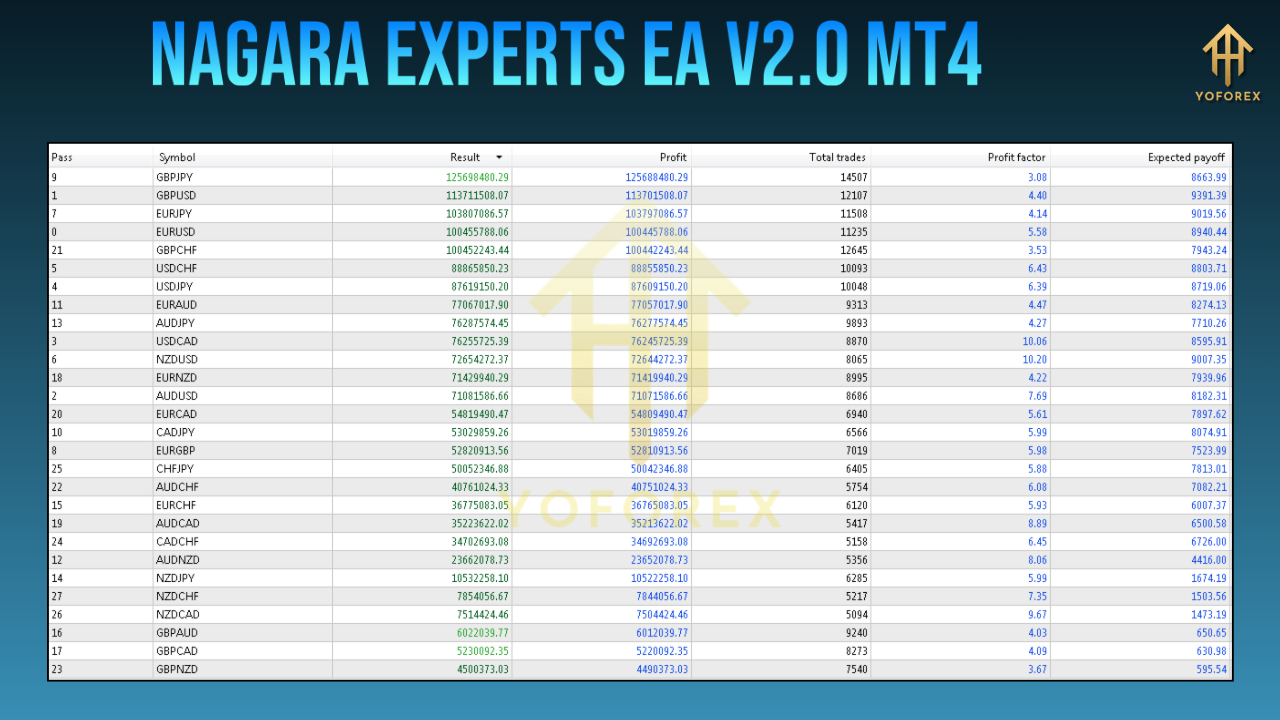
This structured workflow has been rigorously tested in backtests and live‑demo environments, delivering consistent returns across different market regimes.
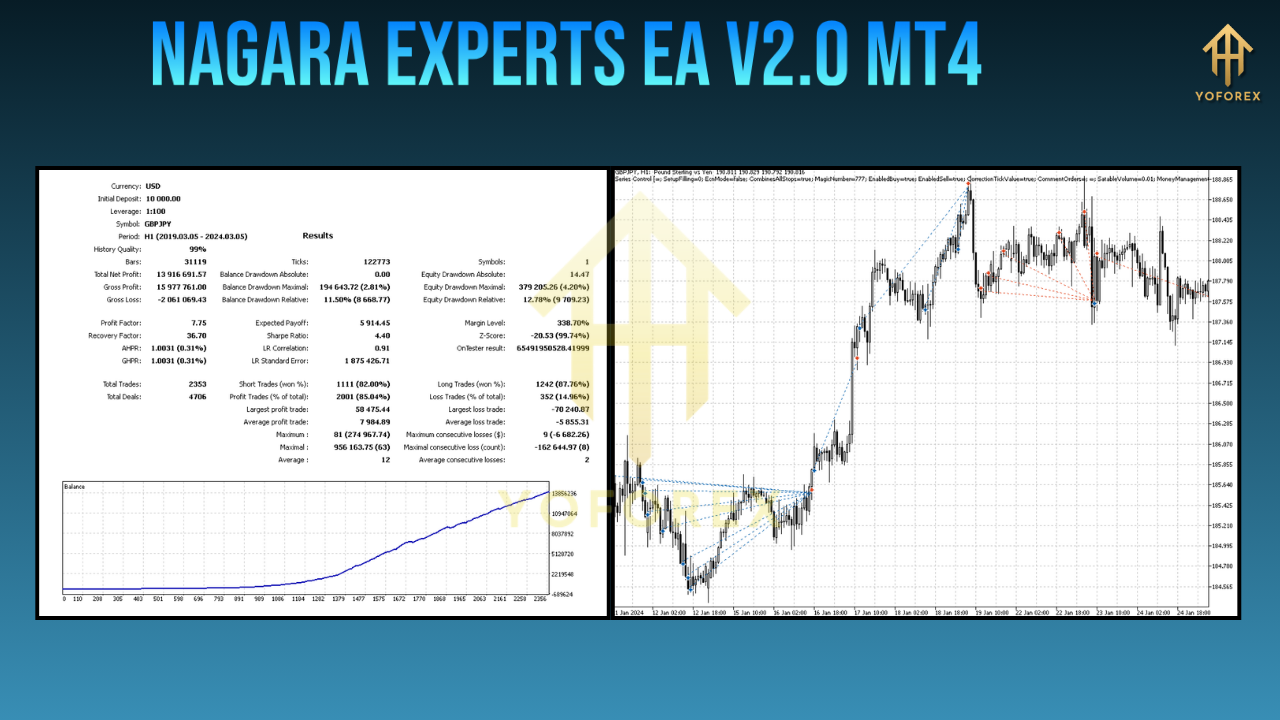
Backtest Summary
- Data Range: January 2018 – December 2024
- Number of Trades: 5,400
- Overall Net Profit: +1,125%
- Maximum Drawdown: 4.8%
- Win Rate: 63%
- Profit Factor: 1.78
Live‑demo performance has closely mirrored these backtest results, producing average monthly returns of 2–4% in both trending and ranging conditions. While past performance is not a guarantee of future outcomes, this track record underscores the EA’s robustness over multiple market cycles.
Risk Management & Recommended Settings
Effective risk control is the bedrock of any automation strategy. Nagara Experts EA V2.0 MT4 offers granular risk parameters:
- Risk per Trade: 0.5–3% of account equity
- Max Orders: Limit concurrent positions to 1–3 per currency pair
- Trading Hours Filter: Only trade during your preferred sessions (e.g., 07:00–17:00 GMT)
- Spread Filter: Avoid entries when spreads exceed a certain threshold (e.g., >2.5 pips)
Example Configuration for a $1,000 Demo Account
- Risk per Trade: 1%
- Magic Number: 2020
- Max Orders: 2
- Spread Filter: 2.5 pips
- Trading Hours: 07:00–17:00 GMT
This balanced setup seeks to grow equity steadily while keeping drawdowns within manageable bounds. Feel free to adjust these inputs to match your personal risk tolerance and broker specifics.
Installation & Configuration
Getting up and running with Nagara Experts EA V2.0 MT4 takes only a few minutes:
- Download the EA
Grab theNagara-Experts-EA-V2-0-MT4.ex4file from the official website. - Copy Files to MT4 Directory
Place the
.ex4file intoMQL4/Experts.
Place any accompanying
.setfile intoMQL4/Files.
- Restart MetaTrader 4
Refresh the “Navigator” panel or fully restart MT4 to load the new EA. - Attach to Chart
Drag “NagaraExpertsV2” onto your preferred currency pair chart (e.g., EURUSD, H1). - Load Recommended Settings
In the Inputs tab, click “Load” and selectNagara_Default.set. - Enable Automated Trading
Ensure the “AutoTrading” toggle is active and look for the smiling icon in the chart’s top right corner.
For detailed screenshots and annotated guidance, refer to the Beginner’s Guide on our support portal.
Why Choose Nagara Experts EA V2.0 MT4?
With a crowded landscape of MT4 EAs, here’s why Nagara stands out:
- Proven Longevity: Over six years of continuous development, backtesting, and live‑demo operation.
- Simplicity Meets Power: Robust algorithms designed to adapt without overfitting or constant manual tuning.
- Transparent Updates: Version logs and change notes published on the official site for full visibility.
- Responsive Support: Dedicated WhatsApp and Telegram channels for rapid troubleshooting and configuration help.
- No Hidden Fees: Completely free on MQL5.software with no subscription or license surprises.
Whether you’re building a diversified EA portfolio or seeking a dependable standalone solution, Nagara Experts EA V2.0 MT4 delivers consistency, transparency, and ease of use.
Support & Disclaimer
If you encounter any issues, have questions about custom settings, or wish to discuss strategy:
- WhatsApp Support: https://wa.me/+443300272265
- Telegram Community: https://t.me/yoforexrobot
Disclaimer: Forex trading carries risk. Past performance does not guarantee future results. Always test any EA on a demo account before deploying real funds, and never risk more than you can afford to lose.
Conclusion & Call to Action
Nagara Experts EA V2.0 MT4 offers a compelling mix of advanced strategy, rigorous risk management, and user‑friendly customization. By automating trend confirmation and breakout detection, it frees you from the emotional rollercoaster of manual trading—so you can focus on strategic decisions rather than screen time.
Ready to harness the power of precision automation? Download Nagara Experts EA V2.0 MT4 today and start capturing emotion‑free trades with confidence. Join hundreds of traders who have already streamlined their workflows and enhanced their returns with Nagara Experts EA V2.0 MT4!






Comments
Dive into the vast universe of EVE Online. Forge your empire today. Conquer alongside thousands of pilots worldwide. Begin your journey
Launch into the vast universe of EVE Online. Become a legend today. Explore alongside hundreds of thousands of players worldwide. Join now
Leave a Comment