
Mastering Trading with Murrey Math Levels Indicator MT5: A Comprehensive Guide
In the fast-paced world of financial markets, traders constantly seek reliable tools to gain an edge. Among the most powerful technical analysis indicators available for MetaTrader 5 (MT5) is the Murrey Math Levels Indicator. Developed by T. Henning Murrey, this tool transforms complex market dynamics into actionable insights through geometrically derived support and resistance levels. Whether you’re a novice or seasoned trader, understanding how to leverage this indicator can significantly enhance your decision-making process. In this comprehensive guide, we’ll explore the mechanics of Murrey Math, step-by-step setup instructions, proven trading strategies, and best practices to maximize its potential.
What is the Murrey Math Levels Indicator?
The Murrey Math system is rooted in chaos theory and fractal geometry, designed to identify key price levels where reversals or continuations are likely. Unlike traditional Fibonacci retracements, which rely on percentage-based levels, Murrey Math uses a grid of nine horizontal lines—each representing a specific mathematical relationship—to define market structure. These lines act as dynamic support/resistance zones, helping traders anticipate entry/exit points with greater precision.
Key features include:
- Dynamic Level Calculation: Automatically adjusts to recent price action.
- Fractal-Based Design: Reflects market cycles and volatility.
- Versatility: Applicable to Forex, stocks, commodities, and cryptocurrencies.
For MT5 users, the indicator integrates seamlessly into charts, providing real-time visual cues without manual calculations.
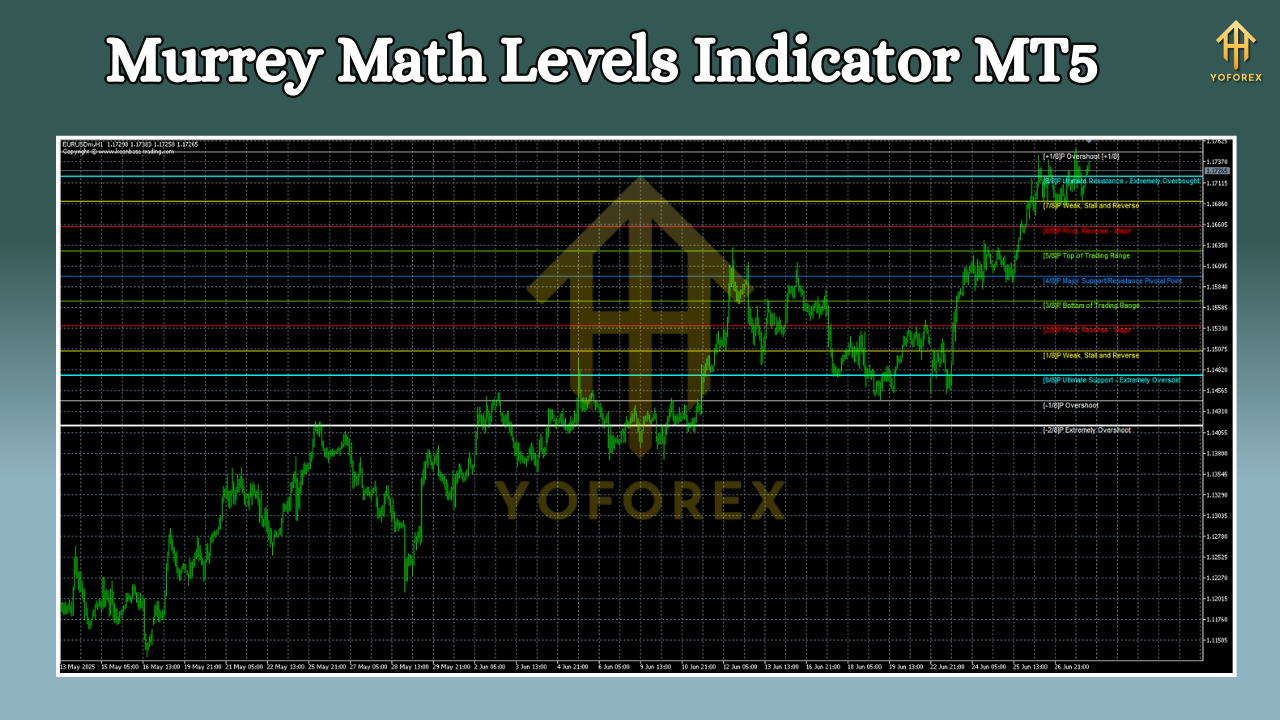
Murrey Math Levels Explained Simply
Here's a clear breakdown of the Murrey Math levels with easy-to-understand explanations:
8/8 - Top Extreme
- What it means: Price is at its highest point (overbought)
- What to do: Expect a reversal downward. Avoid buying here.
7/8 - Weak Reversal Zone
- What it means: Price is high but not extreme
- What to do: Watch for small pullbacks. Check if momentum is slowing.
6/8 - Pivot Resistance
- What it means: Strong barrier where price often stops rising
- What to do: Look for price to turn downward. Good place to consider selling.
5/8 - Major Pivot (50% Level)
- What it means: Middle point of the price range
- What to do: Trend direction often changes here. Key decision point.
4/8 - Minor Support/Resistance
- What it means: Secondary barrier that can slow price movement
- What to do: Use to confirm if the current trend is strong.
3/8 - Pivot Support
- What it means: Strong floor where price often stops falling
- What to do: Look for price to bounce upward. Good place to consider buying.
2/8 - Weak Reversal Zone
- What it means: Price is low but not extreme
- What to do: Watch for small bounces. Check if trading volume increases.
1/8 - Bottom Extreme
- What it means: Price is at its lowest point (oversold)
- What to do: Expect a reversal upward. Avoid selling here.
0/8 - Extreme Bottom
- What it means: Absolute lowest price point
- What to do: Strong reversal up might happen. Be cautious and wait for confirmation.
Key Patterns to Remember:
- Strongest Levels: 0/8, 4/8, and 8/8 are the most important
- Reversal Zones: 2/8 and 6/8 often signal turning points
- Middle Ground: 3/8 to 5/8 is where price tends to balance
- Extreme Points: 0/8 and 8/8 show when price is overstretched
Think of these levels like floors and ceilings in a building - price tends to bounce off them or break through with force. The middle levels (4/8 and 5/8) are like the main lobby where people decide which direction to go.
Traders use these levels to:
- Identify high-probability entry points (e.g., buying at 3/8 support).
- Set stop-loss orders beyond critical levels (e.g., below 2/8 during uptrends).
- Take profits near resistance (e.g., selling at 6/8).
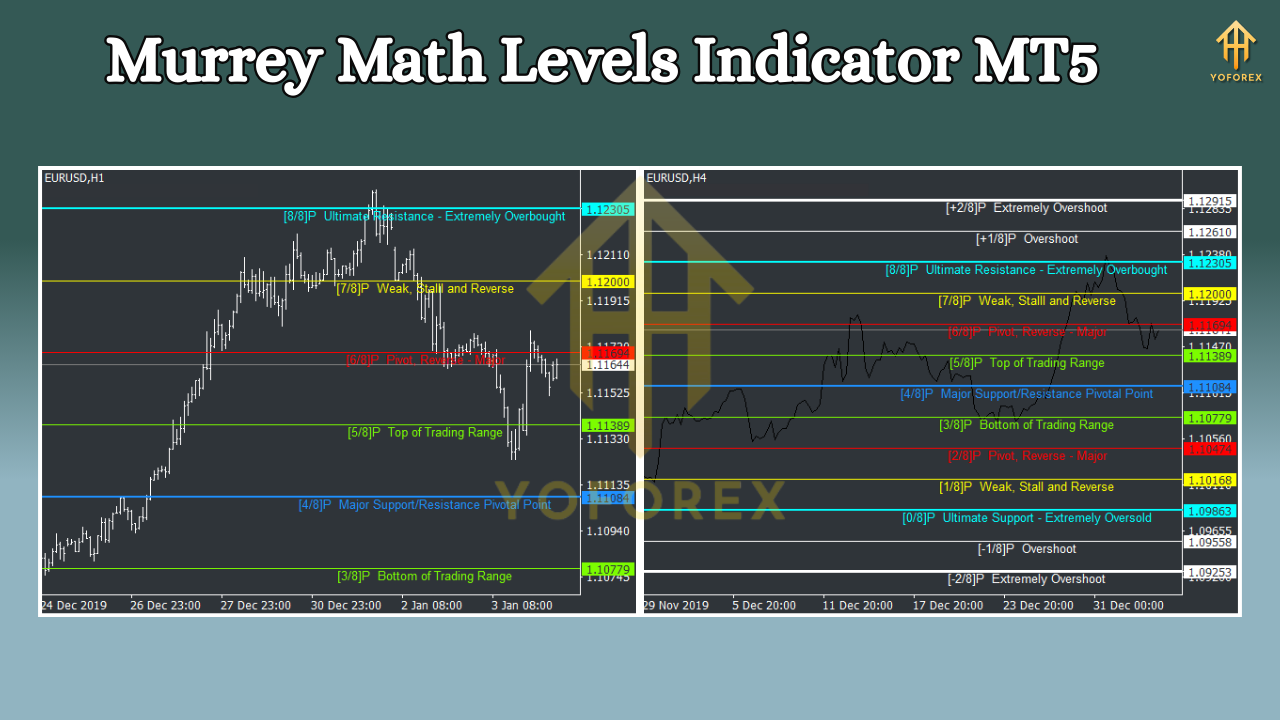
Installing and Configuring the Murrey Math Indicator in MT5
Follow these steps to integrate the indicator into your MT5 platform:
Download the Indicator:
- Obtain the
.ex5file from a trusted source (e.g., MQL5 Market or reputable trading forums). Ensure compatibility with MT5 build 2000+.
- Obtain the
Install via File Explorer:
- Navigate to
File > Open Data Folderin MT5. - Go to
MQL5 > Indicators. - Copy the downloaded
.ex5file into this folder.
- Navigate to
Add to Chart:
- Restart MT5.
- Open a chart (e.g., EUR/USD, 1-hour timeframe).
- Click
Insert > Indicators > Custom > [MurreyMath_Levels].
Configure Settings:
- Period: Default is 64 (optimal for daily/weekly trends). Adjust to 32 for intraday trading.
- Color Scheme: Customize line colors for clarity (e.g., red for resistance, green for support).
- Alerts: Enable pop-up/sound alerts for level breaches to avoid missed opportunities.
Pro Tip: Backtest settings on historical data before live trading to align with your strategy.
Trading Strategies Using Murrey Math Levels
Here are three battle-tested approaches to harness the indicator’s power:
1. Bounce Strategy (Support/Resistance Trades)
- Setup: Wait for price to approach a strong level (3/8, 5/8, or 6/8) after a clear trend.
- Entry: Buy when price bounces off 3/8 support during an uptrend; sell when it rejects 6/8 resistance in a downtrend.
- Exit: Target the next Murrey level (e.g., buy at 3/8 → target 4/8 or 5/8). Use a trailing stop to lock in profits.
2. Breakout Strategy (Trend Continuation)
- Setup: Identify a consolidation phase between two Murrey levels (e.g., 4/8 and 5/8).
- Entry: Enter long if price breaks above 5/8 with rising volume; go short if it drops below 4/8.
- Exit: Hold until price reaches the next extreme level (8/8 or 0/8), or use a profit target based on average true range (ATR).
3. Confluence Strategy (Multi-Indicator Confirmation)
- Combine Murrey Math with other tools for higher accuracy:
- Moving Averages: Trade only if price is above the 20-period EMA during uptrends (below for downtrends).
- RSI/Oscillators: Avoid overbought (RSI >70) entries at 8/8; wait for oversold (RSI <30) conditions at 1/8.
- Candlestick Patterns: Confirm reversals with pin bars or engulfing patterns at Murrey levels.
Advantages and Limitations
Pros:
- Objective Levels: Eliminates guesswork by defining exact support/resistance zones.
- Adaptability: Works across all timeframes and asset classes.
- Risk Management: Clear stop-loss placements reduce emotional trading.
Cons:
- Whipsaw Risk: False signals may occur in low-volatility markets.
- Lag in Extreme Markets: During sharp trends, levels may lag behind price action.
- Not a Standalone Tool: Requires confirmation from other indicators or price action.
Best Practices for Effective Usage
- Timeframe Alignment: Use higher timeframes (4-hour/daily) for trend direction and lower timeframes (15-minute) for entries.
- Volume Analysis: Increase position size when volume surges at Murrey levels, indicating strong institutional interest.
- Multiple Timeframe Validation: Ensure levels align across daily and weekly charts for stronger setups.
- Journaling: Track wins/losses to refine strategy. Note which levels trigger false breakouts vs. genuine reversals.
Conclusion
The Murrey Math Levels Indicator is a versatile tool that demystifies market structure for MT5 traders. By mastering its levels and integrating them into a robust strategy, you can improve timing, manage risk, and capitalize on high-probability setups. Remember: no indicator guarantees success—consistency, discipline, and continuous learning are paramount. Start with paper trading to build confidence, then gradually apply these principles to live markets.
Whether you trade Forex, stocks, or crypto, the Murrey Math system offers a scientific approach to technical analysis. Embrace its logic, respect its limitations, and let it guide you toward smarter, more profitable decisions.
Support & Disclaimer
Got questions or need help? Reach out anytime:
- WhatsApp: https://wa.me/+443300272265
- Telegram: https://t.me/yoforexrobot
Disclaimer: Past performance is no guarantee of future results. All trading carries risk. Always demo-test the KT Murrey Math Levels Indicator MT5 in a risk-free environment before deploying on a live account.






Comments
Leave a Comment