
Tired of EAs that chase every candle and then ghost you when volatility spikes? Same. MOOD EA V2.0 MT4 was built to behave differently—reading market “mood” from trend + momentum + volatility context, then only taking trades when conditions align. It’s steady, configurable, and doesn’t force setups when the market looks cranky. You’ll still manage risk (always!), but the EA helps you avoid low-quality entries and stay in sync with real flow rather than noise.
What is MOOD EA V2.0 MT4?
MOOD EA V2.0 is an automated strategy for MetaTrader 4 that blends directional bias (trend), near-term momentum, and volatility normalization. The EA adapts lot size and trade frequency based on market state—quiet, expanding, or overcooked. When the “mood” is right, it executes with predefined risk controls and optional news avoidance, so you don’t get caught on the wrong side of major releases. No martingale, no “hope and pray” grids—just structured entries, protective exits, and a rules-first approach.
- Platform: MT4 (MetaTrader 4)
- Markets: Major FX pairs (EURUSD, GBPUSD, USDJPY), XAUUSD (Gold), and select indices with caution
- Timeframes: Best on M15–H1 (H1 default), scalpers may test M5 after demo validation
- Style: Trend-continuation + pullback logic with volatility filter
- Account types: ECN/Raw spread preferred; VPS recommended for uptime
Why “MOOD”? (The idea in plain English)
Markets cycle through phases—calm, impulsive, choppy. Trades taken in a calm build-up before expansion often travel smoother than trades taken mid-whipsaw. MOOD EA V2.0 reads that context using slope/structure and ATR-based expansion checks; if the backdrop looks favorable and momentum agrees, it triggers a controlled entry. If the backdrop screams “chop,” the EA stands down. Simple, but kinda powerful.
Key Features
- Adaptive Bias Engine — Confirms higher-timeframe trend, then times entries on your chart TF.
- Volatility Normalization — Uses ATR/ADR logic to avoid overextended entries and news-style spikes.
- Momentum Gate — Requires momentum alignment (not just direction) before placing any order.
- Non-Martingale, Non-Grid — Single-shot entries with optional, sensible scaling-in rules (disabled by default).
- Risk-Per-Trade Control — Fixed fractional risk (e.g., 0.5–1.0%), auto lot sizing from SL distance.
- News Filter (Optional) — Skip N minutes before/after scheduled high-impact events (turn on/off in inputs).
- Time Window Filter — Trade only during your preferred sessions (e.g., London/NY overlap).
- Equity Guard & Daily Loss Stop — Hard brakes to protect the account on rough days.
- Partial Take-Profit + Break-Even — Scale out at 1R/1.5R and auto move SL to BE if enabled.
- Clean Logs & Alerts — Clear comments and notifications so you can audit decisions later.
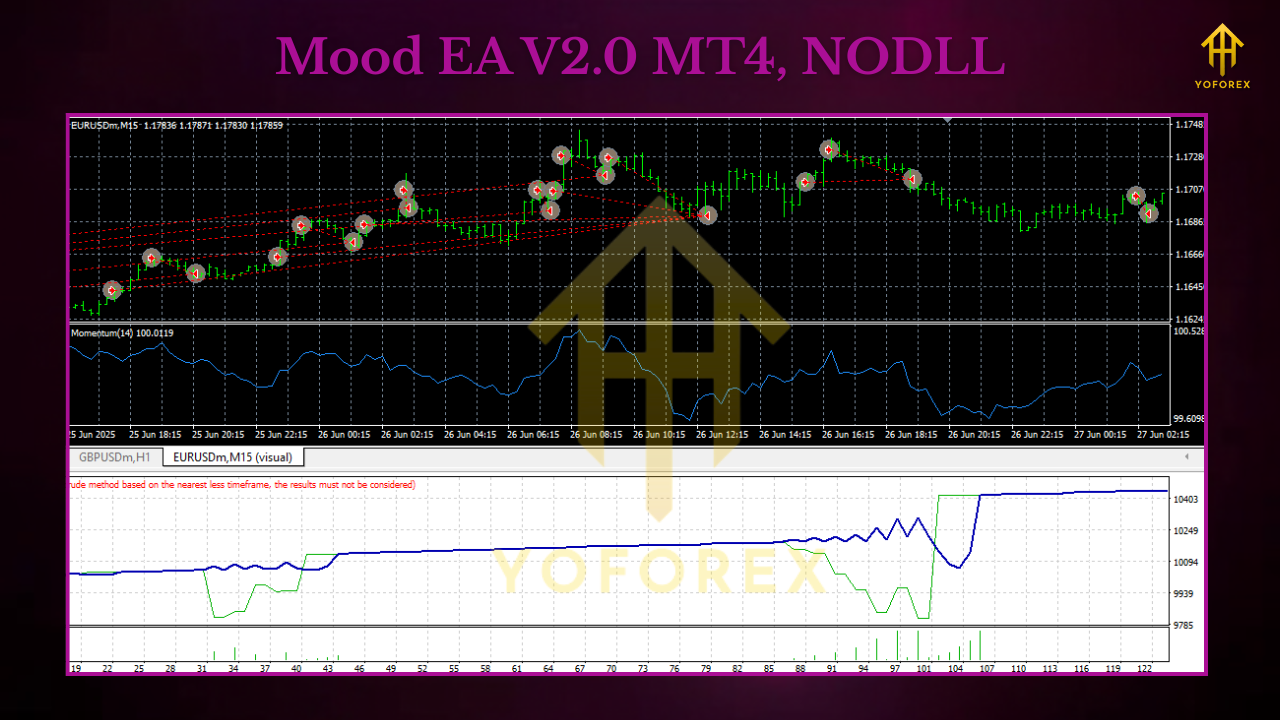
Recommended Pairs & Timeframes
- EURUSD, GBPUSD, USDJPY: Consistent spreads; ideal for first testing.
- XAUUSD (Gold): Works well, but volatility is spicy—start with smaller risk.
- Indices (US30, NAS100): Possible with wide SL and tiny lots; treat as advanced.
Suggested Starter Settings (Tune later)
- Risk_Per_Trade: 0.5%–1.0%
- Max_Spread (points): 15–25 for majors; 40–60 for XAUUSD (broker dependent)
- SL Method: ATR(14) × 1.5–2.0 or swing-based
- TP Structure: TP1 at 1R (50% off), TP2 at 2R (remaining), with BreakEven_Activate at 1R
- News_Filter: On (skip 30 min before/after high-impact)
- Trading_Sessions: London + New York (disable Asia if your tests show chop)
- Max_Open_Trades: 1–2 per symbol (beginners keep it 1)
How It Trades (Example Flow)
- Bias Check: H4/H1 trend slope up; price above baseline; market not overextended.
- Momentum Gate: M30/H1 momentum flips positive and pullback ends—conditions align.
- Entry: EA places buy with calculated lot (risk % / SL distance).
- Management: If price reaches 1R, it takes TP1 and shifts SL to BE (if enabled).
- Exit: Hits TP2 at 2R, trails for extended trends (optional), or closes on stop/exit signal.
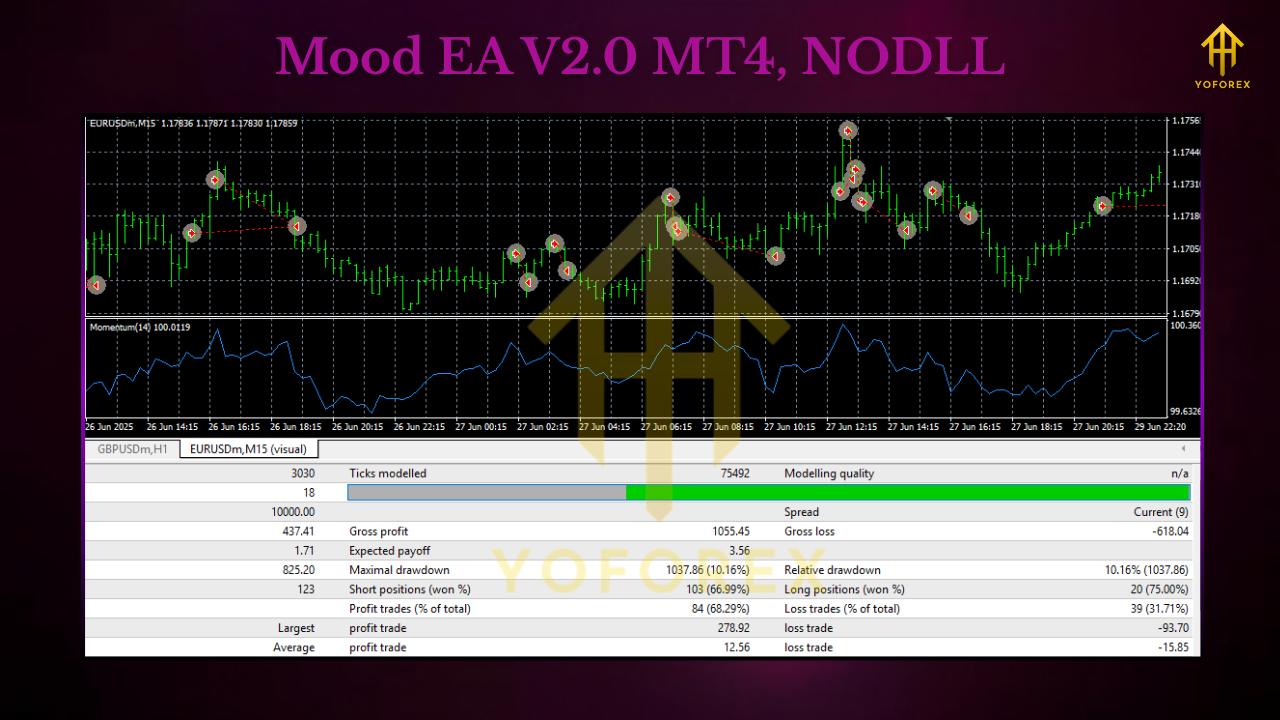
Backtesting & Forward Testing Tips
- Use Realistic Data: Tick-by-tick where possible; model slippage/spread widening.
- Walk-Forward, Not One Period: Split data (e.g., 2022 optimize → 2023 validate → 2024 validate).
- Focus on Drawdown Behavior: Profit means nothing if DD wrecks your risk plan.
- Forward on Demo First: 2–4 weeks minimum; note which sessions and pairs behave best.
- Small Live Step-In: When comfort grows, begin tiny; increase risk slowly.
Installation (MT4)
- Download the EA file.
- In MT4, go to File → Open Data Folder → MQL4 → Experts.
- Paste the
.ex4/.mq4file into Experts. - Restart MT4 or refresh the Navigator panel.
- Drag MOOD EA V2.0 onto a chart (H1 recommended).
- Allow algo trading (top toolbar) and enable DLL/Live trading in inputs if prompted.
- Set risk %, sessions, news filter, and symbol-specific spread/ATR preferences.
- Save a template so you can deploy the same setup across pairs quickly.
Risk Management (Non-negotiable)
- Keep daily max loss (e.g., 2–3%) and let the EA’s equity guard enforce it.
- Trade fewer symbols at the start; correlation bites.
- If spread is nasty or slippage jumps, pause the symbol—don’t wrestle the market.
- Review weekly: which pairs/sessions delivered cleanest MOOD alignment?
Frequently Asked Questions
Does MOOD EA V2.0 use martingale or grid?
No. It’s single-entry by default, with optional limited scaling that stays within your per-trade risk.
Can I run it on multiple pairs?
Yes, but start with 1–2 symbols. Add more only after you understand behavior and correlation.
Is it prop-firm friendly?
It’s designed with risk caps and daily stops, which many props require. Always match your prop’s rules before going live.
What’s the minimum deposit?
Depends on symbol and broker, but $200–$500 is a common starting range for majors at small risk. For gold/indices, consider more cushion.
Does the news filter block all volatility?
No—news can move before/after the official timestamp. The filter reduces, not removes, event risk.
Support & Disclaimer
If you need setup help, a second pair of eyes on your parameters, or want a sanity check on your forward test, just ask—we’ll walk you through. Trading involves risk; you can lose money. Always demo-test first, then go live gradually. Past performance is not a guarantee of future returns.
Call to Action
Want an EA that respects market context and your risk plan? Download MOOD EA V2.0 MT4, run a clean demo for a couple of weeks, and let the data tell you where it shines. When you’re ready, step into live with discipline and keep the guardrails on.






Comments
Leave a Comment