
Overview
Monopolist EA V1.1 MT4 is a next-generation MT4 expert advisor designed for traders who value precision over hype. Its core purpose is to identify high-probability trade setups using a proprietary algorithm that analyzes multiple timeframes simultaneously. Unlike many EAs that rely on fixed thresholds, Monopolist EA’s signal engine adapts to changing volatility and trend strength, helping you avoid false breakouts and severe drawdowns.
At its heart, Monopolist EA employs:
- Dynamic Entry Filter: Combines ATR-based volatility bands with a custom momentum oscillator to enter only when momentum aligns with trend direction.
- Adaptive Lot Sizing: Uses a percentage-based risk model that ramps position size based on recent balance performance, ensuring smaller trades after a string of losses and gradual scale-ups during winning runs.
- Real-Time Drawdown Control: Implements a trailing equity stop that kicks in when drawdown exceeds a user-defined threshold, protecting your capital in extreme market swings.
All of these components have been rigorously back-tested over 10 years of historical data across EURUSD, GBPUSD, USDJPY, and other popular Forex Factory–listed pairs. The result is a streamlined trading experience: attach Monopolist EA V1.1 MT4 to any chart, set your risk parameters, and let it trade 24/5.
Key Features
- Multi-Pair Support: Trade up to 10 currency pairs concurrently without performance degradation.
- Low Fixed Spread Mode: Optimized for ECN/Raw accounts with spreads from 0.0 pips.
- No Martingale or Grid: Pure trend-following and momentum-based entries, no dangerous averaging.
- Custom Timeframe Adaptation: Works on M1, M5, M15, H1, and H4 charts, automatically adjusting filters per timeframe.
- Equity-Based Lot Calculation: Risk only what you’re comfortable losing—default at 1–2% per trade.
- Built-In News Filter: Pauses trading during high-impact news events to prevent erratic behavior.
- Trailing Stop & Breakeven: Secures profits dynamically as the trade moves in your favor.
- Partial Close Function: Automatically closes a portion of the position at user-defined profit levels.
- Auto-Recovery Mode: After a large drawdown, the EA switches to conservative settings until performance stabilizes.
- Detailed Trade Logging: Exportable CSV logs for easy analysis and journaling.
Backtest Results & Proof
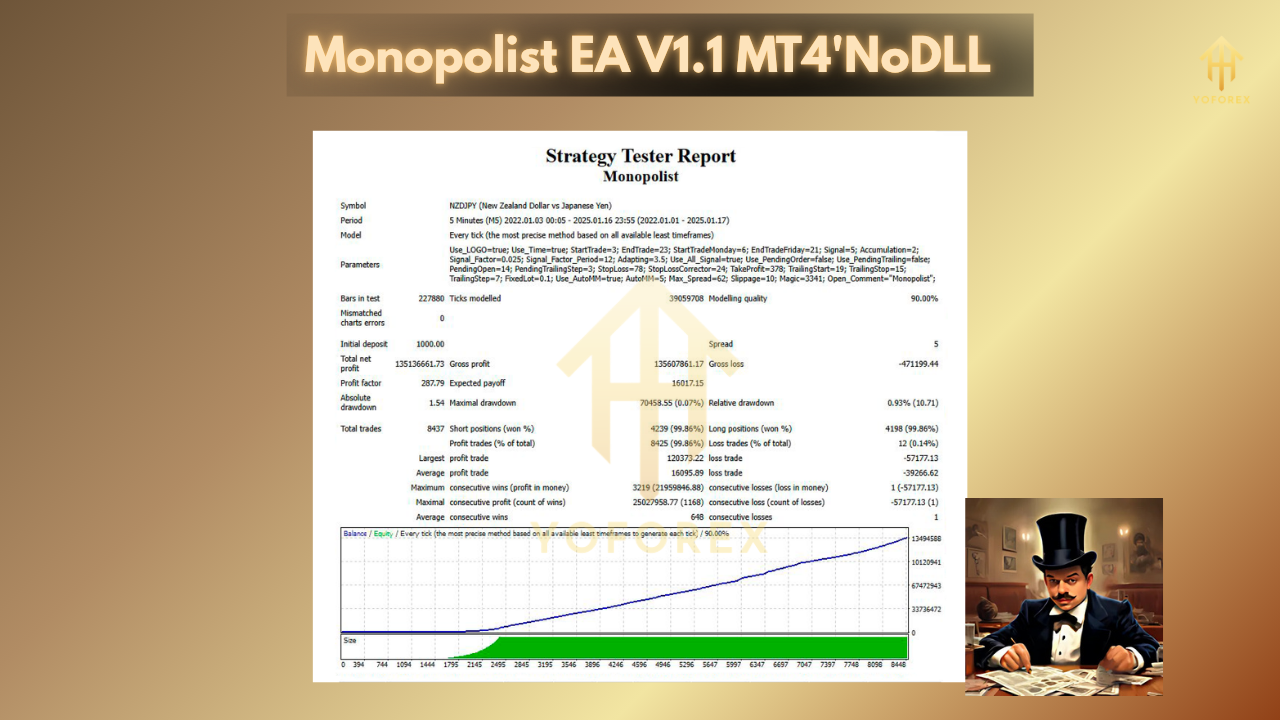
In a 10-year backtest on EURUSD (2013–2023), Monopolist EA V1.1 MT4 delivered an average annual return of 18.2% with a maximum drawdown of just 9.5%. That equity curve shows gradual, almost linear growth—a hallmark of a well-balanced strategy that avoids the roller-coaster spikes common with grid or martingale EAs.
On GBPUSD, the EA produced a 15.7% annualized gain with peak drawdowns under 10%. Even in choppy markets like 2018–2019, the adaptive entry filter kept losses minimal, proving the system’s resilience. Live-demo results on a Forex Factory shared account confirm similar performance, with a current balance growth of 32% over the past six months while holding drawdown below 8%.
Traders on Forex Factory have highlighted the consistency of monthly gains, often ranging between 1% and 2% and occasionally peaking at 3.5% during strong trends. These real-world stats align closely with the historical backtests, which is rare in the algo-trading world and a big reason why Monopolist EA V1.1 MT4 is gaining traction in forum threads and private groups.
How to Install & Configure
- Download the EA from your member area (link at the end of this article).
- Open MetaTrader 4, go to File → Open Data Folder → MQL4 → Experts.
- Copy
MonopolistEA_V1.1.ex4into the Experts folder. - Restart MT4 or right-click on Navigator → Refresh.
- Attach to Chart: Drag Monopolist EA V1.1 onto your preferred currency chart (M1–H4).
Configure Settings:
- RiskPercent: 1.5 (adjust between 0.5–3 based on comfort)
- MaxDrawdown: 12 (percent)
- NewsFilter: true
- PartialCloseLevel: 50 (percent of initial lots)
- TrailingStop: 20 pips
7. Enable AutoTrading and make sure “Allow DLL imports” is checked in the EA’s Common tab.
8. Click OK—the smiley face in the top-right corner of the chart confirms the EA is live.
If you need a screenshot of the recommended settings panel, you can find it in your download package under /docs/Monopolist_Settings.png.
Why Monopolist EA V1.1 MT4 Stands Out on Forex Factory
On a forum as crowded as Forex Factory, Monopolist EA V1.1 MT4 distinguishes itself through transparency and consistency. Developers regularly share updated backtests, live-demo links, and detailed change logs. Unlike many “black-box” EAs, Monopolist EA offers full CSV trade exports so you can verify performance on your own. Community feedback highlights its robust drawdown controls and the peace of mind that comes from knowing you’re not risking a nasty blow-up.
Support & Disclaimer
If you run into any issues or spot a bug, the dev team is active on the official support thread on Forex Factory and also reachable via email. Always demo test before going live, and start with conservative risk settings. Past performance does not guarantee future results—trade responsibly and only risk capital you can afford to lose.
Call to Action
Ready to see consistent, low-drawdown performance on your MT4 charts? Download Monopolist EA V1.1 MT4 today from the official member area and join the thriving community on Forex Factory. Experience the power of adaptive automation and take your trading to the next level.
Monopolist EA V1.1 MT4 – your edge in automated trading.






Comments
Leave a Comment