Introduction
Are you tired of guessing market volatility and getting stopped out by sudden price swings? If so, the NLGMA ATR Indicator V5.85 MT4 is about to become your new best friend. Built on the time-tested Average True Range (ATR) concept, this powerful tool gives you real-time insights into market momentum—so you can set smarter stops, target better entries, and manage risk like a pro. Gone are the days of one-size-fits-all volatility settings; with the latest version 5.85, you’ll gain dynamic ATR bands that adapt to any currency pair or time frame.
Whether you’re a scalper hunting 5-pip moves or a swing trader riding multi-day trends, knowing exactly how choppy or calm the markets are is crucial. The NLGMA ATR Indicator delivers that clarity with an intuitive visual display right on your MT4 charts. In this in-depth guide, we’ll walk you through what makes version 5.85 so special, unpack its key features, show you step-by-step installation, and share tips on optimizing your strategy.
Ready to upgrade your volatility analysis? Let’s dive in.
What Is the NLGMA ATR Indicator V5.85?
The NLGMA ATR Indicator is a custom MT4 tool built on the Average True Range formula, which measures market volatility by comparing the range between high and low prices and gaps between sessions. Version 5.85 brings significant enhancements over prior releases:
- Adaptive ATR Bands that automatically expand or contract based on recent volatility, giving you a dynamic envelope rather than a fixed multiplier.
- Multi-Timeframe Support so you can view ATR readings from lower or higher timeframes without changing charts.
- Custom Alerts to notify you when volatility spikes or contracts beyond your predefined thresholds.
- Performance Optimizations to ensure smooth operation even during high market activity.
By integrating these improvements, the NLGMA ATR Indicator V5.85 helps you pinpoint breakout potential, fine-tune your stop-loss levels, and avoid whipsaw traps. Whether volatility is your friend or foe, this tool gives you the edge you need to stay ahead.
Key Features
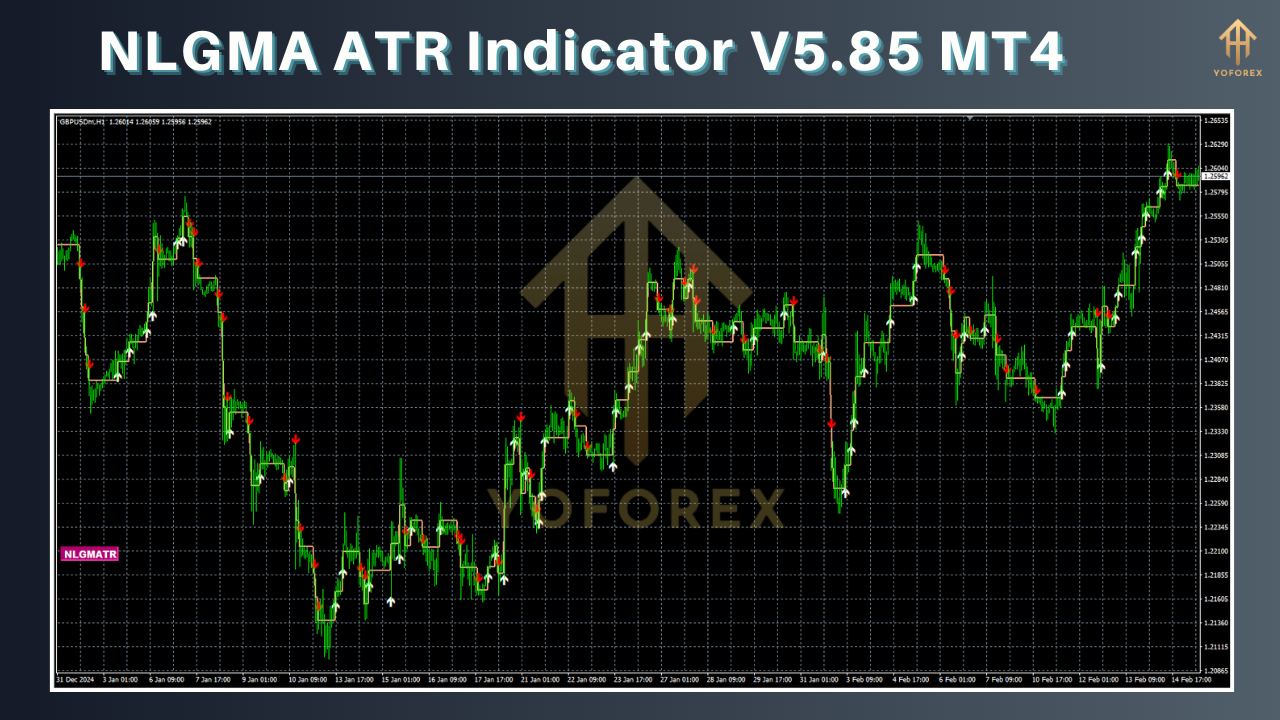
- Dynamic ATR Bands: Automatically adjust envelope width based on real-time volatility.
- Multi-Timeframe Display: Overlay ATR from M15, H1, H4, and D1 directly on your active chart.
- Customizable Lookback Period: Choose any ATR length from 5 to 100 to suit scalping or swing setups.
- Built-In Alerts: Sound and popup alerts when ATR breaches user-defined upper or lower limits.
- Volatility Heatmap: Color-coded bars highlight high-volatility versus low-volatility periods.
- Visual Stop-Loss Tool: Drag-and-drop lines show ideal SL placement based on current ATR.
- Backtest-Ready: Compatible with MT4 strategy tester for historical performance analysis.
- Lightweight Code: Optimized MQL4 script minimizes CPU load on busy charts.
- User-Friendly Interface: Simple inputs panel with clear labels and preset templates.
- Transparent Calculations: Fully comment-ed code so you can audit or tweak logic as needed.
How to Install & Configure
Download the Indicator
Visit your download page at https://yoforexea.com/nlgma-atr-indicator-v5-85-mt4
Click the “Download” button and save the
.ex4file to your PC.
Copy to MT4 Folder
Open your MetaTrader 4 terminal.
Go to File → Open Data Folder → MQL4 → Indicators.
Paste
NLGMA_ATR_V5.85.ex4into the Indicators folder.
Restart MT4
Close and reopen MT4 so it recognizes the new script.
Attach to Chart
In the Navigator panel, expand Indicators → Custom.
Drag NLGMA ATR Indicator v5.85 onto your desired chart.
Configure Inputs
ATR Period: Default 14; adjust for sensitivity (e.g. 7 for fast scalping).
Multiplier: Controls band width; default is 1.5× ATR.
Timeframe Source: Choose chart TF or select higher TF for composite view.
Alert Thresholds: Set upper/lower ATR values for breakout and squeeze alerts.
Visual Style: Customize line color, thickness, and heatmap opacity.
Save Template
After fine-tuning, right-click the chart → Template → Save Template as “NLGMA_ATR_v5.85.tpl”
Upgrade
Version 5.85 introduces several user-driven enhancements:
- Rewritten calculation engine for sub-tick precision in fast markets
- New Volatility Surge Alert for sudden ATR jumps beyond 2× average
- Added Compact Mode to minimize chart footprint on multi-indicator setups
- Improved compatibility with MT4 build 1320+
- Fixed minor bug causing occasional repaint on session gaps
If you’re still on an earlier version, this upgrade delivers smoother performance, sharper signals, and a more flexible user interface—be sure to install it today.
Trading Strategies & Best Practices
Integrating the NLGMA ATR Indicator into your trading routine can boost both entries and exits:
- Breakout Entries: Wait for price to pierce the upper ATR band on rising volatility. This often signals strong momentum and reduces false moves.
- Volatility Squeeze: When ATR contracts below your lower threshold, prepare for a big move. Combine with Bollinger Bands or a momentum oscillator to confirm direction.
- Trailing Stop-Loss: Use the ATR band as a trailing stop. After your trade turns profitable, move SL to the midline or opposite band to lock in gains.
- Risk Sizing: Calculate position size by dividing your risk capital by current ATR value. Larger ATR means wider SL, so reduce lot size accordingly.
- Timeframe Alignment: If you scalp on M5, overlay H1 ATR to filter out noisy signals. Only take entries when higher-TF ATR is above average to ride genuine trends.
Optimization Tips
- Backtest First: Use MT4’s strategy tester to find the ideal ATR period and multiplier for each currency pair.
- Profile Sessions: Volatility often spikes at London and New York open. Adjust alert thresholds specifically for session windows.
- Combine Filters: Pair ATR signals with trend indicators like EMA or Supertrend to confirm momentum.
- Regular Updates: Markets evolve—check for new releases of the NLGMA ATR Indicator and apply upgrades promptly.
- Documentation: Review the built-in help file (right-click indicator → Help) for advanced parameters and sample templates.
Why Choose NLGMA ATR Indicator?
Developed and maintained by YoForex’s expert team, the NLGMA ATR Indicator stands apart thanks to its precision, reliability, and zero-cost licensing. You get ongoing updates, friendly documentation, and a supportive community ready to share templates and settings. Whether you’re just starting out or managing a multi-account portfolio, this free forex volatility indicator puts professional-grade tools at your fingertips—no subscriptions, no hidden fees.
Support & Disclaimer
If you hit any bugs or need help, ping our support team on WhatsApp at https://wa.me/+443300272265 or join the Telegram group at https://t.me/yoforexrobot. Our developers and experienced traders monitor both channels to answer questions and collect feedback.
Disclaimer: Past performance does not guarantee future results. The NLGMA ATR Indicator provides volatility insights only; trading always carries risk. Test thoroughly on a demo account before deploying live, and never risk more than you can afford to lose.
Conclusion & Download
Ready to master market volatility? Download the NLGMA ATR Indicator V5.85 MT4 now at https://yoforexea.com/nlgma-atr-indicator-v5-85-mt4 and unlock dynamic ATR bands, custom alerts, and multi-timeframe analysis—all for free. Elevate your risk management, refine your entries, and trade with confidence.






Comments
Leave a Comment