Magicxx Indicator V1.4 MT5 – Smart Trading Signal Indicator for MetaTrader 5
In modern trading, tools that deliver clarity, accuracy, and non-repainting signals are essential for consistent performance. The Magicxx Indicator V1.4 MT5 is a powerful signal indicator built for traders who use the MetaTrader 5 platform and demand precise entry and exit points across various assets.
Whether you're scalping short bursts of market momentum or capturing swing trades, Magicxx V1.4 is designed to serve as a real-time assistant that identifies trade opportunities with impressive reliability. It's an ideal solution for traders who prefer clean charts, logical signals, and an indicator that performs across different timeframes.
Let’s dive into what makes this tool stand out and how it can upgrade your trading results.
What Is Magicxx Indicator V1.4 MT5?
Magicxx Indicator V1.4 is a signal-based technical tool that generates real-time buy and sell signals based on price action behavior and trend logic. It has been specifically built for the MetaTrader 5 platform and is designed to enhance trading decisions with visual guidance on the chart.
Unlike many other tools that repaint signals after the fact, Magicxx V1.4 does not repaint. This makes it suitable for live trading and backtesting because the signals remain exactly as they appeared when generated.
It supports a wide range of asset classes including currency pairs, synthetic instruments, and indices. You can use it on short-term charts like M1 or M5, as well as higher timeframes like H1, H4, or even D1.
Key Features of Magicxx V1.4
Magicxx V1.4 has several standout features that make it a dependable tool for both novice and experienced traders.
Non-Repainting Signals
The indicator generates fixed buy or sell signals that do not disappear or shift as the chart moves. This allows traders to trust historical signals and analyze performance with transparency.
Timeframe Flexibility
It works seamlessly across all timeframes. Scalpers can use it on M1 and M5 for quick trades, while swing traders can take advantage of H1 or H4 to catch trend continuation or reversals.
Simple Chart Display
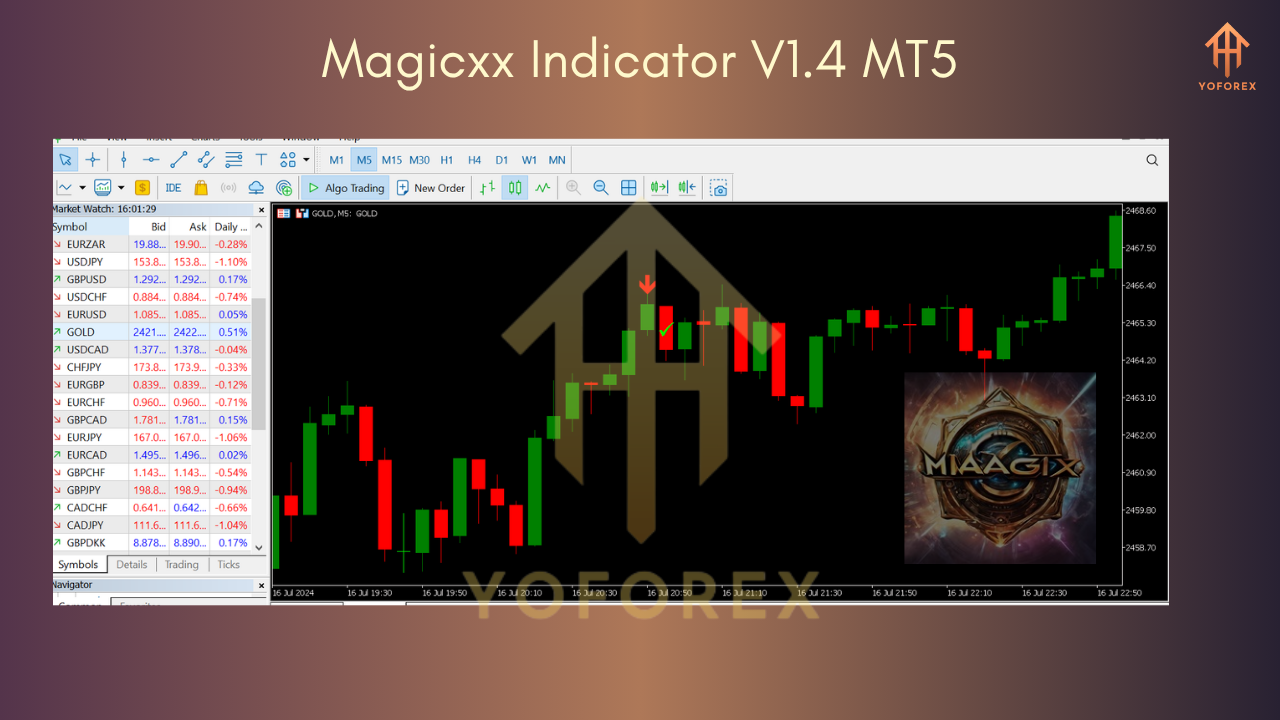
Magicxx uses arrows or signal markers to indicate potential trade opportunities. Its minimal design avoids chart clutter and lets traders focus only on relevant signals.
Customizable Inputs
You can adjust the sensitivity and other parameters of the indicator to match your trading style. Whether you want more frequent signals or conservative alerts, the settings allow you to fine-tune the behavior.
How It Works
Magicxx V1.4 operates through a series of built-in conditions that analyze the market in real time. It identifies potential entry zones based on price direction, trend momentum, volatility shifts, and candle behavior.
Here’s a simplified explanation of its core functionality:
- Analyzes the current trend using directional logic
- Filters noise using internal thresholds for price movement and structure
- Confirms a trade setup using confluence signals
- Displays a visual signal (buy or sell) once the criteria are satisfied
This entire process runs in the background on your MetaTrader 5 chart, and the result is a clean, actionable visual guide to help you make smarter trades.
Strategies for Using Magicxx V1.4
Magicxx V1.4 can be used as a standalone signal generator or in combination with other indicators or systems. Below are some of the most effective strategies to implement:
Trend Following Strategy
In trending markets, use Magicxx to follow the dominant direction. If the chart is trending upward and Magicxx gives a buy signal, it aligns with the existing momentum and may offer a strong entry point.
Reversal Detection Strategy
In consolidating or overbought/oversold markets, Magicxx may generate a signal indicating a trend change. These reversal signals can be useful for swing traders looking to enter at market turning points.
Scalping Strategy
Traders who prefer fast-paced trades on M1 or M5 can use Magicxx to time quick entries and exits. The clear signals help minimize hesitation and speed up decision-making during volatile price movements.
Advantages of Using Magicxx Indicator
Magicxx V1.4 MT5 offers a list of benefits that enhance the way traders interact with the market:
- Improves clarity and reduces analysis time
- Avoids false signals by using built-in filtering logic
- Helps beginners understand market structure through simple visual cues
- Can be adapted to any market and any trading session
- Boosts confidence by offering consistent and visible signal performance
This indicator is particularly beneficial for traders who don’t want to rely on complex multi-indicator setups. It offers a fast, visual approach to market entry decisions.
Who Should Use Magicxx Indicator?
Magicxx V1.4 is suitable for:
- New traders looking for a simple yet effective trading tool
- Intermediate traders aiming to improve their entry timing
- Advanced traders who want a clean visual signal to complement their analysis
- Anyone trading on MetaTrader 5, across forex, synthetic, or indices
The indicator is easy to install, lightweight on system resources, and can be used in both demo and live trading environments.
Installation Instructions
To get started with Magicxx V1.4, follow these steps:
- Download the indicator file in
.ex5format. - Open MetaTrader 5 and go to File > Open Data Folder.
- Navigate to MQL5 > Indicators.
- Paste the Magicxx file into the Indicators folder.
- Restart MetaTrader 5.
- Go to the Navigator panel, find the indicator, and apply it to your desired chart.
- Adjust the settings as needed based on your preferred strategy or market.
Once installed, the indicator begins running immediately, scanning for trade setups in real time.
Final Thoughts
Magicxx Indicator V1.4 MT5 is more than just a signal tool. It offers traders a strategic edge by combining simplicity, logic, and accuracy in a clean chart environment. The non-repainting nature of its signals makes it a trustworthy option for serious traders who want dependable results without unnecessary distractions.
By integrating Magicxx into your trading routine, you can enhance your timing, reduce noise, and improve overall discipline. Whether you are just starting your journey or already have experience, Magicxx can be the visual assistant that makes a real difference in your trading success.
Test it, tweak it, and let it guide your trading decisions with confidence.






Comments
Leave a Comment