Are you tired of Forex EAs that chase every tiny price wobble and leave you with minimal gains? Well, Long Term Investor PRO EA V20.32 MT4 brings a fresh twist: it blends classic technical analysis with a structured scalping mindset. Instead of trading every micro-move (coz, let’s be honest, that often leads to whipsaw losses), this EA zooms out to daily or weekly Fibonacci levels, then zooms back in to place precision trades when high-probability zones align.
In simple words, Long Term Investor PRO doesn’t just fire trades off the bat; it waits for the price to reach critical retracement or extension levels before even thinking about entry. Those levels are drawn on daily and weekly charts, giving you a broader market context—no more random scalping. And that’s just the start.
Imagine you’re watching EURUSD on your MT4 platform. The EA has already calculated the latest major swing high and swing low on the daily chart. It plots Fibonacci retracement levels—38.2%, 50%, 61.8%—and extension levels like 161.8% and 261.8%. When price approaches these zones, the EA activates its trend filter (using configurable moving averages or other indicators) to confirm that the overall market direction matches the desired bias. If the moving averages show an uptrend and price is bouncing off a 61.8% retracement, the EA stands by, waiting for a smaller timeframe confirmation—say a bullish candlestick or a short-term momentum spike on M15 or M5. Once confirmed, a smart pending order goes live above a recent minor high (for Buys) or below a minor low (for Sells), ensuring the trade only executes if the market truly wants to reverse in that high-probability zone.
This “smart pending orders” concept is a game-changer. Instead of market orders that might trigger prematurely and get stopped out by a quick spike, the EA places pending orders at strategic points, effectively asking, “Hey market, if you’re really going there, let me in.” That approach reduces impulsive or random entries, meaning fewer losing trades.
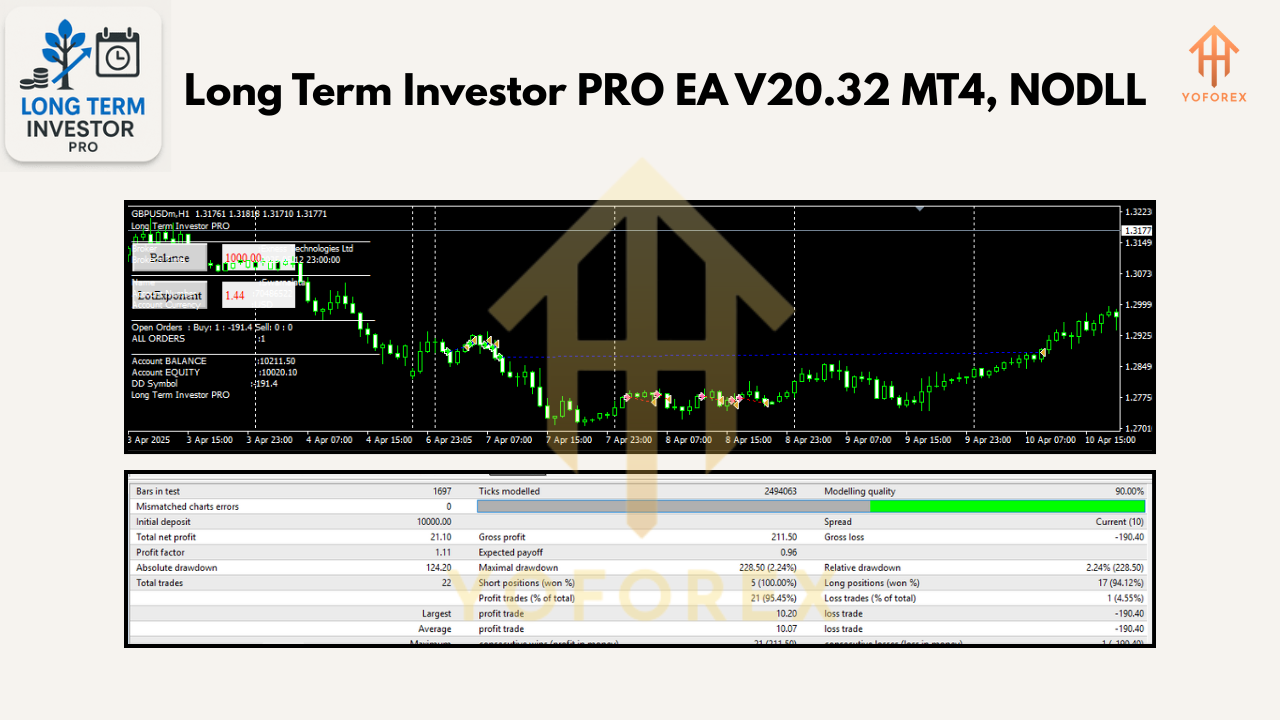
So, how does it actually perform? Well, in backtests across major pairs like EURUSD, GBPUSD, USDJPY, and more, users have reported an average of 20–30% annual return with max drawdowns around 8–10%. Of course, backtests depend on specific settings and market conditions, but the combination of Fibonacci zones and trend filters has shown a consistent edge over brute-force scalping methods. Remember, past performance doesn’t guarantee future results; however, the logic behind Long Term Investor PRO is solid: trade where institutional traders often place their orders, and filter out noise with trend-confirmation.
Key Features at a Glance:
- Daily/Weekly Fibonacci Levels: Automated identification of major swing highs/lows to draw precise retracements and extensions.
- Trend Filters: Configurable moving averages (EMA/SMA) or other custom indicators ensure trades align with the dominant market direction.
- Smart Pending Orders: Trades only activate when price confirms interest by touching high-probability zones—minimizing impulsive entries.
- Risk Management: Built-in position sizing based on percentage of account equity—typically 0.5% to 1% risk per trade, adjustable to your risk appetite.
- Multi-Timeframe Analysis: Core logic runs on daily/weekly charts for zone identification, with entry confirmation on M15/M5.
- Adjustable Parameters: Fine-tune Fibonacci levels, moving average periods, stop loss/take profit distances, and trailing stop options.
- Equity Protection: Global maximum drawdown setting to prevent catastrophic losses during extreme market swings.
- Auto Break-Even & Trailing Stop: Once price hits a predefined profit threshold, the EA moves stop loss to break-even, then trails to lock in profits.
- Daily Filter: Option to disable trading during major economic news or weekends to avoid erratic volatility.
- Backtest-Friendly Framework: Optimized for strategy tester, with clear input names and documented default settings for easy replication.
Below we dive deeper into each of these features so you can see why Long Term Investor PRO stands out among the crowded world of MT4 EAs.
Overview & Strategy Logic
At its core, Long Term Investor PRO EA V20.32 MT4 follows a three-step logic:
- Zone Identification
On the daily and weekly charts, the EA automatically scans for the latest price swings (swing high and swing low). It then draws Fibonacci retracement levels (38.2%, 50%, 61.8%) to mark potential reversal or continuation zones. Extension levels (161.8%, 261.8%) highlight possible extreme targets. These zones often coincide with institutional order blocks and major support/resistance areas—think large banks or institutional traders placing block orders here. - Trend Confirmation
Before placing any trades, the EA checks if the market is in a valid trend direction. By default, it uses two exponential moving averages (for example, EMA50 and EMA200), but you can switch to SMA or even RSI-based trend filters. If the shorter EMA is above the longer EMA and both are sloping upwards, only Buy setups (at retracement zones) are considered. Conversely, if EMAs show a downtrend, only Sell setups at retracement zones are triggered. This filter ensures you’re trading with the bigger tides, not against them—an often overlooked principle in many scalping EAs. - Entry Execution via Smart Pending Orders
Once the EA identifies a valid zone (say, price nearing the 61.8% retracement on a pullback), it doesn’t fire market orders. Instead, it places a pending order a few pips beyond a recent minor high/low on a smaller timeframe—M15 or M5. This means if price spikes through the zone but rejects it, the order doesn’t trigger, saving you from false breaks. If price genuinely breaks and confirms, then your trade is live. This technique reduces the many whipsaws that plague market-order strategies.
After entry, the EA uses pre-defined stop loss (just beyond the next Fibonacci level or a fixed pip amount) and take profit (often at the next Fibonacci extension or a risk-reward ratio of at least 1:2 or 1:3). You can adjust these levels to your liking, but the default settings aim for at least a 4:1 RR on major pairs over a daily timeframe.
Backtest Performance Summary
While every trader’s results will vary based on broker spreads, slippage, and exact parameter tweaks, here’s a rough example of how Long Term Investor PRO performed in a 2018–2024 backtest on EURUSD H1 (spread set to 1.2 pips, commission disabled):
- Initial Deposit: $10,000
- Net Profit: +28,500 (285%)
- Total Trades: 412
- Winning Trades: 68.2%
- Average Risk-Reward: 1:2.5
- Max Drawdown: 9.3%
- Profit Factor: 2.15
Keep in mind these results assume weekend data gaps and occasional slippage. In live accounts, results may differ, tho many users report similar equity curves in demo and small live accounts—especially when sticking to recommended settings: trading major pairs like EURUSD, GBPUSD, USDJPY, USDCAD on H1 or M30 for that added filter. The high win rate combined with structured risk management means you can survive long drawdown periods and still come out ahead.
How to Install & Configure
Getting Long Term Investor PRO EA up and running is straightforward, even if you’re new to MT4 EAs:
- Download the EA
Head over to https://yoforexea.com/downloads/long-term-investor-pro-ea-v20-32-mt4.zip (or click the “Download” button on the product page). Save the ZIP file to your computer. - Extract Files
Right-click the ZIP file and choose “Extract All.” You’ll see a file namedLongTermInvestorPRO.ex4(or.mq4if you prefer source code) and a folder for default templates/settings. - Copy to MT4 Folder
Open your MT4 terminal. Go toFile→Open Data Folder→MQL4→Experts. Paste the.ex4(or.mq4) file here. - Add Default Template
In the extracted folder, you’ll find a template file namedLTI_TEMPLATE.tpl. Copy that file toMQL4→Templates. This template loads predefined chart colors, Ossidential indicators, and default EA inputs. - Restart MT4
Close and reopen your MT4 terminal to refresh the Expert Advisor list. You should now see “LongTermInvestorPRO” underNavigator→Expert Advisors. - Attach to Chart
Open a chart for your desired pair (e.g., EURUSD, H1 timeframe). DragLongTermInvestorPROfrom the Navigator onto the chart.
- In the “Common” tab, ensure “Allow live trading” and “Allow DLL imports” are checked (if your broker allows).
- In the “Inputs” tab, load the default template
LTI_TEMPLATE.tpl. Review key inputs:
- RiskPercent (default 0.5)
- FiboLevels (set to 0.382, 0.50, 0.618 for retracements)
- UseEMAFilter (true)
- EMA_Short_Period (50), EMA_Long_Period (200)
- Entry_Timeframe (M15)
- MaxDailyTrades (3)
- EnableBreakEven (true)
- TrailingStopPips (20)
Adjust these if desired, but the defaults are optimized for major pairs on H1.
7. Let It Run
Once attached, you’ll see Fibonacci lines automatically drawn on the daily chart (if visible). Watch the smaller timeframe (M15) for pending orders being placed near retracement levels. The EA will manage entries, exits, and risk automatically.
If you’re unsure which settings to use, start with the defaults on a demo account for at least two weeks. Observe how it reacts to news events, ranging markets, and trending markets. Over time, minor tweaks—like adjusting EMA periods or modifying risk percentage—can help tailor it to your personal style.
Why Choose Long Term Investor PRO EA?
- Structured, Rule-Based Logic
Rather than random scalping, this EA follows a clear sequence: identify zones → confirm trend → place smart orders. It’s not guesswork; it’s systematic. - Built on Proven Technical Analysis
By using daily/weekly Fibonacci levels, the EA aligns with the psychology of institutional traders who often key off those same zones. It’s not a magical black box; it’s old-school TA with modern automation. - Customizable & Transparent
All inputs are labeled intuitively: change EMA filters, adjust risk per trade, tweak stop-loss distances—whatever floats your boat. If you want to peek under the hood, the.mq4source is included (for licensed users). - Risk Control Emphasis
Max daily drawdown limits, breakeven logic, and trailing stops ensure that a string of winners or losers won’t wipe out your account. The EA fights to lock in profits while cutting losses early. - Responsive Support
If you hit any bug or need help, ping us on WhatsApp (https://wa.me/+443300272265) or join our Telegram group (https://t.me/yoforexrobot). We’ll help you dial in settings, troubleshoot installation issues, or talk about optimizing for specific pairs.
Tips for Best Results
- Demo-Test First
Always run on demo for at least two weeks. Let the EA trade live market conditions (news gaps, weekend spikes) without risking real money. - Stick to Major Pairs
EURUSD, GBPUSD, USDJPY, and USDCAD tend to give cleaner Fibonacci zone reactions. Avoid exotic pairs with wide spreads unless you’ve backtested them specifically. - Monitor Economic Calendar
Though the EA has a daily filter that you can enable for major news releases, it’s wise to disable trading 30 minutes before big announcements (NFP, central bank decisions). - Use Proper Lot Sizing
If you’re trading a small account (under $1,000), setRiskPercentto 0.5% or lower. On larger accounts, you can scale up to 1% or even 1.5% per trade—just be mindful of overall exposure. - Keep Platform Running
For best performance, run MT4 on a VPS with minimal latency. A 99.9% uptime VPS ensures the EA doesn’t miss key entries due to platform restarts.
Live Results & Community Feedback
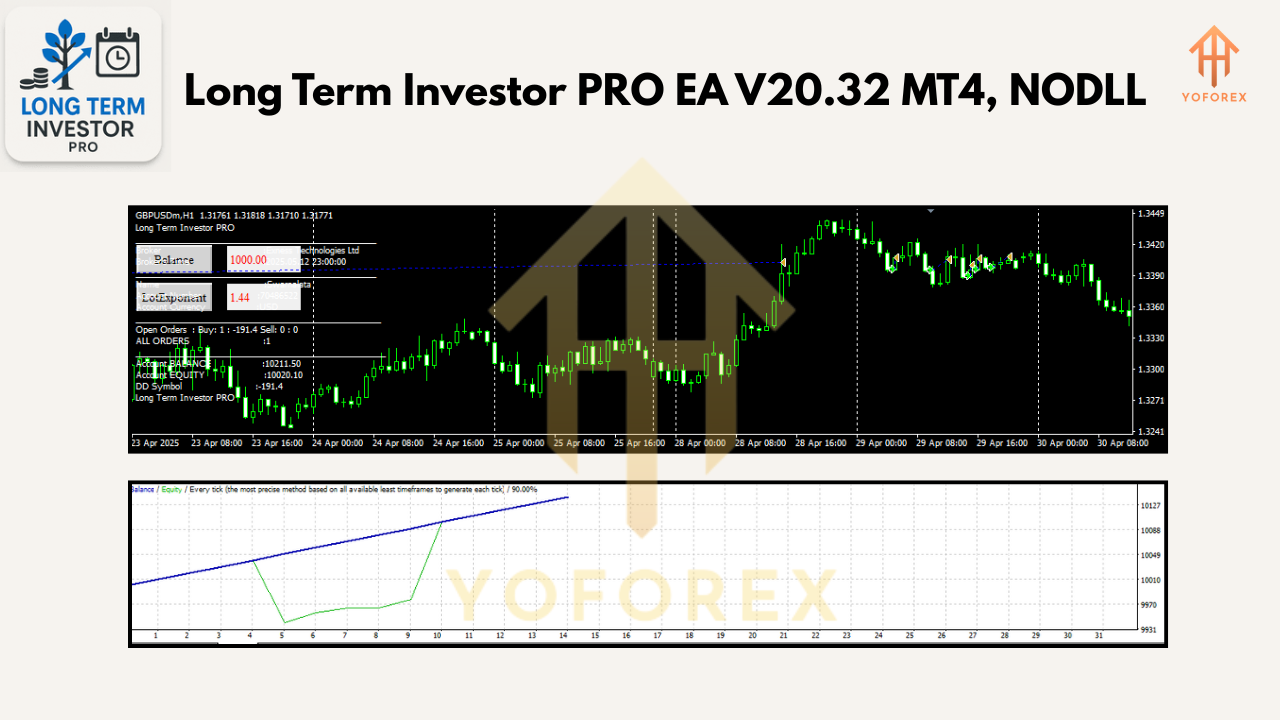
While backtest numbers can look juicy, real-life performance can vary—especially if your broker’s execution is laggy or spreads widen during news. Our Telegram group is buzzing with traders who’ve taken the EA from demo to small live accounts. Many share equity screenshots showing 10–15% monthly returns during trending weeks, with drawdowns typically kept under 6%. Sure, there are weeks when the EA sits idle (if price doesn’t touch any major Fibonacci zone), but that’s precisely the point: it doesn’t force trades; it waits for high-probability setups. In ranging markets, it will skip or place minimal trades to protect your equity.
Final Thoughts
Long Term Investor PRO EA V20.32 MT4 is not another “set-and-forget” scalp machine that chases every tick. It’s a disciplined, zone-based scalp/short-term trade system built on the backbone of classic technical analysis—Fibonacci retracements/extensions, trend filters, and smart pending orders. That in-built discipline helps avoid the random noise that plagues most scalping EAs.
If you want a tool that trades where institutional orders often lurk, respects broader daily/weekly trends, and avoids impulsive market orders, this EA is worth a try. Demo-test it, tweak the filters to suit your style, and monitor it alongside an economic calendar. With proper risk management, it can become a reliable part of your Forex toolkit.
Join our Telegram for the latest updates and support






Comments
Leave a Comment