Introduction
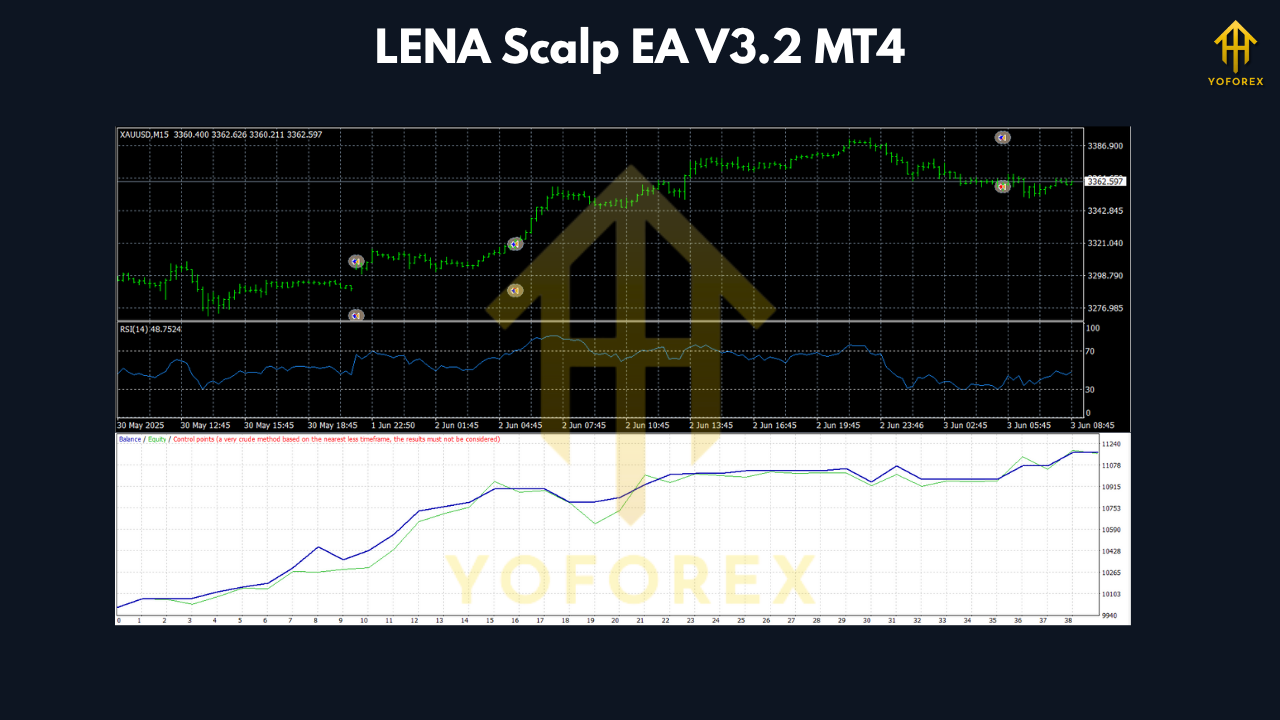
Trading gold (XAUUSD) using automated Expert Advisors (EAs) has become increasingly popular, especially for scalpers looking for frequent small profits. LENA Scalp EA V3.2 is one such EA that promises an AI‑driven, low-risk scalping approach. In this article, we examine LENA Scalp EA V3.2 on M15 for the XAUUSD pair. We’ll break down how it works, how to set it up, performance expectations, advantages, limitations, and tips to use it more effectively.
What Is LENA Scalp EA V3.2?
LENA Scalp EA V3.2 is a MetaTrader 4 expert advisor built to scalp in volatile markets like gold. It emphasizes no martingale, no grid, and uses AI‑style logic for stop loss adjustments.
According to vendor descriptions, the EA checks each trade every 10 seconds to validate whether it should remain open; if a trade is deemed invalid, it closes with minimal loss. It also supports flexible entry and stop‑loss modes and claims to adapt to market conditions.
Although many sources list H1 or M5 as its core timeframes, traders often test it on other frames like M15 to find their best fit.
Why Use M15 for XAUUSD Scalping
While many gold scalpers use shorter frames like M1 or M5, M15 offers a balance:
- Less noise than M1/M5, reducing false signals.
- Still responsive enough to capture intraday swings.
- Easier to manage spread and execution issues.
- Easier backtesting and debugging (longer bars).
If LENA Scalp EA V3.2 is stable on M15 without sacrificing responsiveness, it can offer a smoother trading experience.
Key Features & How It Works
AI‑Based Stop Loss & Trade Validation
One of the standout features is its AI stop‑loss logic. The EA continuously validates active trades; if a trade no longer meets internal criteria, it will exit at the minimal possible loss.
This reduces the chance of holding trades with large drawdowns or trailing into undesirable zones.
No Martingale, No Grid
LENA avoids high‑risk strategies like martingale or grid trading. Its design is to preserve capital rather than chasing large returns via leveraged layering.
Flexible Entry & SL Modes
The EA offers configurable AI modes for entry and stop placement. Users may also run it in “manual mode” where the AI aids trade management without full automation.
Works During All Market Hours
Unlike some EAs that pause during news or low liquidity windows, LENA claims it can run 24/5, managing volatility via its internal logic.
Broker & Capital Requirements
- Works on XAUUSD (gold) pair.
- Best results with low‑spread ECN / raw spread accounts.
- Minimum deposit often cited ~ $100 (some vendors suggest more for safety)
- Use of a VPS (Virtual Private Server) to ensure uptime and low latency is recommended, though not mandatory.
Setup & Installation (MT4)
Here’s a typical installation process:
- Download the EA
.ex4file or package. - In MT4: go to
File → Open Data Folder → MQL4 → Experts. - Paste the EA file there, then restart MT4 or refresh the Navigator panel.
- Open the XAUUSD chart in M15 timeframe, attach the EA.
- Enable AutoTrading (allow the EA to place trades).
- Adjust input settings (lot size, risk, spread limit, trading hours) based on your capital and broker.
- It’s wise to test in a demo account first to validate before going live.
Performance Expectations & Realities
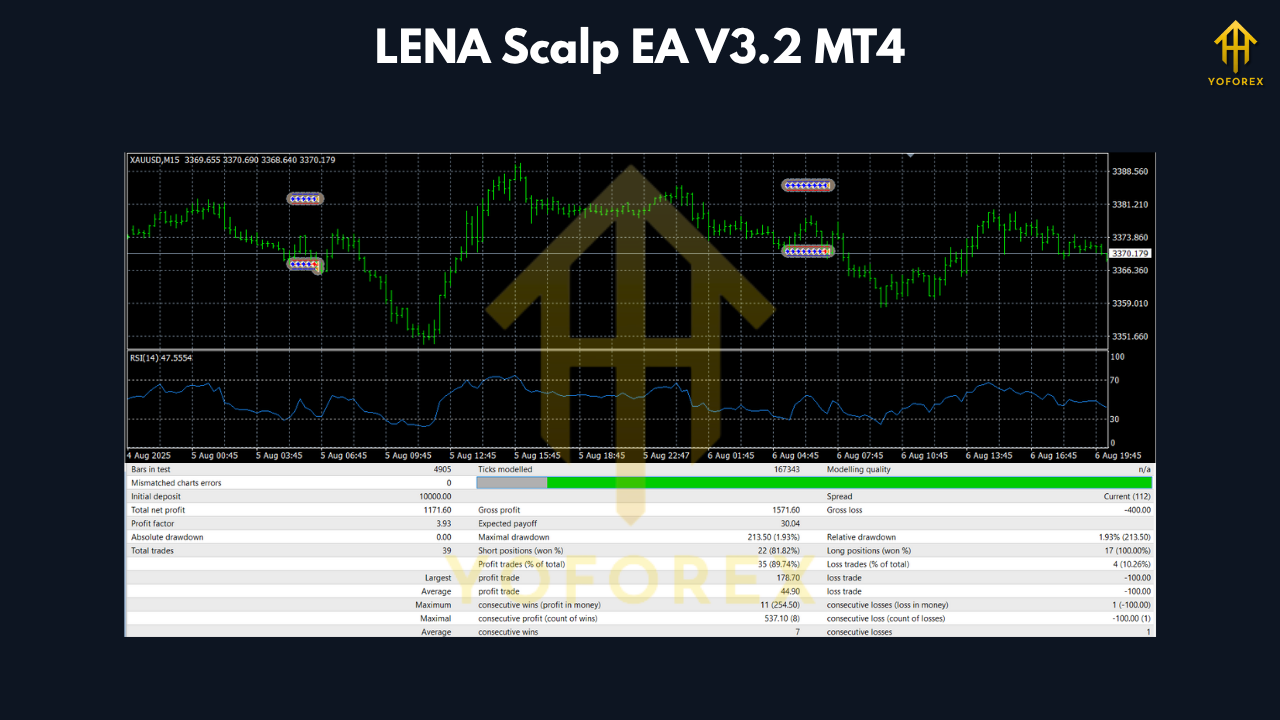
Vendors often show attractive growth figures for LENA Scalp EA, such as a live account growing over 7,715% in months. However, these claims should be taken cautiously:
- Backtest and live results may differ due to slippage, spread, execution latency, and broker behavior.
- Scalping EAs tend to be sensitive to execution quality. Even small changes in spread or latency can impact profitability.
- Forward testing on demo/live accounts is essential to judge real performance.
Given the M15 timeframe, the frequency of trades might be moderate—less aggressive than M1/M5 scalpers—but potentially more stable if the EA performs well in that environment.
Pros & Cons
Pros
- Safer approach: With no martingale or grid strategy, LENA is more capital-conservative.
- Adaptive SL logic: The AI stop loss mechanism helps avoid large drawdowns.
- Works across hours: Can operate during news or volatile windows due to internal controls.
- Flexibility: Configurable entry and stop modes, possibly manual backing.
Cons & Risks
- Dependence on execution quality: For gold scalping, latency and spread matter heavily.
- Vendor claims risk: High growth claims may be based on ideal conditions or overfitted results.
- Hidden “black box” logic: AI logic is not fully transparent — risk unknown behavior in extreme markets.
- Not immune to big moves: Sudden macro shifts (e.g. news, flash crashes) can still hurt.
- Limited to one instrument: Best for XAUUSD; performance on others may be poor or untested.
Tips to Use It Safely
- Start with a demo or small live account before scaling.
- Use a low spread / ECN / raw account to reduce cost.
- Ensure low-latency execution (use VPS close to broker’s server).
- Limit max allowable drawdown and have exit rules if equity drops.
- Monitor performance over several weeks to detect degradation.
- Avoid using during extremely volatile news unless logic handles big swings.
- Ensure proper risk per trade (e.g. 0.5% or 1% of equity).
- Always obey broker constraints (min distance, slippage, freeze zones).
Conclusion
LENA Scalp EA V3.2 is an intriguing option for traders who want a more “intelligent” gold scalper on XAUUSD, especially when applied on the M15 timeframe. Its AI‑driven stop loss validation and avoidance of high-risk techniques (martingale, grid) give it a more conservative edge than some aggressive scalpers.
However, like all EAs, its real potential depends greatly on execution conditions, broker quality, and live forward testing. The optimistic growth claims should be viewed as marketing signals rather than guarantees.
If you plan to try it, begin with a demo account, monitor performance carefully, and use prudent risk management. Over time, you can decide whether LENA Scalp EA V3.2 is suitable for your trading style and gold scalping goals.
Join our Telegram for the latest updates and support






Comments
Leave a Comment