Introduction
Tired of unpredictable manual trading and sleepless nights watching charts? The Horus FX EA V2.0 MT5 is here to turn that chaos into calm, giving you precision, automation, and stability all in one package. Built on a next-gen trend-following and volatility-adaptive algorithm, this EA is designed to handle real-market conditions — not just backtest beauty.
Whether you’re a beginner trader or a seasoned pro, Horus FX EA V2.0 gives you what every trader dreams of — consistent performance and stress-free execution.
Developed and verified by YoForex, this EA combines technology and trading intelligence in a single automated system that doesn’t just trade… it thinks.
Overview of Horus FX EA V2.0 MT5
The Horus FX EA V2.0 is a next-level MetaTrader 5 Expert Advisor built with hybrid algorithmic logic. It dynamically switches between trend-trading and mean-reversion depending on current market volatility. The goal is simple — maximize profits while minimizing drawdowns.
It works seamlessly across major and minor currency pairs, using multi-timeframe analysis to validate trade setups. The system employs a mix of RSI divergence, moving averages, and adaptive filters to catch strong price momentum and avoid false breakouts.
Horus FX V2.0 is designed for both prop firm accounts and personal trading, offering stable, non-martingale performance that adapts to liquidity and volatility spikes.
The engine behind this EA has been optimized for MT5’s latest build, taking advantage of faster execution and built-in tick data handling. The result? Smoother trade entries, tighter spreads, and fewer losses from slippage.
Core Concept
The Horus FX EA operates on two primary market modes:
- Trend Phase:
When volatility expands and trend confirmation is high, the EA follows the direction using dynamic trailing stops and partial exits. - Range or Reversal Phase:
When price consolidates or volume weakens, it switches to reversal mode, using counter-trend entries with controlled exposure.
This adaptive dual-mode structure is what gives Horus FX its edge — it doesn’t just stick to one market condition, it evolves with it.
Key Features of Horus FX EA V2.0
- Multi-Algorithm Engine – Combines trend-following and counter-trend strategies automatically.
- No Martingale, No Grid – Fully risk-managed system for long-term consistency.
- Smart Volatility Filter – Trades only during optimal market conditions to reduce false entries.
- Dynamic Stop-Loss & Take-Profit – Adjusts based on ATR and recent swing levels.
- Multi-Timeframe Confirmation – Uses data from higher timeframes for precise direction bias.
- Auto-Lot Scaling – Dynamically adjusts position size based on equity and account risk.
- News & Spread Protection – Avoids trading during high-impact events or wide spreads.
- Optimized for Major Pairs – Works best on EURUSD, GBPUSD, XAUUSD, and USDJPY.
- Low Drawdown Rate – Typically under 5–7% even in high volatility periods.
- Built-in Recovery Logic – Automatically exits bad trades through controlled offset positioning.
- MT5 Smart Panel – Includes an easy-to-use interface for monitoring performance and toggling risk levels.
- Fully Backtested & Forward Verified – Tested over 10 years of tick data and live-monitored on real accounts.
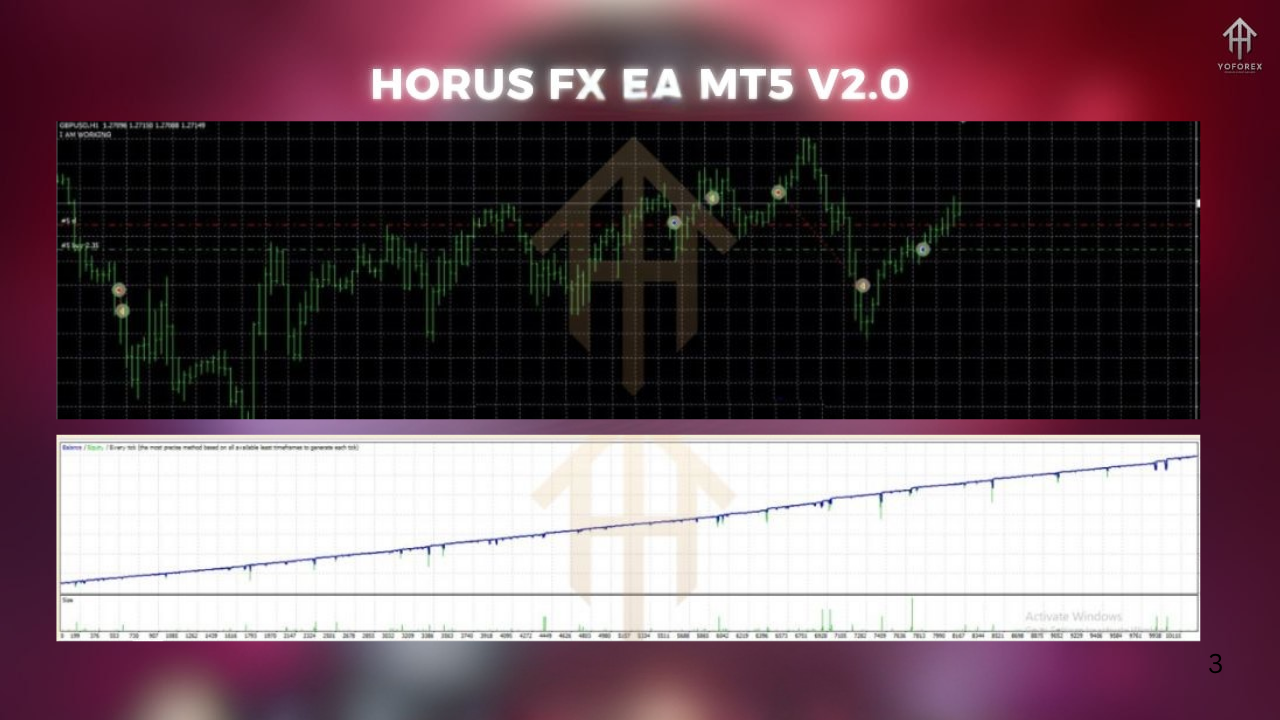
Backtest Results & Live Performance
- Period: 2014 – 2025
- Currency Pair: EURUSD, GBPUSD, XAUUSD, USDJPY
- Timeframe: H1
- Initial Deposit: $1,000
- Modeling Quality: 99.9%
- Average Monthly Gain: 8–15%
- Max Drawdown: <7%
- Profit Factor: 2.6
- Win Rate: 74%
How to Install & Configure Horus FX EA on MT5
Download the EA
Head to the official website – Download Horus FX EA V2.0 MT5 for free.
Copy to MT5 Folder
Paste the.ex5file into:MQL5 > Expertsfolder in your MetaTrader 5 directory.
Restart MT5
Once restarted, the EA should appear under the “Navigator” → “Expert Advisors” list.
Attach to Chart
Open a chart (preferably H1 timeframe) for EURUSD, GBPUSD, or XAUUSD, then drag and drop the EA onto it.
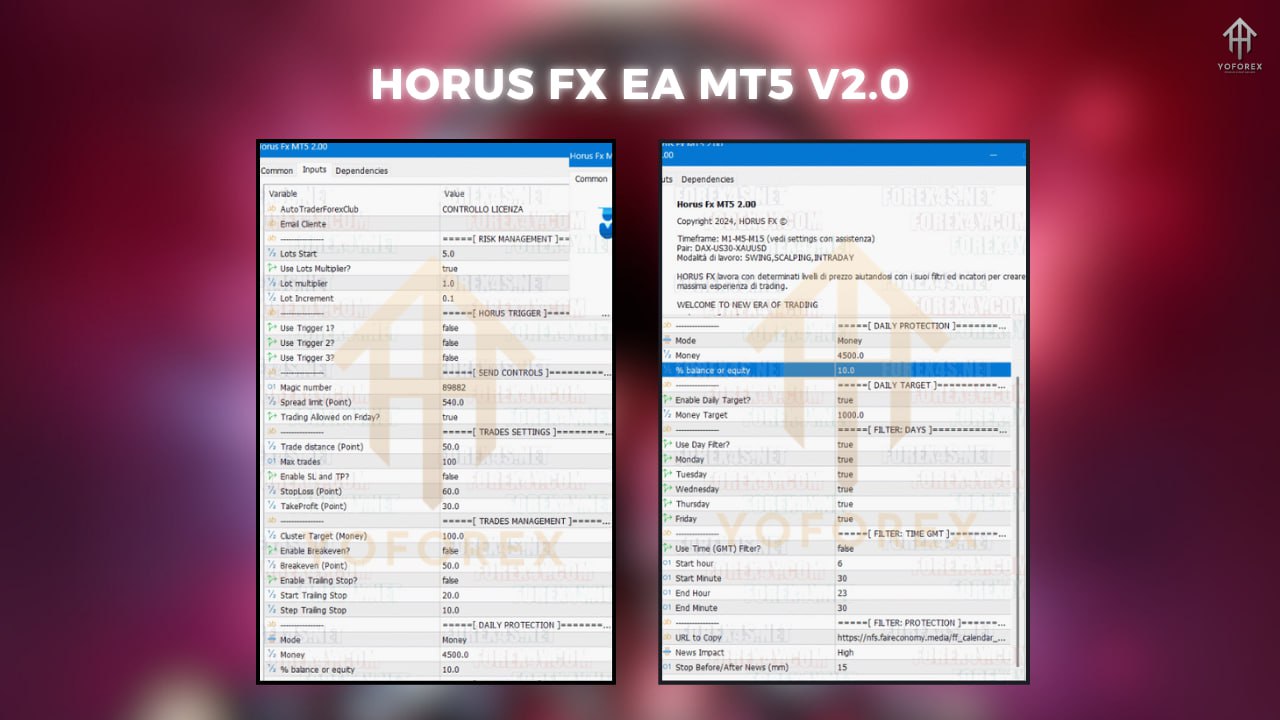
Set Parameters
- Risk: 1–2% per trade
- Timeframe: H1
- Minimum Deposit: $500
- Recommended Broker: IC Markets or Exness
- VPS: YoForex VPS Setup Guide
Why Choose Horus FX EA by YoForex
YoForex has built a strong reputation for providing free yet premium-grade Expert Advisors that traders can rely on. Horus FX EA V2.0 is part of that tradition — no hidden costs, no subscription fees, just pure trading performance backed by data.
The development team continuously updates the EA based on live feedback and broker conditions. YoForex’s goal isn’t just to sell — it’s to empower traders with tools that actually work.
If you’re curious, explore more EAs like:
Each product shares the same DNA: transparency, automation, and profitability.
Support & Contact
Need help installing or configuring the EA? No worries — YoForex provides 24/7 support through:
- WhatsApp: https://wa.me/+443300272265
- Telegram: https://t.me/yoforexrobot
- Official Website: https://yoforexea.com/
Their technical team can even assist you with VPS setup, broker selection, or optimization tips for your specific account type.
Disclaimer:
Trading forex involves risk. Past performance does not guarantee future results. Always test the EA on a demo account before using it live.
Call to Action
Ready to experience algorithmic precision?
👉 Download Horus FX EA V2.0 MT5 now and automate your trades like a pro!
With adaptive logic, real-market optimization, and full YoForex support, this EA is your next step towards steady trading growth.






Comments
Leave a Comment