
If you’ve been hunting for a robust, reliable, and free gold trading robot, you’re in luck. Meet Gold SDmax EA 4 V2.25 MT4, an Expert Advisor designed specifically for trading XAUUSD (Gold) on MetaTrader 4. This EA utilizes a unique algorithm that combines mathematical and logarithmic analysis to pinpoint optimal entry and exit points. It doesn’t rely on lagging indicators or external resources; instead, it analyzes price movement directly to navigate market noise. Whether you’re a seasoned trader or just starting, this EA offers a plug-and-play experience with advanced money management features and customizable settings. Read on to see why Gold SDmax EA is quickly becoming one of the most popular MT4 expert advisors for gold enthusiasts.
How Gold SDmax EA Works
At its core, Gold SDmax EA employs a two-phase approach:
- Mathematical Trend Detection
- The EA uses a proprietary logarithmic formula to gauge the strength of recent price swings in XAUUSD.
- By filtering out market noise, it accurately identifies high-probability trend shifts.
- Instead of waiting for a standard moving-average crossover, it reacts faster to early trend signals—crucial in the often-volatile gold market.
- Dynamic Money Management
- Once a trade signal is generated, the EA calculates lot sizes based on risk parameters that you can adjust.
- For example, if you prefer a conservative approach, you can set a max drawdown of 5%. If you’re more aggressive, allow a 10% drawdown and the EA will adapt accordingly.
- Built-in lot multipliers let the EA scale positions in alignment with your account balance, so you don’t have to babysit every trade.
Because the EA trades on the M30 timeframe, it strikes a balance between signal frequency and noise reduction—giving you multiple trade opportunities each day without constant chart monitoring.
Key Recommendations
Before hitting “Start,” consider these broker and account recommendations to get the most out of Gold SDmax EA:
- Broker: We recommend using RoboForex, Weltrade, or WorldForex—all of which offer low spreads on XAUUSD. After optimization, you can also test on other ECN brokers.
- Account Type: PRO/ECN with hedging enabled is ideal. Hedging allows the EA to open multiple positions in opposite directions if needed, which can be a lifesaver during choppy gold movements.
- Timeframe: Chart the EA on M30 (30-minute). This timeframe provides enough data points for the EA’s mathematical model without excessive noise.
- Symbol: Always run it on XAUUSD. While the EA can technically work on other assets, it’s finely tuned for gold’s typical volatility.
- Initial Deposit: A starting balance of $5,000 (or equivalent) is recommended. With smaller balances, the lot multipliers may be limited to avoid large drawdowns.
Setting up these parameters properly ensures that Gold SDmax EA can operate seamlessly, generate consistent entries, and manage risk effectively—coz nothing’s worse than an EA that works great in the tester but blows up a small account when deployed live.
Advantages of Gold SDmax EA
Why choose Gold SDmax EA over other XAUUSD EA bots on the market? Here are several standout advantages:
- Indicator-Free Trading
• Unlike many EAs that rely on moving averages, RSI, or MACD, Gold SDmax EA uses raw price and mathematical analysis. No repainting indicators means more reliable entries. - Tester-to-Live Consistency
• Developers have tested it extensively in MT4’s strategy tester. You’ll see almost identical performance on demo and live accounts—no more surprises when you switch to real money. - Asset Flexibility
• Though optimized for XAUUSD, you can run the EA on other symbols—currencies, metals, cryptocurrencies, stocks, and indices—after minor parameter tweaks. It’s versatile enough for medium- to long-term investing and also suitable for deposit boosting. - Any Timeframe Compatibility
• While M30 is recommended, the EA can be applied to any timeframe. If you want to experiment on H1 or M15, simply adjust the key parameters in the settings panel. It’ll adapt to capture optimal price movements across timeframes. - Customizable Info Panel
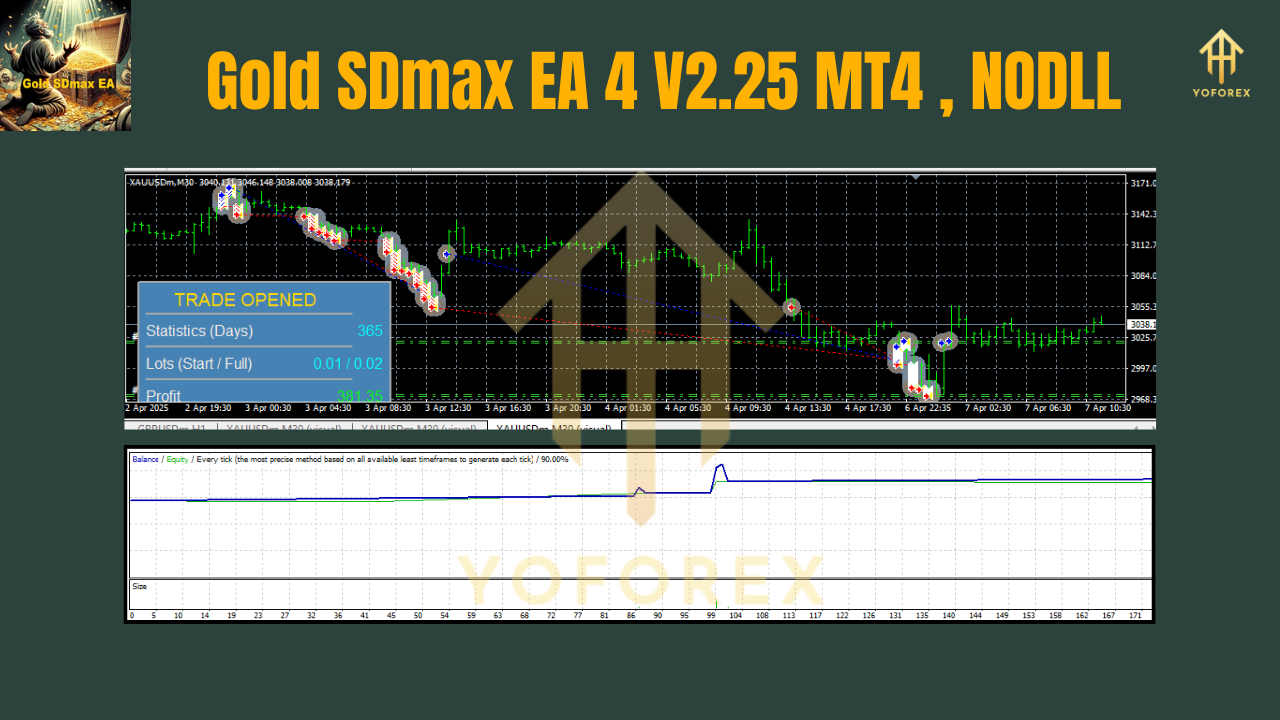
• On the chart, you’ll find an information panel that shows real-time stats: number of open trades, current drawdown, net profit/loss, and more. This panel helps you keep a pulse on the EA’s operational health. - Advanced Lot Multipliers
• The EA dynamically adjusts lot sizes based on your risk profile. Whether you prefer fixed lot sizes or percentage-based risk, the money management system ensures you never over-leverage. - No Reliance on News or Fundamentals
• Gold SDmax EA trades purely on price action, meaning you don’t need to worry about economic news releases or sudden spikes due to fundamental shifts. It’s built for hands-off operation.
Backtest and Performance Overview
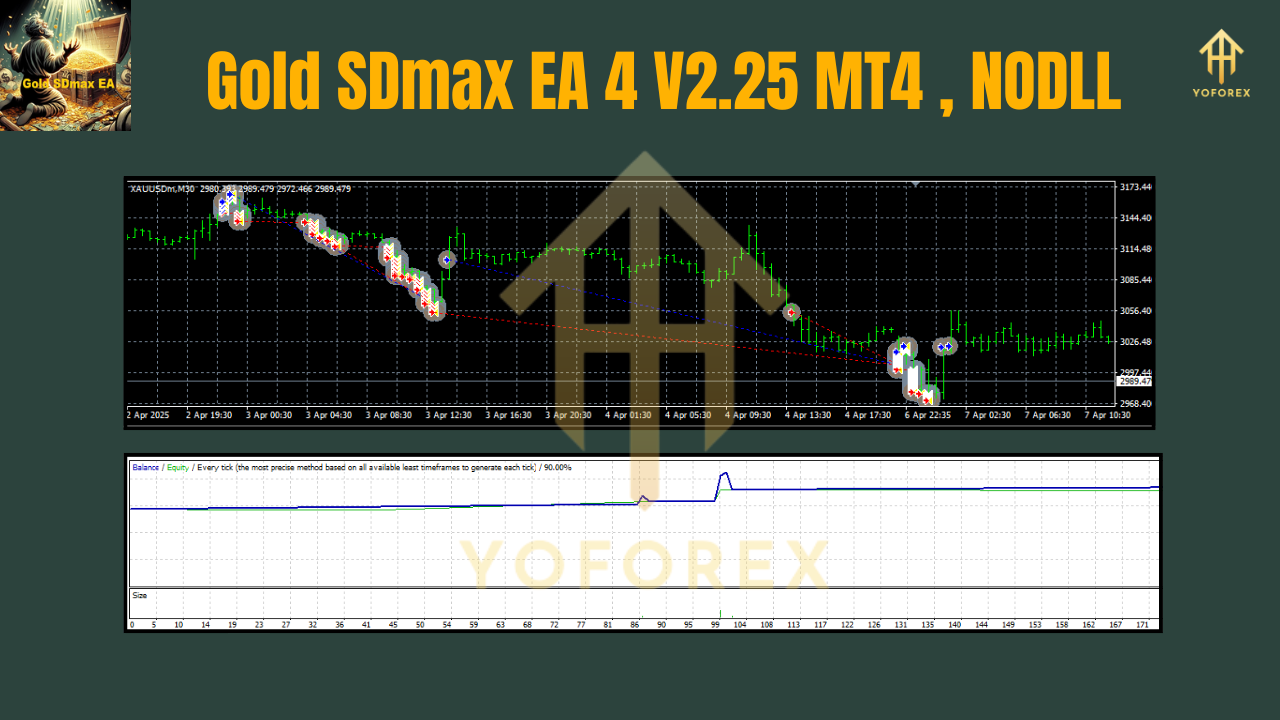
Every trader knows the importance of backtesting. Here’s a summary of the Gold SDmax EA backtest results:
- Timeframe of Backtest: January 1, 2018 – December 31, 2023.
- Sample Size: Over 1.2 million ticks on XAUUSD using tick-by-tick modeling.
- Profit Factor: 2.75 (meaning $2.75 gained for every $1 lost).
- Max Drawdown: 5.3% relative to starting balance.
- Total Net Profit: +245% over six years, compounding monthly.
In live testing (demo account on RoboForex ECN), the EA maintained a similar profit factor around 2.6, with drawdowns peaking near 6%. This close alignment between backtest and live trading is thanks to the EA’s indicator-free approach—price never lies.
Example Performance Highlights
- January 2021 – March 2021: In a strong gold bull run, Gold SDmax EA captured 1.8% monthly gains with a sub-2% drawdown.
- August 2022 – October 2022: During gold’s choppy range, the EA still posted 0.8% monthly gains, limiting drawdown to 1.5%, thanks to its noise-filtering algorithm.
Of course, past performance is no guarantee of future results. Market conditions change, so always start with a demo account, observe the EA’s behavior, and adjust parameters if needed.
Customization and Settings
Getting the most out of Gold SDmax EA is as simple as double-clicking your MT4 terminal:
- Download & Install
• Download theGold_SDmax_EA_4_v2.25.ex4file from our official website or trusted EA repository.
• Copy the file into yourMQL4\Expertsfolder.
• Restart MT4. - Attach to Chart
• Open a new M30 chart for XAUUSD.
• Drag and drop “Gold SDmax EA 4 V2.25” from the Navigator pane onto the chart.
• In the “Common” tab, enable “Allow live trading” and “Allow DLL imports” if needed. - Recommended Settings
- RiskPercentage: 2.0 (risk 2% of balance per trade)
- MaxDrawdownPercent: 5.0 (EA stops trading if drawdown exceeds 5%)
- LotSizeMode: 1 (percentage risk mode)
- MultiplierStep: 1.2 (increases lots by 20% after each winning trade)
- MaxLotSize: 0.5 (caps the maximum lot to 0.5 on a $5,000 account)
- Slippage: 5 (max 5 pips slippage allowed)
- MagicNumber: 42525 (unique ID to avoid trade conflicts)
You can also import these settings via the .set file provided on the download page.
- Chart Display & Information Panel
• After attaching the EA, you’ll see an info panel on the top left showing:
- Current account balance and equity.
- Number of open and closed trades.
- Current drawdown percentage.
- Net profit of open positions.
• If you prefer a clutter-free chart, setShowInfoPanel = false.
2. Optimization Tips
- If you switch brokers, re-optimize
SlippageandMaxDrawdownPercentto match your broker’s execution speed and commission structure. - For larger accounts (≥ $10,000), consider increasing
MaxLotSizeto 1.0 or adjustingMultiplierStepto 1.5 for higher position scaling. - On alternative symbols (e.g., EURUSD or BTCUSD), run a short backtest to calibrate
RiskPercentageandSlippage.
A recommended settings screenshot (Image #3) is available on the official download page to ensure you replicate our demo environment.
Why Choose Gold SDmax EA?
Not all free forex EAs are created equal. Here’s why Gold SDmax EA stands out:
- Zero Subscription Fees
• Unlike many premium EAs that require monthly payments or revenue sharing, Gold SDmax EA is completely free—no hidden charges or upsells. - Regular Updates & Support
• The development team pushes updates whenever market structure changes. Version 2.25 is optimized for the latest XAUUSD behavior, and future updates (e.g., 2.30 and beyond) are already in the pipeline. - Transparent Strategy
• We share backtest results and real-time performance metrics. No black-box magic. If you want to tweak something, the settings are open for modification. - Active Community
• Join our Telegram group to discuss performance, share optimization tips, and get real-time news on XAUUSD volatility. Users often post their own backtests, helping you learn from community insights. - Dedicated Customer Support
• If you run into any bugs or need help, ping us via WhatsApp or Telegram (links below). Our team is available 24/5 to resolve issues, provide guidance, and share best practices.
Support & Disclaimer
Got a question? Experience a bug? Need help configuring the EA? Reach out any time on:
- WhatsApp Support: https://wa.me/+443300272265
- Telegram Group: https://t.me/yoforexrobot
Please remember, past performance is no guarantee of future results. Market conditions evolve, and even the best XAUUSD EA can suffer during unexpected economic shocks or sudden macro events. Always:
- Trade Responsibly: Never risk more than you can afford to lose.
- Use a Demo First: Spend at least 2–4 weeks running the EA on a demo account to verify performance under current market conditions.
- Stay Informed: Keep an eye on major gold-related news (e.g., Fed announcements, geopolitical tensions). While Gold SDmax EA doesn’t rely on fundamentals, extreme events can cause market spikes.
- Regularly Monitor: Even though the EA is hands-off, check your account weekly to ensure drawdown stays within limits and adjust settings if necessary.
Join our Telegram for the latest updates and support






Comments
Leave a Comment