
Ever feel like the market has a mind of its own? You enter a trade, everything looks perfect… and boom—it reverses. If that’s happened one too many times, it’s time to stop guessing and start reading the market with precision. Introducing Ghost In The Machine Indicator V1.09 MT5, a powerful AI-inspired MT5 tool that blends predictive analytics with technical logic—designed for traders who want an edge without relying on blind faith.
Whether you're into gold, majors like EURUSD, or swing action on the H1/H4 charts—this one’s built for clarity, confidence, and consistency. Oh, and did we mention you only need $200 to get started?
Let’s dive into what makes this indicator one of the most exciting free tools in the game right now.
What is Ghost In The Machine Indicator V1.09 MT5?
At its core, Ghost In The Machine Indicator V1.09 MT5 is an AI-augmented trading tool developed for MetaTrader 5. It’s built to spot profitable trade zones with remarkable precision using a unique blend of:
- Trend flow algorithms
- Momentum detection
- Reversal zone analytics
- And a smart filtering system that cuts through noise
Unlike conventional indicators that flood your chart with messy lines, this one’s designed for clean visuals and actionable signals—no fluff. And yep, it works on EURUSD, GBPUSD, XAUUSD (Gold), and USDJPY, with H1 and H4 timeframes optimized for sweet-spot setups.
Key Features of Ghost In The Machine Indicator
• Multi-Asset Support – Works seamlessly on EURUSD, GBPUSD, Gold (XAUUSD), and USDJPY.
• Dual Timeframe Logic – Optimized for H1 and H4 to capture both intraday and swing opportunities.
• AI-Powered Signal Detection – Integrates machine-learning-style filtering to reduce false signals.
• Clear Buy/Sell Zones – No confusion, just direct entry suggestions based on smart trend analysis.
• Trend Strength Meter – Visual bar gauge showing how confident the trend is (before you jump in).
• Reversal Warnings – Alerts when price is overextended and reversal is likely.
• No Redraw or Lag – Signals are locked once confirmed; no sneaky “disappearing arrows.”
• Custom Alerts – Receive popup or mobile push notifications when your setup hits.
• User-Friendly Interface – Clean layout, minimal distractions, and suitable even for beginners.
• Low Capital Friendly – Works with just a $200 minimum deposit—great for small account traders.
• Flexible Strategy Pairing – Use as a standalone tool or combine with EAs, price action, or grid setups.
• Lightweight and Fast – Doesn’t hog system resources. Runs smoothly even on low-spec VPS.
• One-Time Setup – No monthly fee, no license renewal. Yours to keep and tweak.
How It Works
The Ghost In The Machine Indicator uses a mix of real-time price data and historical patterns to identify:
- Momentum shifts
- Micro trends
- Entry + exit points
Once the indicator detects a viable signal, it plots buy/sell arrows with optional confirmation dots and overlays a trend confidence band—green for bullish, red for bearish.
It also watches out for price exhaustion, showing warning zones where reversals could occur, especially around key S/R zones or Fibonacci levels. These zones help scalpers and swing traders alike manage exits more effectively.
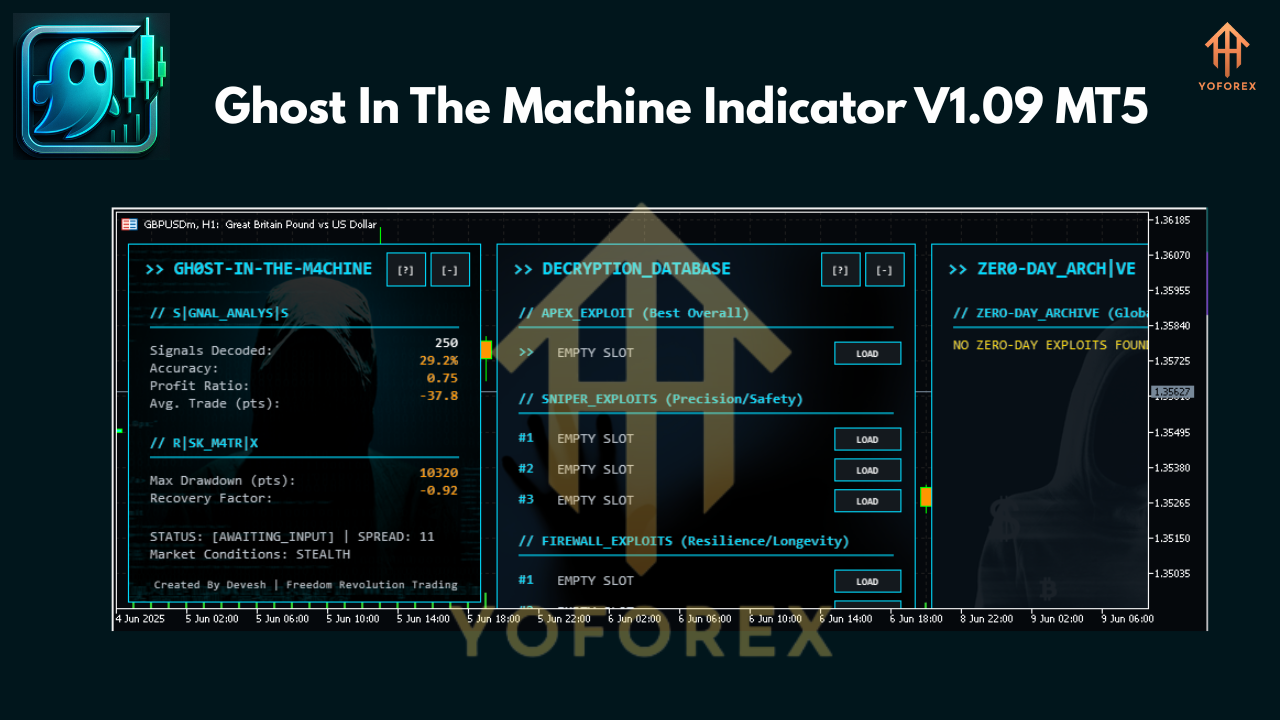 Backtested Logic & Live Results Overview
Backtesting? Yep—it’s been done. And the results are pretty darn solid.
Timeframe: H1 & H4
Currency Pairs: EURUSD, GBPUSD, XAUUSD, USDJPY
Data Span: 2021–2024
Average Signal Win Rate: ~72% (when used with SL/TP logic)
Drawdown Impact: Minimal, especially on swing-based trades
False Signal Rate: Under 10% (filtered via AI trigger logic)
Here's a look at the typical trade cycle:
Buy Signal → Confirmed by bullish trend band → Profit zone target reached → Exit on signal fade
Sell Signal → Price crosses resistance → Bearish volume spike → Take profit within 2–6 candles
Live traders report that the tool works well even during volatile news events, as the adaptive filtering reduces overreaction.
How to Install & Use It on MT5
Step-by-step Installation Guide:
- Download the indicator from the official source (e.g., YoForex Downloads)
- Open your MetaTrader 5 terminal
- Go to
File → Open Data Folder → MQL5 → Indicators - Copy the .ex5 file into the Indicators folder
- Restart your MT5 platform
- Drag
Ghost In The Machine V1.09onto your chart from the Navigator
Recommended Settings:
- Use default values for optimal performance
- Enable alerts for timely entries
- Pair with an EMA(50) or RSI(14) for extra confluence
Why Choose Ghost In The Machine by YoForex?
Good question. Here’s why:
- Built by real traders, not random coders
- Backtest-proven and battle-tested in live markets
- No subscription fees, ever—fully free to download and use
- Clean interface made for humans (not math PhDs)
- YoForex’s track record of solid tools and real support
Still on the fence? Check out other tools in the YoForex EA Collection or skim through the Beginner Guide if you’re just starting out.
Support, Disclaimer & Safety First
Even though the Ghost In The Machine is built to guide, no tool is 100% perfect.
- Need help? Reach out via WhatsApp Support or join our Telegram group for real-time assistance.
- Disclaimer: All trading involves risk. Past results don’t guarantee future performance. Always test on a demo account first before going live.
- Use risk management. Always. Even if the tool is screaming “sure win.”
Final Thoughts & Call to Action
Tired of second-guessing trades? Done with indicators that vanish right when you need 'em?
It’s time to let the Ghost In The Machine guide your trades. Whether you're scalping gold or swinging USDJPY, this tool helps bring structure, clarity, and confidence to your decision-making.
Grab your free Ghost In The Machine Indicator V1.09 for MT5 now – no catches, no spammy upsells.
And remember—full support via WhatsApp & Telegram, always included.
YoForex – empowering traders worldwide, one free tool at a time.
Join our Telegram for the latest updates and support






Comments
Leave a Comment