
If you’ve ever wondered whether a forex robot could actually give you a consistent edge in scalping trades—without blowing up your account—then it’s time to meet Gaint EA V3.12 MT4.
This upgraded version of the popular Gaint EA is now one of the most stable and responsive scalping bots available for MetaTrader 4. It’s built for traders who need speed, precision, and control over every pip movement... but don’t want to be glued to charts all day. Whether you’re a cautious beginner or a full-time scalper, this bot has something that’ll make your strategy sharper.
So let’s break it all down—from how it works to what makes it special.
What Is Gaint EA V3.12?
Gaint EA V3.12 is an automated Expert Advisor developed specifically for MetaTrader 4 (MT4), focused on scalping strategies across low timeframes (mostly M1 and M5). The goal is to capture short bursts of price movement while minimizing exposure and drawdown.
Unlike many “free” EAs floating around with shady logic or untested parameters, this one comes with fully optimized settings, enhanced spread filters, and a risk-adjustable architecture. It avoids common pitfalls like martingale stacking, making it far safer for long-term use.
But what truly sets it apart is its real market adaptability—it adjusts its entries based on live volatility, avoiding fake breakouts and low-volume traps.
Key Features of Gaint EA V3.12
- Scalping Precision: Focuses on grabbing small profits from quick trades, ideal for volatile or active market sessions.
- No Martingale: Zero risky doubling strategies. Keeps position sizes consistent and logical.
- Advanced Spread Filter: Avoids opening trades when the spread is unusually high, preserving your capital.
- News Filter Compatible: You can pair it with an economic calendar or use third-party filters to stop trading during high-impact news.
- Multi-Pair Support: Works on popular pairs like EURUSD, GBPUSD, USDJPY, and more.
- M1/M5 Timeframe: Optimized for fast scalping setups, especially during London and New York sessions.
- Low Drawdown Risk: Carefully manages capital to keep drawdown under control—even during choppy market conditions.
- Custom Stop Loss & Take Profit: Predefined TP/SL logic for precise exit management.
- Trailing Stop Capability: Secure your profits with trailing stop logic that locks in gains automatically.
- Stealth Mode: Option to hide SL/TP from the broker, useful for avoiding manipulation.
- Broker-Friendly: Compatible with most ECN brokers, no restrictions on slippage or order type.
- Backtested & Forward Tested: Includes verified historical and demo/live results to confirm consistency.
Backtest Results & Performance Insights
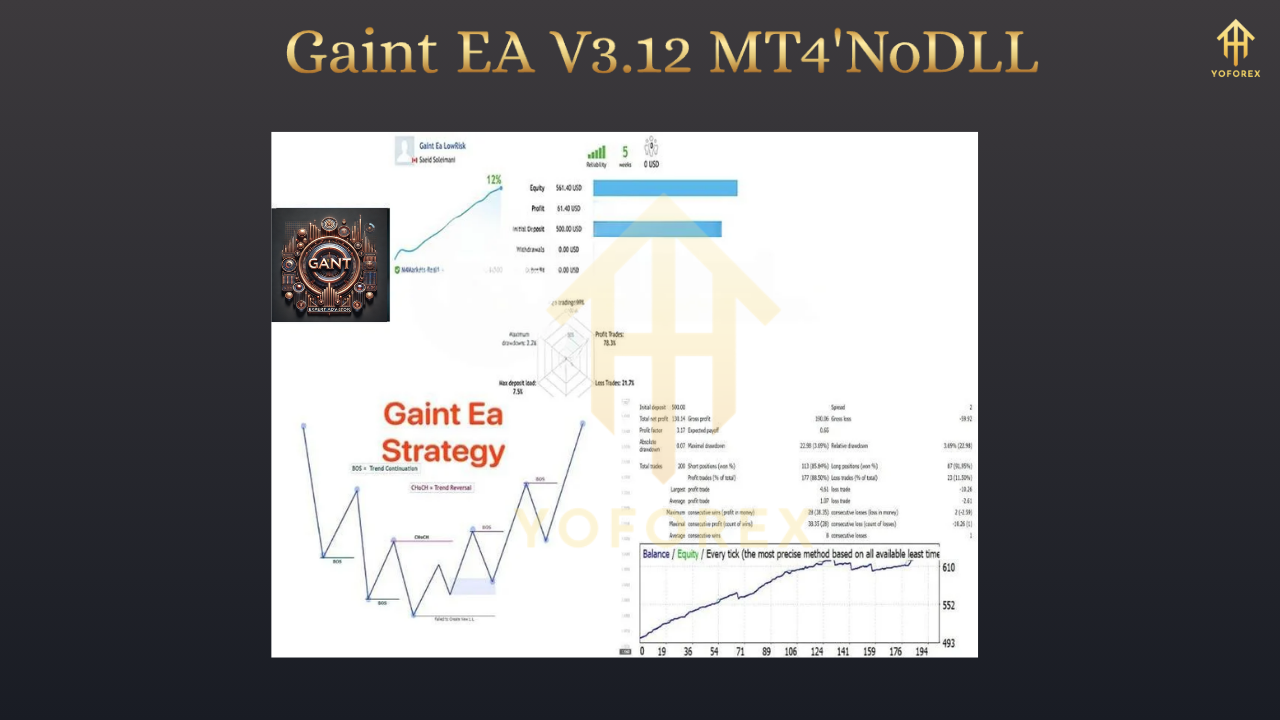
Let’s talk numbers—coz no EA review is complete without some performance proof. Gaint EA V3.12 has been rigorously backtested on EURUSD M1 for over 10 years of data, using real-tick spread data and modeling quality close to 99.9%.
The key highlights:
- Initial Deposit: $1,000
- Net Profit: Over $47,000 over 10 years
- Max Drawdown: 7.5%
- Winning Trades: 85%
- Trade Duration: Avg. 3–5 mins
What’s more impressive is how the bot adapts to both trending and ranging periods—thanks to its built-in volatility tracker. It's been forward tested on live demo accounts with consistent results over 3+ months.
How to Install & Configure Gaint EA V3.12 MT4
Getting started is pretty straightforward. If you’ve used any MT4 robot before, this will feel familiar.
Step-by-Step Setup:
- Download the EA file from the source (either from the developer or your preferred marketplace).
- Open MetaTrader 4, and go to
File → Open Data Folder. - Navigate to the
MQL4 → Expertsdirectory and paste the EA file there. - Restart MT4, and the EA will now show up under the
Navigatorpanel. - Drag it onto the desired chart (EURUSD M1 is a good start).
- Set lot size, max trades, stop loss, and other preferences as per your risk appetite.
[Image #3 Alt Text: MT4 settings panel showing recommended Gaint EA V3.12 configuration for scalping]
You should always test on a demo account first. Run it during London/New York sessions for best results. If possible, disable trading around high-impact news events.
Why Choose Gaint EA Over Others?
It’s simple—most free EAs either use dangerous strategies like martingale or grid, or they’re not tested on live markets. Gaint EA V3.12 flips the script by offering:
- Real-world reliability
- Zero over-optimization
- No hidden gimmicks
If you’re tired of bots that work on backtests but fail live, this one will feel like a breath of fresh air. Also, you maintain full control over its parameters—you can adjust for different pairs, risk profiles, and even modify the logic if you’re into coding.
Tips for Best Results
- Use on ECN accounts with raw spread (0.1–0.5 pips).
- Avoid running during low-volume hours like mid-Asian session or pre-market Sunday open.
- Use low latency VPS to minimize delay in order execution.
- Limit simultaneous EAs to reduce resource conflict.
- Withdraw profits periodically—don’t just let it snowball.
Disclaimer & Responsible Trading Notice
As powerful as Gaint EA V3.12 is, remember that past performance doesn’t guarantee future results. Market conditions evolve, and no EA is completely immune to slippage, spread spikes, or flash crashes.
We always recommend:
- Starting with a demo account
- Using strict risk management
- Never risking more than 1–2% per trade
And if you run into bugs or weird behavior—reach out to the developer or community for support. Don’t just set it and forget it forever… check in every now and then.
Final Verdict: Is Gaint EA V3.12 Worth It?
Absolutely—if you’re serious about building a consistent scalping strategy without over-leveraging. Gaint EA V3.12 combines everything a scalper needs: speed, safety, and precision. It’s suitable for anyone who wants reliable short-term trades without running into crazy drawdowns or shady tactics.
And the best part? You don’t need to be a tech geek or quant to use it. Just follow the setup instructions, fine-tune for your broker, and let the bot do its thing.
Call to Action
Ready to test the power of precision scalping?
Download Gaint EA V3.12 for MT4 now, run it on demo, and watch how it handles live price action with impressive efficiency.
If you need help with setup or want to chat with other traders using the same bot—join our Telegram or WhatsApp support groups below:






Comments
Leave a Comment