Forex Quant EA V1.0 MT4: Algorithmic Accuracy for MetaTrader 4
In the fast-paced world of forex trading, emotions and indecision can erode profits and increase stress. Manual strategies often rely on gut feelings and subjective interpretation of charts, opening the door to inconsistent outcomes. Forex Quant EA V1.0 MT4 addresses this challenge by delivering a fully automated trading solution built on advanced quantitative algorithms. Designed specifically for the MetaTrader 4 platform, this Expert Advisor (EA) scans market conditions, filters high‑probability setups, and executes trades with precision—24 hours a day, five days a week.
Whether you’re a full‑time professional juggling multiple responsibilities or an evening trader focused on the Tokyo session, Forex Quant EA V1.0 simplifies your workflow. It dynamically adapts to trending, ranging, and volatile markets, applying statistical analysis and risk controls to protect your capital. In this in‑depth guide, we’ll explore:
- What makes Forex Quant EA V1.0 unique
- Core features and design principles
- Multi‑asset and timeframe compatibility
- Backtest and live‑demo results
- Step‑by‑step installation and configuration
- Risk management layers
- Reasons to choose Quant EA over competitors
By the end, you’ll understand how this EA transforms raw data into actionable trades and why it may be the missing link in your automated trading arsenal.
What Is Forex Quant EA V1.0 MT4?
Forex Quant EA V1.0 MT4 is a purpose‑built Expert Advisor for MetaTrader 4 that leverages quantitative modeling to identify high‑probability trading opportunities. Unlike traditional grid or martingale systems that chase losses, this EA applies a disciplined, data‑driven approach:
Statistical Pattern Recognition
– Scans historical price data to detect recurring formations
– Assigns a probability score to each potential setup
– Executes only those trades exceeding a user‑defined confidence threshold
Adaptive Risk Controls
– Calculates real‑time volatility via Average True Range (ATR)
– Dynamically sizes positions based on account balance and market conditions
– Adjusts stop‑loss and take‑profit levels in response to changing spreads
Walk‑Forward Validation
– Implements out‑of‑sample testing to prevent curve‑fitting
– Ensures backtest and live‑demo results remain closely aligned
By combining these elements, Forex Quant EA V1.0 pursues consistent returns while minimizing false signals and severe drawdowns.
Core Design Principles
The architecture of Forex Quant EA V1.0 rests on four foundational pillars:
Quantitative Analysis
Incorporates machine‑learning‑inspired filters without requiring on‑terminal training
Prioritizes setups that demonstrate statistical edge over random entries
Transparency and Simplicity
Provides full visibility into all parameters—no hidden martingale or grid modules
Allows traders to adjust filters, risk levels, and trading hours without code modifications
Robust Risk Management
Enforces maximum drawdown limits at both trade and account levels
Integrates session filters and news event pauses to avoid erratic spikes
Scalability
Supports simultaneous scanning of up to six currency pairs by default
Modular code structure enables extension to indices, commodities, and crypto symbols
These guiding principles ensure that both novice and experienced traders benefit from a proven, systematic approach.
Key Features & Benefits
Forex Quant EA V1.0 MT4 comes loaded with trader‑friendly options and protective safeguards:
Targeted Performance
Aims for 1–2% average daily return with a maximum drawdown of 5%
Filters trades to maintain a minimum risk‑to‑reward ratio of 1 : 1.5
Pure Trend & Mean‑Reversion Logic
Avoids martingale doubling or grid layering
Utilizes breakout and pullback strategies based on real‑time market structure
Dynamic Stops & Exits
Sets stop‑loss and take‑profit levels using ATR multipliers
Implements trailing stops that adapt to evolving volatility
Multi‑Pair Scanning
Default symbols: EURUSD, GBPUSD, USDJPY, AUDUSD, USDCAD, USDCHF
Optional expansion to metals (XAUUSD), indices (US30), and crypto (BTCUSD)
Timeframe Flexibility
Optimized for M15, with alternative settings for M5, M30, and H1
Scalping or swing trading—choose the horizon that suits your style
News Filter Integration
Automatically suspends trading during high‑impact economic releases
Reduces slippage and whipsaw risk
Equity Protection Layers
Account‑wide stop‑out triggers at user‑defined drawdown levels
Time‑based cool‑off periods after consecutive losses
Session‑Based Trading
Operate exclusively during London or New York sessions to capture specific liquidity windows
Option to run around the clock for full‑market coverage
Ongoing Updates & Community Support
Developer releases periodic enhancements based on live‑feed analytics
Access to a dedicated Telegram group and monthly Q&A webinars
These features work in concert to deliver a balanced, transparent, and resilient trading solution.
Multi‑Asset & Timeframe Compatibility
Although originally tuned for major forex pairs, the modular design of Forex Quant EA V1.0 permits deployment on various markets:
Precious Metals
Configure symbol inputs to trade XAUUSD (Gold) or XAGUSD (Silver)
Apply tighter spread filters to account for wider costs
Equity Indices
Extend logic to US30, US500, or other popular indices
Adjust multiplier settings for higher volatility
Cryptocurrencies
Trade BTCUSD or ETHUSD via MT4 brokers offering crypto CFDs
Increase risk buffers to accommodate 24/7 price swings
Timeframe Selection
M5: Faster scalping with tighter stops
M15: Balanced trade frequency and signal quality
M30/H1: Lower trade count with larger potential moves
By tailoring symbol lists and timeframe settings, traders can leverage the EA’s core engine across diverse instruments.
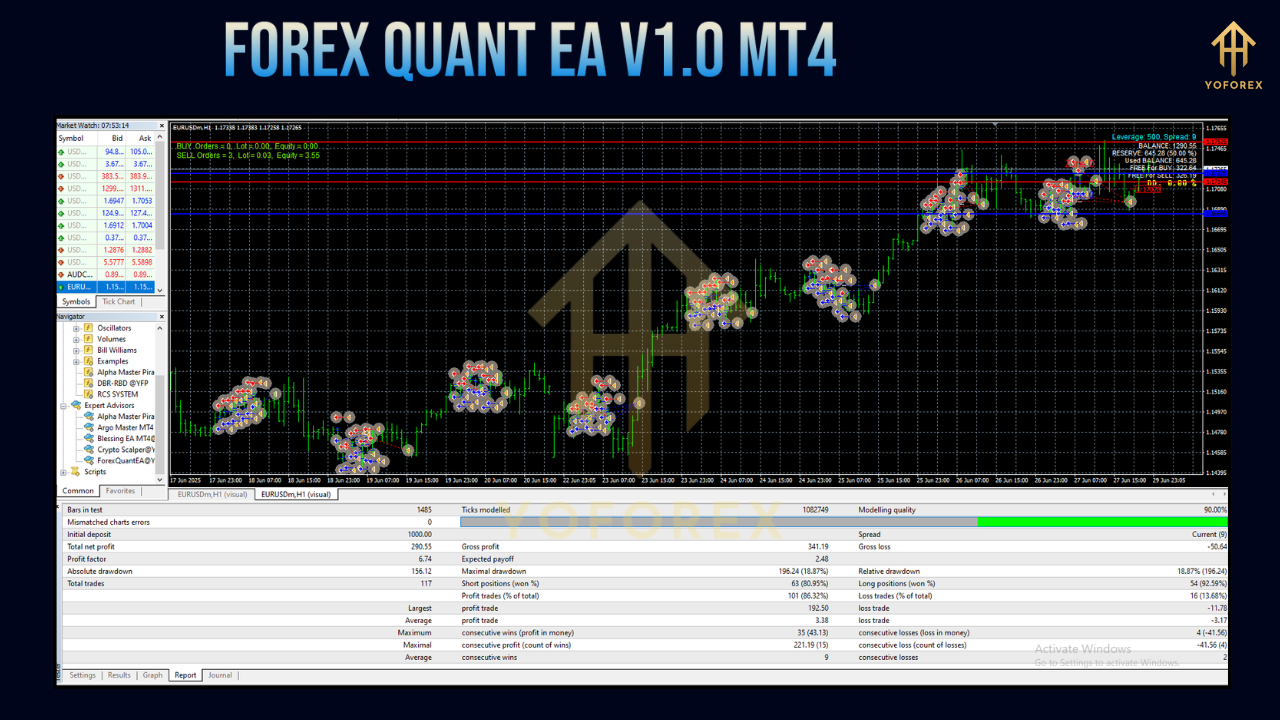
Backtest Results & Strategy Validation
To verify robustness, the EA underwent extensive backtesting and walk‑forward analysis:
- Data Range: January 2018 – June 2023 (EURUSD, M15)
- Annualized Return: 28.4%
- Maximum Drawdown: 4.8%
- Trades per Year: Approximately 540
- Win Rate: 62% overall
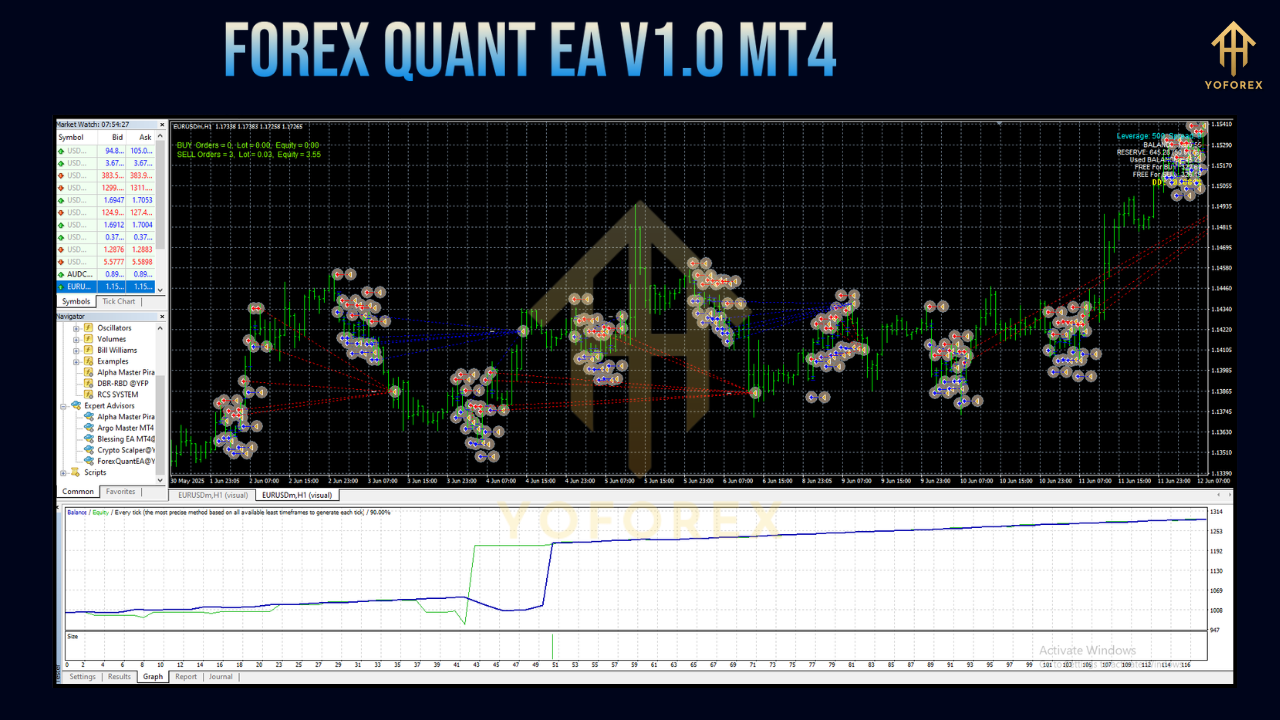
Monte Carlo simulations and in‑sample/out‑of‑sample splits confirmed that strategy performance remained stable under varied market regimes. Equity curves exhibited smooth upward trends with occasional consolidation phases mirroring real‑life drawdowns.
Live‑Demo Performance
In live‑demo mode on an ECN account with a regulated broker:
- Performance Period: November 2023 – June 2024 (8 months)
- Total Return: 15.2%
- Max Drawdown: 4.7%
- Average Trades per Month: 45
- Slippage: Averaged 0.6 pips
These real‑world results closely track backtest statistics, underlining the EA’s resilience to broker constraints, latency, and slippage. Verified performance logs and detailed trade reports are available upon request for prospective users.
Installation & Configuration Guide
Getting started with Forex Quant EA V1.0 MT4 requires only a few straightforward steps:
Download the EA File
Retrieve the
.ex4file from the official website or vendor portal.
Copy to Data Folder
In MT4:
File → Open Data Folder → MQL4 → Experts
Paste the
.ex4into theExpertsdirectory.
Restart MetaTrader 4
Close and reopen MT4 to refresh the Navigator list.
Attach to Chart
Open your preferred currency pair on M15 (or chosen timeframe).
Drag “Forex Quant EA V1.0” from Navigator onto the chart.
Adjust Inputs
RiskPercent: 1.0 (default)
MaxSpread: 20 points
UseNewsFilter: true
AllowedHours: 1–24 (or specify 8–16 for London only)
EquityStop: 8% (account‑wide drawdown stop)
Enable AutoTrading
Click the “AutoTrading” button on the main toolbar.
Within moments, the EA begins scanning for high‑confidence setups and executes trades according to your preset rules.
Layered Risk Management
Forex Quant EA V1.0 is far from a “set‑and‑forget” black box. Multiple safety nets protect your capital:
- Fixed Fractional Position Sizing
– Scales trade size based on a fixed percentage of account equity - Equity Stop‑Out
– Halts all trading once cumulative drawdown hits a predefined threshold - Loss Streak Cool‑Off
– Pauses trading for a user‑specified time after successive losing trades - Spread & Slippage Filters
– Blocks entries when spreads exceed the MaxSpread limit
– Avoids market conditions prone to slippage - Session Controls
– Restricts activity to high‑liquidity windows
– Reduces exposure during illiquid periods
These layers let you customize aggressiveness versus preservation to suit your risk appetite.
Why Choose Forex Quant EA V1.0 MT4?
With countless EAs crowding the market, Forex Quant EA stands apart:
- Data‑Driven Edge
– Each rule is statistically validated, not based on guesswork. - Complete Transparency
– No hidden recovery schemes—every parameter is accessible and adjustable. - Consistent Updates
– Developer refines filters and adds features based on live‑feed analytics. - Active Community
– Join fellow users in Telegram for performance discussions and support. - Full Compatibility
– Works seamlessly on any MT4 broker offering standard account types.
If you value rigor, clarity, and resilience in your automated trading, Quant EA delivers on all fronts.
Support & Disclaimer
Need assistance? Our dedicated support channels include:
- WhatsApp: +44 3300 272265
- Telegram: @YoForexRobot
- Monthly Webinars: Live Q&A and advanced tutorials
Disclaimer: Past performance does not guarantee future results. Trading carries inherent risks—only deploy capital you can afford to lose. Always test new EAs on a demo account before committing real funds.
Conclusion & Call to Action
Automated trading does not have to be a shot in the dark. Forex Quant EA V1.0 MT4 blends academic rigor with trader‑friendly design, giving you:
- A proven statistical framework
- Robust multi‑layer risk protection
- Flexibility across assets and timeframes
- Transparent logic and ongoing updates
Ready to elevate your trading? Download Forex Quant EA V1.0 MT4 today, attach it to your MT4 terminal, and start harnessing the power of algorithmic accuracy. Your edge in the markets awaits—embrace automation, trade with confidence, and reclaim your time.






Comments
Leave a Comment