Trading in the Forex market often feels like trying to hit a moving target. You’ve probably tried dozens of lagging indicators only to find yourself late to the party, chasing signals that have already expired. If that sounds familiar, the Forex Darvas Pointer Indicator MT4 could be the game-changer you’ve been looking for. Inspired by Nicolas Darvas’s legendary box theory, this MT4 indicator not only draws dynamic Darvas boxes around key support and resistance zones but also gives you real-time pointer alerts for high-probability breakouts and reversals.
At its core, the Darvas Box strategy rests on identifying price consolidations (“boxes”) and then waiting for meaningful breakouts above or below those boxes. Traditional Darvas setups require manual drawing and constant chart monitoring, which can be cumbersome across multiple pairs or timeframes. That’s where the Forex Darvas Pointer Indicator MT4 steps in: it automates the box drawing, adapts box sizes to current volatility, and pins pointer arrows the moment price breaches a box boundary. The result? Instant visual cues that you can act on without missing critical moves.
Whether you’re a swing trader hunting daily breakouts or an intraday scalper searching for micro-breaks on the M15 chart, this tool streamlines your workflow. You’ll see clean boxes, color-coded for bullish or bearish bias, and arrows that point you towards entries. No more guesswork. No more manually redrawing levels. Just clear, actionable signals you can backtest, tweak, and integrate into your money-management plan.
Background: Darvas Box Strategy Meets Modern MT4
In the 1950s, dancer–turned–trader Nicolas Darvas documented a simple yet powerful method for riding big trends: draw a box around recent swing highs and lows; when price breaks out of that box on strong volume, enter in the direction of the breakout; then shift your stop-loss to the opposite side of the box. Over the decades, savvy traders have added filters—like volume spikes or momentum confirmation—but the essence remains the same.
Fast-forward to today, and MT4 has become the world’s most popular retail trading platform. Yet, surprisingly few indicators truly automate Darvas Box logic—and even fewer combine it with pointer alerts. The Forex Darvas Pointer Indicator MT4 fills that gap. It continually scans price action, adjusts box boundaries as new highs/lows form, and flags breakout arrows so you don’t have to babysit your charts. Imagine running a dashboard across EURUSD, GBPJPY, USDCHF and getting instant pop-ups whenever any pair flashes a Darvas breakout—now you can trade multiple markets without overload.
How the Forex Darvas Pointer Indicator MT4 Works
Dynamic Box Construction
The indicator calculates swing highs and lows over a user-defined lookback period (default: 20 bars).
It automatically draws colored rectangles (“boxes”) around these pivots, updating in real time as new bars close.
Breakout Detection
As price closes above the top of a bullish box, a green upward arrow appears at the breakout candle’s close.
Conversely, when price breaks below the bottom of a bearish box, a red downward arrow is plotted.
Volatility-Sensitive Settings
You can adjust box width based on Average True Range (ATR) to avoid whipsaws in choppy markets.
Choose Fixed or Adaptive ATR multipliers so the box expands/contracts automatically when volatility shifts.
Pointer Alerts & Notifications
On-screen pop-ups notify you instantly of any breakout.
Optional sound alerts or email notifications let you monitor setups even when MT4 isn’t in focus.
Custom Signal Filters
Filter arrows by minimum breakout length (in pips) to avoid insignificant moves.
Enable trend-direction filter so arrows only appear in alignment with a higher-timeframe moving average.
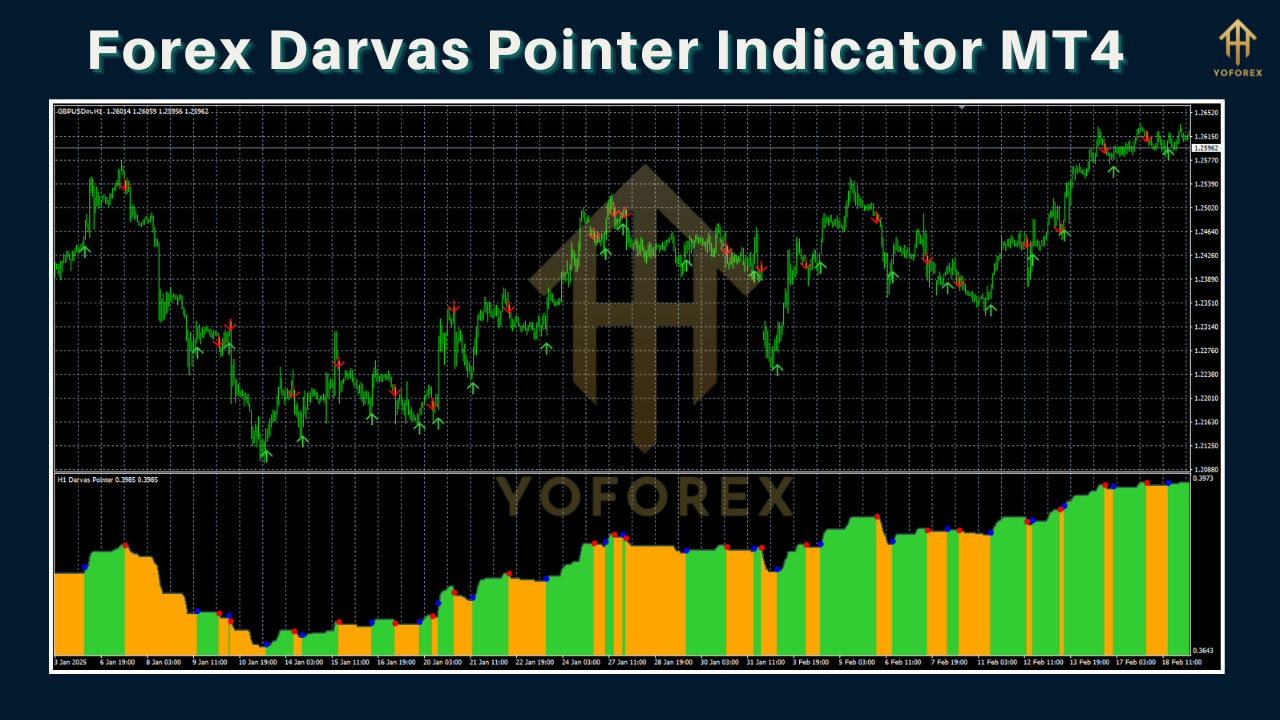
Key Benefits at a Glance
- Faster Decision-Making: No more manual box drawing—get automatic, real-time breakout pointers.
- Reduced Noise: ATR-based filtering and customizable pip thresholds cut out false signals.
- Versatile Trading Styles: Works on all MT4-compatible timeframes, from M1 scalps to H4 swings.
- Multi-Pair Monitoring: Apply the indicator across multiple charts simultaneously—never miss a big move.
- Built-In Alerts: On-screen, sound, or email alerts ensure you catch every opportunity.
- User-Friendly Interface: Clean graphical display with intuitive input parameters for quick setup.
- Backtest Capability: Export arrow data to your favorite tester or just visually review past setups on chart.
Practical Trading Examples
On EURUSD H1, imagine a Darvas box formed between 1.1020 and 1.1070 over the last several sessions. One afternoon, price surges and closes above 1.1070—instantly, a green arrow appears. You place a buy at 1.1080 with a stop at 1.1020 (box bottom), targeting 1.1150 for a 1:1.5 risk-reward. Sure enough, the bullish momentum carries price to your target within hours, netting a tidy gain.
Alternatively, on GBPJPY M15, the ATR filter is set tight to adapt to fast moves. A bearish box at 154.50–154.00 traps price for several bars. When price snaps below 154.00, a red arrow triggers; you short with a stop just above 154.50 and target 153.50. The trade reaches its goal in under 30 minutes, illustrating how the indicator scales from long swings to quick scalps.
Tips for Getting the Most from Your Darvas Pointer
- Optimize Your Lookback: Shorten the pivot period (e.g., 15 bars) for faster signals in volatile markets; lengthen it (e.g., 30 bars) to smooth out noise in ranging conditions.
- Combine with Trend Filters: Overlay a 200-period moving average and only take arrows that align with the slope—arrows above the MA for buys, below for sells.
- Volume Confirmation: Add a volume indicator and require that breakout bars exceed average volume—this adds an extra layer of reliability.
- Money Management: Use fixed fractional sizing to risk a consistent percentage per trade (1–2% of account equity). Keeping stops at box edges helps keep risk defined.
- Journal Every Signal: Record each arrow, entry, exit, and outcome in a trade journal. Over time you’ll see which settings work best for your pair/timeframe.
Risk Management & Customization
No indicator is foolproof. Even Darvas breakouts can ‘fake out’ when markets whipsaw. That’s why the Forex Darvas Pointer Indicator MT4 includes:
- Pip-Based Stop Settings: Automatically calculate stop-loss at the opposite box edge.
- Breakout Retest Option: Wait for a pullback into the shattered box boundary before entry—this filtering reduces premature entries.
- Session Filters: Disable signals outside major trading hours (e.g., London/New York overlaps) to focus on high-liquidity breakouts.
- Alert Throttling: Limit notifications to one per box to prevent alert fatigue during extended trending runs.
By customizing these parameters, you adapt the indicator to your personal comfort with risk, market temperament, and trading style.
Conclusion
The Forex Darvas Pointer Indicator MT4 marries a time-tested box strategy with modern automation, giving you crystal-clear breakout signals and pointer alerts across any currency pair or timeframe. Whether you’re a beginner still grasping chart patterns or a veteran looking to streamline your scanning process, this tool offers a robust, customizable solution. Stop chasing lagging signals—let Darvas’s century-old wisdom guide you to smarter, more disciplined entries and exits.
⚡️Upgrade
Upgrade to the Pro version for multi-timeframe arrows, custom alert templates, and advanced backtest exporting.






Comments
Leave a Comment