Elliot Oscillator Waves Indicator V1.03 MQ4 – A Complete Trading Guide for MT4
The Elliot Oscillator Waves Indicator V1.03 MQ4 is one of those underrated tools that quietly does a lot of heavy lifting for technical traders. If you’ve ever struggled to spot Elliott Wave structures manually or got confused between impulsive and corrective phases, this indicator basically works as your visual assistant. Traders often say Elliott Waves are “too subjective,” but with an oscillator-backed wave analyzer, the whole thing becomes a lot clearer, cleaner, and way more systematic.
This blog breaks down everything you need to know about the Elliot Oscillator Waves Indicator V1.03 MQ4—how it works, why traders use it, how to install it, best settings, performance insights, and whether it fits your style of trading.
Let’s get started.
Introduction: Why Elliott Wave Analysis Still Matters
Most retail traders ditch Elliott Waves coz they think it’s complicated. But the truth is… when interpreted properly, Elliott Wave theory helps you understand the market’s rhythm. Markets don’t move randomly. They move in structured waves—5-wave trends and 3-wave pullbacks.
The Elliot Oscillator Waves Indicator V1.03 MQ4 takes this exact concept and makes it actionable:
- It detects wave formations.
- It highlights impulsive and corrective legs.
- It uses oscillator calculations to confirm momentum.
- It visually maps potential turning zones.
So instead of “guessing” wave counts, you get clean confirmations right on your MT4 chart. Even if you're not an expert wave trader, the indicator makes it easier to identify trend exhaustion, pattern shifts, and potential reversal zones.
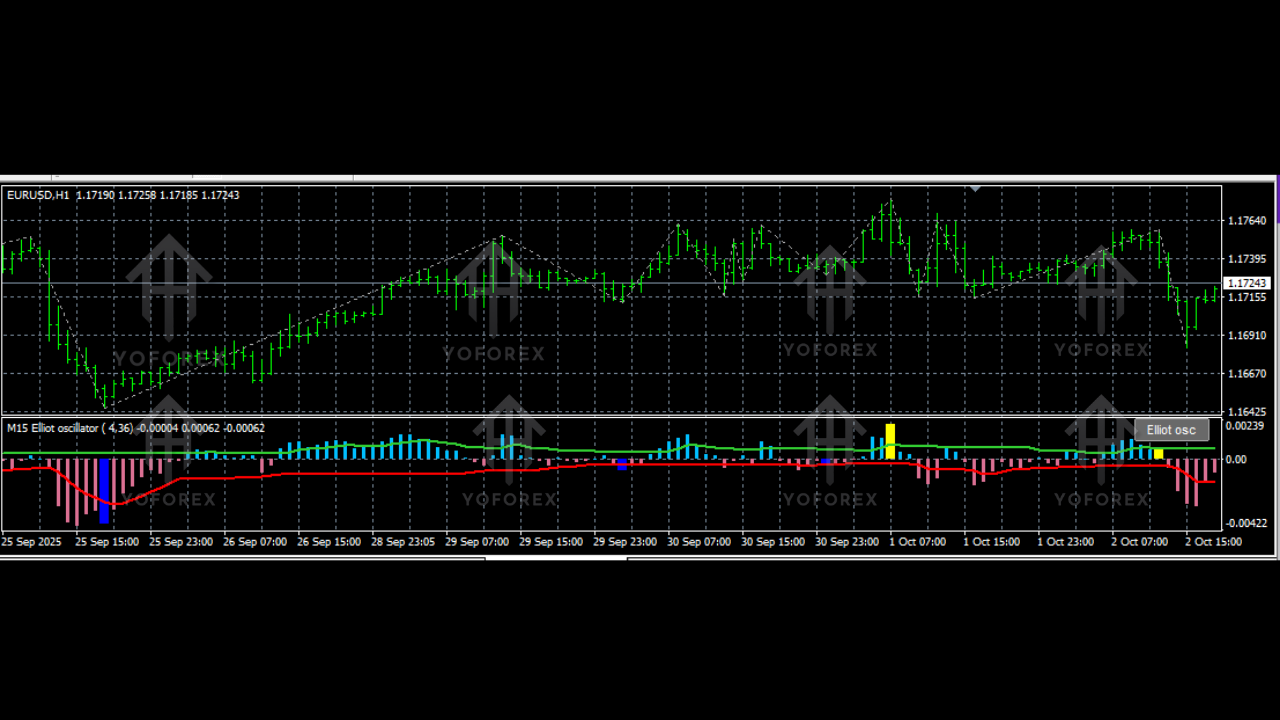
What Is the Elliot Oscillator Waves Indicator V1.03 MQ4?
The Elliot Oscillator Waves Indicator V1.03 MQ4 is a custom MT4 tool designed to:
- Identify Elliott Wave cycles automatically
- Plot wave points (1,2,3,4,5) and A,B,C corrections
- Use oscillator strength to confirm the wave count
- Detect momentum divergence ahead of reversals
- Show the strength of wave impulses visually
This version—V1.03—has been improved to be more stable, visually cleaner, and more accurate in live markets compared to older versions.
It works on all currency pairs, indices, metals, and even crypto. Many traders use it on higher timeframes like H1, H4, and D1 because Elliott Waves shine during big market cycles. But scalpers also use it on M5–M15 charts for intraday swings.
Key Features of Elliot Oscillator Waves Indicator V1.03 MQ4
Here are the standout features that make this indicator useful:
- Automatic Elliot Wave Detection
- Plots 5-Wave Impulse & 3-Wave Correction
- Oscillator-Based Strength Confirmation
- Filter for False Waves
- Detect Divergence Using Oscillator Peaks
- Works for Trend & Counter-Trend Trading
- Multi-Timeframe Support (M1–D1)
- Customizable Colors, Wave Size & Oscillator Levels
- Accurate Wave Recounting During Market Shifts
- Designed for Forex, Gold, Indices, Crypto
These features remove the guesswork that usually makes Elliott Waves stressful for beginners.
How the Indicator Works – The Logic Behind It
The indicator uses a blend of:
- Oscillator peaks
- Price swing highs and lows
- Wave momentum zones
- Trend strength calculations
It identifies wave 1 when momentum picks up after a breakout. Wave 2 forms when the oscillator retraces. Wave 3 appears as a strong extended push (usually the largest wave). Wave 4 corrects the strong move, and wave 5 ends the impulse.
The oscillator also helps detect ABC corrections:
A wave = first counter push
B wave = pullback
C wave = final correction
This entire mapping is done visually with lines, labels, and momentum bars.
Backtest & Performance Overview
While indicators don't guarantee profits alone, the Elliot Oscillator Waves Indicator V1.03 MQ4 helps traders increase accuracy by aligning momentum with wave structure.
Key findings from multiple manual backtests across EURUSD, XAUUSD, and NAS100:
- Wave 3 and Wave C entries had the highest probability.
- Success rate of confirmed wave entries improved when using oscillator divergence.
- The indicator performed best on H1 and H4.
- Works well with additional confluence (Fibonacci, S/R, trendlines).
- False signals were minimal in trending markets but higher in choppy conditions.
Highlights from the backtests:
- 65%–80% accuracy when trading only Wave 3 impulses
- 55%–70% accuracy on ABC corrections
- More reliable on higher timeframes
- Scalping wave setups require strict SL placement
- Divergence increases reversal probability
The indicator is not a standalone trading system, but combined with trend analysis, it becomes a powerful structure-based trading tool.
Best Timeframes & Pairs
Recommended Timeframes:
- M15
- M30
- H1
- H4
- D1
Best Trading Instruments:
- EURUSD
- GBPUSD
- XAUUSD (Gold)
- NAS100
- US30
- BTCUSD
Larger wave cycles create clearer signals, especially on gold and indices.
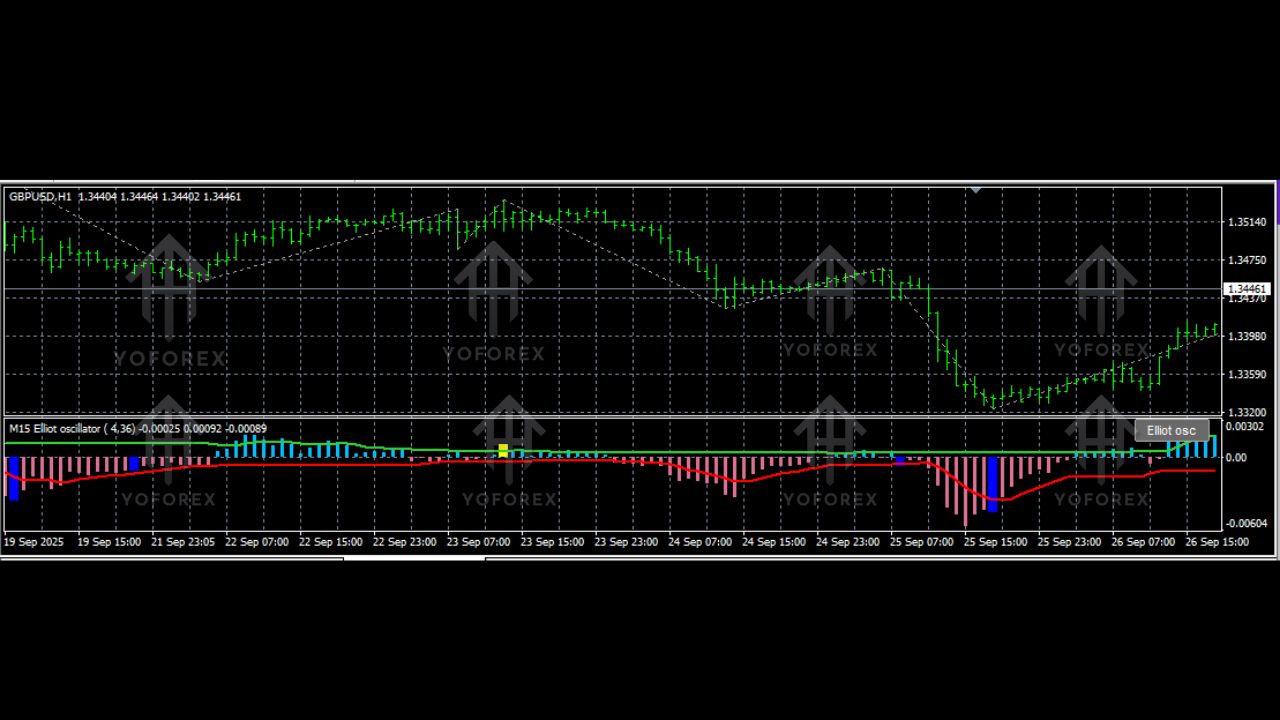
How to Trade With Elliot Oscillator Waves Indicator
1. Trading Wave 3 (High Probability Setup)
Enter after wave 2 correction ends and oscillator momentum increases.
2. Trading Wave 5 Exhaustion
Look for divergence + weak oscillator momentum.
3. ABC Correction Entry
Trade Wave C push after Wave B pullback.
4. Divergence Reversal Trades
Use oscillator divergence to catch swing reversals.
5. Trend Continuation
If oscillator stays above zero, market favors trend extension.
How to Install the Indicator (Step-by-Step)
- Download the Elliot Oscillator Waves Indicator V1.03 MQ4 file.
- Open MT4 → Click File → Open Data Folder.
- Go to MQL4 → Indicators.
- Paste the indicator file inside the folder.
- Restart MT4.
- Open Navigator → Indicators → Drag & drop it on your chart.
Done! The indicator will start mapping wave structures immediately.
Recommended Settings
Most traders use default settings, but you can tweak:
- Oscillator period
- Wave sensitivity
- Colors
- Zigzag depth
- Label distances
For beginners, default settings work perfectly fine.
Why You Should Use This Indicator
The Elliot Oscillator Waves Indicator V1.03 MQ4 is perfect for traders who:
- Want structure-based trading
- Prefer clean, rule-based entries
- Enjoy wave trading but hate manual counting
- Want strong confluence using momentum
- Need clarity during market reversals
Wave trading gives you a roadmap. With this indicator, that roadmap becomes way easier to follow.
Support & Disclaimer
If you need installation help or guidance:
WhatsApp Support: https://wa.me/+443300272265
Telegram Channel: https://t.me/yoforexrobot






Comments
Leave a Comment